
Ընտրել լեզուն

Pennsylvania DL-82 Out‑of‑State Address & Photo Exemption Form (Fillable PDF)

  1. Լեզու Անգլերեն
  2. Երկիր ԱՄՆ
  3. Գործունեություն Վարորդական իրավունք
  4. Պետություն Փենսիլվանիա
Pennsylvania DL-82 Out‑of‑State Address & Photo Exemption Form (Fillable PDF)

What Is the DL-82 Form?

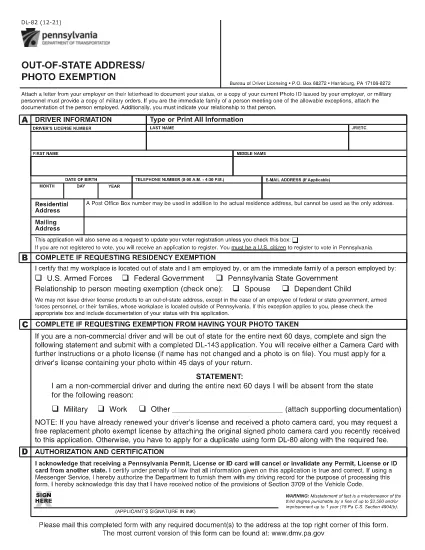
The DL-82 is the Pennsylvania Department of Transportation (PennDOT) form used to request an out‑of‑state address and photo exemption for a driver’s license. It allows military members, federal or state employees, and their immediate families to keep a valid PA license while stationed outside the Commonwealth.

Who Is Eligible for the Exemption?

  • U.S. Armed Forces personnel stationed outside Pennsylvania
  • Federal, state, or local government employees working out of state
  • Immediate family members of the above qualifying applicants
  • Non‑commercial drivers who need a photo exemption while away from Pennsylvania

How to Complete the DL-82 Online with Formize

Instead of downloading the PDF and editing it manually, simply click the “Fill out this form” button on this page. The Formize PDF Filler app will load in your browser, letting you:

  1. Enter your driver’s license number, name, and date of birth.
  2. Select the appropriate exemption check‑boxes.
  3. Upload supporting documents (military orders, employment verification, etc.).
  4. Apply an electronic signature.
  5. Save, print, or submit the completed form directly from the app.

Common Mistakes to Avoid

  • Leaving required fields blank – the form will be rejected.
  • Using an outdated version of the DL-82 – always use the latest PDF linked below.
  • Failing to attach proof of military or employment status.
  • Signing with a handwritten image instead of the built‑in e‑signature tool.

Where to Submit Your Completed Form

After completing the form, you can:

  • Mail it to the PennDOT Bureau of Driver Licensing, Harrisburg, PA.
  • Deliver it in person at any Pennsylvania DMV office.
  • If your employer’s human‑resources department accepts electronic submissions, you may forward the PDF directly.

Processing typically takes 7‑10 business days. Keep a copy of the submitted PDF for your records.

ՀՏՀ
  • What is the purpose of the DL-82 form?

    It allows qualified individuals to request an exemption from providing a new address and photo on their Pennsylvania driver’s license while they are stationed or employed out of state.

  • Can I submit the DL-82 electronically?

    Yes. With Formize you can fill, sign, and download the completed PDF. You still need to mail or deliver the printed form to PennDOT unless your agency accepts electronic copies.

  • How long is the exemption valid?

    The exemption is typically valid for one year, after which you must submit a new DL-82 if you remain out of state.

  • Do I need to provide a new photo if I move back to Pennsylvania?

    When you return to Pennsylvania and renew your license, you must provide a current photo. The DL-82 exemption only applies while you are out of state.

  • What supporting documents are required?

    Proof of military orders, federal or state employment letters, or a spouse’s employment verification if you are a family member. Attach clear copies when you upload them in Formize.

  • Is there a fee to file the DL-82?

    There is no separate fee for the exemption itself, but standard driver’s license renewal or replacement fees still apply.

ԻՆՉՊԵՍ

Ինչպես լրացնել DL-82-ն անվճար, առցանց՝ 4 հեշտ քայլերով.

  1. 1
    Open the Fillable Form
    Click the “Fill out this form” button on the page. The Formize PDF Filler will launch in a new tab.
  2. 2
    Enter Your Information
    Fill in your driver’s license number, name, date of birth, and select the exemption boxes that apply to you.
  3. 3
    Upload Supporting Documents
    Use the upload field to attach military orders, employment verification letters, or any other required proof.
  4. 4
    Sign and Submit
    Add your electronic signature, review all entries, then click “Save” or “Print” to finalize. You can mail the PDF or keep a digital copy.
Ձևավորել PDF Filler հավելվածը
ՄԱՍԻՆ

Վարորդական իրավունքի հայտի ձևեր

Երկրների մեծ մասում վարորդական իրավունքի վկայական ունենալը պարտադիր է, նախքան երթևեկելը: Վարորդական վկայական ստանալը կարևոր իրադարձություն է յուրաքանչյուրի համար, ով ցանկանում է մեքենա վարել:

DL-82-ը վարորդական իրավունքի վկայականի դիմումի ձևերից մեկն է, որը փաստաթղթեր է, որն օգտագործվում է տեղեկատվություն հավաքելու մարդկանցից, ովքեր ցանկանում են դիմել վարորդական իրավունք ստանալու համար: Այն սովորաբար պարունակում է դաշտեր դիմողի անվան, ծննդյան ամսաթվի, ID համարի, կոնտակտային տվյալների, ինչպես նաև վարորդական իրավունքի պատմության և փորձի համար:

ՀԱՏԿՈՒԹՅՈՒՆՆԵՐ

PDF լցոնիչ

Առցանց DL-82-ը լրացնելու ամենահեշտ ձևը

  • Արագ լրացրեք DL-82
    Փնտրու՞մ եք միջոց՝ արագորեն լրացնելու DL-82 առցանց: Մեր առցանց անվճար PDF ձևաթուղթ լրացնողի միջոցով դուք կիմանաք, թե ինչպես խմբագրել և լրացնել այս pdf փաստաթուղթը մեկ րոպեից պակաս ժամանակում:
  • Հեշտ օգտագործման առցանց PDF խմբագիր
    Հոգնե՞լ եք PDF ֆայլեր տպելուց, որպեսզի կարողանաք դրանք խմբագրել, նախքան նորից սկանավորելը և հետ ուղարկելը: Խմբագրել PDF փաստաթղթերը անվճար առցանց: Օգտագործեք մեր առցանց pdf խմբագրիչը ժամանակ և թուղթ խնայելու համար:
  • Հիանալի գործիքներ, բոլոր հարթակներ
    Զարմանում եք, թե ինչպես լրացնել DL-82-ը Mac-ում, կամ գուցե ինչպես անվճար օգտագործել PDF լցոնիչը: Մեր առցանց PDF գործիքներն աշխատում են բոլոր հարթակներում:
  • Անվտանգ ֆայլերի պահպանում
    Ավարտված «DL-82» ֆայլերը պահվում են պաշտպանված տվյալների բազայում, որը կառավարվում է Amazon Cloud հոսթինգի կողմից: Ցանկացած ժամանակ կարող եք ջնջել ձեր ֆայլերը մեր համակարգից: Ամեն դեպքում, այս ֆայլերը ավտոմատ կերպով ջնջվում են 24 ժամ հետո:
  • Զրուցեք DL-82-ի հետ
    Զրուցեք «DL-82»-ի հետ Chatize-ում, որը PDF ընթերցողի անվճար օգնական է: Հարցեր տվեք և ստացեք պատասխաններ «DL-82»-ից։ Պարզապես սեղմեք վերևում գտնվող Զրույց փաստաթղթի հետ կոճակը:

Ջնջել լրացման նիստը

Ջնջե՞լ ընտրված լրացման աշխատաշրջանը: Այս դեպքում ձևը լրացնելու ձեր առաջընթացը կկորչի:

Ջնջել խմբագրման նիստը

Ջնջե՞լ ընտրված խմբագրման աշխատաշրջանը: Այս դեպքում ձևը ստեղծելու և խմբագրելու ձեր առաջընթացը կկորչի: