
Ընտրել լեզուն

DL-14C – Texas Election Identification Certificate (Fillable PDF)

  1. Լեզու Անգլերեն
  2. Երկիր ԱՄՆ
  3. Գործունեություն Վարորդական իրավունք
  4. Պետություն Տեխաս
DL-14C – Texas Election Identification Certificate (Fillable PDF)

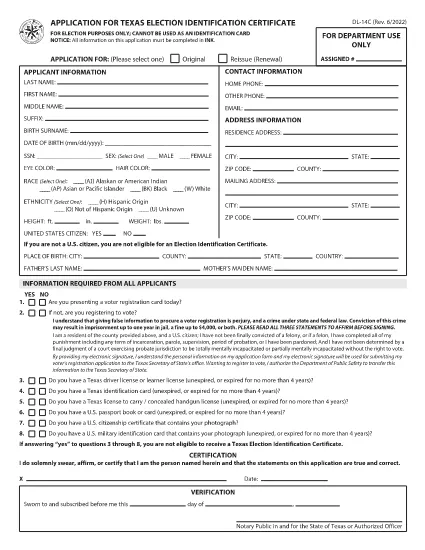
The DL-14C is the official Application for a Texas Election Identification Certificate (EIC). This card allows eligible voters to prove their identity at the polls without a driver’s license or state ID. Our fillable PDF version lets you complete the form quickly, securely, and without printing.

What Is the DL-14C Form?

The DL-14C is issued by the Texas Department of Public Safety (DPS) in partnership with the Texas Secretary of State. It is available to any Texas resident who does not have a driver’s license or state ID but needs a valid photo ID for voting.

How to Fill Out the DL-14C Online

Instead of downloading the PDF and opening a separate editor, simply click the "Fill out this form" button on this page. The Formize PDF Filler app will load the document directly in your browser, allowing you to enter data, add signatures, and save a completed copy.

  • Step 1 – Open the Form: Click the blue "Fill out this form" button.
  • Step 2 – Enter Your Information: Fill in personal details, address, and citizenship status. All fields are searchable and auto‑validated.
  • Step 3 – Upload Supporting Documents: Attach a copy of your birth certificate, passport, or other accepted ID.
  • Step 4 – Sign Electronically: Use your mouse or touchscreen to add a digital signature.
  • Step 5 – Save & Submit: Download the completed PDF or email it directly to the Texas DPS office.

Common Mistakes to Avoid

  • Leaving the SSN field blank when it is optional – you can write “N/A” to avoid processing delays.
  • Providing an outdated address – the DPS requires a current residential address.
  • Uploading non‑PDF supporting documents – convert images to PDF before attaching.
  • Forgetting to sign – an unsigned form is rejected.

Where to Submit Your Completed Form

After you have saved the filled PDF, mail it to the address listed on the last page of the form or submit it in person at any Texas Department of Public Safety office. You can also upload the file through the DPS online portal if you have an account.

Frequently Asked Questions

Below are quick answers to the most common queries about the DL-14C.

ՀՏՀ
  • Do I have to provide my Social Security Number on the DL-14C?

    No. The SSN field is optional for Election Identification Certificate applicants. You can write “N/A” if you prefer not to disclose it.

  • Can I use a driver’s license number on this form?

    Only if you already have a Texas driver’s license. The DL-14C is intended for residents who do NOT have a driver’s license or state ID.

  • How long does it take to receive the Election ID after submitting the form?

    Processing typically takes 7‑10 business days after the DPS receives a complete application and supporting documents.

  • What documents are accepted as proof of identity?

    A certified birth certificate, valid U.S. passport, or an out‑of‑state driver’s license with a translation are accepted.

  • Is there a fee to obtain the Election Identification Certificate?

    No. The DL-14C application for an Election ID is free of charge.

  • Can I fill out the DL-14C on a mobile device?

    Yes. The Formize PDF Filler works on smartphones and tablets, allowing you to complete the form on the go.

ԻՆՉՊԵՍ

Ինչպես լրացնել DL-14C-ն անվճար, առցանց՝ 4 հեշտ քայլերով.

  1. 1
    Open the Fillable Form
    Click the "Fill out this form" button on the page. The Formize PDF Filler will load the DL-14C directly in your browser.
  2. 2
    Complete All Required Fields
    Enter your personal information, address, and citizenship details. Use the built‑in validation to avoid errors.
  3. 3
    Add Supporting Documents and Sign
    Upload PDFs of your birth certificate or passport, then add an electronic signature. Save the completed form to your device.
  4. 4
    Submit the Application
    Print and mail, deliver in person to a DPS office, or upload the PDF through the DPS online portal.
Ձևավորել PDF Filler հավելվածը
ՄԱՍԻՆ

Վարորդական իրավունքի հայտի ձևեր

Երկրների մեծ մասում վարորդական իրավունքի վկայական ունենալը պարտադիր է, նախքան երթևեկելը: Վարորդական վկայական ստանալը կարևոր իրադարձություն է յուրաքանչյուրի համար, ով ցանկանում է մեքենա վարել:

DL-14C-ը վարորդական իրավունքի վկայականի դիմումի ձևերից մեկն է, որը փաստաթղթեր է, որն օգտագործվում է տեղեկատվություն հավաքելու մարդկանցից, ովքեր ցանկանում են դիմել վարորդական իրավունք ստանալու համար: Այն սովորաբար պարունակում է դաշտեր դիմողի անվան, ծննդյան ամսաթվի, ID համարի, կոնտակտային տվյալների, ինչպես նաև վարորդական իրավունքի պատմության և փորձի համար:

ՀԱՏԿՈՒԹՅՈՒՆՆԵՐ

PDF լցոնիչ

Առցանց DL-14C-ը լրացնելու ամենահեշտ ձևը

  • Արագ լրացրեք DL-14C
    Փնտրու՞մ եք միջոց՝ արագորեն լրացնելու DL-14C առցանց: Մեր առցանց անվճար PDF ձևաթուղթ լրացնողի միջոցով դուք կիմանաք, թե ինչպես խմբագրել և լրացնել այս pdf փաստաթուղթը մեկ րոպեից պակաս ժամանակում:
  • Հեշտ օգտագործման առցանց PDF խմբագիր
    Հոգնե՞լ եք PDF ֆայլեր տպելուց, որպեսզի կարողանաք դրանք խմբագրել, նախքան նորից սկանավորելը և հետ ուղարկելը: Խմբագրել PDF փաստաթղթերը անվճար առցանց: Օգտագործեք մեր առցանց pdf խմբագրիչը ժամանակ և թուղթ խնայելու համար:
  • Հիանալի գործիքներ, բոլոր հարթակներ
    Զարմանում եք, թե ինչպես լրացնել DL-14C-ը Mac-ում, կամ գուցե ինչպես անվճար օգտագործել PDF լցոնիչը: Մեր առցանց PDF գործիքներն աշխատում են բոլոր հարթակներում:
  • Անվտանգ ֆայլերի պահպանում
    Ավարտված «DL-14C» ֆայլերը պահվում են պաշտպանված տվյալների բազայում, որը կառավարվում է Amazon Cloud հոսթինգի կողմից: Ցանկացած ժամանակ կարող եք ջնջել ձեր ֆայլերը մեր համակարգից: Ամեն դեպքում, այս ֆայլերը ավտոմատ կերպով ջնջվում են 24 ժամ հետո:
  • Զրուցեք DL-14C-ի հետ
    Զրուցեք «DL-14C»-ի հետ Chatize-ում, որը PDF ընթերցողի անվճար օգնական է: Հարցեր տվեք և ստացեք պատասխաններ «DL-14C»-ից։ Պարզապես սեղմեք վերևում գտնվող Զրույց փաստաթղթի հետ կոճակը:

Ջնջել լրացման նիստը

Ջնջե՞լ ընտրված լրացման աշխատաշրջանը: Այս դեպքում ձևը լրացնելու ձեր առաջընթացը կկորչի:

Ջնջել խմբագրման նիստը

Ջնջե՞լ ընտրված խմբագրման աշխատաշրջանը: Այս դեպքում ձևը ստեղծելու և խմբագրելու ձեր առաջընթացը կկորչի: