
Ընտրել լեզուն

Virginia DMV DTS-22 Surety Bond Affidavit (Fillable PDF)

  1. Երկիր ԱՄՆ
  2. Լեզու Անգլերեն
  3. Գործունեություն Վարորդական իրավունք
  4. Պետություն Վիրջինիա
Virginia DMV DTS-22 Surety Bond Affidavit (Fillable PDF)

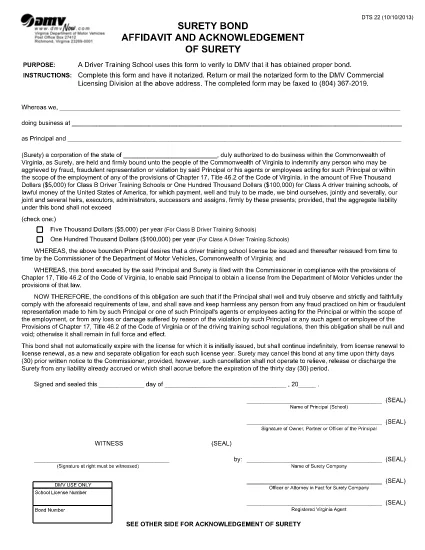
The DTS-22 is the Virginia Department of Motor Vehicles (DMV) Surety Bond Affidavit required by driver training schools and commercial licensing applicants. This form proves that the applicant has obtained the proper bond before operating a school or commercial vehicle program.

Our fillable PDF version lets you complete the entire affidavit directly in your browser—no printing, scanning, or manual data entry required. Once completed, you can download, print, and mail or fax the notarized form to the DMV Commercial Licensing Division.

What Is the DTS-22 Form?

The DTS-22 collects information about the applicant, the surety company, and the bond amount. It must be signed, notarized, and submitted with supporting documentation. Failure to provide a correctly completed form can delay licensing approval.

How to Fill Out the DTS-22 Online

Using the Formize PDF Filler, you can fill out every field, add dates, and insert your electronic signature. The tool validates required fields in real time, reducing errors before you print.

Common Mistakes to Avoid

  • Leaving any required field blank (the filler will highlight these).
  • Using a handwritten signature before notarization—sign only after the notary witnesses your signature.
  • Submitting the form on double‑sided paper; the DMV requires single‑sided printing.
  • Forgetting to include the bond number and surety company’s contact details.

Where to Submit the Completed Form

After notarizing, mail or fax the form to the DMV Commercial Licensing Division at the address listed on the form. You can also drop it off at any Virginia DMV office that handles commercial licensing.

Ready to start? Click the button below to launch the fillable PDF in the Formize PDF Filler app.

ՀՏՀ
  • What is the purpose of the DTS-22 form?

    The DTS-22 certifies that a driver training school or commercial licensing applicant has secured a surety bond, a prerequisite for DMV approval.

  • Can I submit the DTS-22 electronically?

    No. The DMV requires a notarized hard copy. You can fill it out online, then print, notarize, and mail or fax the document.

  • Do I need a notary for the DTS-22?

    Yes. The applicant’s signature must be notarized before the form is submitted to the DMV.

  • What bond amount is required?

    The required bond amount varies by the type of training program. Refer to the instructions on the form or contact your surety provider for details.

  • How long does it take for the DMV to process the DTS-22?

    Processing time depends on the completeness of your submission. A correctly completed and notarized form is usually processed within 5‑7 business days.

  • Can I use a PDF editor instead of Formize?

    You can, but Formize’s fillable PDF ensures field validation and reduces errors. Using a standard PDF editor may miss required fields.

  • Where do I send the completed DTS-22?

    Mail or fax the notarized form to the DMV Commercial Licensing Division at the address printed on the form. Check the DMV website for the latest contact details.

ԻՆՉՊԵՍ

Ինչպես լրացնել DTS-22 form-ն անվճար, առցանց՝ 5 հեշտ քայլերով.

  1. 1
    Open the Fillable Form
    Click the "Fill out this form" button on the page. The Formize PDF Filler will open in a new tab.
  2. 2
    Load the Formize PDF Filler
    Wait a few seconds while the PDF Filler app loads the DTS-22 document.
  3. 3
    Complete All Required Fields
    Enter your information, bond details, and surety company data. Required fields are highlighted in real time.
  4. 4
    Add Your Signature
    Use the built‑in signature tool to place your electronic signature. Do not sign until a notary is present.
  5. 5
    Download or Print
    When finished, click "Download" to save the completed PDF, then print it for notarization and submission.
Ձևավորել PDF Filler հավելվածը
ՄԱՍԻՆ

Վարորդական իրավունքի հայտի ձևեր

Երկրների մեծ մասում վարորդական իրավունքի վկայական ունենալը պարտադիր է, նախքան երթևեկելը: Վարորդական վկայական ստանալը կարևոր իրադարձություն է յուրաքանչյուրի համար, ով ցանկանում է մեքենա վարել:

DTS-22 form-ը վարորդական իրավունքի վկայականի դիմումի ձևերից մեկն է, որը փաստաթղթեր է, որն օգտագործվում է տեղեկատվություն հավաքելու մարդկանցից, ովքեր ցանկանում են դիմել վարորդական իրավունք ստանալու համար: Այն սովորաբար պարունակում է դաշտեր դիմողի անվան, ծննդյան ամսաթվի, ID համարի, կոնտակտային տվյալների, ինչպես նաև վարորդական իրավունքի պատմության և փորձի համար:

ՀԱՏԿՈՒԹՅՈՒՆՆԵՐ

PDF լցոնիչ

Առցանց DTS-22 form-ը լրացնելու ամենահեշտ ձևը

  • Արագ լրացրեք DTS-22 form
    Փնտրու՞մ եք միջոց՝ արագորեն լրացնելու DTS-22 form առցանց: Մեր առցանց անվճար PDF ձևաթուղթ լրացնողի միջոցով դուք կիմանաք, թե ինչպես խմբագրել և լրացնել այս pdf փաստաթուղթը մեկ րոպեից պակաս ժամանակում:
  • Հեշտ օգտագործման առցանց PDF խմբագիր
    Հոգնե՞լ եք PDF ֆայլեր տպելուց, որպեսզի կարողանաք դրանք խմբագրել, նախքան նորից սկանավորելը և հետ ուղարկելը: Խմբագրել PDF փաստաթղթերը անվճար առցանց: Օգտագործեք մեր առցանց pdf խմբագրիչը ժամանակ և թուղթ խնայելու համար:
  • Հիանալի գործիքներ, բոլոր հարթակներ
    Զարմանում եք, թե ինչպես լրացնել DTS-22 form-ը Mac-ում, կամ գուցե ինչպես անվճար օգտագործել PDF լցոնիչը: Մեր առցանց PDF գործիքներն աշխատում են բոլոր հարթակներում:
  • Անվտանգ ֆայլերի պահպանում
    Ավարտված «DTS-22 form» ֆայլերը պահվում են պաշտպանված տվյալների բազայում, որը կառավարվում է Amazon Cloud հոսթինգի կողմից: Ցանկացած ժամանակ կարող եք ջնջել ձեր ֆայլերը մեր համակարգից: Ամեն դեպքում, այս ֆայլերը ավտոմատ կերպով ջնջվում են 24 ժամ հետո:
  • Զրուցեք DTS-22 form-ի հետ
    Զրուցեք «DTS-22 form»-ի հետ Chatize-ում, որը PDF ընթերցողի անվճար օգնական է: Հարցեր տվեք և ստացեք պատասխաններ «DTS-22 form»-ից։ Պարզապես սեղմեք վերևում գտնվող Զրույց փաստաթղթի հետ կոճակը:

Ջնջել լրացման նիստը

Ջնջե՞լ ընտրված լրացման աշխատաշրջանը: Այս դեպքում ձևը լրացնելու ձեր առաջընթացը կկորչի:

Ջնջել խմբագրման նիստը

Ջնջե՞լ ընտրված խմբագրման աշխատաշրջանը: Այս դեպքում ձևը ստեղծելու և խմբագրելու ձեր առաջընթացը կկորչի: