
Ընտրել լեզուն

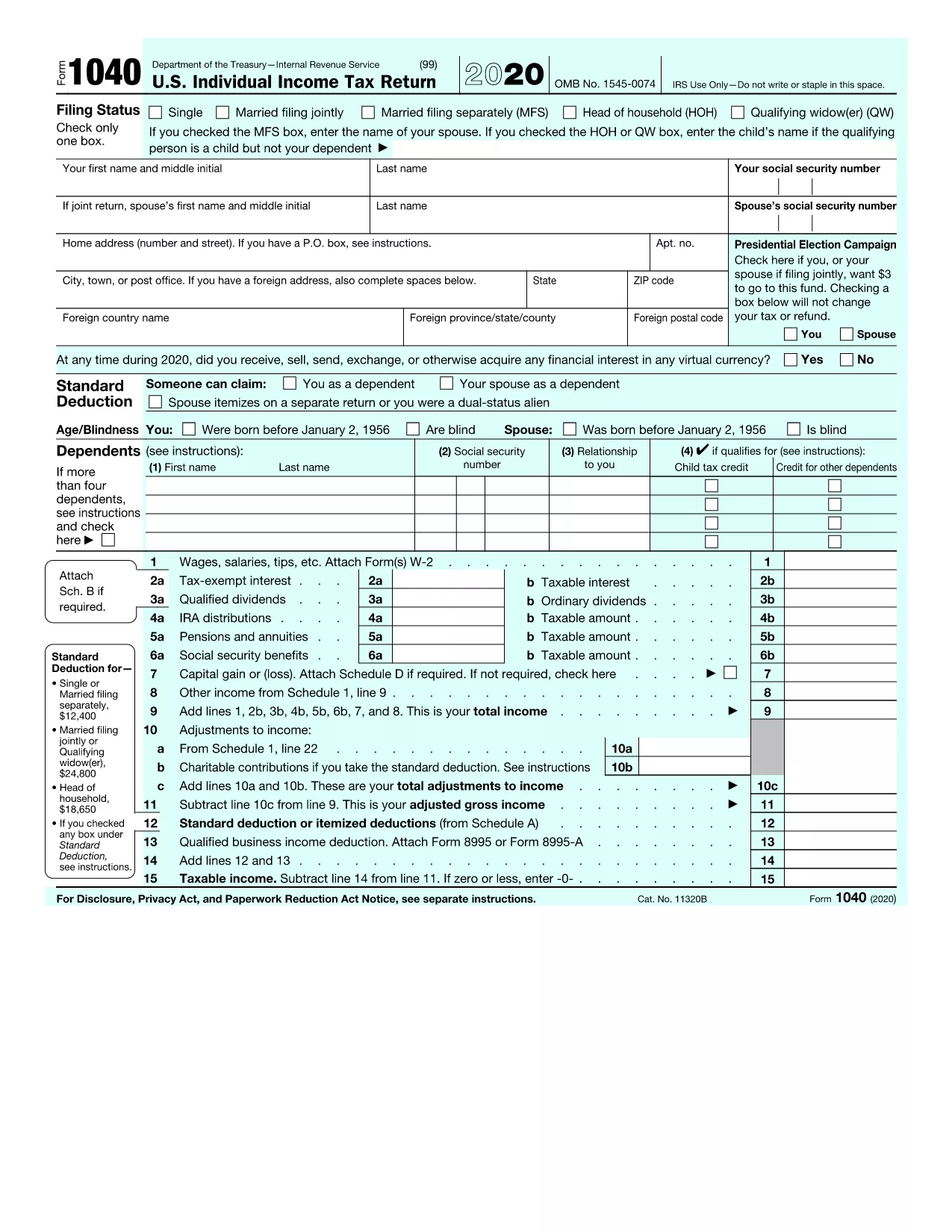
FY 2020 Form 1040 – Fillable PDF Online

  1. Երկիր ԱՄՆ
  2. Լեզու Անգլերեն
  3. Գործունեություն Հարկեր
  4. բաժին IRS
FY 2020 Form 1040 – Fillable PDF Online

The IRS Form 1040 for the fiscal year 2020 is the core document you need to file your individual federal income tax return. With Formize you can open the official PDF, fill it out directly in your browser, and save or print a completed copy – no extra software required.

Why Use the Fillable FY 2020 Form 1040?

Official PDF – The file linked below is the exact version released by the IRS for 2020.
Instant editing – Fill in all fields, calculate totals automatically, and see errors in real time.
Secure & free – Your data stays in your browser; Formize does not store personal information.

How to Fill Out the FY 2020 Form 1040 on Formize

Follow the simple steps in the How‑To section below. The process takes only a few minutes, even if you’re filing a complex return.

Common Mistakes to Avoid on Form 1040 (2020)

  • Leaving the "Standard Deduction" box blank when you qualify.
  • Mismatching Social Security numbers between the main form and Schedule 1.
  • Forgetting to sign the form – an unsigned PDF is rejected by the IRS.
  • Entering the wrong tax year on the top of the page.

Download & Print Options

If you prefer a hard‑copy, you can download the completed PDF after you finish editing and print it on any standard printer. The fillable version retains all the IRS formatting, so printed copies are ready for mailing.

FAQs About the FY 2020 Form 1040

Answers to the most common questions are listed further down the page. If you need additional guidance, the IRS instructions PDF (linked on the form) provides detailed line‑by‑line help.

Download the official FY 2020 Form 1040 PDF

ՀՏՀ
  • What is the FY 2020 Form 1040 used for?

    It is the primary individual income‑tax return for the 2020 tax year, covering wages, deductions, credits, and tax liability.

  • Can I file the FY 2020 Form 1040 electronically?

    Yes. After completing the fillable PDF, you can e‑file through approved tax‑software or submit a paper copy to the IRS.

  • Do I need to print the form after filling it out online?

    Printing is optional. A saved PDF is acceptable for electronic submission, but a printed copy may be required for certain mail‑in situations.

  • Is the Formize filler secure?

    All data stays in your browser; Formize does not store or transmit personal information to third parties.

  • Where can I find the official IRS instructions for Form 1040 (2020)?

    The instructions are linked on the IRS website and can be downloaded as a separate PDF from the same page where you get the form.

  • What if I make a mistake after saving the PDF?

    Open the saved PDF again in Formize, correct the fields, and re‑save. The fillable format lets you edit without starting over.

  • Do I need a special PDF reader to use this form?

    No. The Formize filler works in any modern browser (Chrome, Edge, Firefox, Safari) without additional software.

ԻՆՉՊԵՍ

Ինչպես լրացնել FY 2020 Form 1040-ն անվճար, առցանց՝ 5 հեշտ քայլերով.

  1. 1
    Click "Fill out this form"
    On the Formize page, press the bright orange "Fill out this form" button to launch the PDF in the online filler.
  2. 2
    Wait for the Formize PDF Filler to load
    A loading bar appears while the secure filler initializes. This usually takes only a few seconds.
  3. 3
    Enter your information
    Click each field, type your data, and use the built‑in calculator for totals. Mandatory fields are highlighted.
  4. 4
    Review for errors
    Formize automatically checks for common mistakes (missing SSN, mismatched totals, etc.) and shows warnings.
  5. 5
    Save or print the completed form
    When you’re satisfied, click "Save PDF" to download a copy or "Print" to produce a hard copy for mailing.
Ձևավորել PDF Filler հավելվածը
ՄԱՍԻՆ

Դաշնային հարկային ձևեր

FY 2020 Form 1040-ը դաշնային հարկային ձևերից մեկն է, որն օգտագործվում է Միացյալ Նահանգների Ներքին եկամուտների ծառայությանը (IRS) դաշնային եկամտահարկը զեկուցելու և ներկայացնելու համար: Այս ձևաթղթերն օգտագործվում են անհատների, ձեռնարկությունների և կազմակերպությունների կողմից՝ իրենց եկամուտները, պահումները և այլ համապատասխան տեղեկատվություն, որոնք անհրաժեշտ են իրենց դաշնային հարկային պարտավորությունը հաշվարկելու համար:

Ամենատարածված դաշնային հարկի ձևը Ձև 1040ն է, որն օգտագործվում է անհատ հարկատուների կողմից` իրենց անձնական եկամտահարկը հայտնելու համար: Այլ սովորաբար օգտագործվող ձևերը ներառում են Ձև 1065 գործընկերության համար, Ձև 1120 կորպորացիաների համար, և Ձև 990 հարկերից ազատված կազմակերպությունների համար:

Դաշնային հարկային ձևերը սովորաբար պահանջում են հարկ վճարողներից զեկուցել եկամտի տարբեր աղբյուրների մասին, ինչպիսիք են աշխատավարձերը, աշխատավարձերը և թեյավճարները, ինչպես նաև եկամուտները ներդրումներից, վարձակալած գույքից և այլ աղբյուրներից: Ձևաթղթերը նաև թույլ են տալիս հարկ վճարողներին պահանջել պահումներ և վարկեր տարբեր ծախսերի համար, ինչպիսիք են բարեգործական ներդրումները, հիփոթեքային տոկոսները և առողջապահական ծախսերը:

Կարևոր է ճշգրիտ և ժամանակին ներկայացնել դաշնային հարկային ձևերը, քանի որ դա չկատարելը կարող է հանգեցնել տույժերի և տոկոսների գանձման IRS-ից:

ՀԱՏԿՈՒԹՅՈՒՆՆԵՐ

PDF լցոնիչ

Առցանց FY 2020 Form 1040-ը լրացնելու ամենահեշտ ձևը

  • Արագ լրացրեք FY 2020 Form 1040
    Փնտրու՞մ եք միջոց՝ արագորեն լրացնելու FY 2020 Form 1040 առցանց: Մեր առցանց անվճար PDF ձևաթուղթ լրացնողի միջոցով դուք կիմանաք, թե ինչպես խմբագրել և լրացնել այս pdf փաստաթուղթը մեկ րոպեից պակաս ժամանակում:
  • Հեշտ օգտագործման առցանց PDF խմբագիր
    Հոգնե՞լ եք PDF ֆայլեր տպելուց, որպեսզի կարողանաք դրանք խմբագրել, նախքան նորից սկանավորելը և հետ ուղարկելը: Խմբագրել PDF փաստաթղթերը անվճար առցանց: Օգտագործեք մեր առցանց pdf խմբագրիչը ժամանակ և թուղթ խնայելու համար:
  • Հիանալի գործիքներ, բոլոր հարթակներ
    Զարմանում եք, թե ինչպես լրացնել FY 2020 Form 1040-ը Mac-ում, կամ գուցե ինչպես անվճար օգտագործել PDF լցոնիչը: Մեր առցանց PDF գործիքներն աշխատում են բոլոր հարթակներում:
  • Անվտանգ ֆայլերի պահպանում
    Ավարտված «FY 2020 Form 1040» ֆայլերը պահվում են պաշտպանված տվյալների բազայում, որը կառավարվում է Amazon Cloud հոսթինգի կողմից: Ցանկացած ժամանակ կարող եք ջնջել ձեր ֆայլերը մեր համակարգից: Ամեն դեպքում, այս ֆայլերը ավտոմատ կերպով ջնջվում են 24 ժամ հետո:
  • Զրուցեք FY 2020 Form 1040-ի հետ
    Զրուցեք «FY 2020 Form 1040»-ի հետ Chatize-ում, որը PDF ընթերցողի անվճար օգնական է: Հարցեր տվեք և ստացեք պատասխաններ «FY 2020 Form 1040»-ից։ Պարզապես սեղմեք վերևում գտնվող Զրույց փաստաթղթի հետ կոճակը:

Ջնջել լրացման նիստը

Ջնջե՞լ ընտրված լրացման աշխատաշրջանը: Այս դեպքում ձևը լրացնելու ձեր առաջընթացը կկորչի:

Ջնջել խմբագրման նիստը

Ջնջե՞լ ընտրված խմբագրման աշխատաշրջանը: Այս դեպքում ձևը ստեղծելու և խմբագրելու ձեր առաջընթացը կկորչի: