
Ընտրել լեզուն

Parent Authorization Form for Driver License (Fillable PDF)

  1. Լեզու Անգլերեն
  2. Երկիր ԱՄՆ
  3. Գործունեություն Driver Licensing
  4. բաժին Motor Vehicle Commission
Parent Authorization Form for Driver License (Fillable PDF)

When a teen under 18 applies for a driver’s permit or license, most state motor vehicle agencies require a signed Parent or Guardian Consent Form. This form proves that a parent or legal guardian authorizes the minor to obtain driving privileges and acknowledges responsibility for the teen’s safe operation of the vehicle.

What Is the Parent or Guardian Consent Form?

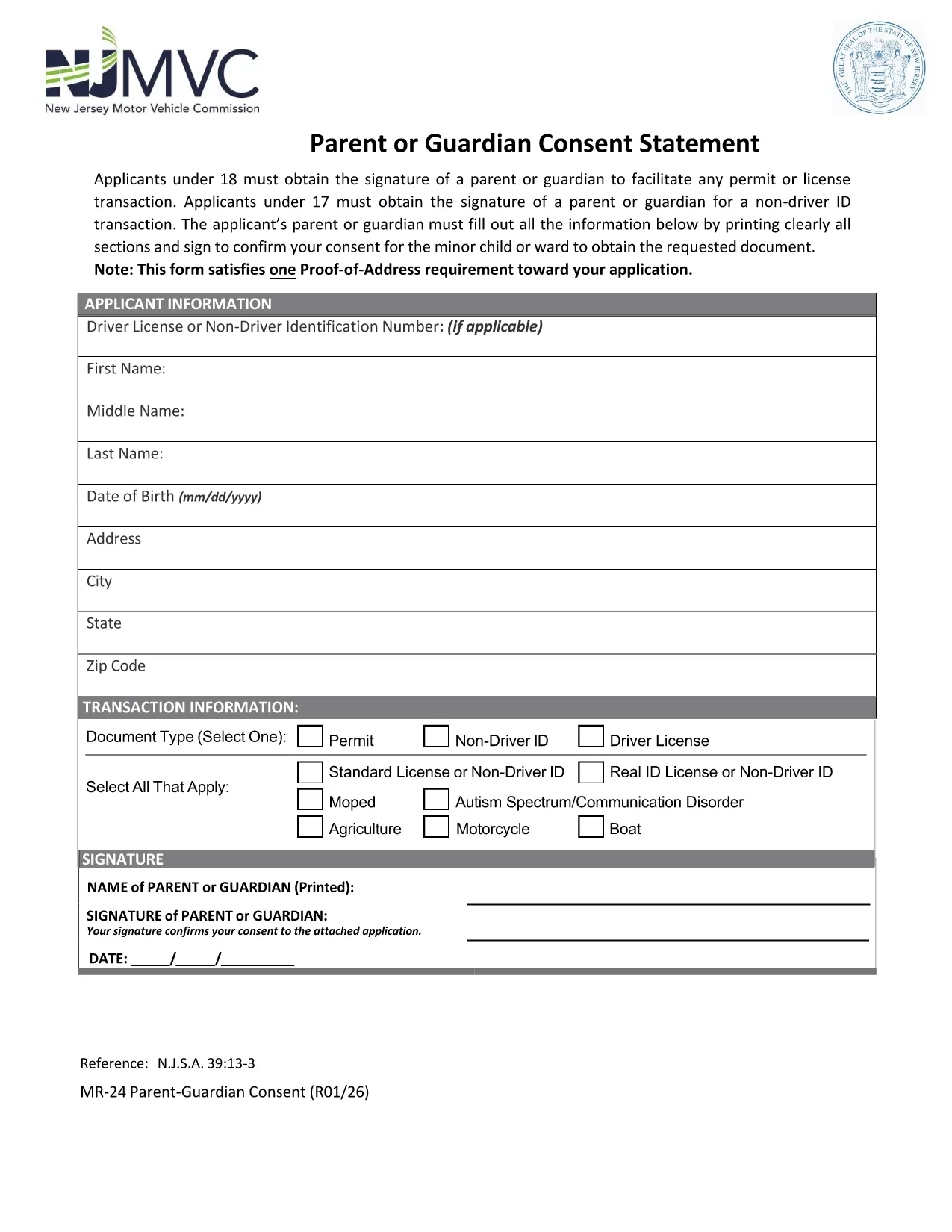
The consent form is a simple one‑page PDF that captures the minor’s personal information, the parent’s contact details, and the parent’s signature. It is used by the Department of Motor Vehicles (DMV) or Motor Vehicle Commission (MVC) to verify that a responsible adult has given permission.

How to Complete the Form Online with Formize

Instead of printing, scanning, or using a PDF editor, you can fill out the form directly on our site. Follow these steps:

  1. Click the "Fill out this form" button below.
  2. Wait a moment while the Formize PDF Filler app loads securely in your browser.
  3. Enter the required information in each field – the interface highlights mandatory sections.
  4. Use the built‑in signature pad to add the parent’s signature (or type the name and select the "Typed Signature" option).
  5. When you’re done, click Save & Download to get a completed PDF you can print or submit electronically.

Common Mistakes to Avoid

  • Illegible handwriting: Even though you can type, many still hand‑write. Use clear, block letters to prevent processing delays.
  • Missing signatures: Both the parent/guardian and, in some states, the minor must sign. The Formize app will warn you if a signature is missing.
  • Incorrect dates: Use the current date; an expired date may cause the form to be rejected.
  • Wrong address: Verify the address matches the one on file with the DMV.

Where to Submit the Completed Form

After you download the filled PDF, you can:

  • Bring it to your local DMV/MVC office when applying for the permit or license.
  • Mail it to the address listed on the form (if your state allows mail‑in submissions).
  • Upload it through the online driver‑license portal, if your state provides that option.

Download the Official PDF

The form below is the official New Jersey Motor Vehicle Commission (MVC) Parent or Guardian Consent Form. It is fully compatible with the Formize PDF Filler.

Download the PDF

ՀՏՀ
  • Do I need a notarized signature on the parent consent form?

    No. Most states, including New Jersey, only require a regular signature from the parent or legal guardian. A notarized signature is not necessary.

  • Can I submit the form electronically?

    Yes, if your state’s DMV/MVC offers an online portal. The filled PDF can be uploaded directly after you save it from Formize.

  • What if my teen is 17 and applying for a learner’s permit?

    A parent or guardian must still sign the consent form. Some states also require a separate “Non‑Driver ID” consent; the same PDF covers both purposes.

  • Is the Formize PDF Filler secure?

    Absolutely. All data is processed locally in your browser; nothing is stored on our servers unless you choose to save the file.

  • Can I edit the form after I’ve downloaded it?

    Yes. The saved PDF remains fillable, so you can reopen it in Formize or any standard PDF editor to make corrections before final submission.

  • What if I make a mistake while filling the form?

    Simply click the "Clear" button next to the field, re‑enter the correct information, and continue. The app prevents accidental submission of incomplete or incorrect data.

  • Do I need to provide proof of relationship with the minor?

    The consent form itself serves as proof. However, some DMVs may request additional documentation (birth certificate, custody papers) during the in‑person visit.

  • Is there a fee to use the Formize PDF Filler?

    No. The fillable PDF and online filler are completely free for users.

ԻՆՉՊԵՍ

Ինչպես լրացնել parent authorization driver license-ն անվճար, առցանց՝ 5 հեշտ քայլերով.

  1. 1
    Open the Fillable Form
    Click the "Fill out this form" button on the page. The Formize PDF Filler loads directly in your browser—no download needed.
  2. 2
    Enter All Required Information
    Type the minor’s name, date of birth, address, and the parent’s contact details into the highlighted fields.
  3. 3
    Add the Parent’s Signature
    Use the signature pad to draw a signature or select the "Typed Signature" option. The app validates that the signature field is completed.
  4. 4
    Save and Download
    When every required field is filled, click "Save & Download". A completed PDF will be saved to your device for printing or electronic submission.
  5. 5
    Submit to Your DMV/MVC
    Take the printed copy to your local motor vehicle office, mail it, or upload it through the state’s online portal as instructed.
Ձևավորել PDF Filler հավելվածը
ՄԱՍԻՆ

parent authorization driver license ձևանմուշ

PDF փաստաթուղթը դիտելու և լրացնելու գործառույթների ավանդական փաթեթով, որը զուգորդվում է վեբ հավելվածի առավելությունների և արձագանքող դասավորության հետ, դուք կարող եք լրացնել parent authorization driver license-ը րոպեների ընթացքում:

ՀԱՏԿՈՒԹՅՈՒՆՆԵՐ

PDF լցոնիչ

Առցանց parent authorization driver license-ը լրացնելու ամենահեշտ ձևը

  • Արագ լրացրեք parent authorization driver license
    Փնտրու՞մ եք միջոց՝ արագորեն լրացնելու parent authorization driver license առցանց: Մեր առցանց անվճար PDF ձևաթուղթ լրացնողի միջոցով դուք կիմանաք, թե ինչպես խմբագրել և լրացնել այս pdf փաստաթուղթը մեկ րոպեից պակաս ժամանակում:
  • Հեշտ օգտագործման առցանց PDF խմբագիր
    Հոգնե՞լ եք PDF ֆայլեր տպելուց, որպեսզի կարողանաք դրանք խմբագրել, նախքան նորից սկանավորելը և հետ ուղարկելը: Խմբագրել PDF փաստաթղթերը անվճար առցանց: Օգտագործեք մեր առցանց pdf խմբագրիչը ժամանակ և թուղթ խնայելու համար:
  • Հիանալի գործիքներ, բոլոր հարթակներ
    Զարմանում եք, թե ինչպես լրացնել parent authorization driver license-ը Mac-ում, կամ գուցե ինչպես անվճար օգտագործել PDF լցոնիչը: Մեր առցանց PDF գործիքներն աշխատում են բոլոր հարթակներում:
  • Անվտանգ ֆայլերի պահպանում
    Ավարտված «parent authorization driver license» ֆայլերը պահվում են պաշտպանված տվյալների բազայում, որը կառավարվում է Amazon Cloud հոսթինգի կողմից: Ցանկացած ժամանակ կարող եք ջնջել ձեր ֆայլերը մեր համակարգից: Ամեն դեպքում, այս ֆայլերը ավտոմատ կերպով ջնջվում են 24 ժամ հետո:
  • Զրուցեք parent authorization driver license-ի հետ
    Զրուցեք «parent authorization driver license»-ի հետ Chatize-ում, որը PDF ընթերցողի անվճար օգնական է: Հարցեր տվեք և ստացեք պատասխաններ «parent authorization driver license»-ից։ Պարզապես սեղմեք վերևում գտնվող Զրույց փաստաթղթի հետ կոճակը:

Ջնջել լրացման նիստը

Ջնջե՞լ ընտրված լրացման աշխատաշրջանը: Այս դեպքում ձևը լրացնելու ձեր առաջընթացը կկորչի:

Ջնջել խմբագրման նիստը

Ջնջե՞լ ընտրված խմբագրման աշխատաշրջանը: Այս դեպքում ձևը ստեղծելու և խմբագրելու ձեր առաջընթացը կկորչի: