
Ընտրել լեզուն

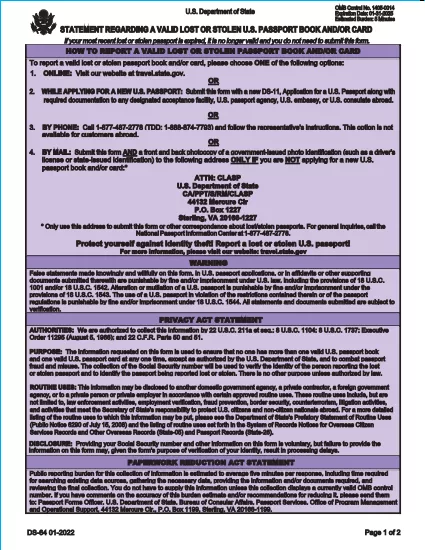
DS-64 Statement Regarding a Lost or Stolen U.S. Passport (Fillable PDF)

  1. Լեզու Անգլերեն
  2. Երկիր ԱՄՆ
  3. Գործունեություն Անձնագիր
DS-64 Statement Regarding a Lost or Stolen U.S. Passport (Fillable PDF)

The DS-64 is the official U.S. Department of State form used to report a lost or stolen passport. Once submitted, the passport is immediately invalidated, preventing fraud and protecting your identity.

What Is the DS-64 Form?

DS-64, titled Statement Regarding a Lost or Stolen Passport, collects personal details, passport information, and a description of how the passport was lost or stolen. It is required whether you plan to request a replacement (DS‑11) or simply need the record of loss.

Why Use Formize’s Fillable PDF Filler?

  • Instant online filling: No need to download, print, and hand‑write.
  • Auto‑save: Your progress is saved in the browser, so you never lose data.
  • Error‑checking: Real‑time validation reduces mistakes.
  • Secure: All data stays on your device; Formize never stores personal information.

Step‑by‑Step Guide to Complete DS-64

Follow the simple steps below to fill, sign, and download the form.

Common Mistakes to Avoid

  • Leaving the passport number blank when you know it – the number is essential for cancellation.
  • Using colored ink or handwritten corrections – Formize requires black‑ink digital entry.
  • Forgetting to indicate whether you are submitting a replacement application (DS‑11).

Where to Submit Your Completed Form

After you download the completed DS‑64 PDF, you can:

  • Mail it to the address printed on the form if you are not applying for a new passport.
  • Include it with your DS‑11 application when requesting a replacement.
  • Submit it in person at a regional passport agency.

There is no fee to submit DS‑64 alone; fees apply only when you request a replacement passport.

ՀՏՀ
  • Can I submit DS‑64 online?

    No. The DS‑64 must be printed, signed, and submitted by mail or in person. Formize only provides a fillable PDF to simplify completion.

  • Is there a fee to file DS‑64?

    There is no fee to report a lost or stolen passport with DS‑64. Fees apply only when you request a replacement passport.

  • What if I don’t know my passport number?

    Enter ‘Unknown’ in the passport number field and provide as much other identifying information as possible.

  • Do I need a notary for DS‑64?

    No. The form only requires your signature; notarization is not required.

  • How long does it take for the passport to be invalidated?

    Once the State Department receives the DS‑64, the passport is typically canceled within a few business days.

  • Can a parent fill out DS‑64 for a minor?

    Yes. A parent or legal guardian may complete the form on behalf of a minor, signing in the appropriate section.

  • What should I do if my passport was expired when it was lost?

    You do not need to submit DS‑64 for an expired passport, but you may still do so to have a record of the loss.

  • Will I receive confirmation that my passport is canceled?

    The State Department does not send a formal confirmation, but the passport will be marked as invalid in their system.

ԻՆՉՊԵՍ

Ինչպես լրացնել DS-64-ն անվճար, առցանց՝ 5 հեշտ քայլերով.

  1. 1
    Open the Fillable Form
    Click the **Fill out this form** button on the page. The Formize PDF Filler app will load instantly in your browser.
  2. 2
    Enter Your Information
    Type your personal details, passport number, and loss description directly into the fields. All required fields are highlighted.
  3. 3
    Review & Sign
    Use the built‑in signature tool to sign the form digitally, then review each section for accuracy.
  4. 4
    Download or Print
    When you’re satisfied, click **Download PDF** to save a copy or **Print** to produce a hard copy for mailing.
  5. 5
    Submit the Form
    Mail or bring the completed DS‑64 to the address shown on the form, or attach it to your DS‑11 replacement application.
Ձևավորել PDF Filler հավելվածը
ՄԱՍԻՆ

Անձնագրերի ձևեր

DS-64-ը անձնագրի ձևերից մեկն է, որը փաստաթղթեր է, որն օգտագործվում է անձնագիր ստանալու համար դիմելու համար, որը ճամփորդական փաստաթուղթ է, որը հավաստում է սեփականատիրոջ ինքնությունը և քաղաքացիությունը և թույլ է տալիս նրանց ճանապարհորդել միջազգային: Անձնագրերի ձևերը կարող են տարբեր լինել՝ կախված անձնագիր տվող երկրից, բայց դրանք սովորաբար պարունակում են անձնական տվյալներ դիմողի մասին, ինչպիսիք են անունը, ծննդյան ամսաթիվը և ծննդյան վայրը, ինչպես նաև տեղեկություններ դիմողի ծնողների և նախկին անձնագրերի կամ ճամփորդական փաստաթղթերի մասին։ .

Միացյալ Նահանգներում անձնագրի երկու ամենատարածված ձևերն են՝ DS-11 և DS-82: DS-11 ձևը օգտագործվում է առաջին անգամ դիմողների, անչափահասների կամ անհատների համար, ովքեր իրավասու չեն օգտագործել DS-82 ձևը: DS-82 ձևաթուղթն օգտագործվում է իրավասու դիմորդների համար անձնագրերը փոստով երկարաձգելու համար: Երկու ձևերն էլ պահանջում են, որ դիմորդը տրամադրի անձնական տեղեկություններ և օժանդակ փաստաթղթեր, ինչպիսիք են անձնագրի լուսանկարը և քաղաքացիության ապացույցը:

Այլ երկրները կարող են ունենալ տարբեր անձնագրերի ձևեր և պահանջներ, սակայն հիմնական գործընթացը սովորաբար ներառում է անձնագրի դիմումի լրացում, օժանդակ փաստաթղթերի տրամադրում և անձնագրային պաշտոնյայի հետ հարցազրույցի մասնակցությունը պետական ​​հաստատությունում կամ դեսպանատանը: Կարևոր է նշել, որ անձնագրի հայտի գործընթացը կարող է տևել մի քանի շաբաթ կամ նույնիսկ ամիսներ, ուստի խորհուրդ է տրվում դիմել ցանկացած պլանավորված ճանապարհորդությունից շատ շուտ:

ՀԱՏԿՈՒԹՅՈՒՆՆԵՐ

PDF լցոնիչ

Առցանց DS-64-ը լրացնելու ամենահեշտ ձևը

  • Արագ լրացրեք DS-64
    Փնտրու՞մ եք միջոց՝ արագորեն լրացնելու DS-64 առցանց: Մեր առցանց անվճար PDF ձևաթուղթ լրացնողի միջոցով դուք կիմանաք, թե ինչպես խմբագրել և լրացնել այս pdf փաստաթուղթը մեկ րոպեից պակաս ժամանակում:
  • Հեշտ օգտագործման առցանց PDF խմբագիր
    Հոգնե՞լ եք PDF ֆայլեր տպելուց, որպեսզի կարողանաք դրանք խմբագրել, նախքան նորից սկանավորելը և հետ ուղարկելը: Խմբագրել PDF փաստաթղթերը անվճար առցանց: Օգտագործեք մեր առցանց pdf խմբագրիչը ժամանակ և թուղթ խնայելու համար:
  • Հիանալի գործիքներ, բոլոր հարթակներ
    Զարմանում եք, թե ինչպես լրացնել DS-64-ը Mac-ում, կամ գուցե ինչպես անվճար օգտագործել PDF լցոնիչը: Մեր առցանց PDF գործիքներն աշխատում են բոլոր հարթակներում:
  • Անվտանգ ֆայլերի պահպանում
    Ավարտված «DS-64» ֆայլերը պահվում են պաշտպանված տվյալների բազայում, որը կառավարվում է Amazon Cloud հոսթինգի կողմից: Ցանկացած ժամանակ կարող եք ջնջել ձեր ֆայլերը մեր համակարգից: Ամեն դեպքում, այս ֆայլերը ավտոմատ կերպով ջնջվում են 24 ժամ հետո:
  • Զրուցեք DS-64-ի հետ
    Զրուցեք «DS-64»-ի հետ Chatize-ում, որը PDF ընթերցողի անվճար օգնական է: Հարցեր տվեք և ստացեք պատասխաններ «DS-64»-ից։ Պարզապես սեղմեք վերևում գտնվող Զրույց փաստաթղթի հետ կոճակը:

Ջնջել լրացման նիստը

Ջնջե՞լ ընտրված լրացման աշխատաշրջանը: Այս դեպքում ձևը լրացնելու ձեր առաջընթացը կկորչի:

Ջնջել խմբագրման նիստը

Ջնջե՞լ ընտրված խմբագրման աշխատաշրջանը: Այս դեպքում ձևը ստեղծելու և խմբագրելու ձեր առաջընթացը կկորչի: