Ընտրել լեզուն

SSA‑8 Lump‑Sum Death Payment Form (Fillable PDF)

  1. Լեզու Անգլերեն
  2. Երկիր ԱՄՆ
  3. Գործունեություն Benefits
  4. բաժին Social Security Administration
Լրացրեք այս ձևը
SSA‑8 Lump‑Sum Death Payment Form (Fillable PDF)

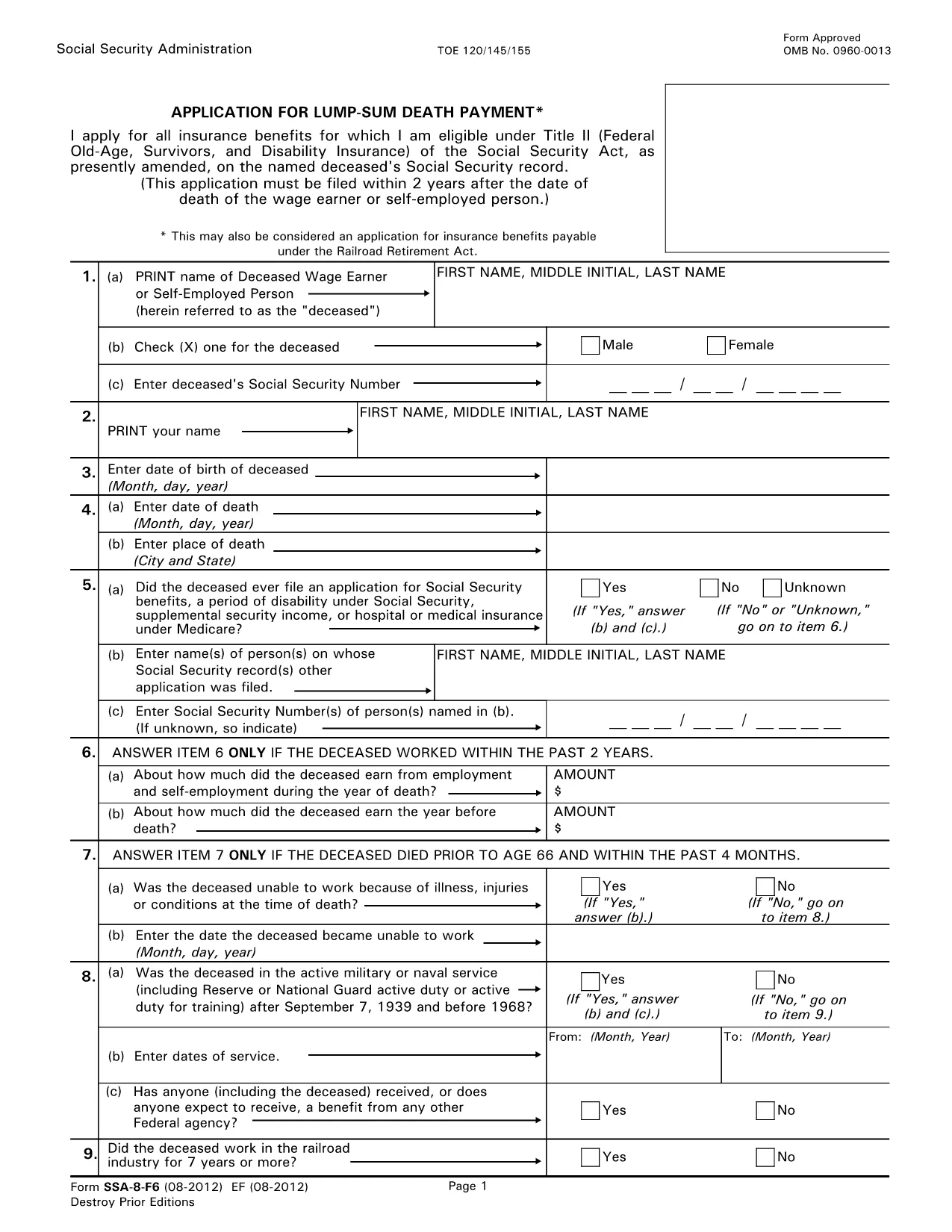
The SSA‑8 is the official Social Security Administration (SSA) application for a lump‑sum death payment to surviving family members. This form is required when a beneficiary wants a one‑time cash payment after the death of a qualified worker.

What Is the SSA‑8 Form?

The SSA‑8 collects personal details about the deceased, the claimant, and the type of payment being requested. It is used by the SSA to verify eligibility and calculate the amount owed.

How to Fill Out the SSA‑8 Online with Formize

Instead of downloading, printing, and scanning, you can complete the form directly on our site. Click the "Fill out this form" button, wait for the Formize PDF Filler to load, and start typing. All fields are interactive, and the app saves your progress automatically.

Key Sections & Required Information

  • Section 1: Deceased’s Social Security number and date of death.
  • Section 2: Claimant’s relationship to the deceased and contact details.
  • Section 3: Payment options – direct deposit or paper check.
  • Section 4: Signature and date.

Common Mistakes to Avoid

  • Leaving the Social Security number blank or entering it with dashes.
  • Providing an outdated address – the SSA will mail any correspondence there.
  • Missing the claimant’s signature; an unsigned form is rejected.
  • Choosing the wrong payment method (e.g., selecting direct deposit without providing bank details).

Where to Submit the Completed Form

After you finish, download the completed PDF and bring it to your local Social Security office or mail it to the address listed on the form. You can locate the nearest office at SSA.gov/locator.

ՀՏՀ
  • Who is eligible for a lump‑sum death payment?

    Surviving spouses, children, and certain dependent parents of a deceased worker who earned enough Social Security credits are eligible.

  • Can I submit the SSA‑8 electronically?

    The SSA does not accept fully electronic submissions. You must download the completed PDF and bring or mail it to a Social Security office.

  • How long does it take to receive the payment?

    Processing usually takes 4‑6 weeks after the SSA receives a correctly completed form.

  • Do I need a notarized signature?

    No notarization is required. A handwritten or electronic signature is sufficient as long as it is legible.

  • What if I make a mistake after submitting?

    Contact your local Social Security office immediately. They can provide a corrected form or advise on next steps.

  • Is there a fee to use Formize PDF Filler?

    No, Formize provides the filler for free on this page.

  • Can I save my progress and finish later?

    Yes. The Formize app autosaves locally in your browser, allowing you to return later before downloading the final PDF.

ԻՆՉՊԵՍ

Ինչպես լրացնել SSA-8 form-ն անվճար, առցանց՝ 5 հեշտ քայլերով.

  1. 1
    Click the Fill‑out Button
    On this page, click the "Fill out this form" button to launch the Formize PDF Filler.
  2. 2
    Wait for the Filler to Load
    The online filler loads in a few seconds. All fields become editable directly in your browser.
  3. 3
    Complete Each Section
    Enter the required information exactly as it appears on the SSA‑8. Use the tab key to move between fields.
  4. 4
    Review and Sign
    Double‑check every entry, add your digital signature, and click "Save" to generate the final PDF.
  5. 5
    Download or Print
    Download the completed form or print it for in‑person submission at your local Social Security office.
Ձևավորել PDF Filler հավելվածը
ՄԱՍԻՆ

SSA-8 form ձևանմուշ

PDF փաստաթուղթը դիտելու և լրացնելու գործառույթների ավանդական փաթեթով, որը զուգորդվում է վեբ հավելվածի առավելությունների և արձագանքող դասավորության հետ, դուք կարող եք լրացնել SSA-8 form-ը րոպեների ընթացքում:

ՀԱՏԿՈՒԹՅՈՒՆՆԵՐ

PDF լցոնիչ

Առցանց SSA-8 form-ը լրացնելու ամենահեշտ ձևը

  • Արագ լրացրեք SSA-8 form
    Փնտրու՞մ եք միջոց՝ արագորեն լրացնելու SSA-8 form առցանց: Մեր առցանց անվճար PDF ձևաթուղթ լրացնողի միջոցով դուք կիմանաք, թե ինչպես խմբագրել և լրացնել այս pdf փաստաթուղթը մեկ րոպեից պակաս ժամանակում:
  • Հեշտ օգտագործման առցանց PDF խմբագիր
    Հոգնե՞լ եք PDF ֆայլեր տպելուց, որպեսզի կարողանաք դրանք խմբագրել, նախքան նորից սկանավորելը և հետ ուղարկելը: Խմբագրել PDF փաստաթղթերը անվճար առցանց: Օգտագործեք մեր առցանց pdf խմբագրիչը ժամանակ և թուղթ խնայելու համար:
  • Հիանալի գործիքներ, բոլոր հարթակներ
    Զարմանում եք, թե ինչպես լրացնել SSA-8 form-ը Mac-ում, կամ գուցե ինչպես անվճար օգտագործել PDF լցոնիչը: Մեր առցանց PDF գործիքներն աշխատում են բոլոր հարթակներում:
  • Անվտանգ ֆայլերի պահպանում
    Ավարտված «SSA-8 form» ֆայլերը պահվում են պաշտպանված տվյալների բազայում, որը կառավարվում է Amazon Cloud հոսթինգի կողմից: Ցանկացած ժամանակ կարող եք ջնջել ձեր ֆայլերը մեր համակարգից: Ամեն դեպքում, այս ֆայլերը ավտոմատ կերպով ջնջվում են 24 ժամ հետո:
  • Զրուցեք SSA-8 form-ի հետ
    Զրուցեք «SSA-8 form»-ի հետ Chatize-ում, որը PDF ընթերցողի անվճար օգնական է: Հարցեր տվեք և ստացեք պատասխաններ «SSA-8 form»-ից։ Պարզապես սեղմեք վերևում գտնվող Զրույց փաստաթղթի հետ կոճակը:

Ջնջել լրացման նիստը

Ջնջե՞լ ընտրված լրացման աշխատաշրջանը: Այս դեպքում ձևը լրացնելու ձեր առաջընթացը կկորչի:

Ջնջել խմբագրման նիստը

Ջնջե՞լ ընտրված խմբագրման աշխատաշրջանը: Այս դեպքում ձևը ստեղծելու և խմբագրելու ձեր առաջընթացը կկորչի: