
Ընտրել լեզուն

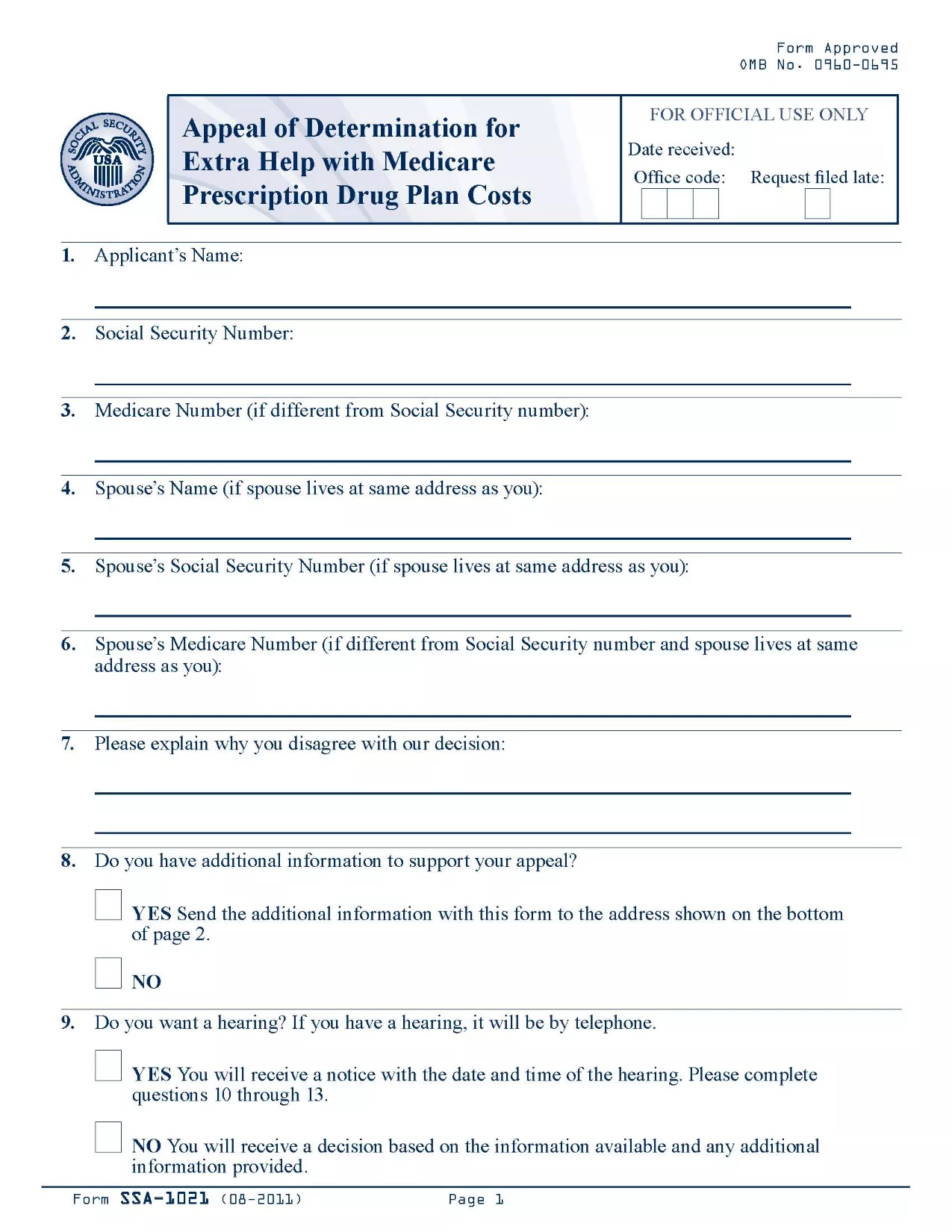
SSA-1021 Appeal of Determination Form (Fillable PDF)

  1. Լեզու Անգլերեն
  2. Երկիր ԱՄՆ
  3. Գործունեություն Սոցիալական անվտանգություն
Լրացրեք այս ձևը
SSA-1021 Appeal of Determination Form (Fillable PDF)

The SSA-1021 is the official Social Security Administration (SSA) form used to appeal a denial of Extra Help with Medicare prescription drug costs. If you received a determination that you are not eligible for the Extra Help program, you can use this form to request a review.

Formize makes the process simple: the PDF is fully fillable online, so you never have to print, scan, or hand‑write anything. Just click the button, fill the fields, and download or save a completed copy.

What is the SSA-1021 Form?

SSA-1021, titled “Appeal of Determination for Extra Help With Medicare Prescription Drug Plan Costs,” collects the information the SSA needs to reconsider your eligibility. It includes sections for personal details, the original determination notice, and the reasons for your appeal.

How to Complete the SSA-1021 Online

Follow the step‑by‑step guide in the How To section below. The Formize PDF filler loads automatically after you click “Fill out this form.”

Common Mistakes to Avoid

  • Leaving any required field blank – the SSA will reject an incomplete form.
  • Providing inaccurate personal information – errors can delay the review.
  • Failing to attach supporting documents (income statements, prescription bills, etc.).

Where to Submit Your Appeal

After completing the form, you can either mail it to the address on your determination notice or upload the PDF through your My Social Security account.

Download the Official PDF

The official, up‑to‑date PDF is available for download below. Clicking the button opens the Formize fillable version, so you can start right away.

Հրահանգներ

  • Լոս Անջելես SA-12 - Instructions for Completing the Appeal of Determination for Extra Help with Medicare Prescription Drug Plan Costs
ՀՏՀ
  • What is the deadline to submit an SSA-1021 appeal?

    You must file the appeal within 60 days of the date on your denial notice. Late filings may be rejected.

  • Can I file the SSA-1021 online?

    Yes. With Formize you fill the PDF online, then download the completed form to upload through your My Social Security account or to print and mail.

  • Do I need a PDF editor to complete SSA-1021?

    No. The Formize PDF Filler provides a fully interactive, browser‑based editor—no extra software required.

  • What supporting documents should I include?

    Attach recent income statements, bank statements, prescription drug receipts, and any letters from your Medicare Part D plan that explain the denial.

  • Will filling the form online make the review faster?

    Submitting a complete, legible PDF reduces processing time because the SSA does not need to request clarification.

  • Is the Formize service free?

    Yes. Formize provides free access to fillable government PDFs; there are no hidden fees.

  • Can I edit the form after downloading it?

    Once you download the completed PDF, you can still open it in any standard PDF viewer to add a digital signature if required.

  • What if I make a mistake while filling the form?

    Simply click the “Reset” button in the filler to clear a field, or use the backspace key to correct the entry before saving.

ԻՆՉՊԵՍ

Ինչպես լրացնել SSA-1021-ն անվճար, առցանց՝ 5 հեշտ քայլերով.

  1. 1
    Click the Fillable Form Button
    On this page, click the bright “Fill out this form” button. The Formize PDF Filler app will open in a new tab.
  2. 2
    Wait for the Formize PDF Filler to Load
    The filler loads the SSA-1021 PDF instantly. A progress bar will show when the document is ready.
  3. 3
    Enter Your Information
    Type directly into each field. Use the tab key or click to move between sections. All fields are validated in real time.
  4. 4
    Attach Supporting Documents
    Use the “Attach File” button next to the relevant sections to upload income statements, prescription receipts, or any other proof.
  5. 5
    Review, Save, and Submit
    When you’re satisfied, click “Save & Download” to get a completed PDF. Print, mail, or upload it to your SSA online account.
Ձևավորել PDF Filler հավելվածը
ՄԱՍԻՆ

Սոցիալական ապահովության ձևեր

SSA-1021-ը Սոցիալական ապահովության ձևերից մեկն է, որն օգտագործվում է Միացյալ Նահանգների Սոցիալական ապահովության վարչության (SSA) կողմից տրամադրվող տարբեր նպաստների և ծառայությունների համար դիմելու համար: SSA-ն դաշնային գործակալություն է, որը կառավարում է ծրագրեր, որոնք նախատեսված են ֆինանսական օգնություն տրամադրելու իրավասու անձանց և ընտանիքներին, ներառյալ կենսաթոշակային նպաստները, հաշմանդամության նպաստները, վերապրածների նպաստները և լրացուցիչ ապահովության եկամուտը (SSI):

Սոցիալական ապահովության որոշ ընդհանուր ձևեր ներառում են.

Սոցիալական ապահովության կենսաթոշակային նպաստների դիմում. այս ձևն օգտագործվում է կենսաթոշակային նպաստների համար դիմելու համար՝ հիմնվելով անհատի աշխատանքային պատմության և վաստակի վրա:

Սոցիալական ապահովության հաշմանդամության նպաստների դիմում. այս ձևն օգտագործվում է հաշմանդամության նպաստների համար դիմելու համար, եթե անհատն ունի ֆիզիկական կամ հոգեկան վիճակ, որը խանգարում է նրան աշխատել:

Սոցիալական ապահովության վերապրածների նպաստների դիմում. այս ձևն օգտագործվում է վերապրածի նպաստների համար դիմելու համար, եթե անհատի ամուսինը կամ ծնողը մահացել է, և նրանք իրավասու են վերապրողի նպաստ ստանալու համար:

Medicare-ի գրանցման դիմում. այս ձևն օգտագործվում է Medicare-ում գրանցվելու համար՝ 65 տարեկանից բարձր անձանց և որոշակի հաշմանդամություն կամ բժշկական պայմաններ ունեցող անձանց առողջության ապահովագրության դաշնային ծրագիր:

Հասցեի ձևի փոփոխություն. այս ձևն օգտագործվում է անհատի հասցեն SSA-ով թարմացնելու համար:

Եկամուտների գրանցման հարցում. այս ձևն օգտագործվում է անհատի եկամուտների գրանցման պատճենը պահանջելու համար, որն օգտագործվում է Սոցիալական ապահովության նպաստները հաշվարկելու համար:

Այս ձևաթղթերը կարող են լրացվել առցանց, փոստով կամ անձամբ Սոցիալական ապահովության տեղական գրասենյակում: Կարևոր է ուշադիր վերանայել և լրացնել բոլոր անհրաժեշտ ձևերը՝ ապահովելու Սոցիալական ապահովության նպաստների ժամանակին և ճշգրիտ մշակումը:

ՀԱՏԿՈՒԹՅՈՒՆՆԵՐ

PDF լցոնիչ

Առցանց SSA-1021-ը լրացնելու ամենահեշտ ձևը

  • Արագ լրացրեք SSA-1021
    Փնտրու՞մ եք միջոց՝ արագորեն լրացնելու SSA-1021 առցանց: Մեր առցանց անվճար PDF ձևաթուղթ լրացնողի միջոցով դուք կիմանաք, թե ինչպես խմբագրել և լրացնել այս pdf փաստաթուղթը մեկ րոպեից պակաս ժամանակում:
  • Հեշտ օգտագործման առցանց PDF խմբագիր
    Հոգնե՞լ եք PDF ֆայլեր տպելուց, որպեսզի կարողանաք դրանք խմբագրել, նախքան նորից սկանավորելը և հետ ուղարկելը: Խմբագրել PDF փաստաթղթերը անվճար առցանց: Օգտագործեք մեր առցանց pdf խմբագրիչը ժամանակ և թուղթ խնայելու համար:
  • Հիանալի գործիքներ, բոլոր հարթակներ
    Զարմանում եք, թե ինչպես լրացնել SSA-1021-ը Mac-ում, կամ գուցե ինչպես անվճար օգտագործել PDF լցոնիչը: Մեր առցանց PDF գործիքներն աշխատում են բոլոր հարթակներում:
  • Անվտանգ ֆայլերի պահպանում
    Ավարտված «SSA-1021» ֆայլերը պահվում են պաշտպանված տվյալների բազայում, որը կառավարվում է Amazon Cloud հոսթինգի կողմից: Ցանկացած ժամանակ կարող եք ջնջել ձեր ֆայլերը մեր համակարգից: Ամեն դեպքում, այս ֆայլերը ավտոմատ կերպով ջնջվում են 24 ժամ հետո:
  • Զրուցեք SSA-1021-ի հետ
    Զրուցեք «SSA-1021»-ի հետ Chatize-ում, որը PDF ընթերցողի անվճար օգնական է: Հարցեր տվեք և ստացեք պատասխաններ «SSA-1021»-ից։ Պարզապես սեղմեք վերևում գտնվող Զրույց փաստաթղթի հետ կոճակը:

Ջնջել լրացման նիստը

Ջնջե՞լ ընտրված լրացման աշխատաշրջանը: Այս դեպքում ձևը լրացնելու ձեր առաջընթացը կկորչի:

Ջնջել խմբագրման նիստը

Ջնջե՞լ ընտրված խմբագրման աշխատաշրջանը: Այս դեպքում ձևը ստեղծելու և խմբագրելու ձեր առաջընթացը կկորչի: