
Ընտրել լեզուն

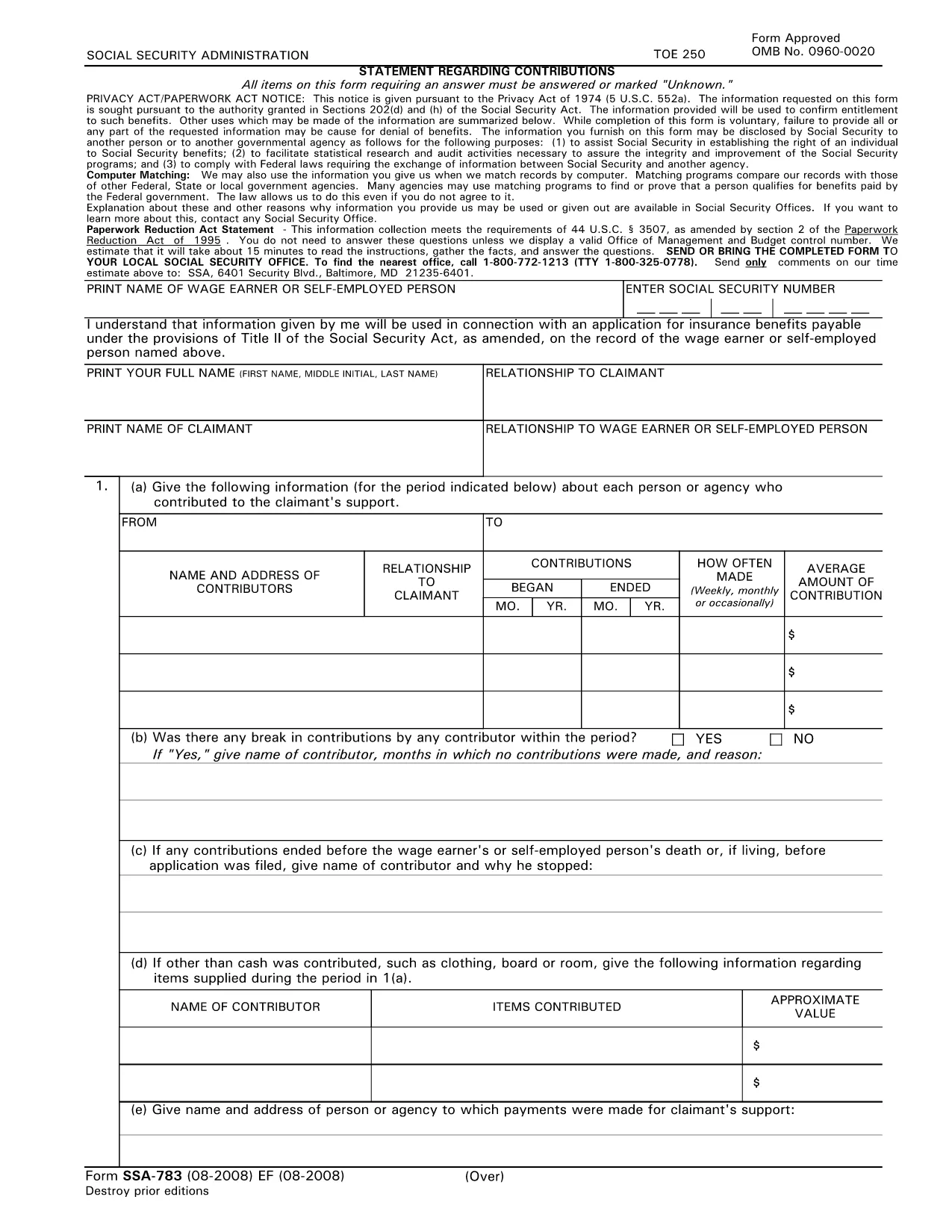
SSA‑783 Statement Regarding Contributions – Fillable PDF Form

  1. Լեզու Անգլերեն
  2. Երկիր ԱՄՆ
  3. Գործունեություն Սոցիալական անվտանգություն
Լրացրեք այս ձևը
SSA‑783 Statement Regarding Contributions – Fillable PDF Form

The SSA‑783 Statement Regarding Contributions is the official Social Security Administration (SSA) form used to report contributions made to a claimant’s support. Whether you’re a wage earner, self‑employed person, or an agency, completing this form accurately is essential for establishing benefit eligibility.

What Is the SSA‑783 Form?

SSA‑783 collects detailed information about each contributor, the amount contributed, and the frequency of payments. The data helps the SSA verify entitlement to benefits under Title II of the Social Security Act.

How to Fill Out the SSA‑783 Form Online

With Formize you can complete the SSA‑783 without printing or using a separate PDF editor. Follow these simple steps:

  • Click the "Fill out this form" button on the page.
  • Wait a few seconds while the Formize PDF Filler app loads.
  • Enter your information directly into the fillable fields.
  • Review each section for accuracy, then click Submit to download the completed PDF.

Common Mistakes to Avoid

  • Leaving fields blank: Incomplete forms are rejected.
  • Incorrect dates or amounts: Double‑check contribution periods and dollar figures.
  • Illegible handwriting: Using a digital fillable PDF eliminates this issue.
  • Missing signatures: The form requires the signer’s name and signature at the end.

Where to Submit the Completed Form

After you download the finished SSA‑783 PDF, mail it to your local Social Security office or bring it in person. You can locate the nearest office by calling 1‑800‑772‑1213 (TTY 1‑800‑325‑0778).

Why Use Formize’s Fillable PDF

Formize provides a secure, browser‑based PDF filler that:

  • Eliminates the need for third‑party PDF editors.
  • Auto‑saves your progress so you can return later.
  • Ensures the final document meets SSA formatting requirements.

Ready to start? Click the button below and complete your SSA‑783 in minutes.

Fill out this form

ՀՏՀ
  • Who must file the SSA‑783 form?

    Anyone who has received contributions toward a claimant’s support—such as a wage earner, self‑employed individual, or agency—must file SSA‑783 to document those payments.

  • Is the SSA‑783 form free to download?

    Yes. Formize provides a free, downloadable fillable PDF of the SSA‑783 form.

  • Can I save my progress and finish later?

    Yes. The Formize PDF Filler automatically saves your entries, allowing you to return and complete the form at any time.

  • How long does it usually take to complete?

    Most users finish the SSA‑783 in 10‑15 minutes, depending on the number of contributors listed.

  • What should I do if I make a mistake?

    Simply correct the field in the fillable PDF before downloading the final version. If you’ve already submitted, contact your local SSA office for guidance.

  • Where do I send the completed SSA‑783?

    Mail the completed form to your local Social Security office or bring it in person. Use the SSA office locator at 1‑800‑772‑1213 for the nearest address.

  • Can I submit the SSA‑783 electronically?

    The SSA currently requires a hard‑copy submission. After filling it out online, print the PDF and send it by mail.

  • Do I need a special PDF editor?

    No. Formize’s browser‑based filler handles everything—no additional software is required.

  • Is my personal information safe?

    Formize uses SSL encryption to protect all data entered into the fillable PDF. Your information is not stored on our servers after you download the completed form.

  • What if I don’t have all the contribution details?

    Provide as much accurate information as possible. If you’re missing data, note “unknown” in the appropriate fields and explain the gap in the comments section.

ԻՆՉՊԵՍ

Ինչպես լրացնել SSA-783-ն անվճար, առցանց՝ 5 հեշտ քայլերով.

  1. 1
    Click the Fill‑out Button
    Locate the “Fill out this form” button on the page and click it to launch the Formize PDF Filler.
  2. 2
    Wait for the Filler to Load
    A few seconds after clicking, the fillable PDF interface will appear in your browser.
  3. 3
    Enter Your Information
    Complete each required field—contributor names, dates, amounts, and signatures—using your keyboard.
  4. 4
    Review and Download
    Check all entries for accuracy, then click “Submit” to download the finished SSA‑783 PDF.
  5. 5
    Submit to SSA
    Print the saved PDF (if needed) and mail or deliver it to your local Social Security office.
Ձևավորել PDF Filler հավելվածը
ՄԱՍԻՆ

Սոցիալական ապահովության ձևեր

SSA-783-ը Սոցիալական ապահովության ձևերից մեկն է, որն օգտագործվում է Միացյալ Նահանգների Սոցիալական ապահովության վարչության (SSA) կողմից տրամադրվող տարբեր նպաստների և ծառայությունների համար դիմելու համար: SSA-ն դաշնային գործակալություն է, որը կառավարում է ծրագրեր, որոնք նախատեսված են ֆինանսական օգնություն տրամադրելու իրավասու անձանց և ընտանիքներին, ներառյալ կենսաթոշակային նպաստները, հաշմանդամության նպաստները, վերապրածների նպաստները և լրացուցիչ ապահովության եկամուտը (SSI):

Սոցիալական ապահովության որոշ ընդհանուր ձևեր ներառում են.

Սոցիալական ապահովության կենսաթոշակային նպաստների դիմում. այս ձևն օգտագործվում է կենսաթոշակային նպաստների համար դիմելու համար՝ հիմնվելով անհատի աշխատանքային պատմության և վաստակի վրա:

Սոցիալական ապահովության հաշմանդամության նպաստների դիմում. այս ձևն օգտագործվում է հաշմանդամության նպաստների համար դիմելու համար, եթե անհատն ունի ֆիզիկական կամ հոգեկան վիճակ, որը խանգարում է նրան աշխատել:

Սոցիալական ապահովության վերապրածների նպաստների դիմում. այս ձևն օգտագործվում է վերապրածի նպաստների համար դիմելու համար, եթե անհատի ամուսինը կամ ծնողը մահացել է, և նրանք իրավասու են վերապրողի նպաստ ստանալու համար:

Medicare-ի գրանցման դիմում. այս ձևն օգտագործվում է Medicare-ում գրանցվելու համար՝ 65 տարեկանից բարձր անձանց և որոշակի հաշմանդամություն կամ բժշկական պայմաններ ունեցող անձանց առողջության ապահովագրության դաշնային ծրագիր:

Հասցեի ձևի փոփոխություն. այս ձևն օգտագործվում է անհատի հասցեն SSA-ով թարմացնելու համար:

Եկամուտների գրանցման հարցում. այս ձևն օգտագործվում է անհատի եկամուտների գրանցման պատճենը պահանջելու համար, որն օգտագործվում է Սոցիալական ապահովության նպաստները հաշվարկելու համար:

Այս ձևաթղթերը կարող են լրացվել առցանց, փոստով կամ անձամբ Սոցիալական ապահովության տեղական գրասենյակում: Կարևոր է ուշադիր վերանայել և լրացնել բոլոր անհրաժեշտ ձևերը՝ ապահովելու Սոցիալական ապահովության նպաստների ժամանակին և ճշգրիտ մշակումը:

ՀԱՏԿՈՒԹՅՈՒՆՆԵՐ

PDF լցոնիչ

Առցանց SSA-783-ը լրացնելու ամենահեշտ ձևը

  • Արագ լրացրեք SSA-783
    Փնտրու՞մ եք միջոց՝ արագորեն լրացնելու SSA-783 առցանց: Մեր առցանց անվճար PDF ձևաթուղթ լրացնողի միջոցով դուք կիմանաք, թե ինչպես խմբագրել և լրացնել այս pdf փաստաթուղթը մեկ րոպեից պակաս ժամանակում:
  • Հեշտ օգտագործման առցանց PDF խմբագիր
    Հոգնե՞լ եք PDF ֆայլեր տպելուց, որպեսզի կարողանաք դրանք խմբագրել, նախքան նորից սկանավորելը և հետ ուղարկելը: Խմբագրել PDF փաստաթղթերը անվճար առցանց: Օգտագործեք մեր առցանց pdf խմբագրիչը ժամանակ և թուղթ խնայելու համար:
  • Հիանալի գործիքներ, բոլոր հարթակներ
    Զարմանում եք, թե ինչպես լրացնել SSA-783-ը Mac-ում, կամ գուցե ինչպես անվճար օգտագործել PDF լցոնիչը: Մեր առցանց PDF գործիքներն աշխատում են բոլոր հարթակներում:
  • Անվտանգ ֆայլերի պահպանում
    Ավարտված «SSA-783» ֆայլերը պահվում են պաշտպանված տվյալների բազայում, որը կառավարվում է Amazon Cloud հոսթինգի կողմից: Ցանկացած ժամանակ կարող եք ջնջել ձեր ֆայլերը մեր համակարգից: Ամեն դեպքում, այս ֆայլերը ավտոմատ կերպով ջնջվում են 24 ժամ հետո:
  • Զրուցեք SSA-783-ի հետ
    Զրուցեք «SSA-783»-ի հետ Chatize-ում, որը PDF ընթերցողի անվճար օգնական է: Հարցեր տվեք և ստացեք պատասխաններ «SSA-783»-ից։ Պարզապես սեղմեք վերևում գտնվող Զրույց փաստաթղթի հետ կոճակը:

Ջնջել լրացման նիստը

Ջնջե՞լ ընտրված լրացման աշխատաշրջանը: Այս դեպքում ձևը լրացնելու ձեր առաջընթացը կկորչի:

Ջնջել խմբագրման նիստը

Ջնջե՞լ ընտրված խմբագրման աշխատաշրջանը: Այս դեպքում ձևը ստեղծելու և խմբագրելու ձեր առաջընթացը կկորչի: