Ընտրել լեզուն

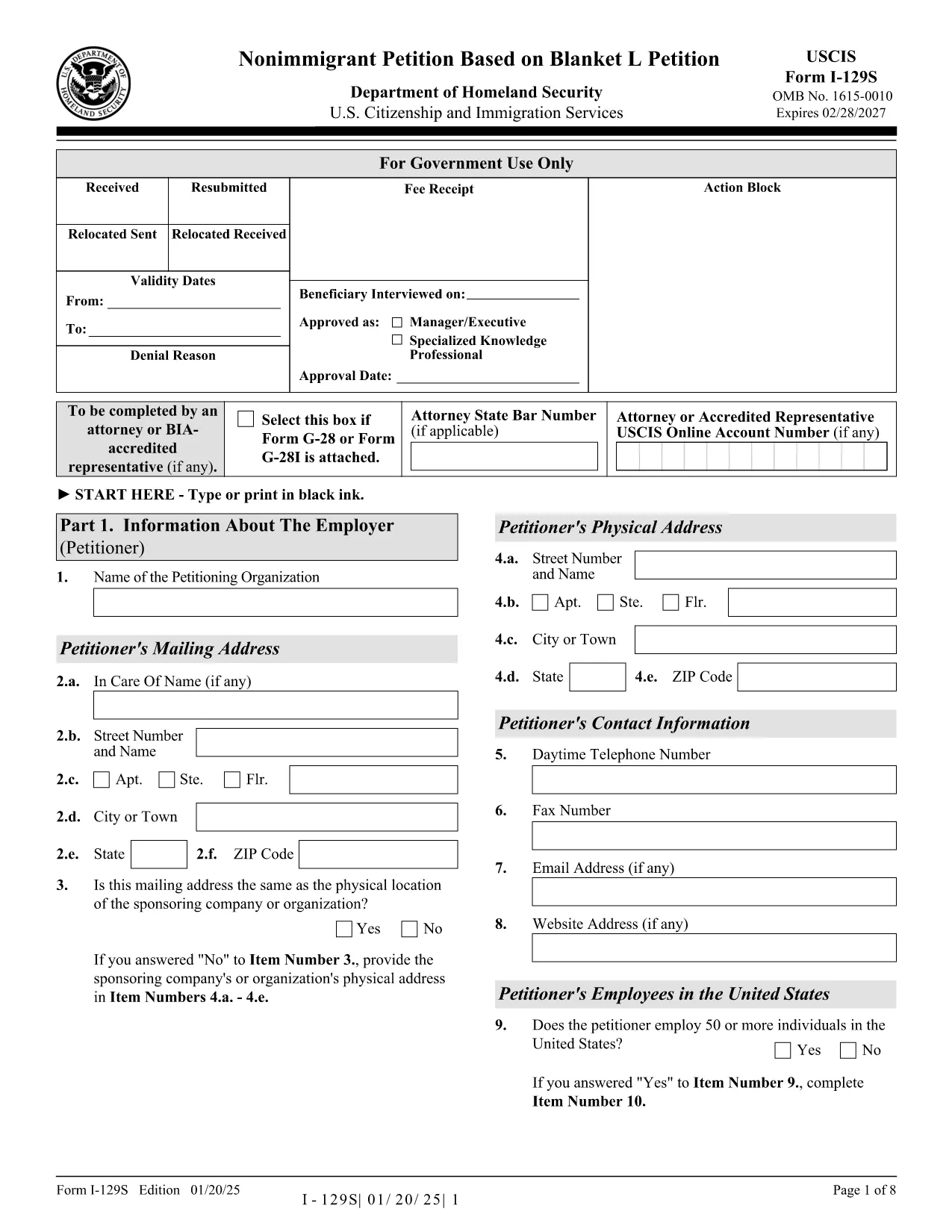
Form I-129S – Nonimmigrant Petition Based on Blanket L

  1. Երկիր ԱՄՆ
  2. Լեզու Անգլերեն
  3. բաժին ԱՄՆ քաղաքացիության և ներգաղթի ծառայություններ
Form I-129S – Nonimmigrant Petition Based on Blanket L

The Form I-129S is the USCIS‑approved petition used by employers to classify eligible alien employees as L‑1 intracompany transferees under a previously approved blanket L petition. This form is required for executives, managers, or professionals with specialized knowledge who have worked for the company abroad for at least one continuous year within the past three years.

On Formize.com you can access a fillable version of the official I‑129S PDF, complete it directly in your browser, and download a clean, printable copy ready for filing. No extra software or PDF editor is needed.

Why Use Form I-129S?

  • Official USCIS format – matches the exact layout and page numbers required by the agency.
  • Fillable fields speed up data entry and reduce errors.
  • All changes are saved automatically while you work.
  • Easy to print or export as a PDF for mailing or electronic submission.

How to Complete the Fillable PDF

Simply click the "Fill out this form" button on the page. The Formize PDF Filler app loads the I‑129S document, and you can start typing into each field. When you’re finished, save the file, download it, and attach it to your filing package.

Common Mistakes to Avoid

  • Leaving the form unsigned – an unsigned I‑129S will be rejected.
  • Using a different edition of the form – always use the latest version (01/20/25 edition).
  • Omitting the required supporting letter that details the employee’s job duties, salary, and prior qualifying employment.
  • Submitting original documents unless the instructions specifically request them.

Where to Submit Your Petition

If the beneficiary is outside the United States, present the completed I‑129S to a U.S. consular officer. Canadian citizens may file directly with U.S. Customs and Border Protection at designated ports of entry. If the employee is already in the U.S., file Form I‑129 together with the I‑129S at the appropriate USCIS lockbox.

Download the Official PDF

Click the button below to open the fillable version, or download the static PDF for offline use.

ՀՏՀ
  • What is Form I-129S used for?

    Form I-129S is the nonimmigrant petition for employees classified under a previously approved blanket L petition. It is used for L‑1 intracompany transferees who meet the executive, managerial, or specialized knowledge criteria.

  • Who can file Form I-129S?

    Only the petitioning employer who holds an approved blanket L petition may file Form I-129S on behalf of eligible employees.

  • Do I need to sign the form electronically?

    The form must be signed by an authorized representative of the employer. If you complete the form online, you can print it, sign it manually, and then submit the scanned copy.

  • Can Canadian citizens file I-129S directly with CBP?

    Yes. Canadian beneficiaries may present the completed I‑129S to U.S. Customs and Border Protection at designated ports of entry or pre‑flight inspection locations.

  • Is there a filing fee for Form I-129S?

    Form I‑129S itself does not have a separate fee, but it is filed together with Form I‑129, which carries the applicable filing fee as listed on the USCIS Fee Schedule.

  • What supporting documents are required?

    You must include a copy of the approved blanket L petition, a detailed employment letter for the beneficiary, and any required translations of foreign‑language documents.

  • Can I edit the form after I download it?

    Yes. Use the fillable PDF on Formize.com to make changes before printing. Once printed and signed, the document should not be altered.

  • How do I know I have the latest edition?

    The current edition (01/20/25) is linked on this page. Always verify the edition date at the bottom of the form before filing.

ԻՆՉՊԵՍ

Ինչպես լրացնել Form I-129S-ն անվճար, առցանց՝ 4 հեշտ քայլերով.

  1. 1
    Open the Fillable Form
    Click the "Fill out this form" button on the page. The Formize PDF Filler loads the I‑129S document in your browser.
  2. 2
    Enter Petition Details
    Type directly into each highlighted field. Use the tab key to move quickly between sections.
  3. 3
    Save and Download
    When all required fields are completed, click "Save" then "Download PDF" to get a printable copy.
  4. 4
    Submit to USCIS
    Attach the completed I‑129S to your filing package (Form I‑129, supporting documents, filing fee) and send it to the appropriate USCIS address or consular office.
Ձևավորել PDF Filler հավելվածը
ՄԱՍԻՆ

Form I-129S ձևանմուշ

PDF փաստաթուղթը դիտելու և լրացնելու գործառույթների ավանդական փաթեթով, որը զուգորդվում է վեբ հավելվածի առավելությունների և արձագանքող դասավորության հետ, դուք կարող եք լրացնել Form I-129S-ը րոպեների ընթացքում:

ՀԱՏԿՈՒԹՅՈՒՆՆԵՐ

PDF լցոնիչ

Առցանց Form I-129S-ը լրացնելու ամենահեշտ ձևը

  • Արագ լրացրեք Form I-129S
    Փնտրու՞մ եք միջոց՝ արագորեն լրացնելու Form I-129S առցանց: Մեր առցանց անվճար PDF ձևաթուղթ լրացնողի միջոցով դուք կիմանաք, թե ինչպես խմբագրել և լրացնել այս pdf փաստաթուղթը մեկ րոպեից պակաս ժամանակում:
  • Հեշտ օգտագործման առցանց PDF խմբագիր
    Հոգնե՞լ եք PDF ֆայլեր տպելուց, որպեսզի կարողանաք դրանք խմբագրել, նախքան նորից սկանավորելը և հետ ուղարկելը: Խմբագրել PDF փաստաթղթերը անվճար առցանց: Օգտագործեք մեր առցանց pdf խմբագրիչը ժամանակ և թուղթ խնայելու համար:
  • Հիանալի գործիքներ, բոլոր հարթակներ
    Զարմանում եք, թե ինչպես լրացնել Form I-129S-ը Mac-ում, կամ գուցե ինչպես անվճար օգտագործել PDF լցոնիչը: Մեր առցանց PDF գործիքներն աշխատում են բոլոր հարթակներում:
  • Անվտանգ ֆայլերի պահպանում
    Ավարտված «Form I-129S» ֆայլերը պահվում են պաշտպանված տվյալների բազայում, որը կառավարվում է Amazon Cloud հոսթինգի կողմից: Ցանկացած ժամանակ կարող եք ջնջել ձեր ֆայլերը մեր համակարգից: Ամեն դեպքում, այս ֆայլերը ավտոմատ կերպով ջնջվում են 24 ժամ հետո:
  • Զրուցեք Form I-129S-ի հետ
    Զրուցեք «Form I-129S»-ի հետ Chatize-ում, որը PDF ընթերցողի անվճար օգնական է: Հարցեր տվեք և ստացեք պատասխաններ «Form I-129S»-ից։ Պարզապես սեղմեք վերևում գտնվող Զրույց փաստաթղթի հետ կոճակը:

Ջնջել լրացման նիստը

Ջնջե՞լ ընտրված լրացման աշխատաշրջանը: Այս դեպքում ձևը լրացնելու ձեր առաջընթացը կկորչի:

Ջնջել խմբագրման նիստը

Ջնջե՞լ ընտրված խմբագրման աշխատաշրջանը: Այս դեպքում ձևը ստեղծելու և խմբագրելու ձեր առաջընթացը կկորչի: