Ընտրել լեզուն

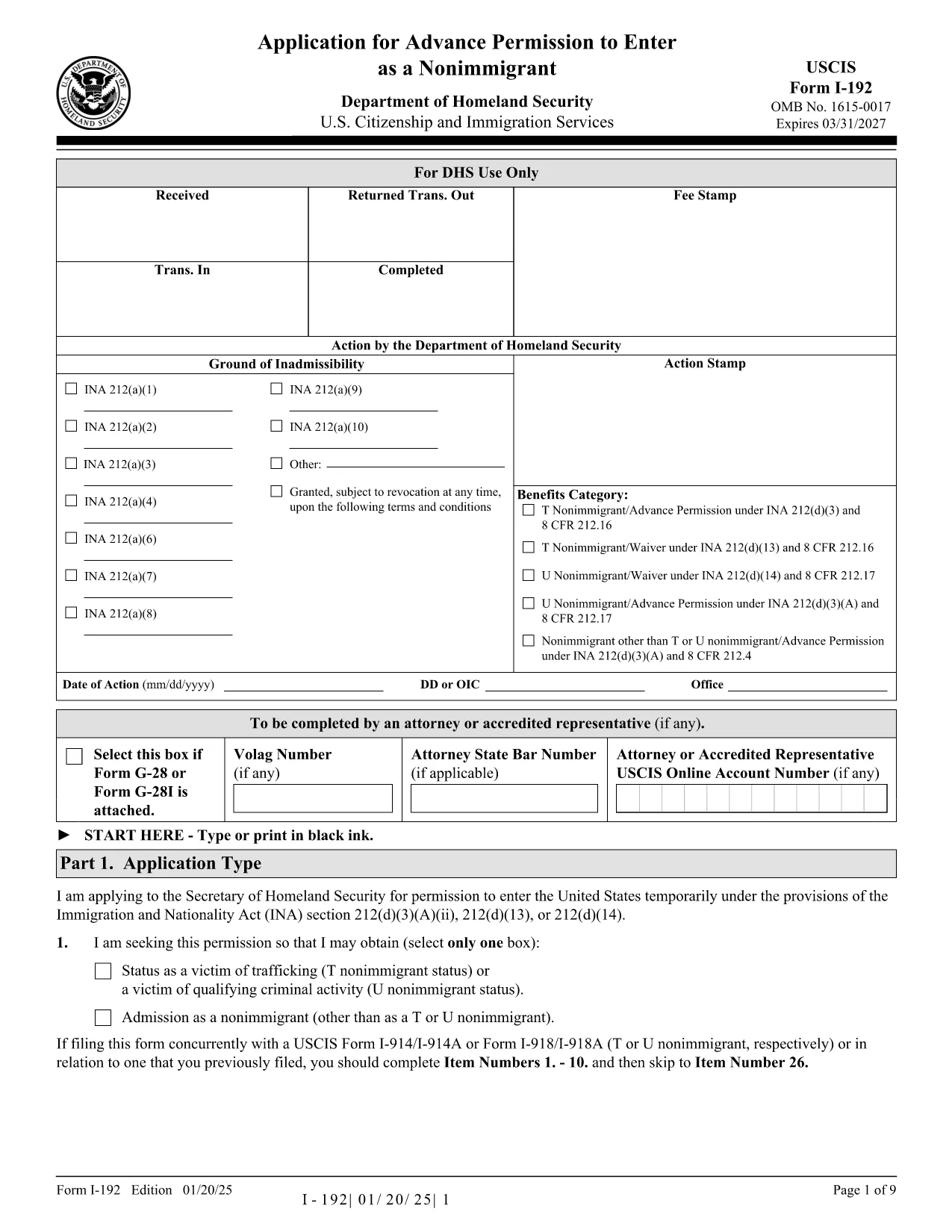
Form I-192 – Application for Advance Permission to Enter as a Nonimmigrant

  1. Երկիր ԱՄՆ
  2. Լեզու Անգլերեն
  3. բաժին ԱՄՆ քաղաքացիության և ներգաղթի ծառայություններ
Form I-192 – Application for Advance Permission to Enter as a Nonimmigrant

The Form I-192 is the official USCIS application used by inadmissible nonimmigrants who need advance permission to temporarily enter the United States. Whether you are applying as a T‑visa victim, a U‑visa applicant, or an inadmissible nonimmigrant who already holds the required documents, this page provides everything you need to fill out the form correctly.

Who Must File Form I-192?

Typical applicants include:

  • Inadmissible nonimmigrants who already possess the appropriate supporting documents.
  • Applicants for T‑nonimmigrant status (victims of human trafficking).
  • Applicants for U‑nonimmigrant status (victims of certain crimes).

If you are traveling under the Visa Waiver Program (VWP) and are inadmissible, you must apply for a regular nonimmigrant visa instead of using Form I-192.

How to Complete and Submit the Form

Follow these simple steps to fill the form online with Formize’s fillable PDF tool:

  1. Click the "Fill out this form" button below.
  2. The Formize PDF Filler app loads instantly – no download or extra software needed.
  3. Enter your information directly into the fillable fields.
  4. Review the completed form for accuracy.
  5. Print, sign, and submit the form according to the filing instructions (USCIS or CBP, depending on your case).

Common Mistakes & Tips for a Smooth Filing

  • Use the correct edition: The PDF at the bottom of each page shows the edition date. Do not mix pages from different editions.
  • Complete every required field: Blank required fields cause delays or rejections.
  • Attach English translations: Any supporting document not in English must have a certified translation.
  • Sign the form: Electronic signatures are not accepted; you must sign a printed copy.
  • Check filing locations: USCIS lockbox addresses differ by state and visa category.

Ready to start? Click the button below to open the fillable PDF and begin your application.

ՀՏՀ
  • Do I need a lawyer to file Form I-192?

    A lawyer is not required, but legal advice can help ensure you meet all eligibility criteria and submit complete documentation.

  • Can I submit Form I-192 electronically?

    No. The form must be printed, signed, and mailed. However, you can fill it out electronically using our fillable PDF before printing.

  • How long does USCIS take to process I-192?

    Processing typically ranges from 90 to 120 days, but times can vary based on case complexity and biometric appointment scheduling.

  • What supporting documents are required?

    You must provide a written statement explaining inadmissibility, copies of any waivers, and English translations of foreign‑language documents.

  • I am a VWP citizen—can I use Form I-192?

    No. VWP travelers who are inadmissible must apply for a regular nonimmigrant visa at a U.S. Embassy or Consulate.

  • Is there a filing fee for Form I-192?

    Yes. Check the current fee on the USCIS Fee Schedule page before submitting your application.

  • Where do I send my completed Form I-192?

    Filing locations differ by visa type and state. Refer to the USCIS filing address table on the official I-192 webpage.

ԻՆՉՊԵՍ

Ինչպես լրացնել Form I-192-ն անվճար, առցանց՝ 4 հեշտ քայլերով.

  1. 1
    Open the Fillable Form
    Click the "Fill out this form" button on the page. The Formize PDF Filler loads instantly in your browser.
  2. 2
    Enter Your Information
    Type directly into each field—name, passport details, reason for inadmissibility, and supporting document references.
  3. 3
    Review & Save
    Use the preview function to double‑check all entries. Save a copy of the completed PDF to your computer.
  4. 4
    Print, Sign, and Submit
    Print the filled form, sign it by hand, attach required evidence, and mail it to the appropriate USCIS or CBP filing address.
Ձևավորել PDF Filler հավելվածը
ՄԱՍԻՆ

Form I-192 ձևանմուշ

PDF փաստաթուղթը դիտելու և լրացնելու գործառույթների ավանդական փաթեթով, որը զուգորդվում է վեբ հավելվածի առավելությունների և արձագանքող դասավորության հետ, դուք կարող եք լրացնել Form I-192-ը րոպեների ընթացքում:

ՀԱՏԿՈՒԹՅՈՒՆՆԵՐ

PDF լցոնիչ

Առցանց Form I-192-ը լրացնելու ամենահեշտ ձևը

  • Արագ լրացրեք Form I-192
    Փնտրու՞մ եք միջոց՝ արագորեն լրացնելու Form I-192 առցանց: Մեր առցանց անվճար PDF ձևաթուղթ լրացնողի միջոցով դուք կիմանաք, թե ինչպես խմբագրել և լրացնել այս pdf փաստաթուղթը մեկ րոպեից պակաս ժամանակում:
  • Հեշտ օգտագործման առցանց PDF խմբագիր
    Հոգնե՞լ եք PDF ֆայլեր տպելուց, որպեսզի կարողանաք դրանք խմբագրել, նախքան նորից սկանավորելը և հետ ուղարկելը: Խմբագրել PDF փաստաթղթերը անվճար առցանց: Օգտագործեք մեր առցանց pdf խմբագրիչը ժամանակ և թուղթ խնայելու համար:
  • Հիանալի գործիքներ, բոլոր հարթակներ
    Զարմանում եք, թե ինչպես լրացնել Form I-192-ը Mac-ում, կամ գուցե ինչպես անվճար օգտագործել PDF լցոնիչը: Մեր առցանց PDF գործիքներն աշխատում են բոլոր հարթակներում:
  • Անվտանգ ֆայլերի պահպանում
    Ավարտված «Form I-192» ֆայլերը պահվում են պաշտպանված տվյալների բազայում, որը կառավարվում է Amazon Cloud հոսթինգի կողմից: Ցանկացած ժամանակ կարող եք ջնջել ձեր ֆայլերը մեր համակարգից: Ամեն դեպքում, այս ֆայլերը ավտոմատ կերպով ջնջվում են 24 ժամ հետո:
  • Զրուցեք Form I-192-ի հետ
    Զրուցեք «Form I-192»-ի հետ Chatize-ում, որը PDF ընթերցողի անվճար օգնական է: Հարցեր տվեք և ստացեք պատասխաններ «Form I-192»-ից։ Պարզապես սեղմեք վերևում գտնվող Զրույց փաստաթղթի հետ կոճակը:

Ջնջել լրացման նիստը

Ջնջե՞լ ընտրված լրացման աշխատաշրջանը: Այս դեպքում ձևը լրացնելու ձեր առաջընթացը կկորչի:

Ջնջել խմբագրման նիստը

Ջնջե՞լ ընտրված խմբագրման աշխատաշրջանը: Այս դեպքում ձևը ստեղծելու և խմբագրելու ձեր առաջընթացը կկորչի: