Ընտրել լեզուն

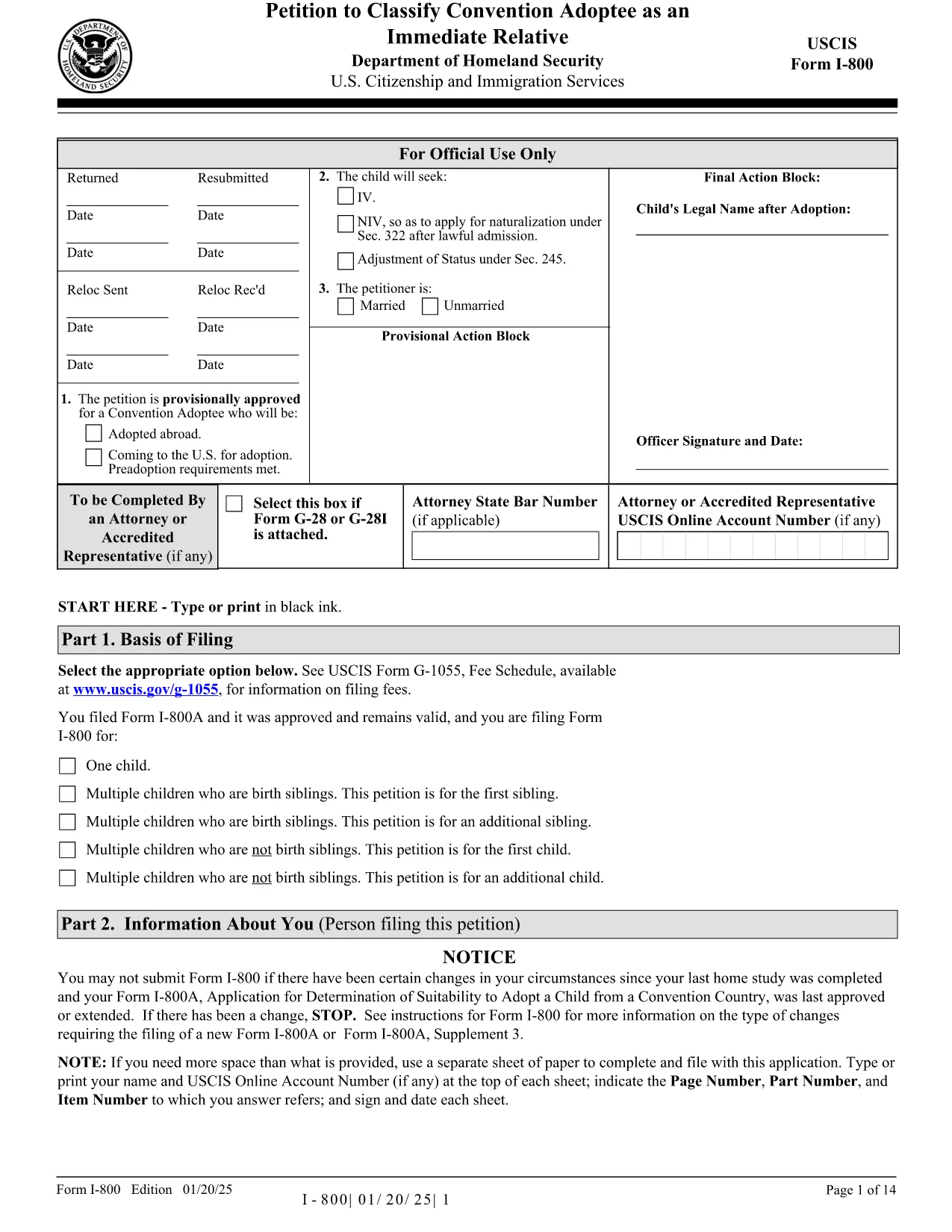
Form I-800 – Petition to Classify a Convention Adoptee

  1. Երկիր ԱՄՆ
  2. Լեզու Անգլերեն
  3. բաժին ԱՄՆ քաղաքացիության և ներգաղթի ծառայություններ
Form I-800 – Petition to Classify a Convention Adoptee

The Form I-800 (Petition to Classify Convention Adoptee as an Immediate Relative) is used by U.S. citizen prospective adoptive parents to finalize the immigration process for a child adopted from a Hague Convention country. This page provides the official fillable PDF, step‑by‑step instructions, and tips to ensure a smooth filing.

What is Form I-800?

Form I-800 is filed after you have an approved Form I-800A (Application for Determination of Suitability to Adopt a Child from a Convention Country). It requests the U.S. Citizenship and Immigration Services (USCIS) to recognize the child as an immediate relative, allowing the child to obtain an immigrant visa.

Eligibility & Required Documents

  • U.S. citizen petitioner (adoptive parent) – must be at least 21 years old.
  • Approved Form I-800A approval notice.
  • Proof of the child’s habitually residing in a Convention country.
  • Article 16 report, adoption agency statements, and post‑placement plans (if applicable).
  • Form I-864 (Affidavit of Support) or I-864EZ.
  • Any required medical examinations, translations, and certifications.

How to Complete the Fillable Form Online

Instead of downloading the PDF and editing it with a separate editor, simply click the "Fill out this form" button on this page. The Formize PDF Filler app will load the fillable version instantly. Follow the on‑screen prompts, save your progress, and download the completed PDF ready for submission.

Common Mistakes to Avoid

  • Using pages from different edition dates – all pages must match the edition date shown at the bottom of the form.
  • Leaving required fields blank (e.g., Part 2 – Information About You).
  • Submitting original documents unless specifically requested.
  • Failing to attach English translations for foreign‑language documents.
  • Paying the filing fee with a personal check – USCIS now requires electronic payment methods.

Where to File & Pay the Fee

Mail the completed Form I-800 and supporting evidence to the USCIS Adoption Lockbox (Dallas, TX). Payment can be made with a credit/debit card using Form G‑1450, or via ACH with Form G‑1650. Check the latest fee schedule on the USCIS website before filing.

Ready to start? Click the button below to open the fillable version and begin your adoption petition today.

ՀՏՀ
  • Do I need an approved Form I-800A before filing Form I-800?

    Yes. USCIS requires an approved Form I-800A before you can submit Form I-800.

  • Can I file Form I-800 online?

    Form I-800 itself must be submitted as a PDF by mail, but you can fill it out online using the Formize fillable version.

  • What is the current filing fee for Form I-800?

    Check the USCIS Fee Schedule for the most up‑to‑date amount. Payment must be made electronically (credit/debit card or ACH).

  • How long does USCIS take to process Form I-800?

    Processing times vary; typically 6‑12 months. You can check real‑time estimates on the USCIS case status page.

  • What should I do if I receive a Request for Evidence (RFE)?

    Respond promptly with the requested documents, following the RFE deadline. Include the RFE notice number on all correspondence.

  • Can I submit original documents with my Form I-800?

    Only submit originals if USCIS specifically asks for them. Otherwise, provide clear photocopies and certified translations.

  • Is there a way to track my mailed Form I-800?

    Yes. Use a traceable mailing service (USPS Certified Mail, FedEx, UPS) and keep the receipt for your records.

  • What if the child is adopted from a non‑Convention country?

    Form I-800 is only for Convention adoptees. For non‑Convention cases, you must file Form I-600 or I-600A.

ԻՆՉՊԵՍ

Ինչպես լրացնել Form I-800-ն անվճար, առցանց՝ 5 հեշտ քայլերով.

  1. 1
    Open the Fillable Form
    Click the "Fill out this form" button on the page. The Formize PDF Filler app loads the official Form I-800 instantly.
  2. 2
    Enter Your Information
    Complete each section, following the on‑screen prompts. Required fields are highlighted in red.
  3. 3
    Save and Review
    Use the "Save" button to store your progress. Review all entries for accuracy before finalizing.
  4. 4
    Download the Completed PDF
    When all fields are filled, click "Download" to get a PDF ready for mailing to USCIS.
  5. 5
    Submit to USCIS
    Mail the downloaded Form I-800 with supporting documents and the correct filing fee to the USCIS Adoption Lockbox.
Ձևավորել PDF Filler հավելվածը
ՄԱՍԻՆ

Form I-800 ձևանմուշ

PDF փաստաթուղթը դիտելու և լրացնելու գործառույթների ավանդական փաթեթով, որը զուգորդվում է վեբ հավելվածի առավելությունների և արձագանքող դասավորության հետ, դուք կարող եք լրացնել Form I-800-ը րոպեների ընթացքում:

ՀԱՏԿՈՒԹՅՈՒՆՆԵՐ

PDF լցոնիչ

Առցանց Form I-800-ը լրացնելու ամենահեշտ ձևը

  • Արագ լրացրեք Form I-800
    Փնտրու՞մ եք միջոց՝ արագորեն լրացնելու Form I-800 առցանց: Մեր առցանց անվճար PDF ձևաթուղթ լրացնողի միջոցով դուք կիմանաք, թե ինչպես խմբագրել և լրացնել այս pdf փաստաթուղթը մեկ րոպեից պակաս ժամանակում:
  • Հեշտ օգտագործման առցանց PDF խմբագիր
    Հոգնե՞լ եք PDF ֆայլեր տպելուց, որպեսզի կարողանաք դրանք խմբագրել, նախքան նորից սկանավորելը և հետ ուղարկելը: Խմբագրել PDF փաստաթղթերը անվճար առցանց: Օգտագործեք մեր առցանց pdf խմբագրիչը ժամանակ և թուղթ խնայելու համար:
  • Հիանալի գործիքներ, բոլոր հարթակներ
    Զարմանում եք, թե ինչպես լրացնել Form I-800-ը Mac-ում, կամ գուցե ինչպես անվճար օգտագործել PDF լցոնիչը: Մեր առցանց PDF գործիքներն աշխատում են բոլոր հարթակներում:
  • Անվտանգ ֆայլերի պահպանում
    Ավարտված «Form I-800» ֆայլերը պահվում են պաշտպանված տվյալների բազայում, որը կառավարվում է Amazon Cloud հոսթինգի կողմից: Ցանկացած ժամանակ կարող եք ջնջել ձեր ֆայլերը մեր համակարգից: Ամեն դեպքում, այս ֆայլերը ավտոմատ կերպով ջնջվում են 24 ժամ հետո:
  • Զրուցեք Form I-800-ի հետ
    Զրուցեք «Form I-800»-ի հետ Chatize-ում, որը PDF ընթերցողի անվճար օգնական է: Հարցեր տվեք և ստացեք պատասխաններ «Form I-800»-ից։ Պարզապես սեղմեք վերևում գտնվող Զրույց փաստաթղթի հետ կոճակը:

Ջնջել լրացման նիստը

Ջնջե՞լ ընտրված լրացման աշխատաշրջանը: Այս դեպքում ձևը լրացնելու ձեր առաջընթացը կկորչի:

Ջնջել խմբագրման նիստը

Ջնջե՞լ ընտրված խմբագրման աշխատաշրջանը: Այս դեպքում ձևը ստեղծելու և խմբագրելու ձեր առաջընթացը կկորչի: