
Ընտրել լեզուն

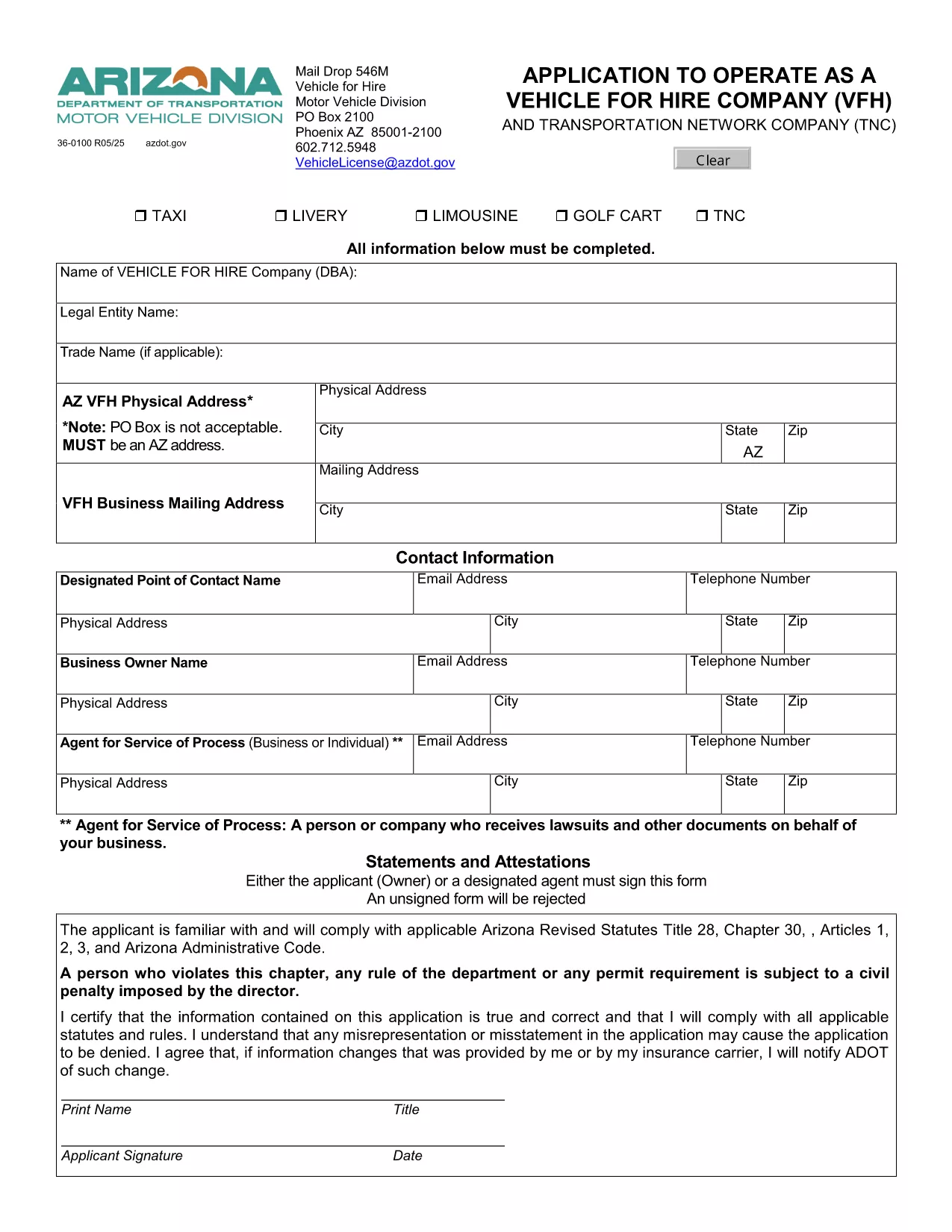
Arizona Form 36-0100 – Vehicle for Hire Application (Fillable PDF)

  1. Լեզու Անգլերեն
  2. Երկիր ԱՄՆ
  3. Գործունեություն Տրանսպորտային միջոցների գրանցում
  4. Պետություն Արիզոնա
Arizona Form 36-0100 – Vehicle for Hire Application (Fillable PDF)

Form 36-0100 is the official Arizona Department of Transportation (ADOT) application used by individuals and companies that want to operate a vehicle for hire, such as taxis, rideshare services, or limousine companies. This fillable PDF lets you enter all required information directly in your browser, save a copy, and print a signed version for submission.

What Is Form 36-0100?

The form collects essential details about the applicant, the vehicle(s), insurance coverage, and compliance with state safety regulations. It is required before any vehicle can be legally used for commercial passenger transport in Arizona.

How to Complete the Fillable Form Online

Instead of downloading the PDF and opening it in a separate editor, simply click the “Fill out this form” button on this page. The Formize PDF Filler app will load instantly, allowing you to:

  • Enter text into every field using your keyboard.
  • Select dates, checkboxes, and dropdown options.
  • Save your progress and return later if needed.
  • Export a completed, printable PDF with one click.

Common Mistakes to Avoid

  • Leaving required fields blank: The form will highlight missing information before you can submit.
  • Using non‑black ink for signatures: Print the final PDF and sign with a black pen as required by ADOT.
  • Submitting outdated insurance documents: Verify that your policy dates cover the entire period you intend to operate.

Where to Submit Your Completed Form

After printing and signing, mail the form to:

Vehicle for Hire Division
Arizona Department of Transportation
PO Box 2100
Phoenix, AZ 85001‑2100

Or deliver it in person to any ADOT Motor Vehicle Division office.

Need More Help?

If you have questions about eligibility, insurance requirements, or the submission process, contact the ADOT Vehicle Licensing Unit at VehicleLicense@azdot.gov or call 602‑712‑5948.

ՀՏՀ
  • Is Form 36-0100 available in a fillable format?

    Yes. On this page you can fill it out online with the Formize PDF Filler, then download the completed PDF.

  • Do I need a separate insurance certificate?

    ADOT requires a current commercial liability insurance policy that covers passenger transport. Attach a copy with your application.

  • Can I submit the form electronically?

    Arizona law still requires a printed, signed copy. After filling it online, print, sign, and mail the form.

  • How long does the approval process take?

    Typically 10–15 business days after ADOT receives the completed, signed application and supporting documents.

  • What if I make a mistake after submitting?

    Contact the Vehicle for Hire Division to request a correction form. Do not alter the already‑submitted PDF.

  • Is there a fee for filing Form 36-0100?

    Yes. The current application fee is listed on the form’s first page and must be paid by check or money order.

  • Do I need to renew this form annually?

    The vehicle for hire license must be renewed each year, but the same Form 36-0100 is used for renewal with updated information.

  • Can I use this form for a rideshare company?

    Absolutely. Any business that transports passengers for compensation in Arizona uses Form 36-0100.

ԻՆՉՊԵՍ

Ինչպես լրացնել Form 36-0100-ն անվճար, առցանց՝ 5 հեշտ քայլերով.

  1. 1
    Open the Fillable Form
    Click the “Fill out this form” button on the page. The Formize PDF Filler loads directly in your browser.
  2. 2
    Enter Your Information
    Complete each field – personal details, vehicle information, insurance data, and declarations – using your keyboard.
  3. 3
    Save & Review
    Use the “Save” button to store a draft. Review all entries; required fields will be highlighted if missed.
  4. 4
    Export and Print
    When finished, click “Export PDF”. Print the document, sign with a black pen, and attach any supporting documents.
  5. 5
    Submit to ADOT
    Mail or deliver the signed PDF to the Vehicle for Hire Division address listed on the form.
Ձևավորել PDF Filler հավելվածը
ՄԱՍԻՆ

Տրանսպորտային միջոցների գրանցման ձևեր

Եթե ​​դուք ունեք կամ վարձակալում եք ավտոմոբիլ, կցասայլ կամ նավ, դուք պետք է կատարեք որոշակի պարտավորություններ՝ ձեր մեքենան օրինական գրանցված և անվտանգ պահելու համար:

Form 36-0100-ը Տրանսպորտային միջոցի գրանցման ձևերից մեկն է, որը փաստաթղթեր են, որոնք օգտագործվում են համապատասխան նահանգային կամ մարզային մարմնում մեքենա գրանցելու համար: Այս ձևաթղթերը սովորաբար պահանջվում են, երբ անձը գնում է նոր կամ օգտագործված փոխադրամիջոց կամ երբ նրանք տեղափոխվում են նոր նահանգ կամ նահանգ մեքենայով:

Տրանսպորտային միջոցների գրանցման համար անհրաժեշտ ճշգրիտ պահանջներն ու ձևերը կարող են տարբեր լինել՝ կախված գտնվելու վայրից, սակայն, ընդհանուր առմամբ, գործընթացը ներառում է մեքենայի, սեփականատիրոջ և մեքենայի ցանկացած արգելանքների մասին տեղեկատվություն տրամադրելը:

Գրանցման ձևերն ու վճարները ներկայացնելուց հետո նահանգային կամ մարզային մարմինը մեքենայի տիրոջը կտրամադրի գրանցման վկայական կամ պետհամարանիշ: Այս գրանցումը թույլ է տալիս տրանսպորտային միջոցը օրինական կերպով շահագործել հանրային ճանապարհների և մայրուղիների վրա:

ՀԱՏԿՈՒԹՅՈՒՆՆԵՐ

PDF լցոնիչ

Առցանց Form 36-0100-ը լրացնելու ամենահեշտ ձևը

  • Արագ լրացրեք Form 36-0100
    Փնտրու՞մ եք միջոց՝ արագորեն լրացնելու Form 36-0100 առցանց: Մեր առցանց անվճար PDF ձևաթուղթ լրացնողի միջոցով դուք կիմանաք, թե ինչպես խմբագրել և լրացնել այս pdf փաստաթուղթը մեկ րոպեից պակաս ժամանակում:
  • Հեշտ օգտագործման առցանց PDF խմբագիր
    Հոգնե՞լ եք PDF ֆայլեր տպելուց, որպեսզի կարողանաք դրանք խմբագրել, նախքան նորից սկանավորելը և հետ ուղարկելը: Խմբագրել PDF փաստաթղթերը անվճար առցանց: Օգտագործեք մեր առցանց pdf խմբագրիչը ժամանակ և թուղթ խնայելու համար:
  • Հիանալի գործիքներ, բոլոր հարթակներ
    Զարմանում եք, թե ինչպես լրացնել Form 36-0100-ը Mac-ում, կամ գուցե ինչպես անվճար օգտագործել PDF լցոնիչը: Մեր առցանց PDF գործիքներն աշխատում են բոլոր հարթակներում:
  • Անվտանգ ֆայլերի պահպանում
    Ավարտված «Form 36-0100» ֆայլերը պահվում են պաշտպանված տվյալների բազայում, որը կառավարվում է Amazon Cloud հոսթինգի կողմից: Ցանկացած ժամանակ կարող եք ջնջել ձեր ֆայլերը մեր համակարգից: Ամեն դեպքում, այս ֆայլերը ավտոմատ կերպով ջնջվում են 24 ժամ հետո:
  • Զրուցեք Form 36-0100-ի հետ
    Զրուցեք «Form 36-0100»-ի հետ Chatize-ում, որը PDF ընթերցողի անվճար օգնական է: Հարցեր տվեք և ստացեք պատասխաններ «Form 36-0100»-ից։ Պարզապես սեղմեք վերևում գտնվող Զրույց փաստաթղթի հետ կոճակը:

Ջնջել լրացման նիստը

Ջնջե՞լ ընտրված լրացման աշխատաշրջանը: Այս դեպքում ձևը լրացնելու ձեր առաջընթացը կկորչի:

Ջնջել խմբագրման նիստը

Ջնջե՞լ ընտրված խմբագրման աշխատաշրջանը: Այս դեպքում ձևը ստեղծելու և խմբագրելու ձեր առաջընթացը կկորչի: