
Ընտրել լեզուն

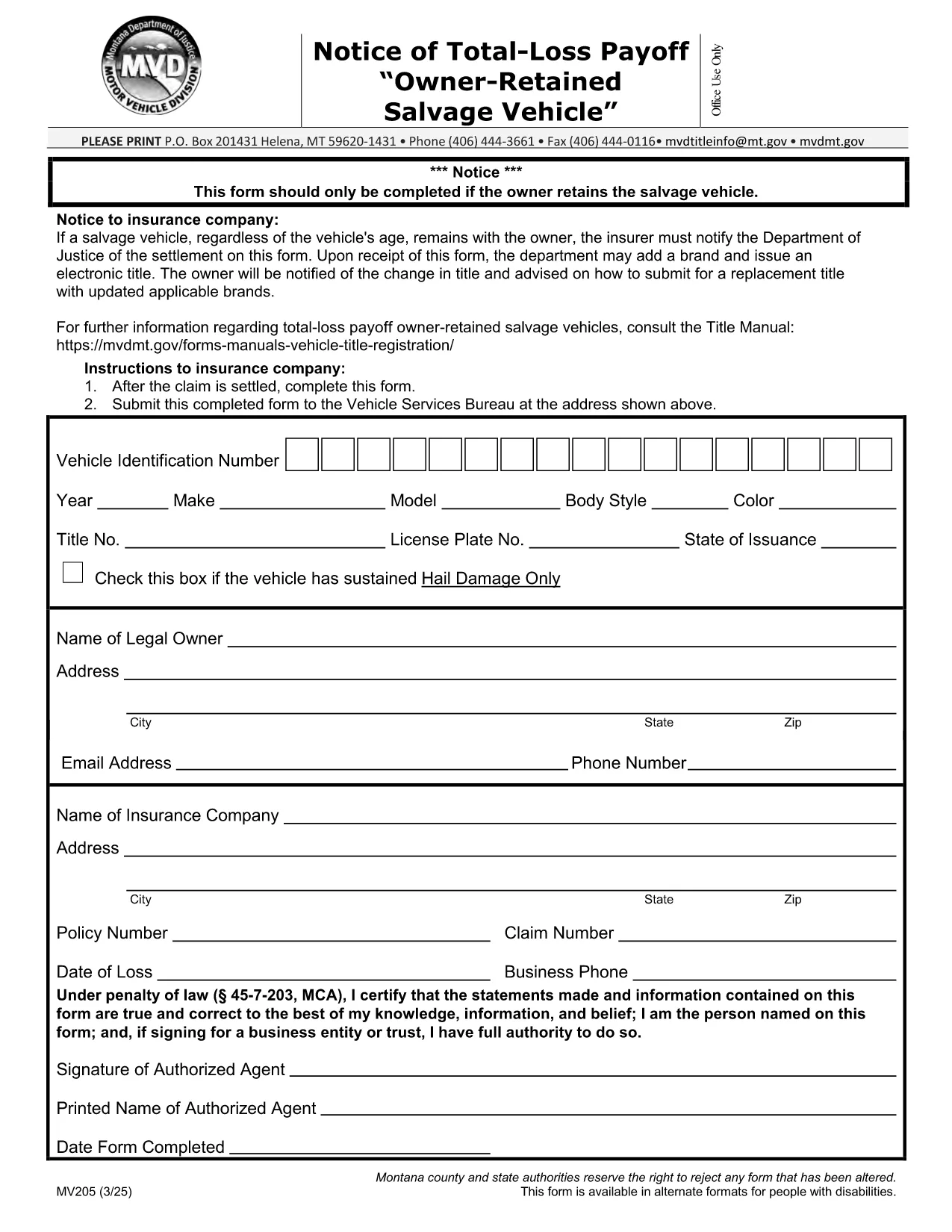
MV205 Notice of Total‑Loss Payoff – Owner‑Retained Salvage Vehicle

  1. Լեզու Անգլերեն
  2. Երկիր ԱՄՆ
  3. Գործունեություն Տրանսպորտային միջոցների գրանցում
  4. Պետություն Մոնտանա
MV205 Notice of Total‑Loss Payoff – Owner‑Retained Salvage Vehicle

The MV205 Notice of Total‑Loss Payoff is the official document used when a salvage vehicle remains with its owner after a total‑loss settlement. Insurance companies must notify the Department of Motor Vehicles (DMV) using this form, and the owner may be required to surrender the certificate of ownership.

What Is the MV205 Form?

The MV205 captures essential details about the vehicle, the insurance settlement, and the owner’s intent to retain the salvage. It is required by most state motor vehicle agencies, including Montana, to ensure proper title handling and to prevent fraudulent title transfers.

How to Complete the MV205 Online with Formize

Instead of downloading, printing, and scanning, you can fill the MV205 directly in your browser. Follow these simple steps:

  1. Click the "Fill out this form" button on this page.
  2. Wait a few seconds while the Formize PDF Filler app loads.
  3. Enter the required information in each fillable field (vehicle VIN, insurer details, payout amount, etc.).
  4. Use the built‑in eSignature tool to sign the form electronically.
  5. Click Save & Download to get a completed PDF, or choose Send via Email to forward it directly to your insurance company or DMV.

Common Mistakes & Tips for a Successful Submission

  • Incorrect VIN: Double‑check the Vehicle Identification Number; a single digit error can delay processing.
  • Missing insurer information: Include the insurer’s name, claim number, and contact details exactly as they appear on the settlement statement.
  • Signature errors: Use the eSignature tool; a handwritten signature scanned later may be rejected.
  • Leaving optional fields blank: If a field is marked "optional," you may leave it empty, but be sure all required fields are completed.
  • Submitting the wrong version: Use the official MV205 PDF provided below to avoid outdated formats.

Where to Send the Completed Form

After you finish the online fill, send the PDF to the address listed on the form. Typically, this is the state Department of Motor Vehicles or the specific office handling title transfers. Some states also accept electronic submissions through their online portal—check your local DMV website for details.

Need help? Review the FAQs below or contact your insurance provider for clarification on the settlement amount.

ՀՏՀ
  • Who needs to file the MV205 form?

    Any vehicle owner whose insurance company has paid a total‑loss settlement and who intends to keep the salvage vehicle must file the MV205 with the state DMV.

  • Can I submit the MV205 electronically?

    Many states accept an electronically signed PDF. Check your local DMV website; otherwise, print the completed form and mail it to the address shown on the form.

  • What happens if I forget to include the insurer’s claim number?

    The DMV may reject the form, causing processing delays. Always include the full claim number as it appears on the settlement statement.

  • Do I need to surrender my current certificate of ownership?

    Yes, the DMV typically requires you to surrender the existing certificate of ownership when you submit the MV205 for a salvage vehicle.

  • Is the Formize filler free to use?

    Formize offers free filling and e‑signing for most state forms, including MV205. No download or installation is required.

  • How long does it take the DMV to process the MV205?

    Processing time varies by state, but most DMVs complete the review within 7‑10 business days after receiving a correctly completed form.

  • Can I correct a mistake after I’ve submitted the MV205?

    If you notice an error, contact your DMV immediately. In most cases, you’ll need to submit a corrected MV205 with a brief explanation.

  • Is the MV205 the same as a title transfer form?

    No. The MV205 notifies the DMV of a total‑loss payoff for a retained salvage vehicle. A separate title transfer form is required to change ownership.

ԻՆՉՊԵՍ

Ինչպես լրացնել MV205 form-ն անվճար, առցանց՝ 5 հեշտ քայլերով.

  1. 1
    Open the Fillable Form
    Click the "Fill out this form" button on the page. The Formize PDF Filler will open in a new tab.
  2. 2
    Load the Formize PDF Filler
    Wait a few seconds while the secure online editor loads the MV205 PDF.
  3. 3
    Enter All Required Information
    Type the VIN, insurer details, payout amount, and any other required fields directly into the fillable boxes.
  4. 4
    Add Your Electronic Signature
    Use the built‑in eSignature tool to sign the form. This signature is legally binding.
  5. 5
    Save or Send the Completed Form
    Click "Save & Download" to keep a copy, or choose "Send via Email" to forward the completed MV205 to your DMV or insurance company.
Ձևավորել PDF Filler հավելվածը
ՄԱՍԻՆ

Տրանսպորտային միջոցների գրանցման ձևեր

MV205 form-ը DMV ձևերից մեկն է, որը նաև հայտնի է որպես Ավտոմեքենաների դեպարտամենտի ձևաթղթեր, որոնք փաստաթղթեր են, որոնք օգտագործվում են շարժիչային տրանսպորտային միջոցների հետ կապված տարբեր գործարքներում և գործընթացներում: DMV-ն կառավարական գործակալություն է, որը պատասխանատու է վարորդների լիցենզավորման, տրանսպորտային միջոցների գրանցման և ավտոմոբիլային տրանսպորտի մասին օրենքների կիրարկման համար: Առկա DMV-ի հատուկ ձևերը կարող են տարբեր լինել ըստ իրավասության, բայց ահա մի քանի ընդհանուր օրինակներ.

Վարորդական վկայականի ձևեր. այս ձևերն օգտագործվում են վարորդական իրավունքի վկայական ստանալու կամ փոփոխություններ կամ երկարաձգումներ պահանջելու համար: Դրանք սովորաբար պահանջում են անձնական տվյալներ, ինքնության ապացույց և կարող են ներառել բժշկական տեղեկատվության կամ վարորդական պատմության բաժիններ:

Տրանսպորտային միջոցների գրանցման ձևեր. այս ձևաթղթերն օգտագործվում են DMV-ում ավտոմեքենա գրանցելու համար: Նրանք պահանջում են մեքենայի մասին տեղեկություններ, սեփականության մանրամասները և ապահովագրության ապացույցը:

Վերնագրերի փոխանցման ձևեր. մեքենա գնելիս կամ վաճառելիս այս ձևերն օգտագործվում են սեփականության իրավունքը մի կողմից մյուսին փոխանցելու համար: Նրանք պահանջում են տեղեկատվություն գնորդի, վաճառողի, մեքենայի մանրամասների մասին և կարող են ներառել վաճառքի օրինագիծ:

Տրանսպորտային միջոցների ազատման պարտավորությունների ձևաթղթեր. տրանսպորտային միջոցի սեփականության իրավունքը վաճառելիս կամ փոխանցելիս այս ձևաթղթերը տեղեկացնում են DMV-ին, որ վաճառողն այլևս պատասխանատվություն չի կրում մեքենայի համար: Այն օգնում է պաշտպանել վաճառողին վաճառքից հետո մեքենայի հետ կապված պատահարների կամ միջադեպերի պատասխանատվությունից:

Ավտոհամարանիշի և գրանցման նորացման ձևեր. այս ձևերն օգտագործվում են մեքենայի գրանցումը թարմացնելու կամ նոր համարանիշեր պահանջելու համար: Նրանք սովորաբար պահանջում են տեղեկություններ գրանցված սեփականատիրոջ, ընթացիկ գրանցման մանրամասների և կիրառելի վճարների վճարման մասին:

Վարորդական փաստաթղթերի հարցումների ձևեր. այս ձևաթղթերը թույլ են տալիս անհատներին խնդրել DMV-ից իրենց վարորդական փաստաթղթերը, որոնք տեղեկատվություն են տրամադրում վարորդական իրավունքի խախտումների, վկայականի կարգավիճակի և այլ համապատասխան մանրամասների մասին:

Հատուկ կամ անհատականացված պետհամարանիշների ձևեր. այս ձևերն օգտագործվում են անհատականացված կամ հատուկ համարանիշների համար դիմելու համար, որոնք անհատներին թույլ են տալիս հարմարեցնել իրենց համարանիշը հատուկ նիշերով կամ դիզայնով:

Սրանք ընդամենը մի քանի օրինակ են բազմաթիվ ձևերի, որոնք կարող են հասանելի լինել DMV-ի միջոցով: Հատուկ ձևերն ու պահանջները կարող են տարբեր լինել ըստ իրավասության, ուստի կարևոր է խորհրդակցել DMV-ի տեղական վեբկայքի հետ կամ այցելել DMV գրասենյակ՝ ձեր կոնկրետ կարիքների համար ճիշտ ձևաթղթեր ստանալու համար:

ՀԱՏԿՈՒԹՅՈՒՆՆԵՐ

PDF լցոնիչ

Առցանց MV205 form-ը լրացնելու ամենահեշտ ձևը

  • Արագ լրացրեք MV205 form
    Փնտրու՞մ եք միջոց՝ արագորեն լրացնելու MV205 form առցանց: Մեր առցանց անվճար PDF ձևաթուղթ լրացնողի միջոցով դուք կիմանաք, թե ինչպես խմբագրել և լրացնել այս pdf փաստաթուղթը մեկ րոպեից պակաս ժամանակում:
  • Հեշտ օգտագործման առցանց PDF խմբագիր
    Հոգնե՞լ եք PDF ֆայլեր տպելուց, որպեսզի կարողանաք դրանք խմբագրել, նախքան նորից սկանավորելը և հետ ուղարկելը: Խմբագրել PDF փաստաթղթերը անվճար առցանց: Օգտագործեք մեր առցանց pdf խմբագրիչը ժամանակ և թուղթ խնայելու համար:
  • Հիանալի գործիքներ, բոլոր հարթակներ
    Զարմանում եք, թե ինչպես լրացնել MV205 form-ը Mac-ում, կամ գուցե ինչպես անվճար օգտագործել PDF լցոնիչը: Մեր առցանց PDF գործիքներն աշխատում են բոլոր հարթակներում:
  • Անվտանգ ֆայլերի պահպանում
    Ավարտված «MV205 form» ֆայլերը պահվում են պաշտպանված տվյալների բազայում, որը կառավարվում է Amazon Cloud հոսթինգի կողմից: Ցանկացած ժամանակ կարող եք ջնջել ձեր ֆայլերը մեր համակարգից: Ամեն դեպքում, այս ֆայլերը ավտոմատ կերպով ջնջվում են 24 ժամ հետո:
  • Զրուցեք MV205 form-ի հետ
    Զրուցեք «MV205 form»-ի հետ Chatize-ում, որը PDF ընթերցողի անվճար օգնական է: Հարցեր տվեք և ստացեք պատասխաններ «MV205 form»-ից։ Պարզապես սեղմեք վերևում գտնվող Զրույց փաստաթղթի հետ կոճակը:

Ջնջել լրացման նիստը

Ջնջե՞լ ընտրված լրացման աշխատաշրջանը: Այս դեպքում ձևը լրացնելու ձեր առաջընթացը կկորչի:

Ջնջել խմբագրման նիստը

Ջնջե՞լ ընտրված խմբագրման աշխատաշրջանը: Այս դեպքում ձևը ստեղծելու և խմբագրելու ձեր առաջընթացը կկորչի: