
Ընտրել լեզուն

Nevada VP 264 Non‑Resident Business Permit – Fillable PDF

  1. Լեզու Անգլերեն
  2. Երկիր ԱՄՆ
  3. Գործունեություն Տրանսպորտային միջոցների գրանցում
  4. Պետություն Նևադա
Nevada VP 264 Non‑Resident Business Permit – Fillable PDF

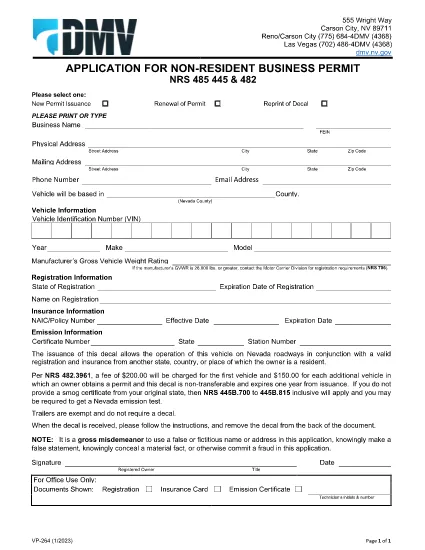
The VP 264 is the Nevada Department of Motor Vehicles (DMV) application for a Non‑Resident Business Permit. This permit allows a vehicle owned by a non‑resident to legally operate on Nevada roadways when the vehicle is registered and insured in another state, country, or jurisdiction.

Our fillable PDF version hosted on Formize lets you complete the entire application directly in your browser—no extra software required. Simply click the "Fill out this form" button, let the Formize PDF Filler load, and start entering your information.

Once you’ve finished, you can download the completed PDF, print it, and mail it to the Nevada DMV along with the required supporting documents and fees.

What Is the VP 264 Form?

VP 264 is used by businesses, out‑of‑state residents, and commercial operators who need a temporary decal to legally drive a vehicle in Nevada. The form collects:

  • Owner and vehicle identification details
  • Proof of registration and insurance from the home jurisdiction
  • Business purpose and duration of stay in Nevada
  • Signature and date

Key Benefits of Using Formize Fillable PDF

  • Instant online editing – no need to download, print, and scan.
  • Auto‑save – your progress is saved locally as you type.
  • Validation cues – required fields are highlighted.
  • Secure download – the final PDF is generated on your device.

Step‑by‑Step Guide to Complete VP 264 Online

Follow the simple steps below (see the “howto” section for a quick checklist).

Common Mistakes to Avoid

  • Leaving the "Vehicle Identification Number" (VIN) blank or entering it with spaces.
  • Submitting an out‑of‑date insurance card – the policy must be active on the submission date.
  • Forgetting to sign the form; an unsigned form will be returned.
  • Using an incorrect mailing address for the Nevada DMV.

Where to Submit Your Completed Form

Mail the printed, signed VP 264 PDF to:

Nevada Department of Motor Vehicles
Vehicle Registration Division
P.O. Box 4565
Carson City, NV 89701‑4565

Include the required fee (check or money order) and any supporting documentation such as proof of out‑of‑state registration and insurance.

ՀՏՀ
  • Who needs to file VP 264?

    Any non‑resident individual or business that will operate a vehicle in Nevada while the vehicle remains registered and insured in another jurisdiction.

  • Can I submit the VP 264 form electronically?

    The Nevada DMV currently requires a printed, signed copy of the form to be mailed with supporting documents. The online fillable PDF simplifies data entry but does not replace the mailed submission.

  • How long is the non‑resident business permit valid?

    The permit is typically valid for up to 90 days from the date of issuance, but you can request an extension by submitting a new VP 264 before the current permit expires.

  • What fees are associated with VP 264?

    A standard processing fee of $30 is required, payable by check or money order made out to "Nevada Department of Motor Vehicles".

  • Do I need a Nevada insurance policy?

    No. You must provide proof of valid insurance from your home state or country, but the policy must meet Nevada's minimum liability requirements.

  • What should I do if I make a mistake on the form?

    Correct the error before signing. If you discover an error after printing, cross out the mistake, initial it, and write the correct information clearly.

  • Is there a deadline to submit VP 264 before using the vehicle in Nevada?

    Submit the completed form at least 10 business days before the vehicle’s first day of operation in Nevada to allow processing time.

ԻՆՉՊԵՍ

Ինչպես լրացնել VP 264-ն անվճար, առցանց՝ 5 հեշտ քայլերով.

  1. 1
    Open the Fillable Form
    Click the "Fill out this form" button on the page. The Formize PDF Filler app will launch in a new tab.
  2. 2
    Wait for the Loader
    Allow a few seconds for the PDF to load completely. All form fields will become editable.
  3. 3
    Complete Each Section
    Enter the required information exactly as it appears on your vehicle registration and insurance documents. Required fields are marked with an asterisk.
  4. 4
    Review and Sign
    Double‑check every entry, then use the signature field to add your electronic signature or print later to sign manually.
  5. 5
    Download and Submit
    Click "Download PDF" to save the completed form, print it, attach the required documents, and mail it to the Nevada DMV address provided.
Ձևավորել PDF Filler հավելվածը
ՄԱՍԻՆ

Տրանսպորտային միջոցների գրանցման ձևեր

Եթե ​​դուք ունեք կամ վարձակալում եք ավտոմոբիլ, կցասայլ կամ նավ, դուք պետք է կատարեք որոշակի պարտավորություններ՝ ձեր մեքենան օրինական գրանցված և անվտանգ պահելու համար:

VP 264-ը Տրանսպորտային միջոցի գրանցման ձևերից մեկն է, որը փաստաթղթեր են, որոնք օգտագործվում են համապատասխան նահանգային կամ մարզային մարմնում մեքենա գրանցելու համար: Այս ձևաթղթերը սովորաբար պահանջվում են, երբ անձը գնում է նոր կամ օգտագործված փոխադրամիջոց կամ երբ նրանք տեղափոխվում են նոր նահանգ կամ նահանգ մեքենայով:

Տրանսպորտային միջոցների գրանցման համար անհրաժեշտ ճշգրիտ պահանջներն ու ձևերը կարող են տարբեր լինել՝ կախված գտնվելու վայրից, սակայն, ընդհանուր առմամբ, գործընթացը ներառում է մեքենայի, սեփականատիրոջ և մեքենայի ցանկացած արգելանքների մասին տեղեկատվություն տրամադրելը:

Գրանցման ձևերն ու վճարները ներկայացնելուց հետո նահանգային կամ մարզային մարմինը մեքենայի տիրոջը կտրամադրի գրանցման վկայական կամ պետհամարանիշ: Այս գրանցումը թույլ է տալիս տրանսպորտային միջոցը օրինական կերպով շահագործել հանրային ճանապարհների և մայրուղիների վրա:

ՀԱՏԿՈՒԹՅՈՒՆՆԵՐ

PDF լցոնիչ

Առցանց VP 264-ը լրացնելու ամենահեշտ ձևը

  • Արագ լրացրեք VP 264
    Փնտրու՞մ եք միջոց՝ արագորեն լրացնելու VP 264 առցանց: Մեր առցանց անվճար PDF ձևաթուղթ լրացնողի միջոցով դուք կիմանաք, թե ինչպես խմբագրել և լրացնել այս pdf փաստաթուղթը մեկ րոպեից պակաս ժամանակում:
  • Հեշտ օգտագործման առցանց PDF խմբագիր
    Հոգնե՞լ եք PDF ֆայլեր տպելուց, որպեսզի կարողանաք դրանք խմբագրել, նախքան նորից սկանավորելը և հետ ուղարկելը: Խմբագրել PDF փաստաթղթերը անվճար առցանց: Օգտագործեք մեր առցանց pdf խմբագրիչը ժամանակ և թուղթ խնայելու համար:
  • Հիանալի գործիքներ, բոլոր հարթակներ
    Զարմանում եք, թե ինչպես լրացնել VP 264-ը Mac-ում, կամ գուցե ինչպես անվճար օգտագործել PDF լցոնիչը: Մեր առցանց PDF գործիքներն աշխատում են բոլոր հարթակներում:
  • Անվտանգ ֆայլերի պահպանում
    Ավարտված «VP 264» ֆայլերը պահվում են պաշտպանված տվյալների բազայում, որը կառավարվում է Amazon Cloud հոսթինգի կողմից: Ցանկացած ժամանակ կարող եք ջնջել ձեր ֆայլերը մեր համակարգից: Ամեն դեպքում, այս ֆայլերը ավտոմատ կերպով ջնջվում են 24 ժամ հետո:
  • Զրուցեք VP 264-ի հետ
    Զրուցեք «VP 264»-ի հետ Chatize-ում, որը PDF ընթերցողի անվճար օգնական է: Հարցեր տվեք և ստացեք պատասխաններ «VP 264»-ից։ Պարզապես սեղմեք վերևում գտնվող Զրույց փաստաթղթի հետ կոճակը:

Ջնջել լրացման նիստը

Ջնջե՞լ ընտրված լրացման աշխատաշրջանը: Այս դեպքում ձևը լրացնելու ձեր առաջընթացը կկորչի:

Ջնջել խմբագրման նիստը

Ջնջե՞լ ընտրված խմբագրման աշխատաշրջանը: Այս դեպքում ձևը ստեղծելու և խմբագրելու ձեր առաջընթացը կկորչի: