
Ընտրել լեզուն

North Carolina MVR-63 Power of Attorney Fillable PDF

  1. Լեզու Անգլերեն
  2. Երկիր ԱՄՆ
  3. Գործունեություն Տրանսպորտային միջոցների գրանցում
  4. Պետություն Հյուսիսային Կարոլինա
North Carolina MVR-63 Power of Attorney Fillable PDF

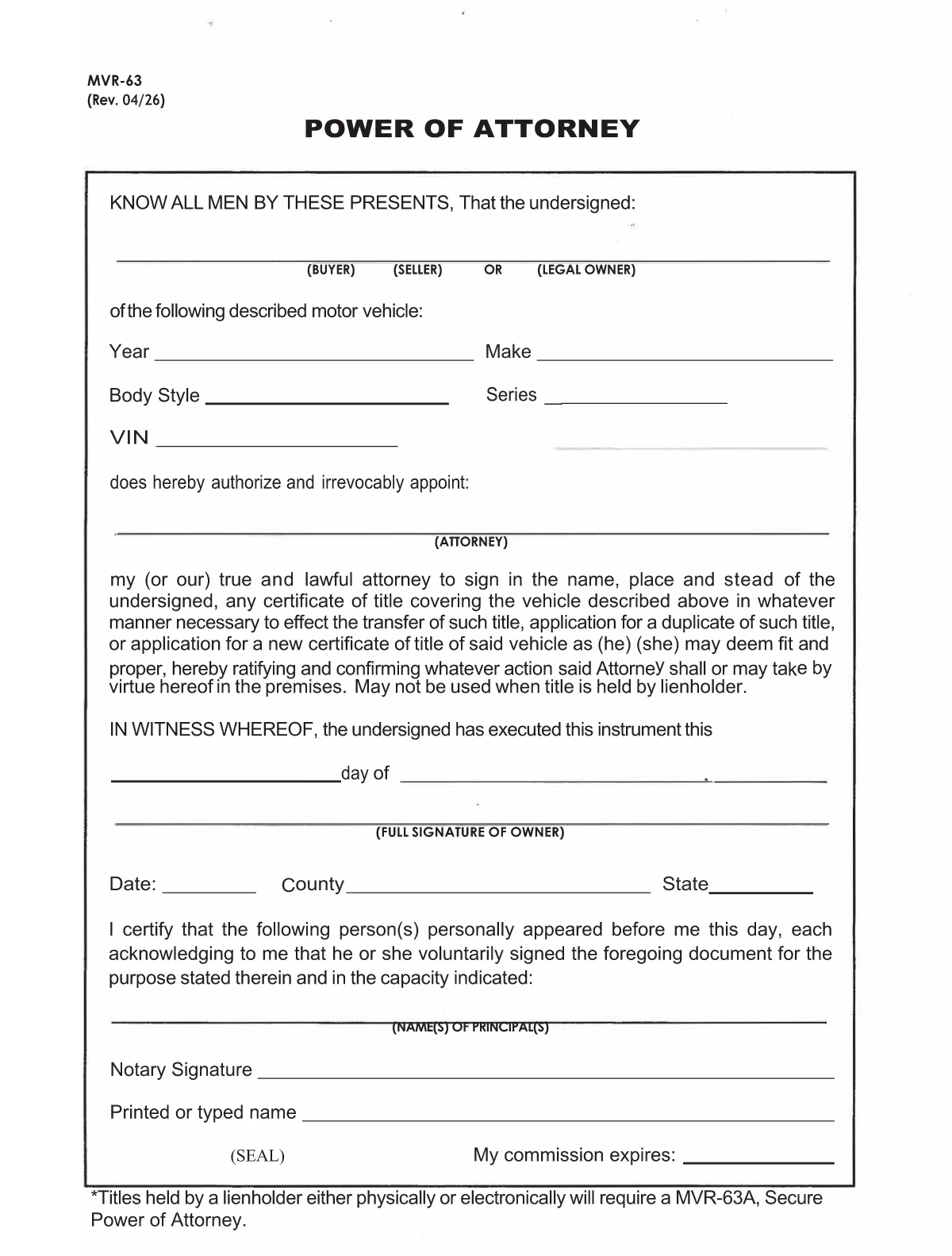
The MVR-63 is North Carolina’s Motor Vehicle Power of Attorney. It authorizes another person (the attorney‑in‑fact) to act on your behalf for vehicle‑related matters such as titling, registration, lien recording, or duplicate title requests. Using Formize’s fillable PDF, you can complete the form directly in your browser—no Adobe Acrobat required.

Our online PDF filler automatically preserves the exact layout of the official NCDOT document, ensuring the completed form is accepted by the Division of Motor Vehicles (DMV). Simply click the button below, fill in the required fields, and download the signed PDF ready for notarization.

Below you’ll find a quick overview of the form’s sections, step‑by‑step instructions, and tips to avoid common errors.

ՀՏՀ
  • What is the purpose of the MVR-63 form?

    The MVR-63 grants a designated person the legal authority to handle motor‑vehicle transactions for the owner, such as titling, registration, lien recording, or obtaining duplicate titles.

  • Do I need a notary for the MVR-63?

    Yes. North Carolina law requires the MVR-63 to be notarized before the DMV will accept it.

  • Can I submit the MVR-63 electronically?

    The DMV still requires a notarized, printed copy. However, you can fill out the form online, print it, and then have it notarized.

  • Is there a fee to download the MVR-63 PDF?

    No. The official form is provided free of charge by the North Carolina Department of Transportation.

  • What information is required for the vehicle description?

    You must list the vehicle’s year, make, model, VIN (Vehicle Identification Number), and body type.

  • Can I give the attorney limited powers?

    Yes. The form includes checkboxes allowing you to specify which actions the attorney may perform (e.g., only title transfer or only registration).

  • How long is the MVR-63 valid?

    The form remains valid until the owner revokes it in writing or the DMV cancels it for any reason.

  • What if I make a mistake on the form?

    Cross out the error with a single line, initial it, and correct the information in the appropriate field before signing and notarizing.

ԻՆՉՊԵՍ

Ինչպես լրացնել MVR-63-ն անվճար, առցանց՝ 7 հեշտ քայլերով.

  1. 1
    Open the Fillable Form
    Click the “Fill out this form” button on this page. The Formize PDF Filler app will open in a new tab.
  2. 2
    Wait for the Filler to Load
    The app loads the official MVR-63 PDF and makes every field editable. This usually takes a few seconds.
  3. 3
    Enter Owner Information
    Fill in the vehicle owner’s name, address, driver’s license number, and vehicle details (VIN, make, model, year).
  4. 4
    Add Attorney‑in‑Fact Details
    Provide the attorney’s full name, address, and relationship to the owner. Choose the specific powers you are granting.
  5. 5
    Sign and Date
    Type the owner’s signature in the signature field, add the date, and, if required, the county and state.
  6. 6
    Notarize the Form
    Print the completed PDF and have it notarized in person, or use an online notary service accepted by the NCDOT.
  7. 7
    Download or Submit
    After notarization, download the final PDF and submit it to your local DMV office or the designated agency.
Ձևավորել PDF Filler հավելվածը
ՄԱՍԻՆ

Տրանսպորտային միջոցների գրանցման ձևեր

Եթե ​​դուք ունեք կամ վարձակալում եք ավտոմոբիլ, կցասայլ կամ նավ, դուք պետք է կատարեք որոշակի պարտավորություններ՝ ձեր մեքենան օրինական գրանցված և անվտանգ պահելու համար:

MVR-63-ը Տրանսպորտային միջոցի գրանցման ձևերից մեկն է, որը փաստաթղթեր են, որոնք օգտագործվում են համապատասխան նահանգային կամ մարզային մարմնում մեքենա գրանցելու համար: Այս ձևաթղթերը սովորաբար պահանջվում են, երբ անձը գնում է նոր կամ օգտագործված փոխադրամիջոց կամ երբ նրանք տեղափոխվում են նոր նահանգ կամ նահանգ մեքենայով:

Տրանսպորտային միջոցների գրանցման համար անհրաժեշտ ճշգրիտ պահանջներն ու ձևերը կարող են տարբեր լինել՝ կախված գտնվելու վայրից, սակայն, ընդհանուր առմամբ, գործընթացը ներառում է մեքենայի, սեփականատիրոջ և մեքենայի ցանկացած արգելանքների մասին տեղեկատվություն տրամադրելը:

Գրանցման ձևերն ու վճարները ներկայացնելուց հետո նահանգային կամ մարզային մարմինը մեքենայի տիրոջը կտրամադրի գրանցման վկայական կամ պետհամարանիշ: Այս գրանցումը թույլ է տալիս տրանսպորտային միջոցը օրինական կերպով շահագործել հանրային ճանապարհների և մայրուղիների վրա:

ՀԱՏԿՈՒԹՅՈՒՆՆԵՐ

PDF լցոնիչ

Առցանց MVR-63-ը լրացնելու ամենահեշտ ձևը

  • Արագ լրացրեք MVR-63
    Փնտրու՞մ եք միջոց՝ արագորեն լրացնելու MVR-63 առցանց: Մեր առցանց անվճար PDF ձևաթուղթ լրացնողի միջոցով դուք կիմանաք, թե ինչպես խմբագրել և լրացնել այս pdf փաստաթուղթը մեկ րոպեից պակաս ժամանակում:
  • Հեշտ օգտագործման առցանց PDF խմբագիր
    Հոգնե՞լ եք PDF ֆայլեր տպելուց, որպեսզի կարողանաք դրանք խմբագրել, նախքան նորից սկանավորելը և հետ ուղարկելը: Խմբագրել PDF փաստաթղթերը անվճար առցանց: Օգտագործեք մեր առցանց pdf խմբագրիչը ժամանակ և թուղթ խնայելու համար:
  • Հիանալի գործիքներ, բոլոր հարթակներ
    Զարմանում եք, թե ինչպես լրացնել MVR-63-ը Mac-ում, կամ գուցե ինչպես անվճար օգտագործել PDF լցոնիչը: Մեր առցանց PDF գործիքներն աշխատում են բոլոր հարթակներում:
  • Անվտանգ ֆայլերի պահպանում
    Ավարտված «MVR-63» ֆայլերը պահվում են պաշտպանված տվյալների բազայում, որը կառավարվում է Amazon Cloud հոսթինգի կողմից: Ցանկացած ժամանակ կարող եք ջնջել ձեր ֆայլերը մեր համակարգից: Ամեն դեպքում, այս ֆայլերը ավտոմատ կերպով ջնջվում են 24 ժամ հետո:
  • Զրուցեք MVR-63-ի հետ
    Զրուցեք «MVR-63»-ի հետ Chatize-ում, որը PDF ընթերցողի անվճար օգնական է: Հարցեր տվեք և ստացեք պատասխաններ «MVR-63»-ից։ Պարզապես սեղմեք վերևում գտնվող Զրույց փաստաթղթի հետ կոճակը:

Ջնջել լրացման նիստը

Ջնջե՞լ ընտրված լրացման աշխատաշրջանը: Այս դեպքում ձևը լրացնելու ձեր առաջընթացը կկորչի:

Ջնջել խմբագրման նիստը

Ջնջե՞լ ընտրված խմբագրման աշխատաշրջանը: Այս դեպքում ձևը ստեղծելու և խմբագրելու ձեր առաջընթացը կկորչի: