
Ընտրել լեզուն

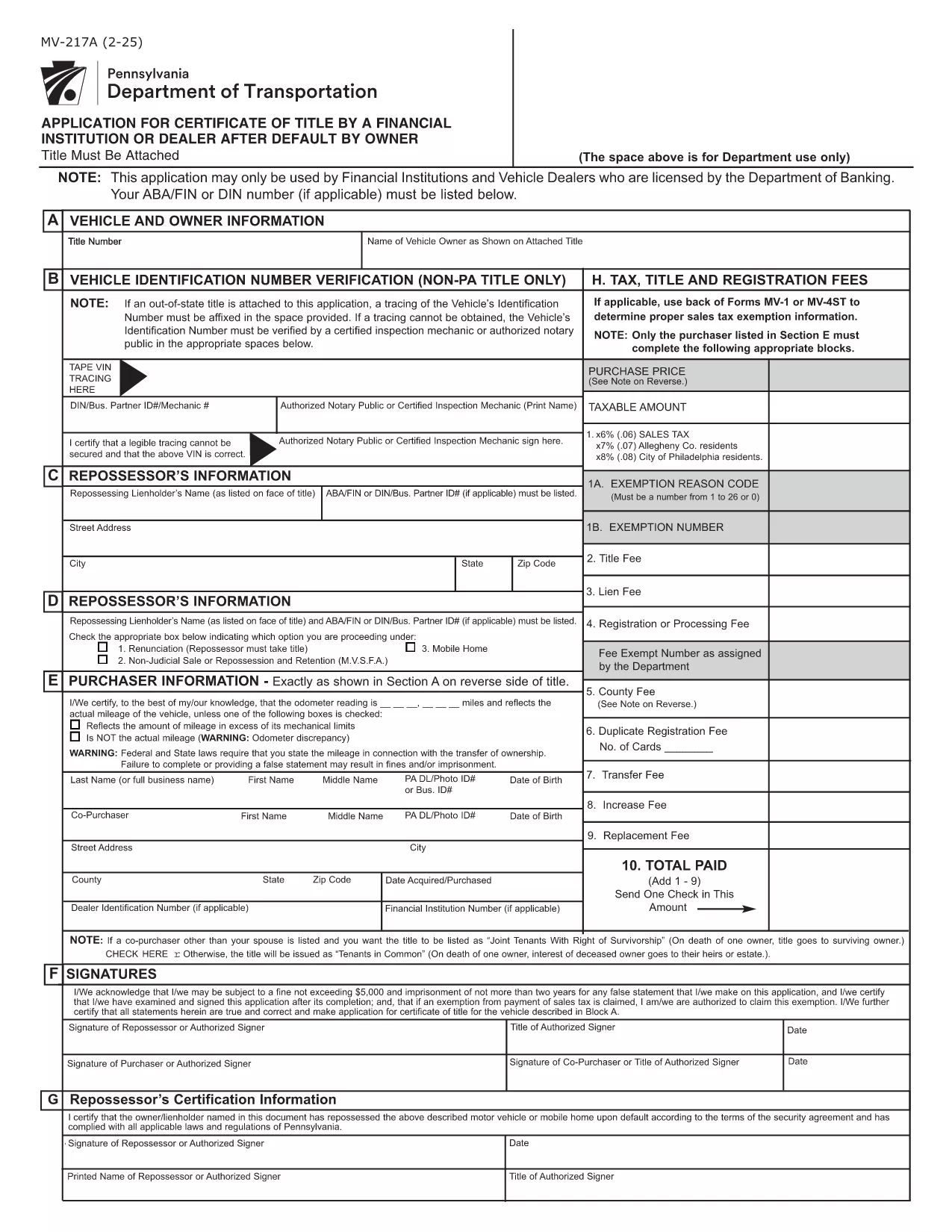
Pennsylvania Form MV-217 – Fillable PDF Online

  1. Լեզու Անգլերեն
  2. Երկիր ԱՄՆ
  3. Գործունեություն Տրանսպորտային միջոցների գրանցում
  4. Պետություն Փենսիլվանիա
Pennsylvania Form MV-217 – Fillable PDF Online

Form MV-217 is the Pennsylvania Department of Transportation (PennDOT) application used to request a Certificate of Title after a vehicle owner defaults. It is required for financial institutions, licensed vehicle dealers, and lienholders when the original title cannot be released.

What is Form MV-217?

This form authorizes PennDOT to issue a new title when the original owner has defaulted on a loan or other financial obligation. The form is only for licensed entities; individuals must follow a different legal process.

How to Fill Out MV-217 Online

Instead of downloading the PDF and editing it manually, simply click the "Fill out this form" button on our page. The Formize PDF Filler will load in your browser, letting you complete every field instantly.

Common Mistakes to Avoid

  • Leaving the “Lienholder” section blank when you are the lienholder.
  • Submitting an unsigned form – the signature field must be completed electronically.
  • Using the wrong form version (MV-217A vs. MV-217). Verify the version required by your institution.

Where to Submit the Completed Form

After you finish, download the completed PDF and mail or deliver it to your local PennDOT office or the financial institution that requested the title. Some lenders also accept electronic submissions via email.

Frequently Asked Questions

For quick answers, see the FAQ section below or scroll down to the step‑by‑step guide.

ՀՏՀ
  • Who is allowed to submit Form MV-217?

    Only financial institutions, licensed vehicle dealers, and lienholders that are authorized by the Pennsylvania Department of Banking may use this form.

  • Is there a fee to file MV‑217?

    PennDOT may charge a processing fee. Check with your local PennDOT office or lender for the exact amount.

  • Can I use the form if I am an individual owner?

    Individuals must follow the “Judgment and Execution” option (Option 1) instead of MV‑217. This form is not intended for private owners.

  • What happens after I submit the form?

    PennDOT reviews the application, verifies the default, and issues a new Certificate of Title to the lienholder or authorized dealer.

  • Do I need to attach supporting documents?

    Yes. Include a copy of the original title, proof of default (e.g., court order), and any lienholder agreements as required.

  • How long does processing take?

    Processing time varies, but most applications are completed within 10‑15 business days after receipt.

  • Can I edit the form after I’ve saved it?

    Yes. Open the saved PDF in the Formize filler again to make changes before final submission.

ԻՆՉՊԵՍ

Ինչպես լրացնել MV-217 PDF-ն անվճար, առցանց՝ 5 հեշտ քայլերով.

  1. 1
    Click the Fill‑out Button
    Press the bright "Fill out this form" button on the page. The Formize PDF Filler loads directly in your browser.
  2. 2
    Wait for the Filler to Load
    A few seconds may pass while the app prepares the fillable fields. No download required.
  3. 3
    Complete All Required Fields
    Enter the lienholder information, vehicle details, and default description exactly as they appear on your records.
  4. 4
    Add Your Electronic Signature
    Use the signature field to sign electronically. This satisfies PennDOT’s requirement for a signed application.
  5. 5
    Save or Submit the Form
    When finished, click "Save PDF" to download a copy for your records, or follow your lender’s instructions to submit the file.
Ձևավորել PDF Filler հավելվածը
ՄԱՍԻՆ

Տրանսպորտային միջոցների գրանցման ձևեր

Եթե ​​դուք ունեք կամ վարձակալում եք ավտոմոբիլ, կցասայլ կամ նավ, դուք պետք է կատարեք որոշակի պարտավորություններ՝ ձեր մեքենան օրինական գրանցված և անվտանգ պահելու համար:

MV-217 PDF-ը Տրանսպորտային միջոցի գրանցման ձևերից մեկն է, որը փաստաթղթեր են, որոնք օգտագործվում են համապատասխան նահանգային կամ մարզային մարմնում մեքենա գրանցելու համար: Այս ձևաթղթերը սովորաբար պահանջվում են, երբ անձը գնում է նոր կամ օգտագործված փոխադրամիջոց կամ երբ նրանք տեղափոխվում են նոր նահանգ կամ նահանգ մեքենայով:

Տրանսպորտային միջոցների գրանցման համար անհրաժեշտ ճշգրիտ պահանջներն ու ձևերը կարող են տարբեր լինել՝ կախված գտնվելու վայրից, սակայն, ընդհանուր առմամբ, գործընթացը ներառում է մեքենայի, սեփականատիրոջ և մեքենայի ցանկացած արգելանքների մասին տեղեկատվություն տրամադրելը:

Գրանցման ձևերն ու վճարները ներկայացնելուց հետո նահանգային կամ մարզային մարմինը մեքենայի տիրոջը կտրամադրի գրանցման վկայական կամ պետհամարանիշ: Այս գրանցումը թույլ է տալիս տրանսպորտային միջոցը օրինական կերպով շահագործել հանրային ճանապարհների և մայրուղիների վրա:

ՀԱՏԿՈՒԹՅՈՒՆՆԵՐ

PDF լցոնիչ

Առցանց MV-217 PDF-ը լրացնելու ամենահեշտ ձևը

  • Արագ լրացրեք MV-217 PDF
    Փնտրու՞մ եք միջոց՝ արագորեն լրացնելու MV-217 PDF առցանց: Մեր առցանց անվճար PDF ձևաթուղթ լրացնողի միջոցով դուք կիմանաք, թե ինչպես խմբագրել և լրացնել այս pdf փաստաթուղթը մեկ րոպեից պակաս ժամանակում:
  • Հեշտ օգտագործման առցանց PDF խմբագիր
    Հոգնե՞լ եք PDF ֆայլեր տպելուց, որպեսզի կարողանաք դրանք խմբագրել, նախքան նորից սկանավորելը և հետ ուղարկելը: Խմբագրել PDF փաստաթղթերը անվճար առցանց: Օգտագործեք մեր առցանց pdf խմբագրիչը ժամանակ և թուղթ խնայելու համար:
  • Հիանալի գործիքներ, բոլոր հարթակներ
    Զարմանում եք, թե ինչպես լրացնել MV-217 PDF-ը Mac-ում, կամ գուցե ինչպես անվճար օգտագործել PDF լցոնիչը: Մեր առցանց PDF գործիքներն աշխատում են բոլոր հարթակներում:
  • Անվտանգ ֆայլերի պահպանում
    Ավարտված «MV-217 PDF» ֆայլերը պահվում են պաշտպանված տվյալների բազայում, որը կառավարվում է Amazon Cloud հոսթինգի կողմից: Ցանկացած ժամանակ կարող եք ջնջել ձեր ֆայլերը մեր համակարգից: Ամեն դեպքում, այս ֆայլերը ավտոմատ կերպով ջնջվում են 24 ժամ հետո:
  • Զրուցեք MV-217 PDF-ի հետ
    Զրուցեք «MV-217 PDF»-ի հետ Chatize-ում, որը PDF ընթերցողի անվճար օգնական է: Հարցեր տվեք և ստացեք պատասխաններ «MV-217 PDF»-ից։ Պարզապես սեղմեք վերևում գտնվող Զրույց փաստաթղթի հետ կոճակը:

Ջնջել լրացման նիստը

Ջնջե՞լ ընտրված լրացման աշխատաշրջանը: Այս դեպքում ձևը լրացնելու ձեր առաջընթացը կկորչի:

Ջնջել խմբագրման նիստը

Ջնջե՞լ ընտրված խմբագրման աշխատաշրջանը: Այս դեպքում ձևը ստեղծելու և խմբագրելու ձեր առաջընթացը կկորչի: