
Ընտրել լեզուն

VTR-71-6 – Application for Authority to Dispose of an Abandoned Vehicle (Fillable PDF)

  1. Լեզու Անգլերեն
  2. Երկիր ԱՄՆ
  3. Գործունեություն Տրանսպորտային միջոցների գրանցում
  4. Պետություն Տեխաս
VTR-71-6 – Application for Authority to Dispose of an Abandoned Vehicle (Fillable PDF)

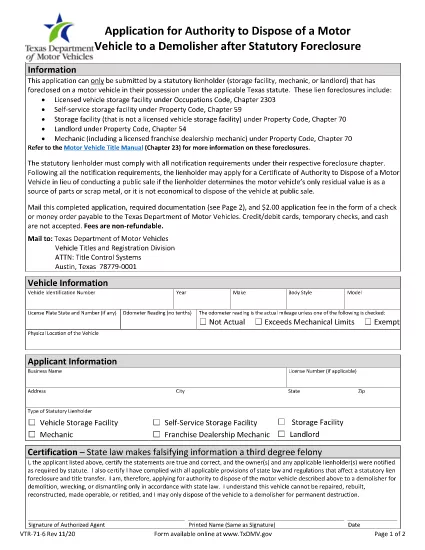
The Texas Department of Motor Vehicles (TxDMV) requires the VTR-71-6 form when you need official permission to dispose of an abandoned or public nuisance vehicle to a licensed demolisher. This fillable PDF is now available through Formize, so you can complete it securely in your browser—no extra software needed.

What Is the VTR-71-6 Form?

VTR-71-6, titled Application for Authority to Dispose of an Abandoned Nuisance Vehicle to a Demolisher, is used by vehicle owners, lienholders, or law‑enforcement agencies to certify that a vehicle meets the state’s criteria for demolition. The form collects:

  • Vehicle identification details (VIN, make, model, year)
  • Owner and lienholder information
  • Reason for disposal and supporting documentation
  • Signatures from the owner, lienholder and a law‑enforcement officer (if required)

How to Complete the VTR-71-6 Online with Formize

Instead of downloading the PDF, clicking “Fill out this form” on this page launches the Formize PDF Filler app. Follow the steps below to finish the form in minutes.

Common Mistakes to Avoid

  • Missing signatures: Every required signature must be entered; otherwise the TxDMV will reject the submission.
  • Incorrect VIN: Double‑check the VIN against the title and registration documents.
  • Incomplete supporting documents: Attach a copy of the notice to the owner and any police reports when applicable.

Where to Submit the Completed Form

After you finish the online form, you can:

  • Print the completed PDF and mail it to the TxDMV address listed on the form.
  • Upload the PDF through the TxDMV online filing portal.

Download the Official PDF

If you prefer the original document, you can download the official VTR-71-6 PDF directly from the TxDMV:

Download VTR-71-6 PDF

ՀՏՀ
  • Who can submit a VTR-71-6 form?

    The vehicle owner, a lienholder, or an authorized law‑enforcement agency may complete and submit the VTR-71-6.

  • Is the Formize filler free to use?

    Yes, Formize provides a free online filler for this PDF. No download or installation is required.

  • What happens after I submit the form?

    The TxDMV reviews the application. If approved, you’ll receive a Certificate of Authority, allowing the vehicle to be taken to a licensed demolisher.

  • Can I save my progress and finish later?

    The Formize app lets you save a draft locally. Click “Save Draft” before closing the browser, then reopen the saved file to continue.

  • Do I need a notarized signature?

    A notarized signature is not required for VTR-71-6, but all required parties must sign electronically.

  • How long does the approval process take?

    Processing typically takes 7‑10 business days after the TxDMV receives a complete, correctly signed form.

ԻՆՉՊԵՍ

Ինչպես լրացնել VTR-71-6-ն անվճար, առցանց՝ 5 հեշտ քայլերով.

  1. 1
    Open the Fillable Form
    Click the “Fill out this form” button on this page. The Formize PDF Filler app will load in a new window.
  2. 2
    Enter Vehicle Information
    Type the VIN, make, model, year, and license plate number into the highlighted fields.
  3. 3
    Provide Owner and Lienholder Details
    Fill in the owner’s name, address, and any lienholder information required by the form.
  4. 4
    Add Supporting Documents
    Upload a scanned copy of the notice to the owner and any police or law‑enforcement reports if applicable.
  5. 5
    Sign and Submit
    Use the electronic signature fields for the owner, lienholder, and law‑enforcement officer. When finished, click “Save & Download” to get the completed PDF.
Ձևավորել PDF Filler հավելվածը
ՄԱՍԻՆ

Տրանսպորտային միջոցների գրանցման ձևեր

Եթե ​​դուք ունեք կամ վարձակալում եք ավտոմոբիլ, կցասայլ կամ նավ, դուք պետք է կատարեք որոշակի պարտավորություններ՝ ձեր մեքենան օրինական գրանցված և անվտանգ պահելու համար:

VTR-71-6-ը Տրանսպորտային միջոցի գրանցման ձևերից մեկն է, որը փաստաթղթեր են, որոնք օգտագործվում են համապատասխան նահանգային կամ մարզային մարմնում մեքենա գրանցելու համար: Այս ձևաթղթերը սովորաբար պահանջվում են, երբ անձը գնում է նոր կամ օգտագործված փոխադրամիջոց կամ երբ նրանք տեղափոխվում են նոր նահանգ կամ նահանգ մեքենայով:

Տրանսպորտային միջոցների գրանցման համար անհրաժեշտ ճշգրիտ պահանջներն ու ձևերը կարող են տարբեր լինել՝ կախված գտնվելու վայրից, սակայն, ընդհանուր առմամբ, գործընթացը ներառում է մեքենայի, սեփականատիրոջ և մեքենայի ցանկացած արգելանքների մասին տեղեկատվություն տրամադրելը:

Գրանցման ձևերն ու վճարները ներկայացնելուց հետո նահանգային կամ մարզային մարմինը մեքենայի տիրոջը կտրամադրի գրանցման վկայական կամ պետհամարանիշ: Այս գրանցումը թույլ է տալիս տրանսպորտային միջոցը օրինական կերպով շահագործել հանրային ճանապարհների և մայրուղիների վրա:

ՀԱՏԿՈՒԹՅՈՒՆՆԵՐ

PDF լցոնիչ

Առցանց VTR-71-6-ը լրացնելու ամենահեշտ ձևը

  • Արագ լրացրեք VTR-71-6
    Փնտրու՞մ եք միջոց՝ արագորեն լրացնելու VTR-71-6 առցանց: Մեր առցանց անվճար PDF ձևաթուղթ լրացնողի միջոցով դուք կիմանաք, թե ինչպես խմբագրել և լրացնել այս pdf փաստաթուղթը մեկ րոպեից պակաս ժամանակում:
  • Հեշտ օգտագործման առցանց PDF խմբագիր
    Հոգնե՞լ եք PDF ֆայլեր տպելուց, որպեսզի կարողանաք դրանք խմբագրել, նախքան նորից սկանավորելը և հետ ուղարկելը: Խմբագրել PDF փաստաթղթերը անվճար առցանց: Օգտագործեք մեր առցանց pdf խմբագրիչը ժամանակ և թուղթ խնայելու համար:
  • Հիանալի գործիքներ, բոլոր հարթակներ
    Զարմանում եք, թե ինչպես լրացնել VTR-71-6-ը Mac-ում, կամ գուցե ինչպես անվճար օգտագործել PDF լցոնիչը: Մեր առցանց PDF գործիքներն աշխատում են բոլոր հարթակներում:
  • Անվտանգ ֆայլերի պահպանում
    Ավարտված «VTR-71-6» ֆայլերը պահվում են պաշտպանված տվյալների բազայում, որը կառավարվում է Amazon Cloud հոսթինգի կողմից: Ցանկացած ժամանակ կարող եք ջնջել ձեր ֆայլերը մեր համակարգից: Ամեն դեպքում, այս ֆայլերը ավտոմատ կերպով ջնջվում են 24 ժամ հետո:
  • Զրուցեք VTR-71-6-ի հետ
    Զրուցեք «VTR-71-6»-ի հետ Chatize-ում, որը PDF ընթերցողի անվճար օգնական է: Հարցեր տվեք և ստացեք պատասխաններ «VTR-71-6»-ից։ Պարզապես սեղմեք վերևում գտնվող Զրույց փաստաթղթի հետ կոճակը:

Ջնջել լրացման նիստը

Ջնջե՞լ ընտրված լրացման աշխատաշրջանը: Այս դեպքում ձևը լրացնելու ձեր առաջընթացը կկորչի:

Ջնջել խմբագրման նիստը

Ջնջե՞լ ընտրված խմբագրման աշխատաշրջանը: Այս դեպքում ձևը ստեղծելու և խմբագրելու ձեր առաջընթացը կկորչի: