Pilih bahasa

EFT Sign‑Up Form – Fillable PDF for Instant Registration

  1. Bahasa Bahasa inggris
  2. Negara Australia
  3. Departemen Banking
  4. Aktivitas Electronic Funds Transfer
EFT Sign‑Up Form – Fillable PDF for Instant Registration

Looking for a fast, secure way to register for Electronic Funds Transfer (EFT)? Our fillable EFT sign‑up form lets you complete the entire registration online without printing, scanning, or faxing. The PDF is fully interactive, compatible with all browsers, and automatically saves your entries.

Why Use a Fillable EFT Registration Form

A fillable PDF eliminates manual errors, speeds up processing (often under 5 business days), and provides a paper‑less audit trail. Financial institutions in Australia accept this form for new bank‑account authorisations, payroll setups, and supplier payments.

Key Sections of the EFT Sign‑Up PDF

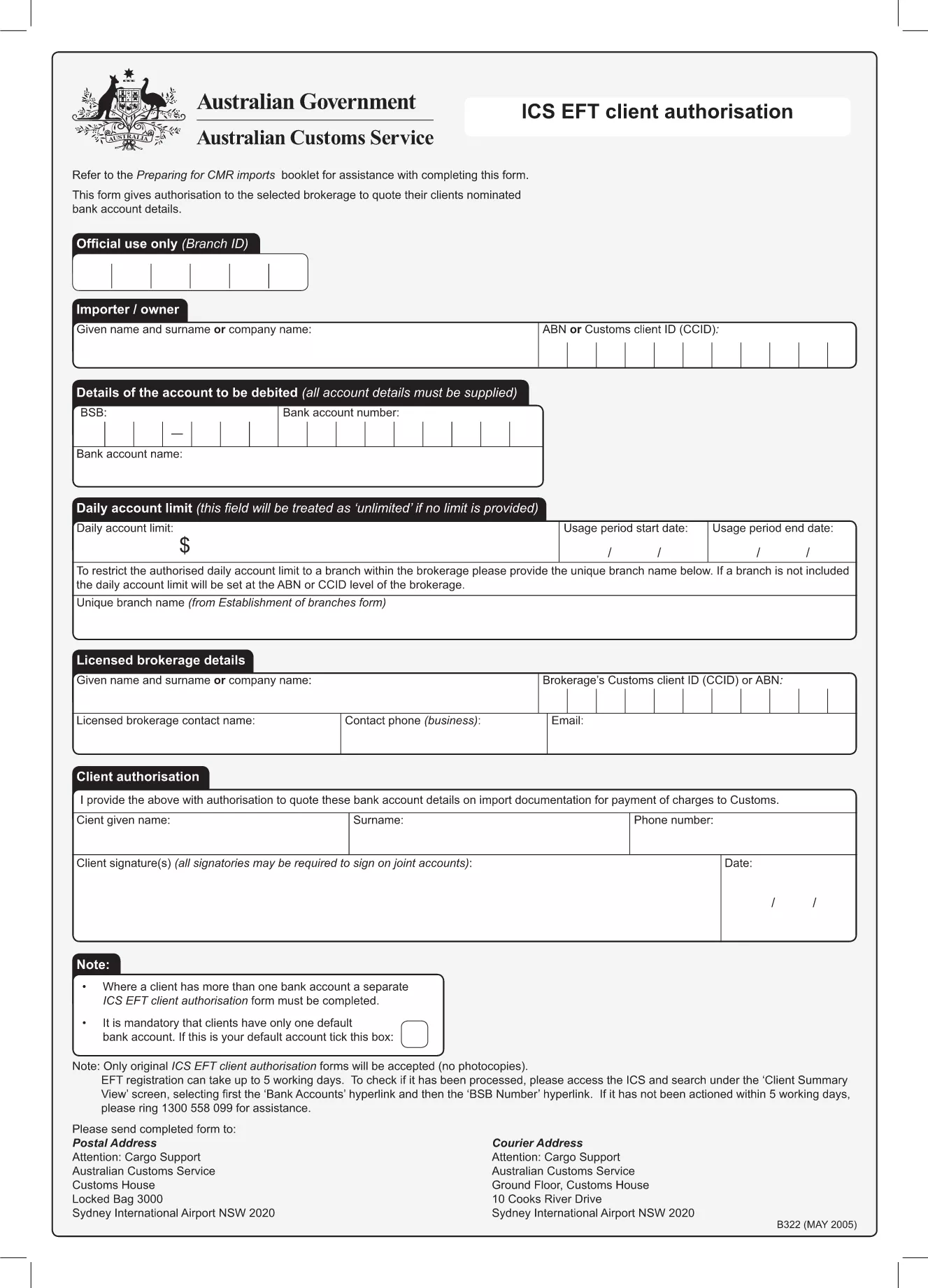
  • Account Details: BSB, account number, and account name.
  • Authorisation Clause: Your signature authorises electronic payments.
  • Contact Information: Phone, email, and mailing address.
  • Bank Verification: Optional fields for bank‑issued confirmation.

Step‑by‑Step Guide to Complete the Form

Follow the simple steps below to fill out the form directly on this page. No extra software is required.

Common Mistakes to Avoid

  • Leaving the BSB or account number blank.
  • Using an outdated signature image.
  • Skipping the authorisation checkbox.
  • Submitting the form without a supporting bank letter when required.

How to Submit Your Completed EFT Form

Once you have filled out the form, click the Submit button to securely email the PDF to the designated processing address, or download it for manual submission to your bank.

FAQ
  • Is the EFT sign‑up form really fillable online?

    Yes. The PDF is fully interactive and loads in the Formize PDF Filler, so you can type directly into the fields without any extra software.

  • Do I need to print the form to sign it?

    No. You can add a digital signature within the Formize app, or upload a scanned image of your handwritten signature.

  • How long does processing take after I submit?

    Most banks process a new EFT registration within 3‑5 business days, provided all required fields are completed correctly.

  • Can I edit the form after I have submitted it?

    Once submitted, the form is locked for security. If you need changes, download a new copy, edit, and resubmit.

  • What if I make a mistake while filling out the form?

    The Formize filler lets you clear or modify any field before you submit. Simply click the field you wish to change and re‑enter the correct information.

  • Is my personal and banking information safe?

    Formize uses SSL encryption for all data transfers. Your information is stored only temporarily during the session and is never shared with third parties.

  • Do I need a specific browser to use the filler?

    The Formize PDF Filler works with all modern browsers—Chrome, Firefox, Edge, and Safari.

  • Can I use this form for payroll EFT enrolment?

    Yes. The same registration form is accepted by most Australian payroll providers for direct‑deposit authorisation.

BAGAIMANA CARANYA

Cara mengisi eft sign-up form gratis secara online dalam 4 langkah mudah:

  1. 1
    Open the Fillable Form
    Click the "Fill out this form" button on the page. The Formize PDF Filler app will load instantly in your browser.
  2. 2
    Enter Your Information
    Complete each field—account details, contact info, and authorisation—using your keyboard or touch screen.
  3. 3
    Save Your Progress
    The app automatically saves your entries. You can close the window and return later without losing data.
  4. 4
    Submit or Download
    When finished, choose "Submit" to email the completed form securely, or "Download" to save a copy for manual submission.
Bentuk aplikasi Pengisi PDF
TENTANG

kerangka eft sign-up form

Dengan serangkaian fitur tradisional untuk melihat dan mengisi dokumen PDF, dipadukan dengan manfaat aplikasi web dan tata letak responsif, Anda dapat menyelesaikan eft sign-up form dalam hitungan menit.

FITUR

Pengisi PDF

Cara termudah untuk mengisi formulir PDF secara online

  • Isi eft sign-up form dengan cepat
    Mencari cara mengisi eft sign-up form dengan cepat secara online? Dengan pengisi formulir PDF online gratis kami, Anda akan tahu cara mengedit dan mengisi dokumen pdf ini dalam waktu kurang dari satu menit.
  • Editor PDF online yang mudah digunakan
    Muak dengan mencetak file PDF sehingga Anda dapat mengeditnya, sebelum memindai ulang dan mengirimnya kembali? Edit dokumen PDF secara online gratis. Gunakan editor pdf online kami untuk menghemat waktu dan kertas.
  • Alat hebat, semua platform
    Ingin tahu cara mengisi eft sign-up form di Mac, atau mungkin cara menggunakan pengisi PDF gratis? Alat PDF online kami berfungsi di semua platform.
  • Penyimpanan file yang aman
    File "eft sign-up form" yang telah selesai disimpan dalam database aman yang dikelola oleh hosting Amazon Cloud. Anda dapat menghapus file Anda dari sistem kami kapan saja. Bagaimanapun, file-file ini secara otomatis dihapus setelah 24 jam.
  • Ngobrol dengan eft sign-up form
    Ngobrol dengan "eft sign-up form" di Chatize yang merupakan asisten pembaca PDF gratis. Ajukan pertanyaan dan dapatkan jawaban dari "eft sign-up form". Cukup klik tombol Chat Dengan Dokumen di atas.

Hapus sesi pengisian

Hapus sesi pengisian yang dipilih? Dalam hal ini, kemajuan Anda dalam menyelesaikan formulir akan hilang.

Hapus sesi pengeditan

Hapus sesi pengeditan yang dipilih? Dalam hal ini, kemajuan Anda dalam membuat dan mengedit formulir akan hilang.