
Pilih bahasa

Form 1528 – Client DNA Collection Statement (Fillable PDF)

  1. Negara Australia
  2. Bahasa Bahasa inggris
  3. Aktivitas Karakter atau identitas
Form 1528 – Client DNA Collection Statement (Fillable PDF)

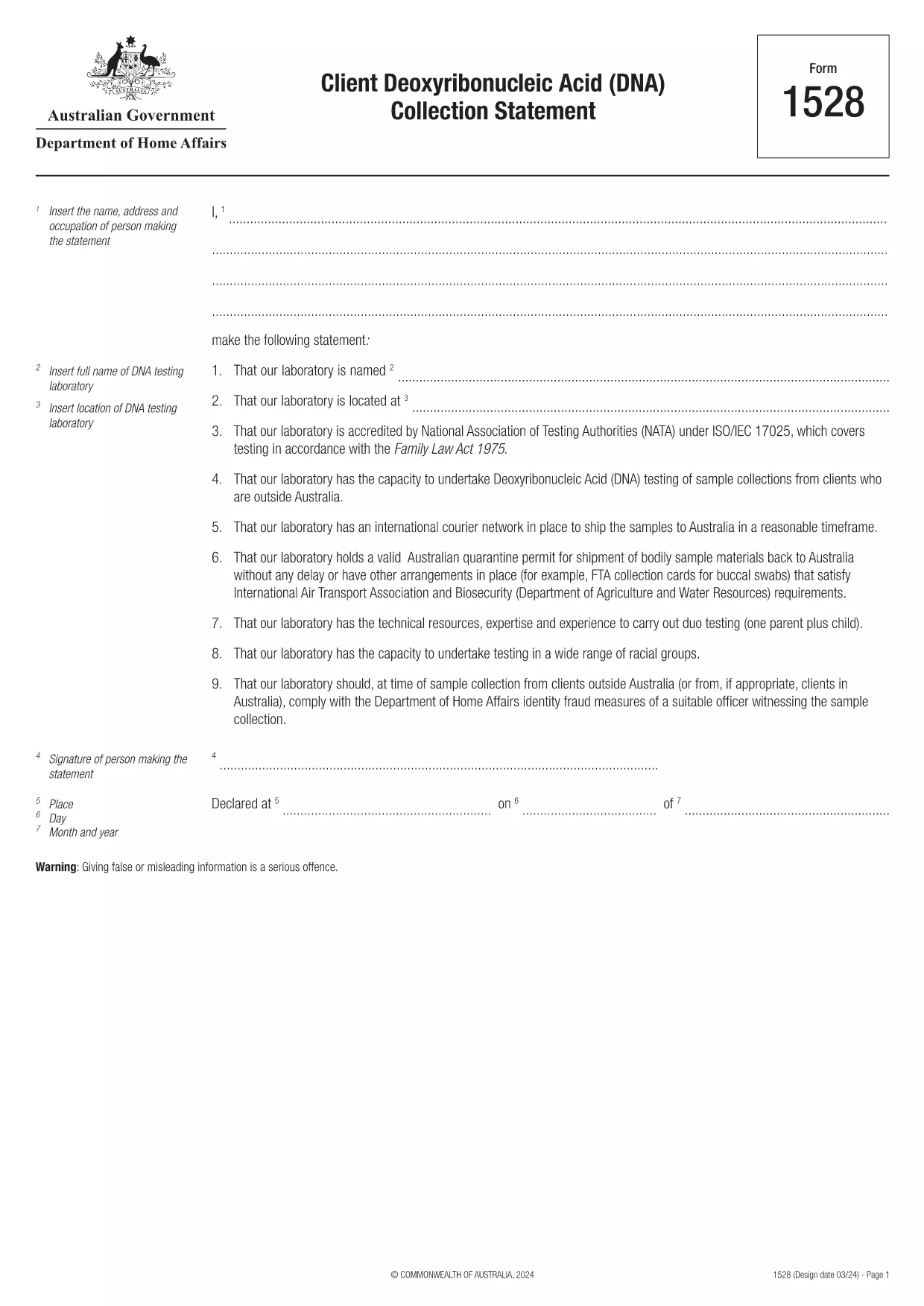
Form 1528 is the official Client Deoxyribonucleic Acid (DNA) Collection Statement required by the Australian Department of Home Affairs. The form captures the name, address and occupation of the person making the statement, as well as details of the DNA testing laboratory.

What Is Form 1528?

This form is used when an individual must provide a DNA sample for immigration, visa, or forensic purposes. It must be completed by the person providing the sample and signed by an authorised DNA testing laboratory.

How to Fill Out Form 1528 with Formize

Instead of printing, scanning, or editing the PDF manually, simply click the “Fill out this form” button on this page. The Formize PDF Filler app will load the fillable version, letting you enter data, add signatures, and save the completed document in seconds.

Common Mistakes & Tips

  • Leave no blank fields – the Department rejects forms with empty required sections.
  • Use the exact laboratory name and address as it appears on the lab’s official letterhead.
  • Check date formats – use DD/MM/YYYY throughout.
  • Sign electronically only after all information is verified; a digital signature is accepted.

Where to Submit the Completed Form

After you download the completed PDF, you can upload it through your online visa portal, email it to the requesting officer, or deliver a printed copy to the nearest Australian Visa Application Centre.

Need More Help?

For detailed guidance, review the instructions on the Department of Home Affairs website or contact your DNA testing laboratory for clarification on laboratory‑specific fields.

FAQ
  • Is an electronic signature accepted on Form 1528?

    Yes. The Department of Home Affairs accepts a clear electronic signature created with the Formize PDF Filler.

  • Can I print the form after filling it online?

    Absolutely. After completing the form, you can download the PDF and print a hard copy if you prefer a physical submission.

  • What if I make a mistake after saving the form?

    Open the saved PDF again in Formize, edit the incorrect fields, and re‑save. The fillable PDF allows unlimited edits before final submission.

  • Do I need to attach any supporting documents?

    Typically, the DNA laboratory will provide a separate certification letter. Attach that letter alongside the completed Form 1528 when you submit your application.

  • How long does it take to process Form 1528?

    Processing time varies by case, but the Department generally reviews the statement within 5‑10 business days after receipt.

  • Is there a fee for using Formize’s PDF filler?

    Formize offers a free basic fillable version for Form 1528. Advanced features such as bulk signing require a paid plan, but are not needed for a single submission.

  • Can I fill out Form 1528 on a mobile device?

    Yes. The Formize PDF Filler works on smartphones and tablets, allowing you to complete the form anywhere.

  • What format should I use when uploading the completed form?

    Upload the final document as a PDF file. Ensure the file size does not exceed the portal’s limit (usually 5 MB).

BAGAIMANA CARANYA

Cara mengisi Form 1528 gratis secara online dalam 5 langkah mudah:

  1. 1
    Open the Fillable Form
    Click the “Fill out this form” button on the page. The Formize PDF Filler app will launch in a new tab with the fillable version of Form 1528.
  2. 2
    Enter Your Information
    Type the required details – personal data, laboratory name, and address – directly into the highlighted fields.
  3. 3
    Add Electronic Signatures
    Use the signature tool to sign the statement and, if required, the laboratory representative’s signature.
  4. 4
    Review & Validate
    Double‑check every field for accuracy, especially dates and laboratory information.
  5. 5
    Download or Submit
    When you’re satisfied, click “Save & Download” to get the completed PDF, or use the built‑in “Submit” button to send it directly to the Home Affairs portal.
Bentuk aplikasi Pengisi PDF
TENTANG

Bentuk Karakter atau Identitas

Form 1528 adalah salah satu dokumen atau formulir yang berkaitan dengan penetapan atau verifikasi identitas seseorang. Formulir ini biasanya memerlukan informasi pribadi dan dokumentasi untuk mengonfirmasi identitas seseorang. Berikut beberapa contoh formulir yang umumnya dikaitkan dengan verifikasi identitas:

Formulir Verifikasi Identitas: Formulir ini digunakan oleh organisasi, seperti pemberi kerja, lembaga pemerintah, atau lembaga keuangan, untuk memverifikasi identitas individu. Mereka biasanya meminta informasi pribadi, seperti nama, alamat, tanggal lahir, dan nomor Jaminan Sosial, dan mungkin memerlukan dokumentasi pendukung seperti tanda pengenal yang dikeluarkan pemerintah, paspor, atau akta kelahiran.

Formulir Bukti Alamat: Formulir ini digunakan untuk memverifikasi alamat tempat tinggal seseorang. Mereka mungkin meminta orang tersebut untuk memberikan tagihan utilitas, laporan bank, perjanjian sewa, atau dokumen lain yang menunjukkan alamat mereka saat ini.

Formulir Otorisasi Pemeriksaan Latar Belakang: Saat sebuah organisasi melakukan pemeriksaan latar belakang terhadap seseorang, sering kali organisasi tersebut meminta orang tersebut untuk mengisi formulir yang mengizinkan pemeriksaan tersebut. Formulir ini mungkin meminta informasi pribadi, termasuk nama, tanggal lahir, dan nomor Jaminan Sosial, yang membantu menentukan identitas orang tersebut.

Formulir Pernyataan Pencurian Identitas: Dalam kasus pencurian identitas, korban mungkin perlu mengisi formulir pernyataan pencurian identitas. Formulir ini membantu individu melaporkan penggunaan identitas mereka yang menipu dan memberikan catatan hukum atas insiden tersebut.

Penting untuk dicatat bahwa bentuk dan persyaratan khusus untuk menetapkan atau memverifikasi identitas dapat bervariasi tergantung pada konteksnya, seperti tujuan, yurisdiksi, atau organisasi yang terlibat. Selalu mengacu pada formulir khusus yang disediakan oleh organisasi atau lembaga yang meminta verifikasi identitas untuk mendapatkan informasi paling akurat dan terkini.

FITUR

Pengisi PDF

Cara termudah untuk mengisi formulir PDF secara online

  • Isi Form 1528 dengan cepat
    Mencari cara mengisi Form 1528 dengan cepat secara online? Dengan pengisi formulir PDF online gratis kami, Anda akan tahu cara mengedit dan mengisi dokumen pdf ini dalam waktu kurang dari satu menit.
  • Editor PDF online yang mudah digunakan
    Muak dengan mencetak file PDF sehingga Anda dapat mengeditnya, sebelum memindai ulang dan mengirimnya kembali? Edit dokumen PDF secara online gratis. Gunakan editor pdf online kami untuk menghemat waktu dan kertas.
  • Alat hebat, semua platform
    Ingin tahu cara mengisi Form 1528 di Mac, atau mungkin cara menggunakan pengisi PDF gratis? Alat PDF online kami berfungsi di semua platform.
  • Penyimpanan file yang aman
    File "Form 1528" yang telah selesai disimpan dalam database aman yang dikelola oleh hosting Amazon Cloud. Anda dapat menghapus file Anda dari sistem kami kapan saja. Bagaimanapun, file-file ini secara otomatis dihapus setelah 24 jam.
  • Ngobrol dengan Form 1528
    Ngobrol dengan "Form 1528" di Chatize yang merupakan asisten pembaca PDF gratis. Ajukan pertanyaan dan dapatkan jawaban dari "Form 1528". Cukup klik tombol Chat Dengan Dokumen di atas.

Hapus sesi pengisian

Hapus sesi pengisian yang dipilih? Dalam hal ini, kemajuan Anda dalam menyelesaikan formulir akan hilang.

Hapus sesi pengeditan

Hapus sesi pengeditan yang dipilih? Dalam hal ini, kemajuan Anda dalam membuat dan mengedit formulir akan hilang.