
Pilih bahasa

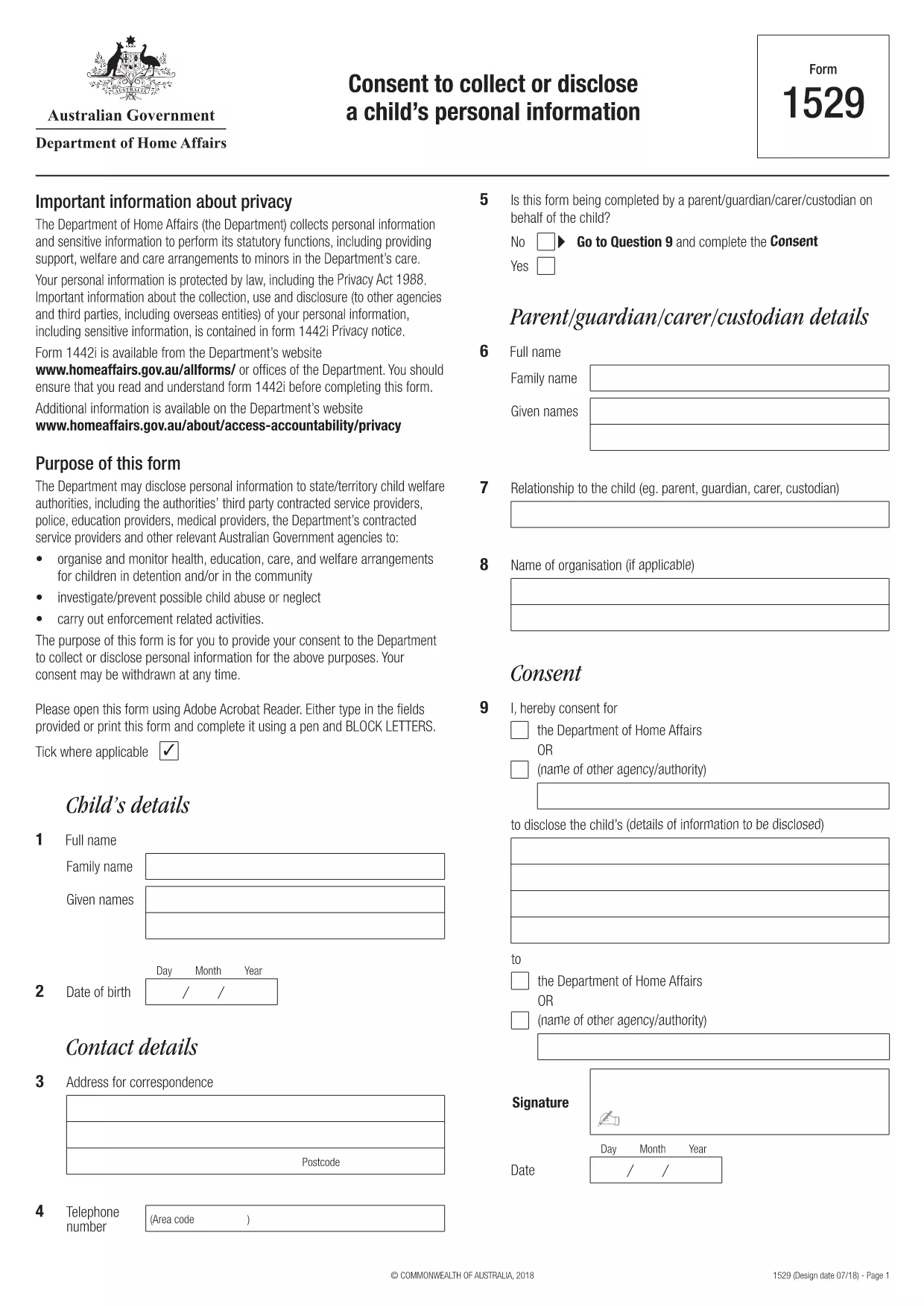
Form 1529 – Consent to Collect or Disclose a Child’s Personal Information

  1. Negara Australia
  2. Bahasa Bahasa inggris
  3. Aktivitas Karakter atau identitas
Form 1529 – Consent to Collect or Disclose a Child’s Personal Information

What is Form 1529?

Form 1529 is the official consent to collect or disclose a child’s personal information required by the Australian Department of Home Affairs. It allows parents or guardians to give permission for government agencies to access or share a minor’s data for immigration, welfare, or protection purposes.

Who Needs to Complete Form 1529?

The form is mandatory for:

  • Parents or legal guardians of children under 18 who are involved in a Home Affairs case.
  • Applicants for visas, citizenship, or refugee status who have dependent children.
  • Legal representatives acting on behalf of a child.

How to Fill Out Form 1529 Online

Instead of downloading the PDF and using a separate editor, you can fill the form directly on Formize:

  1. Click the **"Fill out this form"** button below.
  2. Wait a few seconds while the Formize PDF Filler app loads the fillable version of Form 1529.
  3. Enter the required information in each field – the interface highlights mandatory sections.
  4. Review your answers, then click **"Submit"** to generate a completed PDF.
  5. Download, print, or email the finished form directly from the page.

Common Mistakes to Avoid

  • Leaving mandatory fields blank – the filler will flag these before you can submit.
  • Using an outdated version of the form – always use the PDF linked on this page (2024‑latest).
  • Providing incorrect dates or identification numbers – double‑check passports, birth certificates, and visa numbers.
  • Signing digitally when a handwritten signature is required – follow the instructions on the final page of the PDF.

Where to Submit the Completed Form

After you have downloaded the signed PDF, you can submit it through one of the following channels:

  • Upload via the Home Affairs online portal (ImmiAccount).
  • Attach to your visa or citizenship application.
  • Mail to the address listed on the form’s last page.

Keeping a copy for your records is recommended.

FAQ
  • What is the purpose of Form 1529?

    Form 1529 gives parents or guardians consent for the Department of Home Affairs to collect, use, or share a child’s personal information for immigration and welfare decisions.

  • Can I fill Form 1529 on a mobile device?

    Yes. The Formize PDF Filler works on all modern browsers, including smartphones and tablets.

  • Do I need a lawyer to complete this form?

    No. The form is designed for parents or legal guardians. If you have complex legal questions, consult a migration agent.

  • Is an electronic signature accepted?

    The Department accepts electronic signatures for most cases, but check the specific instructions on the last page of the PDF.

  • How long is Form 1529 valid?

    The consent is valid for the duration of the specific visa or immigration process it relates to. A new form may be required for new applications.

  • What should I do if I make a mistake after submitting?

    Contact the Home Affairs help desk immediately and request a revised form. Do not alter a submitted PDF on your own.

  • Is there a fee to download or fill Form 1529?

    Downloading and filling the form via Formize is free. Any government processing fees are separate.

BAGAIMANA CARANYA

Cara mengisi form 1529 gratis secara online dalam 5 langkah mudah:

  1. 1
    Open the Fillable Form
    Click the **"Fill out this form"** button on the page. The Formize PDF Filler app will open in a new window.
  2. 2
    Load the Form
    Wait a few seconds while the system loads the fillable version of Form 1529.
  3. 3
    Enter Your Information
    Complete each highlighted field. Required fields are marked with an asterisk.
  4. 4
    Review and Submit
    Check all entries for accuracy, then click **"Submit"** to generate the completed PDF.
  5. 5
    Download or Print
    Save the finished form to your device, print it if a physical signature is needed, and submit as instructed.
Bentuk aplikasi Pengisi PDF
TENTANG

Bentuk Karakter atau Identitas

form 1529 adalah salah satu dokumen atau formulir yang berkaitan dengan penetapan atau verifikasi identitas seseorang. Formulir ini biasanya memerlukan informasi pribadi dan dokumentasi untuk mengonfirmasi identitas seseorang. Berikut beberapa contoh formulir yang umumnya dikaitkan dengan verifikasi identitas:

Formulir Verifikasi Identitas: Formulir ini digunakan oleh organisasi, seperti pemberi kerja, lembaga pemerintah, atau lembaga keuangan, untuk memverifikasi identitas individu. Mereka biasanya meminta informasi pribadi, seperti nama, alamat, tanggal lahir, dan nomor Jaminan Sosial, dan mungkin memerlukan dokumentasi pendukung seperti tanda pengenal yang dikeluarkan pemerintah, paspor, atau akta kelahiran.

Formulir Bukti Alamat: Formulir ini digunakan untuk memverifikasi alamat tempat tinggal seseorang. Mereka mungkin meminta orang tersebut untuk memberikan tagihan utilitas, laporan bank, perjanjian sewa, atau dokumen lain yang menunjukkan alamat mereka saat ini.

Formulir Otorisasi Pemeriksaan Latar Belakang: Saat sebuah organisasi melakukan pemeriksaan latar belakang terhadap seseorang, sering kali organisasi tersebut meminta orang tersebut untuk mengisi formulir yang mengizinkan pemeriksaan tersebut. Formulir ini mungkin meminta informasi pribadi, termasuk nama, tanggal lahir, dan nomor Jaminan Sosial, yang membantu menentukan identitas orang tersebut.

Formulir Pernyataan Pencurian Identitas: Dalam kasus pencurian identitas, korban mungkin perlu mengisi formulir pernyataan pencurian identitas. Formulir ini membantu individu melaporkan penggunaan identitas mereka yang menipu dan memberikan catatan hukum atas insiden tersebut.

Penting untuk dicatat bahwa bentuk dan persyaratan khusus untuk menetapkan atau memverifikasi identitas dapat bervariasi tergantung pada konteksnya, seperti tujuan, yurisdiksi, atau organisasi yang terlibat. Selalu mengacu pada formulir khusus yang disediakan oleh organisasi atau lembaga yang meminta verifikasi identitas untuk mendapatkan informasi paling akurat dan terkini.

FITUR

Pengisi PDF

Cara termudah untuk mengisi formulir PDF secara online

  • Isi form 1529 dengan cepat
    Mencari cara mengisi form 1529 dengan cepat secara online? Dengan pengisi formulir PDF online gratis kami, Anda akan tahu cara mengedit dan mengisi dokumen pdf ini dalam waktu kurang dari satu menit.
  • Editor PDF online yang mudah digunakan
    Muak dengan mencetak file PDF sehingga Anda dapat mengeditnya, sebelum memindai ulang dan mengirimnya kembali? Edit dokumen PDF secara online gratis. Gunakan editor pdf online kami untuk menghemat waktu dan kertas.
  • Alat hebat, semua platform
    Ingin tahu cara mengisi form 1529 di Mac, atau mungkin cara menggunakan pengisi PDF gratis? Alat PDF online kami berfungsi di semua platform.
  • Penyimpanan file yang aman
    File "form 1529" yang telah selesai disimpan dalam database aman yang dikelola oleh hosting Amazon Cloud. Anda dapat menghapus file Anda dari sistem kami kapan saja. Bagaimanapun, file-file ini secara otomatis dihapus setelah 24 jam.
  • Ngobrol dengan form 1529
    Ngobrol dengan "form 1529" di Chatize yang merupakan asisten pembaca PDF gratis. Ajukan pertanyaan dan dapatkan jawaban dari "form 1529". Cukup klik tombol Chat Dengan Dokumen di atas.

Hapus sesi pengisian

Hapus sesi pengisian yang dipilih? Dalam hal ini, kemajuan Anda dalam menyelesaikan formulir akan hilang.

Hapus sesi pengeditan

Hapus sesi pengeditan yang dipilih? Dalam hal ini, kemajuan Anda dalam membuat dan mengedit formulir akan hilang.