
Pilih bahasa

Duplicate Driver’s License Application (WA)

  1. Bahasa Bahasa inggris
  2. Negara Australia
  3. Aktivitas Pendaftaran kendaraan
  4. Departemen Departemen Perhubungan
Duplicate Driver’s License Application (WA)

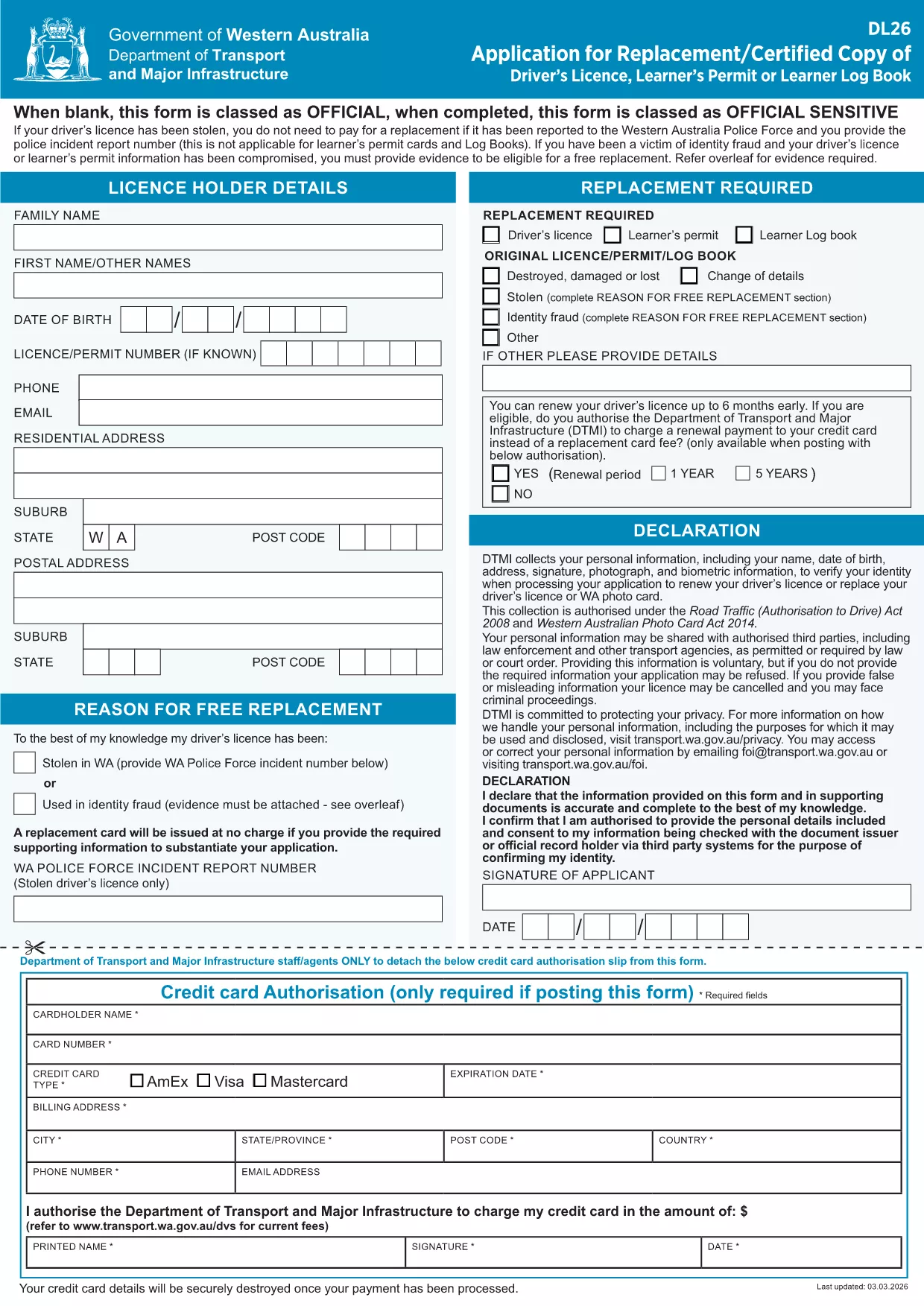
If you’ve lost, damaged, or had your driver’s licence stolen, the Western Australian Department of Transport requires you to complete a Duplicate Driver’s License application. This fillable PDF form is officially recognised and can be submitted online or in‑person.

What is a Duplicate Driver’s License?

A duplicate licence is a replacement for an existing licence that is no longer usable. It is not a new licence class; it simply reproduces the same details, number, and endorsements as the original.

How to Complete the Duplicate Licence PDF

Instead of downloading the PDF to a desktop editor, click the "Fill out this form" button on this page. The Formize PDF Filler app will load the document directly in your browser, allowing you to type, select, and sign without any additional software.

Common Mistakes to Avoid

  • Leaving any required field blank – the form will not submit.
  • Using a non‑black pen for the signature when printing a hard copy.
  • Providing an incorrect address – it must match the address on your proof of residence.
  • Forgetting to attach supporting evidence (e.g., police report for theft).

Where to Submit Your Application

After completing the form, you can:

  • Print and deliver it to a Transport WA Customer Service Centre.
  • Mail the signed PDF to the address listed on the form.
  • Upload the completed PDF through the Transport WA online portal if you have a digital account.

Why Use Formize’s Fillable PDF Tool?

Formize turns static PDFs into interactive, web‑based forms. Benefits include:

  • Instant validation of required fields.
  • No installation of Adobe Acrobat needed.
  • Secure, encrypted transmission of your personal data.
  • Save a draft and return later if you need more documents.

Get your duplicate licence processed quickly and avoid unnecessary trips to the office.

FAQ
  • Do I need a police report to get a duplicate licence?

    A police report is required only if your licence was stolen. For lost or damaged licences, a statutory declaration is sufficient.

  • How long does it take to receive the duplicate licence?

    Processing usually takes 5‑7 business days after the completed form and supporting documents are received.

  • Can I use the same photo from my original licence?

    Yes. The duplicate licence copies the original photo, so you do not need to provide a new one unless it is damaged.

  • Is there a fee for a duplicate driver’s licence in WA?

    A standard replacement fee applies. Check the latest fee schedule on the Transport WA website before submitting.

  • What if I make a mistake after submitting the form?

    Contact the Department of Transport’s Customer Service Centre immediately. You may need to submit a corrected form or an amendment request.

  • Can I fill out the form on a mobile device?

    Yes. Formize’s PDF filler is fully responsive and works on smartphones and tablets.

  • Do I need to print the form if I submit it online?

    No. An electronic submission is accepted as long as you sign digitally and attach all required documents.

  • Is my personal information safe when using Formize?

    Formize uses SSL encryption and does not store your data after the session ends, ensuring your information remains private.

BAGAIMANA CARANYA

Cara mengisi duplicate driver’s license gratis secara online dalam 5 langkah mudah:

  1. 1
    Open the Fillable Form
    Click the "Fill out this form" button on the page. The Formize PDF Filler will load the duplicate licence PDF directly in your browser.
  2. 2
    Enter Your Details
    Type your personal information, licence number, and address into the highlighted fields. Required fields are marked with an asterisk.
  3. 3
    Attach Supporting Documents
    Use the upload button to add a police report, proof of identity, or any other evidence requested on the form.
  4. 4
    Sign Electronically
    Click the signature field and type your full name or draw your signature with your mouse or touchscreen.
  5. 5
    Submit or Download
    When the form is complete, click "Submit" to send it directly to Transport WA or click "Download" to print and mail a hard copy.
Bentuk aplikasi Pengisi PDF
TENTANG

Formulir Pendaftaran Kendaraan

Jika Anda memiliki atau menyewa kendaraan bermotor, trailer, atau perahu, Anda harus memenuhi kewajiban tertentu untuk menjaga agar kendaraan Anda terdaftar secara sah dan aman.

duplicate driver’s license adalah salah satu formulir STNK yang merupakan dokumen yang digunakan untuk mendaftarkan kendaraan bermotor dengan otoritas negara bagian atau provinsi terkait. Formulir ini biasanya diperlukan saat seseorang membeli kendaraan baru atau bekas atau saat mereka pindah ke negara bagian atau provinsi baru dengan kendaraan.

Persyaratan dan formulir pasti yang diperlukan untuk pendaftaran kendaraan dapat berbeda-beda di setiap lokasi, tetapi umumnya, prosesnya mencakup pemberian informasi tentang kendaraan, pemilik, dan hak gadai apa pun pada kendaraan tersebut.

Setelah formulir pendaftaran dan biaya diserahkan, otoritas negara bagian atau provinsi akan menerbitkan sertifikat pendaftaran atau plat nomor kepada pemilik kendaraan. Pendaftaran ini memungkinkan kendaraan untuk dioperasikan secara legal di jalan umum dan jalan raya.

FITUR

Pengisi PDF

Cara termudah untuk mengisi formulir PDF secara online

  • Isi duplicate driver’s license dengan cepat
    Mencari cara mengisi duplicate driver’s license dengan cepat secara online? Dengan pengisi formulir PDF online gratis kami, Anda akan tahu cara mengedit dan mengisi dokumen pdf ini dalam waktu kurang dari satu menit.
  • Editor PDF online yang mudah digunakan
    Muak dengan mencetak file PDF sehingga Anda dapat mengeditnya, sebelum memindai ulang dan mengirimnya kembali? Edit dokumen PDF secara online gratis. Gunakan editor pdf online kami untuk menghemat waktu dan kertas.
  • Alat hebat, semua platform
    Ingin tahu cara mengisi duplicate driver’s license di Mac, atau mungkin cara menggunakan pengisi PDF gratis? Alat PDF online kami berfungsi di semua platform.
  • Penyimpanan file yang aman
    File "duplicate driver’s license" yang telah selesai disimpan dalam database aman yang dikelola oleh hosting Amazon Cloud. Anda dapat menghapus file Anda dari sistem kami kapan saja. Bagaimanapun, file-file ini secara otomatis dihapus setelah 24 jam.
  • Ngobrol dengan duplicate driver’s license
    Ngobrol dengan "duplicate driver’s license" di Chatize yang merupakan asisten pembaca PDF gratis. Ajukan pertanyaan dan dapatkan jawaban dari "duplicate driver’s license". Cukup klik tombol Chat Dengan Dokumen di atas.

Hapus sesi pengisian

Hapus sesi pengisian yang dipilih? Dalam hal ini, kemajuan Anda dalam menyelesaikan formulir akan hilang.

Hapus sesi pengeditan

Hapus sesi pengeditan yang dipilih? Dalam hal ini, kemajuan Anda dalam membuat dan mengedit formulir akan hilang.