Pilih bahasa

Application Form Victoria – Fillable PDF

  1. Bahasa Bahasa inggris
  2. Negara Australia
  3. Departemen Justice and Community Safety
  4. Aktivitas Government Services
Application Form Victoria – Fillable PDF

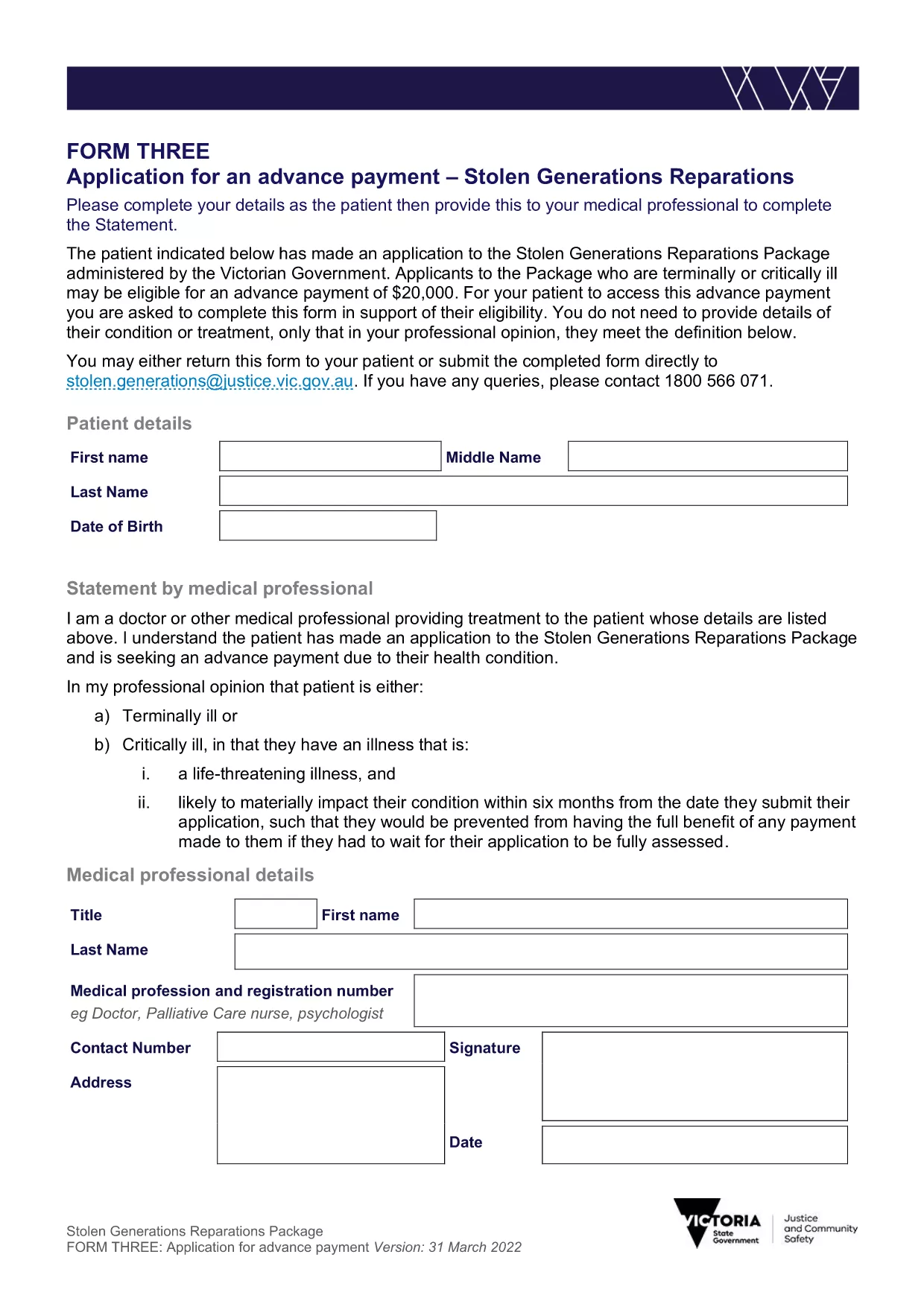
Looking for a fast, secure way to complete your Victorian application form? Formize.com offers a free, online PDF filler that lets you edit and submit the official Stolen Generations Reparations Package – Application for an Advance Payment directly in your browser.

What is the Victorian Application Form?

This is the government‑approved PDF used to apply for an advance payment under the Stolen Generations Reparations Package in Victoria. The form collects personal details, eligibility information, and consent statements required by the Department of Justice and Community Safety.

How to Fill Out the Form Online

Instead of downloading, printing, and scanning, simply click the "Fill out this form" button below. The Formize PDF Filler will load automatically, allowing you to type, check boxes, and sign electronically.

  • Click **Fill out this form**.
  • Wait a few seconds while the Formize PDF Filler app loads.
  • Enter your information in each field – the interface highlights required fields.
  • Save your progress at any time or submit the completed form directly to the Victorian government portal.

Common Mistakes to Avoid

  • Leaving required fields blank – the filler will flag missing information before you can submit.
  • Using an outdated version – always use the PDF linked on this page to ensure you have the latest format.
  • Incorrect file format for attachments – if you need to attach supporting documents, use PDF, JPG, or PNG only.

Where to Submit Your Application

After completing the form, you can:

  • Download the filled PDF and email it to stolen.generations@justice.vic.gov.au.
  • Upload the PDF directly through the Victorian government’s online portal (link provided on the confirmation screen).

Download the Fillable PDF

If you prefer to work offline, you can still download the official fillable PDF below. It works with any standard PDF editor, but we recommend using Formize for the best experience.

Download the Victorian Application Form (PDF)

FAQ
  • Is the Victorian application form free to use?

    Yes. Both the PDF download and the Formize online filler are completely free.

  • Can I edit the form after I have saved it?

    Absolutely. The Formize filler lets you reopen the saved PDF at any time to make changes.

  • Do I need a PDF reader to fill out the form?

    No. The Formize web app works in any modern browser, so no extra software is required.

  • What if I make a mistake while filling the form?

    Use the **Undo** button in the filler or simply delete the incorrect entry and re‑type. The form validates required fields before submission.

  • How do I know my data is secure?

    Formize uses SSL encryption for all data transferred between your browser and our servers. Your information is never stored permanently.

  • Can I print a hard copy after completing the form?

    Yes. Once the form is filled, click the **Print** icon in the filler to produce a hard‑copy version.

BAGAIMANA CARANYA

Cara mengisi application form victoria gratis secara online dalam 4 langkah mudah:

  1. 1
    Open the Formize PDF Filler
    Click the **Fill out this form** button on the page. The Formize PDF Filler loads in a new tab.
  2. 2
    Enter Your Details
    Type directly into each field. Required fields are highlighted in red until completed.
  3. 3
    Save or Submit
    When finished, you can download the completed PDF for your records or submit it online via the Victorian government portal.
  4. 4
    Confirm Submission
    You will receive an on‑screen confirmation and a copy of the submitted form emailed to you (if you provided an email address).
Bentuk aplikasi Pengisi PDF
TENTANG

kerangka application form victoria

Dengan serangkaian fitur tradisional untuk melihat dan mengisi dokumen PDF, dipadukan dengan manfaat aplikasi web dan tata letak responsif, Anda dapat menyelesaikan application form victoria dalam hitungan menit.

FITUR

Pengisi PDF

Cara termudah untuk mengisi formulir PDF secara online

  • Isi application form victoria dengan cepat
    Mencari cara mengisi application form victoria dengan cepat secara online? Dengan pengisi formulir PDF online gratis kami, Anda akan tahu cara mengedit dan mengisi dokumen pdf ini dalam waktu kurang dari satu menit.
  • Editor PDF online yang mudah digunakan
    Muak dengan mencetak file PDF sehingga Anda dapat mengeditnya, sebelum memindai ulang dan mengirimnya kembali? Edit dokumen PDF secara online gratis. Gunakan editor pdf online kami untuk menghemat waktu dan kertas.
  • Alat hebat, semua platform
    Ingin tahu cara mengisi application form victoria di Mac, atau mungkin cara menggunakan pengisi PDF gratis? Alat PDF online kami berfungsi di semua platform.
  • Penyimpanan file yang aman
    File "application form victoria" yang telah selesai disimpan dalam database aman yang dikelola oleh hosting Amazon Cloud. Anda dapat menghapus file Anda dari sistem kami kapan saja. Bagaimanapun, file-file ini secara otomatis dihapus setelah 24 jam.
  • Ngobrol dengan application form victoria
    Ngobrol dengan "application form victoria" di Chatize yang merupakan asisten pembaca PDF gratis. Ajukan pertanyaan dan dapatkan jawaban dari "application form victoria". Cukup klik tombol Chat Dengan Dokumen di atas.

Hapus sesi pengisian

Hapus sesi pengisian yang dipilih? Dalam hal ini, kemajuan Anda dalam menyelesaikan formulir akan hilang.

Hapus sesi pengeditan

Hapus sesi pengeditan yang dipilih? Dalam hal ini, kemajuan Anda dalam membuat dan mengedit formulir akan hilang.