Pilih bahasa

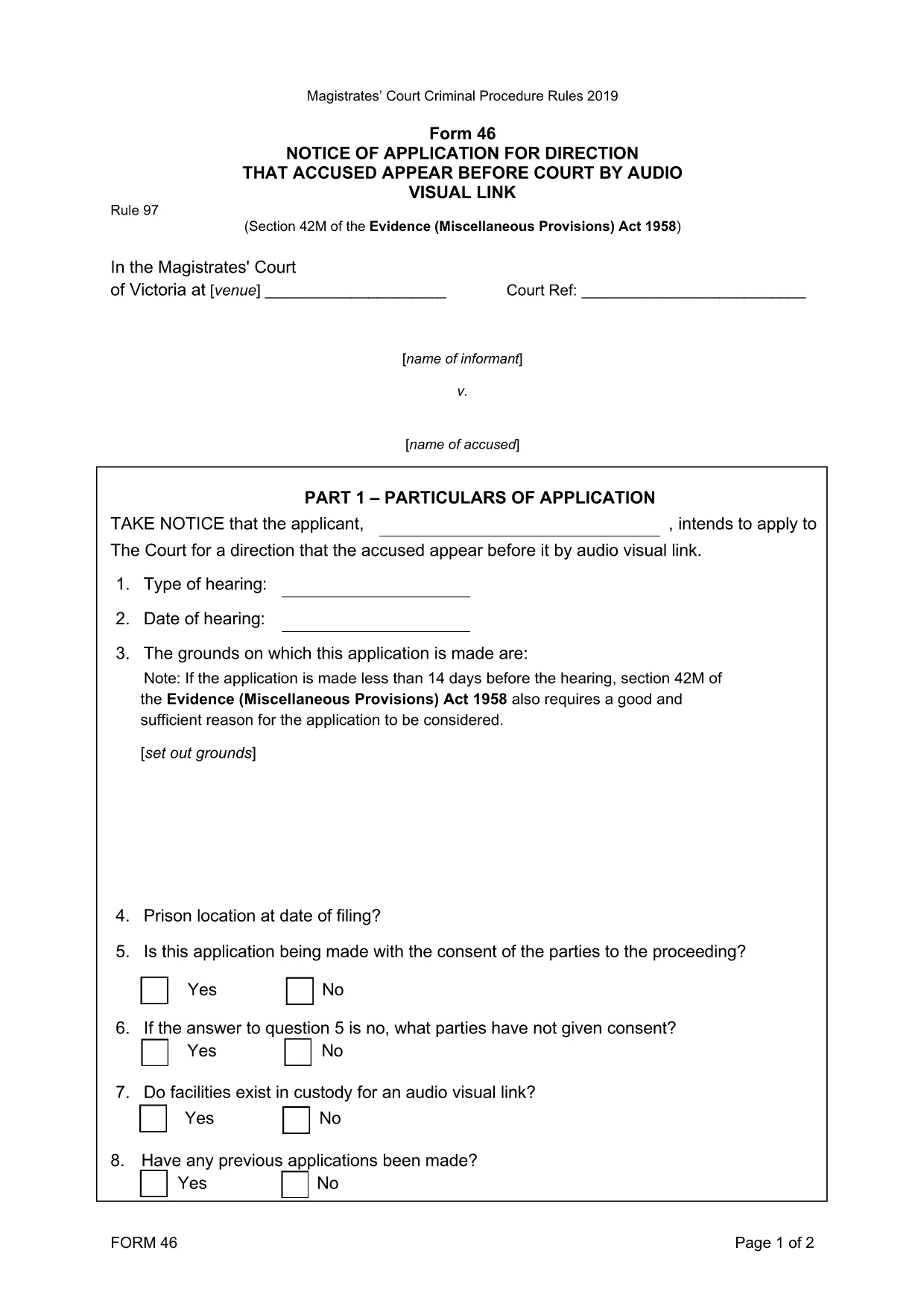
Form 46‑0414: Application for Appearance by Audio‑Visual Link

  1. Bahasa Bahasa inggris
  2. Negara Australia
  3. Aktivitas Legal Forms
  4. Departemen Magistrates' Court
Form 46‑0414: Application for Appearance by Audio‑Visual Link

Form 46‑0414 is the official application used in the Magistrates' Court of Victoria when a defendant or a witness needs to appear in court via an audio‑visual link (AVL). This form streamlines the request, ensuring the court has all required details to grant an AVL appearance.

What is Form 46‑0414?

The form captures essential information such as the case number, parties involved, reason for the AVL request, and any supporting documentation. It is a mandatory filing whenever a physical appearance is impractical due to health, distance, or other valid reasons.

How to Fill Form 46‑0414 Online

Instead of downloading the PDF and editing it manually, simply click the "Fill out this form" button on this page. The Formize PDF Filler app will load instantly, letting you type directly into each field, add signatures, and save your progress.

  • Step 1: Click the blue "Fill out this form" button.
  • Step 2: The Formize filler loads – the PDF appears with editable fields.
  • Step 3: Complete each section, attaching any required documents.
  • Step 4: Review, then click "Save & Download" to get the finished PDF.

Common Mistakes to Avoid

  • Leaving the "Reason for AVL" section blank – the court needs a clear justification.
  • Using an outdated case number – verify the number on your court notice.
  • Forgetting to attach supporting medical or travel documents.
  • Signing the form with a typed name only – use the electronic signature tool in Formize.

Where to Submit the Completed Form

After saving the filled PDF, you can:

  • Email it to the court registry (check the address on your notice).
  • Upload it via the Magistrates' Court online portal.
  • Deliver a printed copy in person to the court clerk.

Download the Fillable PDF

If you prefer to work offline, you can download the original fillable PDF directly from the court’s website. The file is fully searchable and compatible with most PDF editors.

FAQ
  • Who can use Form 46‑0414?

    Any defendant, accused person, or witness who has been ordered to appear in person but needs an audio‑visual link due to health, distance, or other valid reasons.

  • Is the form available in a printable version?

    Yes. You can download the original fillable PDF from the court’s website and print it if you prefer a paper submission.

  • What supporting documents are required?

    Typically a medical certificate, travel restriction notice, or any other proof that explains why a physical appearance is not possible.

  • How long does the court take to approve an AVL request?

    Approval time varies, but most courts aim to respond within 5‑7 business days after receiving a complete application.

  • Can I submit the form electronically?

    Yes. After completing the form with Formize, you can email the PDF or upload it through the Magistrates' Court online portal.

  • What happens if I forget to sign the form?

    The court will reject the application. Use the electronic signature tool in Formize to add a valid signature before submitting.

  • Do I need a lawyer to fill out Form 46‑0414?

    A lawyer is not required, but legal advice can help ensure all details are accurate and improve the chance of approval.

BAGAIMANA CARANYA

Cara mengisi Form 46‑0414 gratis secara online dalam 4 langkah mudah:

  1. 1
    Open the Fillable Form
    Click the "Fill out this form" button on the page. The Formize PDF Filler will open in a new window.
  2. 2
    Enter Your Information
    Type directly into each highlighted field – case number, parties, reason for AVL, and any supporting details.
  3. 3
    Add Attachments
    Use the paperclip icon to upload medical certificates or travel documents required by the court.
  4. 4
    Save and Download
    When finished, click "Save & Download". The completed PDF is ready to email or upload to the court.
Bentuk aplikasi Pengisi PDF
TENTANG

kerangka Form 46‑0414

Dengan serangkaian fitur tradisional untuk melihat dan mengisi dokumen PDF, dipadukan dengan manfaat aplikasi web dan tata letak responsif, Anda dapat menyelesaikan Form 46‑0414 dalam hitungan menit.

FITUR

Pengisi PDF

Cara termudah untuk mengisi formulir PDF secara online

  • Isi Form 46‑0414 dengan cepat
    Mencari cara mengisi Form 46‑0414 dengan cepat secara online? Dengan pengisi formulir PDF online gratis kami, Anda akan tahu cara mengedit dan mengisi dokumen pdf ini dalam waktu kurang dari satu menit.
  • Editor PDF online yang mudah digunakan
    Muak dengan mencetak file PDF sehingga Anda dapat mengeditnya, sebelum memindai ulang dan mengirimnya kembali? Edit dokumen PDF secara online gratis. Gunakan editor pdf online kami untuk menghemat waktu dan kertas.
  • Alat hebat, semua platform
    Ingin tahu cara mengisi Form 46‑0414 di Mac, atau mungkin cara menggunakan pengisi PDF gratis? Alat PDF online kami berfungsi di semua platform.
  • Penyimpanan file yang aman
    File "Form 46‑0414" yang telah selesai disimpan dalam database aman yang dikelola oleh hosting Amazon Cloud. Anda dapat menghapus file Anda dari sistem kami kapan saja. Bagaimanapun, file-file ini secara otomatis dihapus setelah 24 jam.
  • Ngobrol dengan Form 46‑0414
    Ngobrol dengan "Form 46‑0414" di Chatize yang merupakan asisten pembaca PDF gratis. Ajukan pertanyaan dan dapatkan jawaban dari "Form 46‑0414". Cukup klik tombol Chat Dengan Dokumen di atas.

Hapus sesi pengisian

Hapus sesi pengisian yang dipilih? Dalam hal ini, kemajuan Anda dalam menyelesaikan formulir akan hilang.

Hapus sesi pengeditan

Hapus sesi pengeditan yang dipilih? Dalam hal ini, kemajuan Anda dalam membuat dan mengedit formulir akan hilang.