Pilih bahasa

NSW Photo Card Application Form – Fillable PDF with Photo

  1. Negara Australia
  2. Bahasa Bahasa inggris
  3. Aktivitas Identification
  4. Departemen Transport
NSW Photo Card Application Form – Fillable PDF with Photo

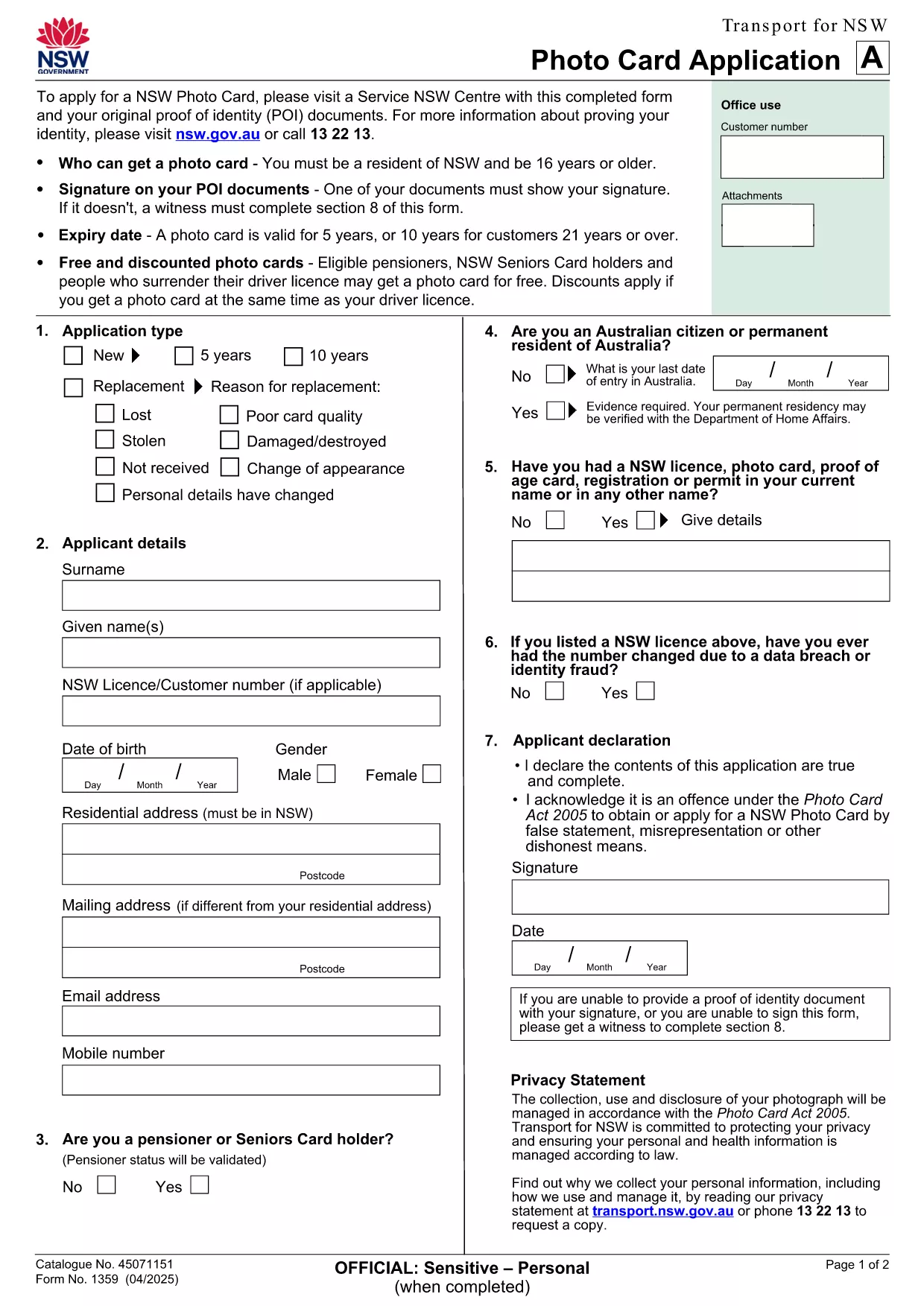
Looking for a fast, secure way to apply for a NSW Photo Card? This page gives you direct access to the official NSW Photo Card application form that includes a dedicated photo field. Whether you prefer to download the PDF or fill it out instantly online, Formize makes the process simple.

Why You Need a NSW Photo Card

A NSW Photo Card is an accepted form of identification for residents aged 16 and over who don’t have a driver licence. It displays your name, address, date of birth and a recent photo, and is valid for up to 10 years for eligible customers.

Key Features of the Fillable PDF Form

  • Built‑in photo placeholder – attach a passport‑style picture directly in the form.
  • Editable text fields for personal details, address, and signature.
  • Auto‑calculation of fees based on eligibility and concessions.
  • Compliant with Transport for NSW security standards.

How to Complete the Form Online with Formize

Instead of downloading the PDF and using a separate editor, simply click the "Fill out this form" button on this page. The Formize PDF Filler app loads in seconds, letting you type, upload a photo, and sign electronically.

Common Mistakes to Avoid

  • Uploading a photo that doesn’t meet the NSW guidelines (e.g., glasses glare, incorrect background).
  • Leaving any mandatory field blank – the filler will highlight missing information.
  • Submitting an outdated address proof; always use a current utility bill or bank statement.

Where to Submit Your Application

After completing the form, print it (if required) and visit any Service NSW Centre. Bring your original identity documents, the signed form, and the photo you uploaded. Cash, card, or EFTPOS payments are accepted.

Need extra help? Review the official Service NSW guide for detailed photo requirements and eligibility criteria.

FAQ
  • Do I need a driver licence to apply for a NSW Photo Card?

    No. The Photo Card is intended for residents who do not have a driver licence or whose licence has expired.

  • What photo specifications are required?

    The photo must be a clear, front‑facing headshot with a plain background, no glasses glare, and a size of 35mm × 45mm.

  • Can I submit the form entirely online?

    You can fill the form online with Formize, but the final submission must be in person at a Service NSW Centre to have your photo taken and verify identity documents.

  • How long is the Photo Card valid?

    The card is valid for 5 years for most applicants, or 10 years for eligible customers aged 21 and over.

  • Are there any fees or concessions?

    Fees vary based on whether you hold a driver licence and your eligibility for concessions (e.g., seniors, pensioners, carers).

  • What should I do if I cannot attend a Service NSW Centre?

    Eligible applicants with medical reasons can use a photo kit and mail the completed form, as outlined on the Service NSW website.

BAGAIMANA CARANYA

Cara mengisi application form with photo gratis secara online dalam 5 langkah mudah:

  1. 1
    Open the Fillable Form
    Click the "Fill out this form" button on the page. The Formize PDF Filler loads in a new window.
  2. 2
    Enter Your Details
    Type your name, address, date of birth, and any other required information into the highlighted fields.
  3. 3
    Upload Your Photo
    Use the photo placeholder to upload a recent passport‑style picture that meets NSW guidelines.
  4. 4
    Add Your Signature
    Draw or upload a digital signature in the signature field.
  5. 5
    Review & Submit
    Check all fields for completeness, then click "Save & Download" to get a printable copy. Bring the printed form to a Service NSW Centre.
Bentuk aplikasi Pengisi PDF
TENTANG

kerangka application form with photo

Dengan serangkaian fitur tradisional untuk melihat dan mengisi dokumen PDF, dipadukan dengan manfaat aplikasi web dan tata letak responsif, Anda dapat menyelesaikan application form with photo dalam hitungan menit.

FITUR

Pengisi PDF

Cara termudah untuk mengisi formulir PDF secara online

  • Isi application form with photo dengan cepat
    Mencari cara mengisi application form with photo dengan cepat secara online? Dengan pengisi formulir PDF online gratis kami, Anda akan tahu cara mengedit dan mengisi dokumen pdf ini dalam waktu kurang dari satu menit.
  • Editor PDF online yang mudah digunakan
    Muak dengan mencetak file PDF sehingga Anda dapat mengeditnya, sebelum memindai ulang dan mengirimnya kembali? Edit dokumen PDF secara online gratis. Gunakan editor pdf online kami untuk menghemat waktu dan kertas.
  • Alat hebat, semua platform
    Ingin tahu cara mengisi application form with photo di Mac, atau mungkin cara menggunakan pengisi PDF gratis? Alat PDF online kami berfungsi di semua platform.
  • Penyimpanan file yang aman
    File "application form with photo" yang telah selesai disimpan dalam database aman yang dikelola oleh hosting Amazon Cloud. Anda dapat menghapus file Anda dari sistem kami kapan saja. Bagaimanapun, file-file ini secara otomatis dihapus setelah 24 jam.
  • Ngobrol dengan application form with photo
    Ngobrol dengan "application form with photo" di Chatize yang merupakan asisten pembaca PDF gratis. Ajukan pertanyaan dan dapatkan jawaban dari "application form with photo". Cukup klik tombol Chat Dengan Dokumen di atas.

Hapus sesi pengisian

Hapus sesi pengisian yang dipilih? Dalam hal ini, kemajuan Anda dalam menyelesaikan formulir akan hilang.

Hapus sesi pengeditan

Hapus sesi pengeditan yang dipilih? Dalam hal ini, kemajuan Anda dalam membuat dan mengedit formulir akan hilang.