Pilih bahasa

Photo Card Application Form (PC1) – Fillable PDF

  1. Negara Australia
  2. Bahasa Bahasa inggris
  3. Aktivitas Identification
  4. Departemen Transport
Photo Card Application Form (PC1) – Fillable PDF

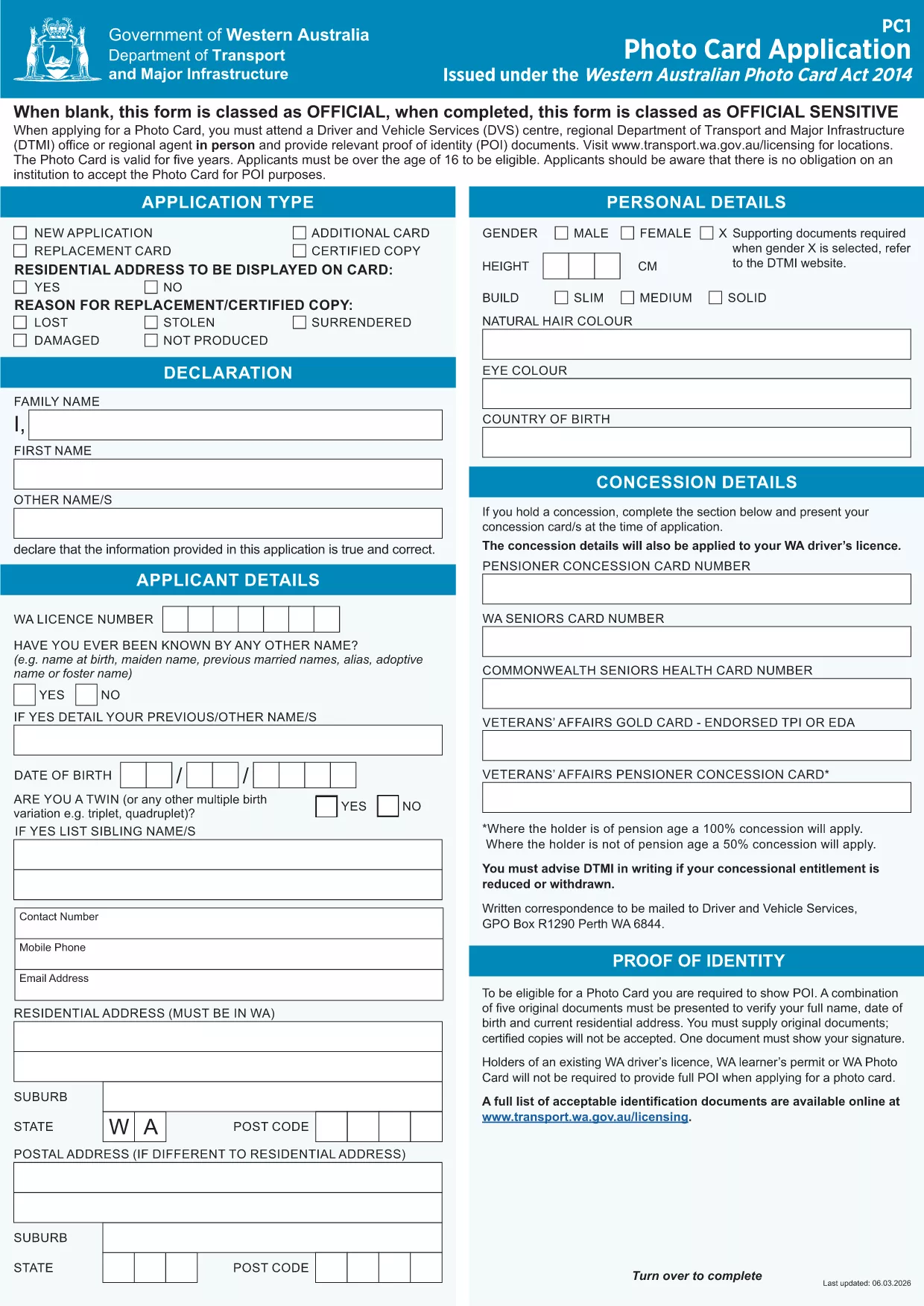
The Western Australian Photo Card (PC1) is an official identification document issued under the Photo Card Act 2014. Our fillable PDF version lets you complete the entire application online, upload your picture, and submit it without printing.

What Is the PC1 Photo Card Application?

The PC1 form collects personal details, proof of identity, and a recent photograph. It is used for drivers who do not hold a driver licence or who need an additional ID card.

How to Complete the Fillable PDF Online

Instead of downloading the PDF and editing it in a separate editor, simply click the "Fill out this form" button on this page. The Formize PDF Filler app will load the document directly in your browser, allowing you to:

  • Enter all required fields
  • Upload a clear, recent picture
  • Save your progress
  • Download or submit the completed form securely

Common Mistakes to Avoid

  • Using a photo that is not a recent head‑shot (must be taken within the last 12 months).
  • Leaving any mandatory fields blank – the filler will highlight missing information.
  • Submitting a low‑resolution image; the system requires at least 300 dpi.

Where to Submit Your Application

After completing the form, you can either:

  • Download the signed PDF and mail it to Transport WA – Photo Card Division, or
  • Upload the file directly through the online portal linked on the confirmation page.

FAQs About the Photo Card Form

Find quick answers to the most common questions below, or scroll down to the full FAQ section.

FAQ
  • Do I need a passport‑style photo for the PC1 form?

    Yes. The photo must be a clear head‑shot taken within the last 12 months, with a plain background and no glasses.

  • Can I edit the form after I have saved it?

    Absolutely. The Formize PDF Filler lets you reopen the saved file and make changes before final submission.

  • Is there a fee for the Western Australian Photo Card?

    Yes, a standard fee applies. Check the Transport WA website for the current price schedule.

  • What identification documents do I need to attach?

    You must provide at least two forms of ID, such as a birth certificate, passport, or Medicare card.

  • How long does processing take after I submit the form?

    Processing typically takes 10‑15 business days once all required documents are received.

  • Can I use the same form for a driver licence replacement?

    No. The PC1 is only for the Photo Card. Driver licence applications use a different form.

  • Is the fillable PDF compatible with mobile devices?

    Yes. Formize’s PDF Filler works on most modern smartphones and tablets.

BAGAIMANA CARANYA

Cara mengisi photo card application pdf gratis secara online dalam 5 langkah mudah:

  1. 1
    Click the Fill Out Button
    Press the "Fill out this form" button on this page to launch the Formize PDF Filler.
  2. 2
    Wait for the Filler to Load
    The fillable PDF will appear in your browser within a few seconds.
  3. 3
    Enter Your Details and Upload a Photo
    Complete all required fields, then upload a recent head‑shot that meets the photo guidelines.
  4. 4
    Review, Sign, and Save
    Double‑check the information, add your electronic signature, and save the completed form.
  5. 5
    Submit or Download
    Choose to submit the form directly through the portal or download the PDF for mailing.
Bentuk aplikasi Pengisi PDF
TENTANG

kerangka photo card application pdf

Dengan serangkaian fitur tradisional untuk melihat dan mengisi dokumen PDF, dipadukan dengan manfaat aplikasi web dan tata letak responsif, Anda dapat menyelesaikan photo card application pdf dalam hitungan menit.

FITUR

Pengisi PDF

Cara termudah untuk mengisi formulir PDF secara online

  • Isi photo card application pdf dengan cepat
    Mencari cara mengisi photo card application pdf dengan cepat secara online? Dengan pengisi formulir PDF online gratis kami, Anda akan tahu cara mengedit dan mengisi dokumen pdf ini dalam waktu kurang dari satu menit.
  • Editor PDF online yang mudah digunakan
    Muak dengan mencetak file PDF sehingga Anda dapat mengeditnya, sebelum memindai ulang dan mengirimnya kembali? Edit dokumen PDF secara online gratis. Gunakan editor pdf online kami untuk menghemat waktu dan kertas.
  • Alat hebat, semua platform
    Ingin tahu cara mengisi photo card application pdf di Mac, atau mungkin cara menggunakan pengisi PDF gratis? Alat PDF online kami berfungsi di semua platform.
  • Penyimpanan file yang aman
    File "photo card application pdf" yang telah selesai disimpan dalam database aman yang dikelola oleh hosting Amazon Cloud. Anda dapat menghapus file Anda dari sistem kami kapan saja. Bagaimanapun, file-file ini secara otomatis dihapus setelah 24 jam.
  • Ngobrol dengan photo card application pdf
    Ngobrol dengan "photo card application pdf" di Chatize yang merupakan asisten pembaca PDF gratis. Ajukan pertanyaan dan dapatkan jawaban dari "photo card application pdf". Cukup klik tombol Chat Dengan Dokumen di atas.

Hapus sesi pengisian

Hapus sesi pengisian yang dipilih? Dalam hal ini, kemajuan Anda dalam menyelesaikan formulir akan hilang.

Hapus sesi pengeditan

Hapus sesi pengeditan yang dipilih? Dalam hal ini, kemajuan Anda dalam membuat dan mengedit formulir akan hilang.