
Pilih bahasa

RTB‑13 Application for Substituted Service (Fillable PDF)

  1. Bahasa Bahasa inggris
  2. Negara Kanada
  3. Aktivitas Penyewaan
  4. Negara British Columbia
RTB‑13 Application for Substituted Service (Fillable PDF)

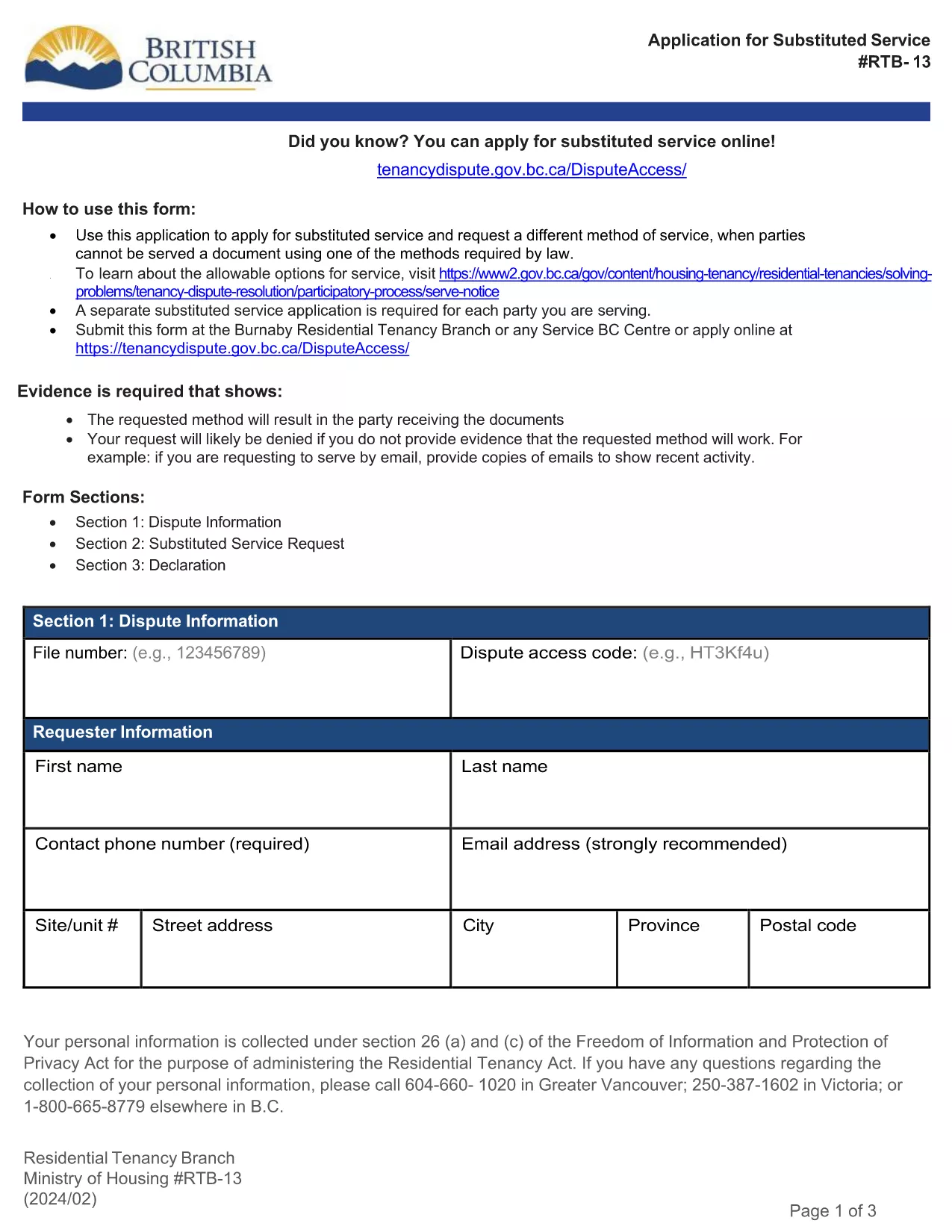
The RTB‑13 Application for Substituted Service is the official form used by the British Columbia Residential Tenancy Branch when a party needs the arbitrator to order an alternative method of serving documents. This form is required when the usual service methods under the Residential Tenancy Act cannot be used.

What Is the RTB‑13 Form?

RTB‑13 is a government‑issued, fillable PDF that captures details such as:

  • Parties involved (landlord, tenant, arbitrator)
  • Reason for requesting substituted service
  • Proposed method of service (email, courier, posting, etc.)
  • Supporting evidence or affidavits

When Should You Use RTB‑13?

Use this form if you have tried the standard service methods (personal delivery, registered mail, etc.) and they have failed, or if the other party’s location makes normal service impractical. Common scenarios include:

  • Tenant has moved without leaving a forwarding address.
  • Landlord cannot locate the tenant after multiple attempts.
  • Documents need to be served to a corporate entity that only accepts electronic delivery.

How to Complete the RTB‑13 Online

Instead of downloading the PDF to a desktop editor, simply click the "Fill out this form" button below. The Formize PDF Filler app will load in your browser, allowing you to:

  1. Navigate field‑by‑field using the Tab key.
  2. Enter required information directly into each box.
  3. Attach supporting documents or affidavits.
  4. Save a copy for your records.
  5. Submit the completed form to the Residential Tenancy Branch via email or upload.

Common Mistakes & Tips

  • Missing signatures: The form is invalid without the landlord’s and tenant’s signatures.
  • Incorrect dates: Use the exact date you attempted the standard service.
  • Insufficient detail: Clearly describe why normal service failed and propose a realistic alternative.
  • File size limits: Keep attached PDFs under 5 MB to avoid upload errors.

Download the Fillable PDF

If you prefer to work offline, you can still download the official RTB‑13 PDF using the link below. Open it with the latest version of Adobe Acrobat Reader for full fillable functionality.

FAQ
  • What is the purpose of RTB‑13?

    RTB‑13 requests that an arbitrator order a different method of serving documents when standard service methods are impossible or have failed.

  • Can I submit RTB‑13 electronically?

    Yes. After completing the fillable PDF with Formize, you can email the PDF or upload it through the Residential Tenancy Branch’s online portal.

  • Do I need a lawyer to fill out RTB‑13?

    No. The form is designed for landlords and tenants to complete themselves, though you may seek legal advice if the situation is complex.

  • How long does the arbitrator take to decide on a substituted service request?

    Processing times vary, but most decisions are issued within 10‑14 business days after the completed form is received.

  • What supporting documents should I include?

    Attach proof of attempted service (e.g., delivery receipts, correspondence), affidavits, and any relevant court orders or notices.

  • Is there a fee for filing RTB‑13?

    There is no filing fee for the RTB‑13 application itself, though other tenancy dispute fees may apply.

  • Can I save my progress and return later?

    Yes. The Formize PDF Filler lets you save a draft on your computer and continue editing at any time.

  • What if I make a mistake after submitting?

    Contact the Residential Tenancy Branch immediately. You may be asked to submit a corrected RTB‑13 with a brief explanation of the changes.

BAGAIMANA CARANYA

Cara mengisi RTB-13 gratis secara online dalam 5 langkah mudah:

  1. 1
    Click the Fill‑out Button
    Press the "Fill out this form" button on the page. The Formize PDF Filler loads instantly in your browser.
  2. 2
    Enter Your Information
    Tab through each fillable field, entering the required details such as party names, reasons for substituted service, and proposed method.
  3. 3
    Attach Supporting Documents
    Use the attachment field to upload affidavits, proof of attempted service, or any other evidence the arbitrator may need.
  4. 4
    Save and Review
    Click "Save" to store a copy on your device, then review all entries for accuracy before submitting.
  5. 5
    Submit to the Residential Tenancy Branch
    Follow the on‑screen instructions to email or upload the completed RTB‑13 form directly to the BC Residential Tenancy Branch.
Bentuk aplikasi Pengisi PDF
TENTANG

Formulir untuk tuan tanah dan/atau penyewa untuk mengusulkan tindakan yang berkaitan dengan perjanjian sewa-menyewa.

RTB-13 adalah salah satu dokumen yang digunakan dalam proses penyewaan atau penyewaan suatu properti. Bentuk-bentuk ini menetapkan perjanjian hukum antara pemilik properti (tuan tanah) dan penyewa, yang menguraikan syarat dan ketentuan perjanjian sewa. Berikut adalah beberapa formulir persewaan atau sewa yang umum:

Permohonan Sewa: Formulir ini biasanya diisi oleh calon penyewa yang tertarik untuk menyewa properti. Ini mengumpulkan informasi pribadi tentang pelamar, seperti nama mereka, informasi kontak, rincian pekerjaan, riwayat sewa, dan referensi. Aplikasi persewaan membantu tuan tanah menilai kesesuaian penyewa dan membuat keputusan yang tepat.

Perjanjian Sewa: Perjanjian sewa adalah kontrak yang mengikat secara hukum yang menguraikan hak dan tanggung jawab pemilik dan penyewa. Ini mencakup rincian penting seperti durasi sewa, jumlah sewa, uang jaminan, biaya keterlambatan pembayaran, kebijakan hewan peliharaan, tanggung jawab pemeliharaan, dan persyaratan lain khusus untuk properti sewaan. Perjanjian sewa dapat bervariasi panjang dan kompleksitasnya tergantung pada pasar sewa dan undang-undang setempat.

Perjanjian Sewa: Mirip dengan perjanjian sewa, perjanjian sewa adalah kontrak yang mengatur penyewaan suatu properti. Namun, perjanjian sewa umumnya digunakan untuk sewa jangka pendek, seperti perjanjian bulanan. Perjanjian sewa biasanya lebih fleksibel dan dapat diakhiri atau diubah dengan periode pemberitahuan yang lebih singkat dibandingkan dengan sewa jangka panjang.

Formulir Pemeriksaan Pindah Masuk/Keluar: Formulir ini digunakan untuk mendokumentasikan kondisi properti sewaan pada awal dan akhir masa sewa. Mereka merinci kondisi setiap kamar dan kerusakan apa pun yang ada, memastikan bahwa kedua belah pihak memiliki catatan kondisi properti untuk menyelesaikan perselisihan mengenai uang jaminan atau klaim kerusakan.

Pemberitahuan untuk Mengosongkan: Formulir ini digunakan oleh pemilik atau penyewa untuk memberikan pemberitahuan niat untuk mengakhiri sewa. Jangka waktu pemberitahuan yang diperlukan dapat bervariasi tergantung pada undang-undang setempat dan ketentuan perjanjian sewa atau perjanjian sewa.

Penting untuk dicatat bahwa bentuk persewaan atau sewa dapat bervariasi tergantung pada yurisdiksi dan persyaratan khusus dari pemilik atau perusahaan pengelola properti. Disarankan untuk berkonsultasi dengan undang-undang setempat dan mencari nasihat profesional untuk memastikan kepatuhan terhadap peraturan yang berlaku dan untuk menggunakan formulir yang sesuai untuk transaksi sewa atau sewa tertentu.

FITUR

Pengisi PDF

Cara termudah untuk mengisi formulir PDF secara online

  • Isi RTB-13 dengan cepat
    Mencari cara mengisi RTB-13 dengan cepat secara online? Dengan pengisi formulir PDF online gratis kami, Anda akan tahu cara mengedit dan mengisi dokumen pdf ini dalam waktu kurang dari satu menit.
  • Editor PDF online yang mudah digunakan
    Muak dengan mencetak file PDF sehingga Anda dapat mengeditnya, sebelum memindai ulang dan mengirimnya kembali? Edit dokumen PDF secara online gratis. Gunakan editor pdf online kami untuk menghemat waktu dan kertas.
  • Alat hebat, semua platform
    Ingin tahu cara mengisi RTB-13 di Mac, atau mungkin cara menggunakan pengisi PDF gratis? Alat PDF online kami berfungsi di semua platform.
  • Penyimpanan file yang aman
    File "RTB-13" yang telah selesai disimpan dalam database aman yang dikelola oleh hosting Amazon Cloud. Anda dapat menghapus file Anda dari sistem kami kapan saja. Bagaimanapun, file-file ini secara otomatis dihapus setelah 24 jam.
  • Ngobrol dengan RTB-13
    Ngobrol dengan "RTB-13" di Chatize yang merupakan asisten pembaca PDF gratis. Ajukan pertanyaan dan dapatkan jawaban dari "RTB-13". Cukup klik tombol Chat Dengan Dokumen di atas.

Hapus sesi pengisian

Hapus sesi pengisian yang dipilih? Dalam hal ini, kemajuan Anda dalam menyelesaikan formulir akan hilang.

Hapus sesi pengeditan

Hapus sesi pengeditan yang dipilih? Dalam hal ini, kemajuan Anda dalam membuat dan mengedit formulir akan hilang.