
Pilih bahasa

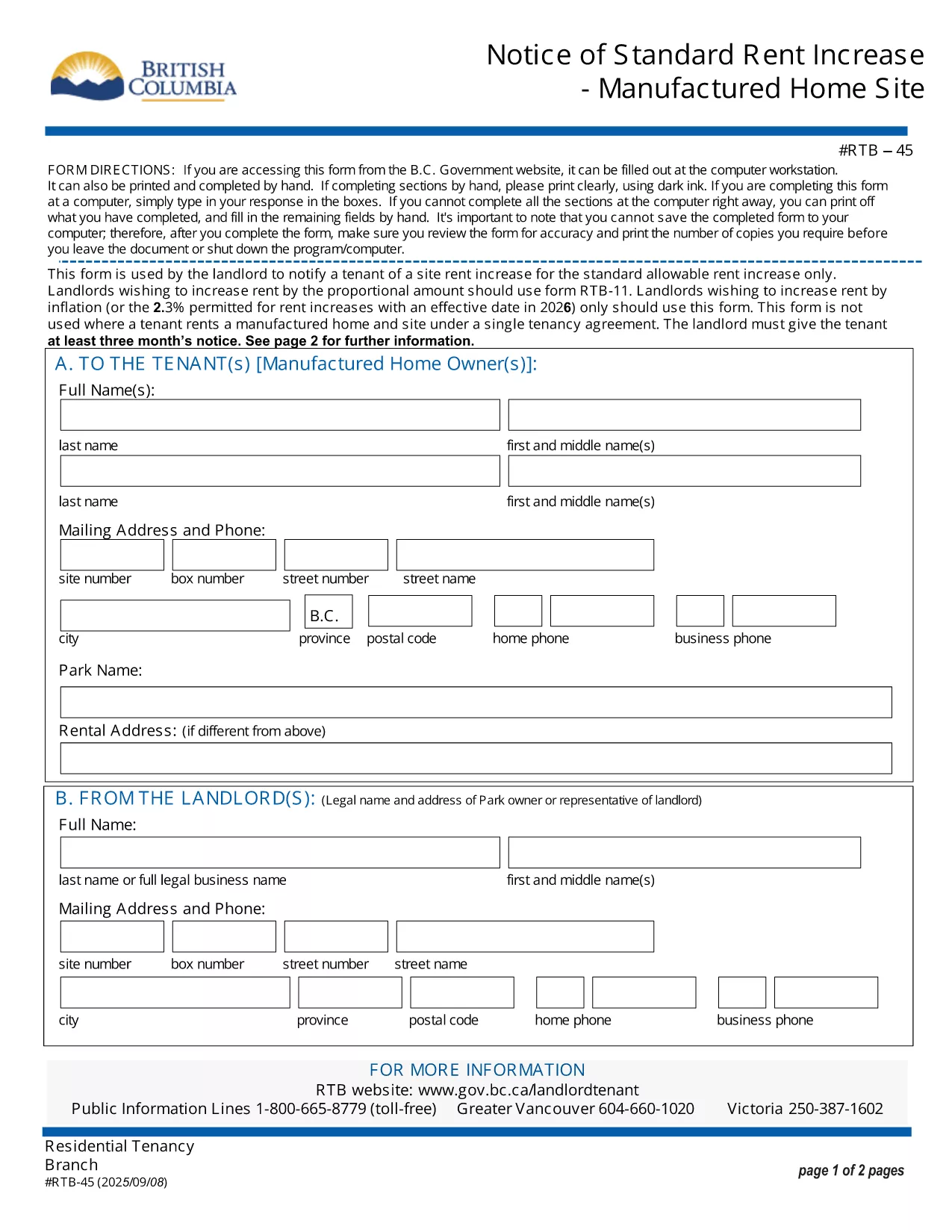
RTB‑45 Notice of Rent Increase – Fillable PDF

  1. Bahasa Bahasa inggris
  2. Negara Kanada
  3. Aktivitas Penyewaan
  4. Negara British Columbia
RTB‑45 Notice of Rent Increase – Fillable PDF

The RTB‑45 is the official notice used in British Columbia to inform tenants of a rent increase for manufactured home sites. Landlords must provide this form at least three months before the increase takes effect, as required by the Residential Tenancy Act.

Our fillable PDF version lets you complete the notice directly in your browser—no printing, scanning, or faxing needed. Simply click the button below, fill the required fields, and download a legally‑compliant PDF ready to serve.

What Is the RTB‑45 Form?

The RTB‑45 details the new rent amount, the date the increase starts, and the reason for the change. It must be signed by the landlord (or authorized agent) and delivered to the tenant in writing.

How to Complete the RTB‑45 Online

Using Formize’s PDF Filler, the process is quick and secure:

  • Click the "Fill out this form" button.
  • Wait for the Formize PDF Filler app to load.
  • Enter the landlord’s contact information, tenant’s name, current rent, new rent, and effective date.
  • Review the populated fields for accuracy.
  • Save or download the completed PDF and serve it to the tenant.

Common Mistakes to Avoid

  • Incorrect notice period: BC law requires at least three months’ written notice.
  • Missing signatures: The form is not valid without the landlord’s signature.
  • Wrong effective date: The increase cannot take effect before the tenancy has been in place for 12 months.

Download & Save Your Completed Form

After filling out the RTB‑45, you can download the PDF for your records or email it directly to the tenant. The fillable version retains all formatting, ensuring the document remains compliant with BC tenancy regulations.

FAQ
  • Who must use the RTB‑45 form?

    Landlords of manufactured home sites in British Columbia must use RTB‑45 to give tenants written notice of a rent increase.

  • How many days notice is required?

    BC law requires at least three months (90 days) written notice before the rent increase takes effect.

  • Can I submit the RTB‑45 electronically?

    Yes. The fillable PDF can be completed online and emailed to the tenant, as long as the tenant receives a legible, signed copy.

  • Do I need a lawyer to fill out the form?

    No. The form is straightforward; just follow the on‑screen prompts. If you have complex questions, consult a tenancy specialist.

  • What happens if I miss the notice period?

    If the three‑month notice isn’t given, the rent increase is invalid and you must re‑issue a new RTB‑45 with proper notice.

  • Is the fillable PDF compatible with all browsers?

    The Formize PDF Filler works with modern browsers (Chrome, Edge, Firefox, Safari). For best results, use the latest version.

BAGAIMANA CARANYA

Cara mengisi RTB-45 gratis secara online dalam 5 langkah mudah:

  1. 1
    Click the Fill Out Button
    Press the "Fill out this form" button on the page to launch the Formize PDF Filler.
  2. 2
    Wait for the Filler to Load
    The app loads in a few seconds; a loading indicator will appear.
  3. 3
    Enter Required Information
    Complete each field: landlord details, tenant name, current rent, new rent, and effective date.
  4. 4
    Review and Validate
    Double‑check all entries for accuracy and ensure the signature field is filled.
  5. 5
    Save or Download
    Click "Save" to store the form in your account or "Download" to get a printable PDF.
Bentuk aplikasi Pengisi PDF
TENTANG

Formulir untuk tuan tanah dan/atau penyewa untuk mengusulkan tindakan yang berkaitan dengan perjanjian sewa-menyewa.

RTB-45 adalah jenis perjanjian sewa tempat tinggal yang digunakan oleh sebagian besar tuan tanah swasta dan asosiasi perumahan.

Ada beberapa hal yang harus dipatuhi oleh pemilik atau penggarap yang diatur dalam peraturan tersebut. Dalam beberapa kasus, mereka mungkin perlu mengisi formulir, yang disebut 'formulir yang ditentukan', yang mengusulkan tindakan yang dapat memengaruhi pihak lain dalam perjanjian sewa.

Formulir disebut formulir yang ditentukan karena kata-kata di dalamnya telah disusun dengan hati-hati untuk memastikan bahwa orang yang mengisi formulir dan orang yang dilayani dapat memahami apa yang diusulkan dan apa yang dapat mereka lakukan sebagai tanggapan. Kegagalan untuk memberikan formulir yang benar dapat membatalkan tindakan yang diusulkan.

Anda tidak boleh mengubah kata-kata dalam formulir ini kecuali ada formulir yang menyatakan bahwa Anda boleh melakukannya. Jika Anda mengubah kata-kata, formulir mungkin tidak valid. Anda juga harus mematuhi setiap periode pemberitahuan yang ditetapkan dalam formulir.

FITUR

Pengisi PDF

Cara termudah untuk mengisi formulir PDF secara online

  • Isi RTB-45 dengan cepat
    Mencari cara mengisi RTB-45 dengan cepat secara online? Dengan pengisi formulir PDF online gratis kami, Anda akan tahu cara mengedit dan mengisi dokumen pdf ini dalam waktu kurang dari satu menit.
  • Editor PDF online yang mudah digunakan
    Muak dengan mencetak file PDF sehingga Anda dapat mengeditnya, sebelum memindai ulang dan mengirimnya kembali? Edit dokumen PDF secara online gratis. Gunakan editor pdf online kami untuk menghemat waktu dan kertas.
  • Alat hebat, semua platform
    Ingin tahu cara mengisi RTB-45 di Mac, atau mungkin cara menggunakan pengisi PDF gratis? Alat PDF online kami berfungsi di semua platform.
  • Penyimpanan file yang aman
    File "RTB-45" yang telah selesai disimpan dalam database aman yang dikelola oleh hosting Amazon Cloud. Anda dapat menghapus file Anda dari sistem kami kapan saja. Bagaimanapun, file-file ini secara otomatis dihapus setelah 24 jam.
  • Ngobrol dengan RTB-45
    Ngobrol dengan "RTB-45" di Chatize yang merupakan asisten pembaca PDF gratis. Ajukan pertanyaan dan dapatkan jawaban dari "RTB-45". Cukup klik tombol Chat Dengan Dokumen di atas.

Hapus sesi pengisian

Hapus sesi pengisian yang dipilih? Dalam hal ini, kemajuan Anda dalam menyelesaikan formulir akan hilang.

Hapus sesi pengeditan

Hapus sesi pengeditan yang dipilih? Dalam hal ini, kemajuan Anda dalam membuat dan mengedit formulir akan hilang.