Pilih bahasa

Anganwadi Application Form – Fill Online Instantly

  1. Negara India
  2. Bahasa Bahasa inggris
  3. Departemen Women and Child Development
  4. Aktivitas Child Development
Isi formulir ini
Anganwadi Application Form – Fill Online Instantly

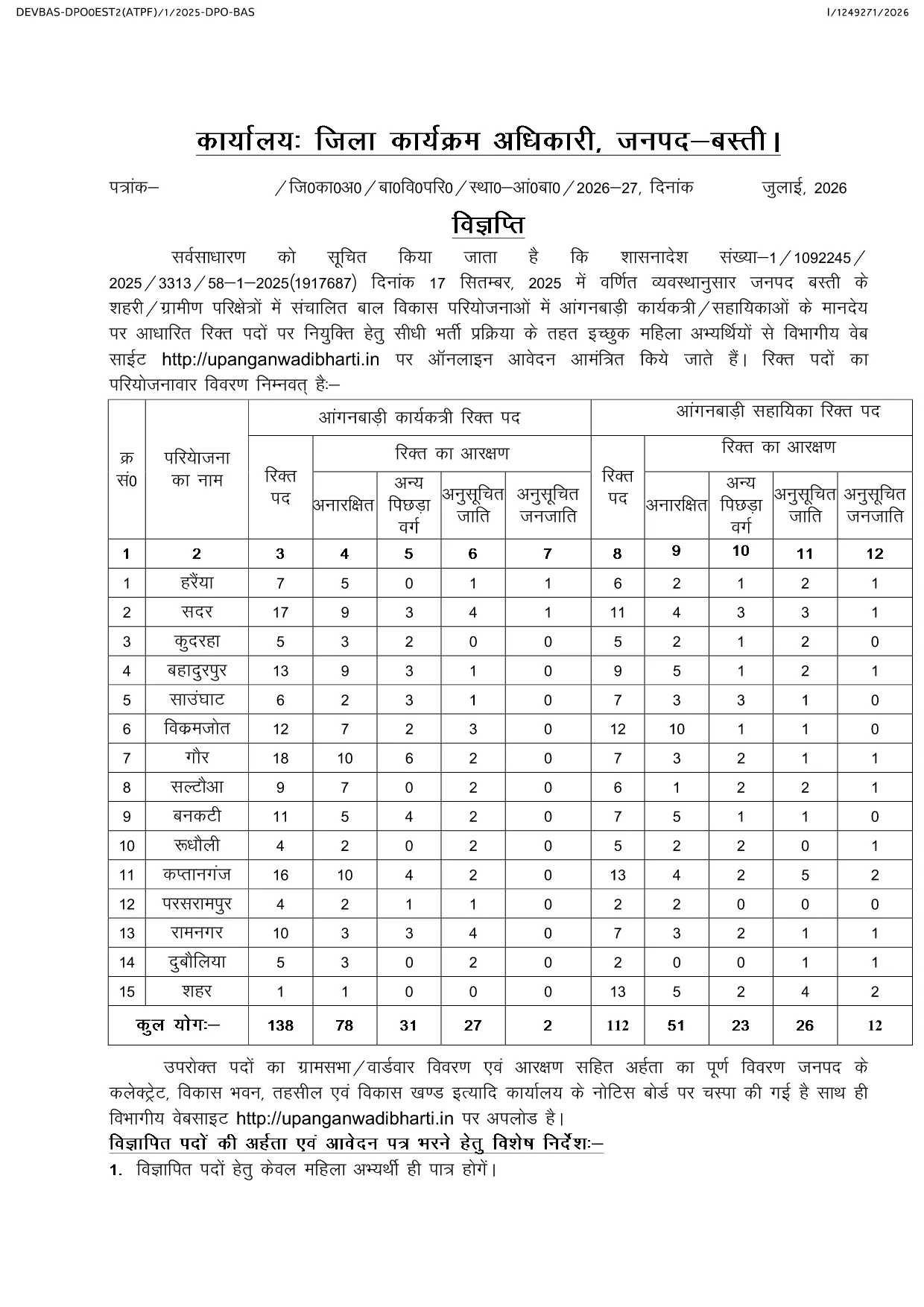
Looking for the official Anganwadi application form for the latest recruitment cycle? Formize lets you open the PDF directly in your browser, fill every field, and submit without ever downloading or printing. The form is fully compatible with the Uttar Pradesh Anganwadi Worker Bharti 2026 notification and follows the Integrated Child Development Services (ICDS) guidelines.

Why Choose Formize for Anganwadi Forms

  • Instant loading of the official PDF – no extra software required.
  • All fields are editable and auto‑saved while you work.
  • Secure, browser‑based filling keeps your personal data private.
  • One‑click download of the completed PDF for submission.

How to Complete the Anganwadi Application Online

Simply click the "Fill out this form" button below. The Formize PDF Filler app will load the document, and you can start entering your details right away.

Eligibility & Required Documents

Before you begin, make sure you meet the basic criteria and have the following documents ready:

  • Age between 18 and 35 years (relaxations applicable as per UP government rules).
  • Minimum educational qualification: 10+2 or equivalent.
  • Proof of residence in the village/ward you are applying for.
  • Recent passport‑size photograph, signature, and scanned ID proof.

Common Mistakes to Avoid

  • Leaving mandatory fields blank – the form will not submit.
  • Uploading photos that do not meet size or format requirements.
  • Entering incorrect village or ward codes – double‑check the official notification.
  • Failing to review the preview before final submission.

Ready to start? Click the button below, fill out the form, and submit your application with confidence.

FAQ
  • Is there any fee to fill the Anganwadi application form online?

    No. The Anganwadi application form is completely free to fill and download using Formize.

  • Can I edit the form after I have downloaded it?

    Yes. The PDF remains fully editable, but it is recommended to complete and review the form before the first download to avoid errors.

  • What file formats are accepted for photo and signature uploads?

    Upload JPG or PNG images. The maximum file size is 200 KB for each image.

  • Do I need a PDF reader to use Formize?

    No. Formize works entirely in the browser, so you do not need any additional PDF software.

  • How can I be sure my data is secure?

    All data is processed locally in your browser and never stored on our servers unless you choose to download the completed PDF.

  • What should I do if I encounter an error while filling the form?

    Refresh the page and reopen the form. If the problem persists, clear your browser cache or try a different browser.

  • When is the last date to submit the Anganwadi application?

    The last date varies by district. Refer to the official notification linked on the page for the exact deadline for your district.

BAGAIMANA CARANYA

Cara mengisi Anganwadi application form gratis secara online dalam 4 langkah mudah:

  1. 1
    Open the Form
    Click the "Fill out this form" button on the page. The Formize PDF Filler app will load the Anganwadi application PDF directly in your browser.
  2. 2
    Enter Your Details
    Complete each field—personal information, education, residence, and upload your photo and signature. All changes are saved automatically.
  3. 3
    Review & Validate
    Use the preview function to double‑check every entry. Ensure all mandatory fields are filled and documents meet the size requirements.
  4. 4
    Download & Submit
    After confirming the preview, click the download button to save the filled PDF. Submit the file according to the instructions in the official notification.
Bentuk aplikasi Pengisi PDF
TENTANG

kerangka Anganwadi application form

Dengan serangkaian fitur tradisional untuk melihat dan mengisi dokumen PDF, dipadukan dengan manfaat aplikasi web dan tata letak responsif, Anda dapat menyelesaikan Anganwadi application form dalam hitungan menit.

FITUR

Pengisi PDF

Cara termudah untuk mengisi formulir PDF secara online

  • Isi Anganwadi application form dengan cepat
    Mencari cara mengisi Anganwadi application form dengan cepat secara online? Dengan pengisi formulir PDF online gratis kami, Anda akan tahu cara mengedit dan mengisi dokumen pdf ini dalam waktu kurang dari satu menit.
  • Editor PDF online yang mudah digunakan
    Muak dengan mencetak file PDF sehingga Anda dapat mengeditnya, sebelum memindai ulang dan mengirimnya kembali? Edit dokumen PDF secara online gratis. Gunakan editor pdf online kami untuk menghemat waktu dan kertas.
  • Alat hebat, semua platform
    Ingin tahu cara mengisi Anganwadi application form di Mac, atau mungkin cara menggunakan pengisi PDF gratis? Alat PDF online kami berfungsi di semua platform.
  • Penyimpanan file yang aman
    File "Anganwadi application form" yang telah selesai disimpan dalam database aman yang dikelola oleh hosting Amazon Cloud. Anda dapat menghapus file Anda dari sistem kami kapan saja. Bagaimanapun, file-file ini secara otomatis dihapus setelah 24 jam.
  • Ngobrol dengan Anganwadi application form
    Ngobrol dengan "Anganwadi application form" di Chatize yang merupakan asisten pembaca PDF gratis. Ajukan pertanyaan dan dapatkan jawaban dari "Anganwadi application form". Cukup klik tombol Chat Dengan Dokumen di atas.

Hapus sesi pengisian

Hapus sesi pengisian yang dipilih? Dalam hal ini, kemajuan Anda dalam menyelesaikan formulir akan hilang.

Hapus sesi pengeditan

Hapus sesi pengeditan yang dipilih? Dalam hal ini, kemajuan Anda dalam membuat dan mengedit formulir akan hilang.