
Pilih bahasa

IRS Form 3911 – Fillable PDF for Lost Refund Trace

  1. Negara Amerika Serikat
  2. Bahasa Bahasa inggris
  3. Aktivitas Pajak
  4. Departemen Layanan Pendapatan Internal
IRS Form 3911 – Fillable PDF for Lost Refund Trace

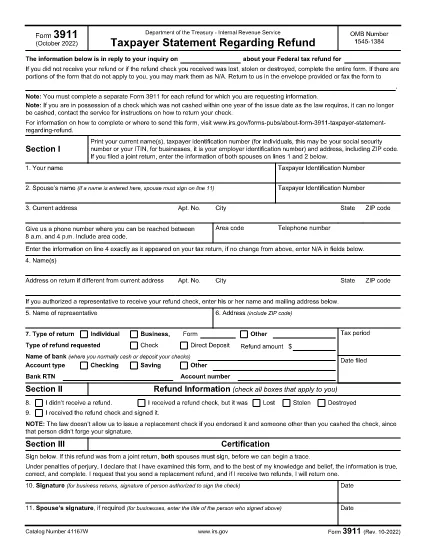
IRS Form 3911, titled “Taxpayer Statement Regarding Refund,” is the official document you use when a tax refund check is lost, stolen or never received. The form lets the IRS trace the payment and issue a replacement.

What Is IRS Form 3911?

This one‑page form collects your personal information, details about the original tax return, and the refund amount. It is required for each missing refund.

How to Fill Out Form 3911 Online

Instead of downloading a static PDF, click the “Fill out this form” button on this page. The Formize PDF Filler loads the fillable version instantly. Follow these steps:

  1. Enter your name, Social Security Number (or EIN/ITIN), and mailing address.
  2. Provide the tax year, type of return (1040, 1040‑SR, etc.), and the exact refund amount.
  3. Indicate whether the original refund was a check or direct deposit.
  4. If a representative will receive the check, fill in their details.
  5. Sign and date the form in Section III.

Common Mistakes to Avoid

  • Leaving any required field blank – the IRS will reject the submission.
  • Using an outdated address – make sure the address matches the one on your most recent return.
  • Submitting one form for multiple missing refunds – file a separate Form 3911 for each refund.
  • Signing only the taxpayer’s line when filing jointly – both spouses must sign.

Where to Send the Completed Form

After you save the completed PDF, mail it to the address listed in the form’s instructions for your state. If you have a pre‑addressed IRS envelope, use it; otherwise, send it to the IRS Processing Center for “Taxpayer Statement Regarding Refund.”

FAQs About Form 3911

Quick answers to the most common questions are listed below.

FAQ
  • When should I file IRS Form 3911?

    File Form 3911 as soon as you know a refund check was lost, stolen, never received, or returned by the post office. The IRS cannot trace a refund without this form.

  • Do I need to file a separate Form 3911 for each missing refund?

    Yes. Each missing check requires its own Form 3911, even if the refunds are from different tax years.

  • Can I file Form 3911 electronically?

    Form 3911 must be printed, signed, and mailed to the IRS. The fillable PDF makes completing it easier, but electronic submission is not accepted.

  • What if my address changed after I filed my return?

    Enter the new address in Section I and also write the address as it appears on your original tax return in Line 4. This helps the IRS locate the refund.

  • How long does the IRS take to process a refund trace?

    Processing typically takes 30–45 days after the IRS receives your completed Form 3911, but times can vary based on workload and the complexity of the case.

  • Do I need to include supporting documents?

    Usually a copy of your most recent tax return and a photo ID are helpful but not required unless the IRS requests them.

  • What if the original check was cashed fraudulently?

    Indicate that situation in Section II and provide any relevant details. The IRS will investigate and may issue a replacement refund.

BAGAIMANA CARANYA

Cara mengisi IRS Form 3911 gratis secara online dalam 4 langkah mudah:

  1. 1
    Open the Fillable Form
    Click the "Fill out this form" button on this page. The Formize PDF Filler app will load the fillable version of IRS Form 3911 directly in your browser.
  2. 2
    Enter Your Personal Information
    Type your name, Social Security Number (or EIN/ITIN), mailing address, and phone number in Section I.
  3. 3
    Provide Refund Details
    In Section II, select the tax year, indicate the type of return, enter the refund amount, and specify whether the original refund was a check or direct deposit.
  4. 4
    Sign and Submit
    Complete Section III with your signature (and spouse’s signature if filing jointly), save the PDF, and mail it to the address shown in the form’s instructions.
Bentuk aplikasi Pengisi PDF
TENTANG

Formulir pajak

IRS Form 3911 adalah salah satu formulir Pajak yang merupakan dokumen yang digunakan untuk melaporkan informasi tentang pendapatan, pemotongan, dan kewajiban pajak seseorang atau bisnis kepada otoritas pajak terkait. Formulir ini diperlukan untuk mematuhi peraturan perpajakan dan memenuhi kewajiban perpajakan. Formulir pajak bervariasi tergantung negara dan persyaratan pajak spesifik yang berlaku. Berikut adalah beberapa jenis formulir pajak yang umum:

Formulir Pajak Perorangan: Formulir ini digunakan oleh wajib pajak orang pribadi untuk melaporkan penghasilan pribadinya dan pengurangan klaim, kredit, dan pengecualian. Contohnya mencakup formulir 1040 di Amerika Serikat atau formulir Pengembalian Pajak Self-Assessment di Inggris.

Formulir Pajak Bisnis: Formulir pajak bisnis digunakan oleh perusahaan, kemitraan, atau wiraswasta untuk melaporkan pendapatan bisnis, pengeluaran, dan informasi terkait pajak lainnya. Contohnya termasuk formulir Jadwal C (Laba atau Rugi dari Bisnis) di Amerika Serikat atau formulir CT600 (Pengembalian Pajak Perusahaan) di Inggris.

Formulir Pajak Penggajian: Formulir ini digunakan oleh pemberi kerja untuk melaporkan upah, gaji, dan pajak yang dipotong dari gaji karyawannya. Contohnya mencakup formulir W-2 di Amerika Serikat atau formulir P60 di Inggris.

Formulir Pajak Penjualan: Formulir pajak penjualan digunakan oleh bisnis untuk melaporkan dan menyetorkan pajak penjualan yang dipungut atas barang atau jasa kena pajak. Formulir pajak penjualan spesifik berbeda-beda di setiap yurisdiksi.

Formulir Pajak Pertambahan Nilai (PPN): Formulir PPN digunakan di negara-negara yang mengenakan pajak pertambahan nilai untuk melaporkan dan menyetorkan PPN yang dipungut atas penjualan dan mengklaim kredit PPN untuk pembelian. Contohnya termasuk formulir pengembalian PPN yang digunakan di banyak negara.

Formulir Perkiraan Pajak: Formulir perkiraan pajak digunakan untuk melaporkan dan membayar perkiraan pajak atas penghasilan yang tidak dikenakan pemotongan, seperti pendapatan wirausaha atau pendapatan investasi.

Ini hanyalah beberapa contoh dari berbagai formulir pajak yang mungkin ada. Formulir spesifik yang diperlukan bergantung pada undang-undang dan peraturan perpajakan di negara atau yurisdiksi Anda. Penting untuk berkonsultasi dengan pedoman otoritas pajak atau mencari nasihat profesional untuk menentukan formulir mana yang dapat diterapkan pada situasi Anda.

FITUR

Pengisi PDF

Cara termudah untuk mengisi formulir PDF secara online

  • Isi IRS Form 3911 dengan cepat
    Mencari cara mengisi IRS Form 3911 dengan cepat secara online? Dengan pengisi formulir PDF online gratis kami, Anda akan tahu cara mengedit dan mengisi dokumen pdf ini dalam waktu kurang dari satu menit.
  • Editor PDF online yang mudah digunakan
    Muak dengan mencetak file PDF sehingga Anda dapat mengeditnya, sebelum memindai ulang dan mengirimnya kembali? Edit dokumen PDF secara online gratis. Gunakan editor pdf online kami untuk menghemat waktu dan kertas.
  • Alat hebat, semua platform
    Ingin tahu cara mengisi IRS Form 3911 di Mac, atau mungkin cara menggunakan pengisi PDF gratis? Alat PDF online kami berfungsi di semua platform.
  • Penyimpanan file yang aman
    File "IRS Form 3911" yang telah selesai disimpan dalam database aman yang dikelola oleh hosting Amazon Cloud. Anda dapat menghapus file Anda dari sistem kami kapan saja. Bagaimanapun, file-file ini secara otomatis dihapus setelah 24 jam.
  • Ngobrol dengan IRS Form 3911
    Ngobrol dengan "IRS Form 3911" di Chatize yang merupakan asisten pembaca PDF gratis. Ajukan pertanyaan dan dapatkan jawaban dari "IRS Form 3911". Cukup klik tombol Chat Dengan Dokumen di atas.

Hapus sesi pengisian

Hapus sesi pengisian yang dipilih? Dalam hal ini, kemajuan Anda dalam menyelesaikan formulir akan hilang.

Hapus sesi pengeditan

Hapus sesi pengeditan yang dipilih? Dalam hal ini, kemajuan Anda dalam membuat dan mengedit formulir akan hilang.