
Pilih bahasa

IRS Form 4136 – Fillable PDF for Fuel Tax Credits

  1. Negara Amerika Serikat
  2. Bahasa Bahasa inggris
  3. Aktivitas Pajak
  4. Departemen Layanan Pendapatan Internal
IRS Form 4136 – Fillable PDF for Fuel Tax Credits

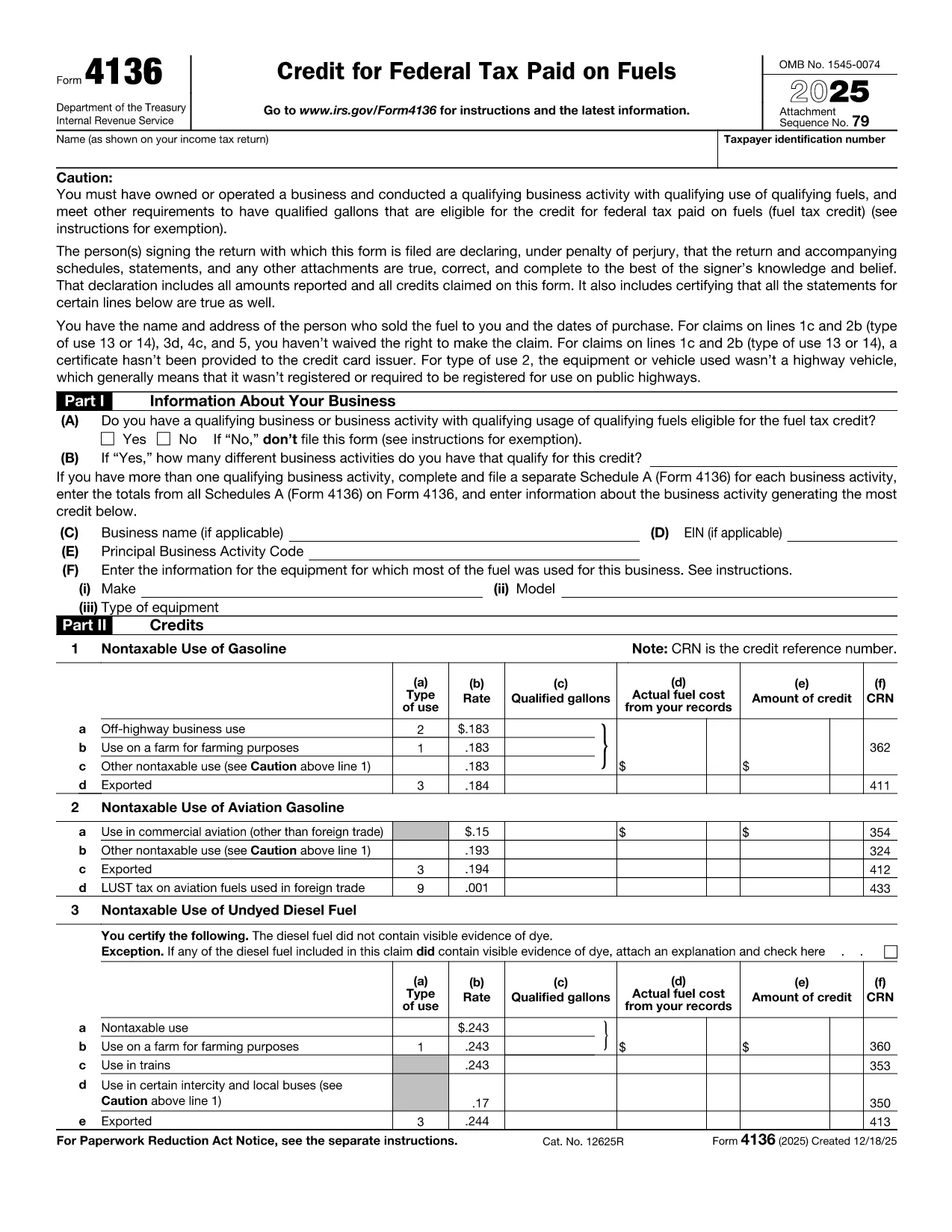
Form 4136, Credit for Federal Tax Paid on Fuels, lets eligible taxpayers claim a credit for excise taxes paid on gasoline, diesel, aviation gasoline, kerosene, and other qualified fuels. Whether you run a farming operation, a construction fleet, or an aviation business, this form can reduce your tax liability.

What Is Form 4136 and Who Can Use It?

The IRS issues Form 4136 to businesses and individuals who use fuel for non‑taxable purposes such as off‑highway equipment, farming, or export. The credit applies to:

  • Gasoline used on farms, construction sites, or in certain commercial vehicles.
  • Diesel fuel for off‑road machinery.
  • Aviation gasoline for eligible aircraft.
  • Kerosene and other special fuels.

If you are the ultimate purchaser of the fuel, you are the only party who can claim the credit.

How to Complete the Fillable Form 4136 on Formize

Instead of downloading the PDF and editing it with a separate program, simply click the “Fill out this form” button on this page. The Formize PDF Filler app will load the official fillable version of Form 4136, letting you:

  1. Enter your business name, EIN, and filing year.
  2. Select the type of fuel and the qualified use (e.g., off‑highway, farm, export).
  3. Input gallons used and the calculated credit amount.
  4. Electronically sign and submit the form directly to the IRS portal (if you have e‑file capability) or print for mailing.

The interface is fully responsive, saves your progress automatically, and validates entries to reduce errors.

Common Mistakes to Avoid When Filing Form 4136

  • Using personal fuel purchases: Only fuel used for business or qualified non‑taxable purposes qualifies.
  • Incorrect rate application: Each fuel type has a specific credit rate; double‑check the IRS rate table.
  • Missing export documentation: If you claim export credits, attach a bill of lading or customs receipt.
  • Failing to sign: The form requires a signature under penalty of perjury; the Formize app adds a digital signature field.

Download the Official Fillable PDF

When you need an offline copy, you can download the current IRS version of Form 4136 directly from the link below. The file is a fillable PDF, compatible with Adobe Acrobat, Foxit, and the Formize online editor.

Download IRS Form 4136 (PDF)

instruksi

  • Bentuk 4136 Sitemap - Instruksi untuk Formulir 4136, Kredit untuk Pajak Federal Dibayar pada Bahan Bakar
FAQ
  • What types of fuel qualify for a credit on Form 4136?

    Gasoline, diesel fuel, aviation gasoline, kerosene, and other fuels listed in the IRS instructions qualify when used for non‑taxable purposes such as off‑highway business use, farming, or export.

  • Can I claim a credit for fuel used in personal vehicles?

    No. The credit is only available for fuel used in business operations or other qualified non‑taxable uses. Personal use does not qualify.

  • Do I need supporting documentation for the credit?

    Yes. Keep receipts, fuel invoices, and, for exported fuel, a bill of lading or customs documentation. The IRS may request these records during an audit.

  • Is the fillable PDF compatible with all PDF editors?

    The official Form 4136 PDF is fillable in Adobe Acrobat, Foxit Reader, and the Formize online editor. All fields retain their functionality across platforms.

  • How often is Form 4136 updated?

    The IRS releases a new version each tax year. The link provided points to the current version; older versions are available in the IRS prior‑year archive.

  • Can I file Form 4136 electronically?

    Yes, if you use tax software that supports IRS e‑file for fuel credits. Otherwise, print the completed form, sign it, and mail it with your return.

  • What is the deadline to submit Form 4136?

    Form 4136 must be filed with the tax return for the year in which the fuel was used, typically by the April filing deadline (or October if you file an extension).

BAGAIMANA CARANYA

Cara mengisi Form 4136 gratis secara online dalam 3 langkah mudah:

  1. 1
    Open the Fillable Form
    Click the “Fill out this form” button on the page. The Formize PDF Filler app will load the official Form 4136.
  2. 2
    Enter Your Information
    Fill in your business name, EIN, fuel type, gallons used, and select the appropriate credit rate. The app validates each field in real time.
  3. 3
    Sign and Save
    Add your digital signature, review the summary, and either download the completed PDF for mailing or submit it electronically if you have e‑file access.
Bentuk aplikasi Pengisi PDF
TENTANG

Formulir pajak

Form 4136 adalah salah satu formulir Pajak yang merupakan dokumen yang digunakan untuk melaporkan informasi terkait pajak kepada otoritas pajak terkait. Ada berbagai jenis formulir pajak, termasuk formulir pajak federal, negara bagian, dan lokal, yang dapat bervariasi tergantung pada keadaan dan lokasi pembayar pajak.

FITUR

Pengisi PDF

Cara termudah untuk mengisi formulir PDF secara online

  • Isi Form 4136 dengan cepat
    Mencari cara mengisi Form 4136 dengan cepat secara online? Dengan pengisi formulir PDF online gratis kami, Anda akan tahu cara mengedit dan mengisi dokumen pdf ini dalam waktu kurang dari satu menit.
  • Editor PDF online yang mudah digunakan
    Muak dengan mencetak file PDF sehingga Anda dapat mengeditnya, sebelum memindai ulang dan mengirimnya kembali? Edit dokumen PDF secara online gratis. Gunakan editor pdf online kami untuk menghemat waktu dan kertas.
  • Alat hebat, semua platform
    Ingin tahu cara mengisi Form 4136 di Mac, atau mungkin cara menggunakan pengisi PDF gratis? Alat PDF online kami berfungsi di semua platform.
  • Penyimpanan file yang aman
    File "Form 4136" yang telah selesai disimpan dalam database aman yang dikelola oleh hosting Amazon Cloud. Anda dapat menghapus file Anda dari sistem kami kapan saja. Bagaimanapun, file-file ini secara otomatis dihapus setelah 24 jam.
  • Ngobrol dengan Form 4136
    Ngobrol dengan "Form 4136" di Chatize yang merupakan asisten pembaca PDF gratis. Ajukan pertanyaan dan dapatkan jawaban dari "Form 4136". Cukup klik tombol Chat Dengan Dokumen di atas.

Hapus sesi pengisian

Hapus sesi pengisian yang dipilih? Dalam hal ini, kemajuan Anda dalam menyelesaikan formulir akan hilang.

Hapus sesi pengeditan

Hapus sesi pengeditan yang dipilih? Dalam hal ini, kemajuan Anda dalam membuat dan mengedit formulir akan hilang.