
Pilih bahasa

IRS Form 5306 – Fillable PDF Online

  1. Negara Amerika Serikat
  2. Bahasa Bahasa inggris
  3. Aktivitas Pajak
  4. Departemen Layanan Pendapatan Internal
IRS Form 5306 – Fillable PDF Online

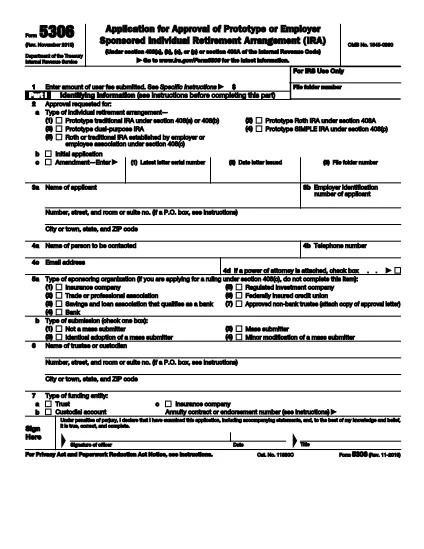
Form 5306 is the Internal Revenue Service (IRS) document used to request an opinion letter for certain annuity contracts, trusts, and custodial accounts. The form must be completed accurately and submitted with supporting documentation to receive a valid IRS opinion.

With Formize, you can fill out the official IRS Form 5306 directly in your browser—no Adobe Acrobat required. Our secure fillable PDF interface saves you time and eliminates the need for paper copies.

What Is Form 5306?

Form 5306 (Rev. November 2019) collects details about the annuity, trust, or custodial account for which you are seeking an IRS opinion letter. The form includes sections for taxpayer identification, contract information, and the specific tax question you need answered.

How to Complete Form 5306 Online

Follow the simple steps below to fill out the form using Formize’s PDF Filler:

  • Click the “Fill out this form” button on the page.
  • Wait a few seconds while the Formize PDF Filler app loads the fillable version of Form 5306.
  • Enter all required information in the highlighted fields.
  • Use the built‑in validation to ensure numbers and dates are entered correctly.
  • When finished, download the completed PDF, print it, or email it directly to the IRS.

Common Mistakes to Avoid

  • Leaving required fields blank: The IRS will reject the submission.
  • Incorrect taxpayer identification numbers: Double‑check SSN/EIN entries.
  • Mismatched contract dates: Ensure the dates on the form match the underlying agreement.
  • Using the wrong version of the form: This page always provides the latest revision (Nov 2019).

Where to Submit the Completed Form

After you’ve completed Form 5306, mail it to the address listed in the form instructions, or fax it if you have a fax number on file with the IRS. Keep a copy for your records.

Download the Official PDF

If you prefer to work offline, you can download the official IRS PDF directly from the link below. The file is the same document that powers the online filler.

Download IRS Form 5306 (PDF)

FAQ
  • What is the purpose of IRS Form 5306?

    Form 5306 is used to request an IRS opinion letter for annuity contracts, trusts, or custodial accounts that meet specific Internal Revenue Code requirements.

  • Can I fill out Form 5306 on a mobile device?

    Yes. Formize’s PDF Filler works on smartphones and tablets, allowing you to complete the form on any modern browser.

  • Do I need special software to edit Form 5306?

    No. The form is fully fillable online through Formize, which requires only a web browser.

  • Is the online filler secure?

    Absolutely. All data is processed in your browser and never stored on our servers unless you choose to download or email the completed PDF.

  • What supporting documents must I attach?

    Attach a copy of the trust, custodial account, or annuity contract, plus any other documents referenced in the form instructions.

  • How do I know I have the latest version of Form 5306?

    This page always links to the most recent IRS revision (November 2019). The PDF download and online filler are synchronized.

  • Can I submit Form 5306 electronically?

    The IRS currently requires a paper submission for opinion letters. After completing the form online, print and mail it as instructed.

  • What if I make a mistake after submitting?

    Contact the IRS directly with a corrected Form 5306 and a brief explanation of the error.

BAGAIMANA CARANYA

Cara mengisi Form 5306 gratis secara online dalam 5 langkah mudah:

  1. 1
    Click the Fill button
    Press the “Fill out this form” button on this page to launch the Formize PDF Filler.
  2. 2
    Wait for the app to load
    The fillable version of Form 5306 will appear in a few seconds—no download needed.
  3. 3
    Enter required information
    Complete each highlighted field. The filler checks for formatting errors automatically.
  4. 4
    Review and validate
    Use the built‑in validation tools to double‑check all entries before finalizing.
  5. 5
    Save, download, or submit
    When you’re satisfied, download the completed PDF, print it, or email it directly to the IRS.
Bentuk aplikasi Pengisi PDF
TENTANG

Formulir pajak

Form 5306 adalah salah satu formulir Pajak yang merupakan dokumen yang digunakan untuk melaporkan informasi terkait pajak kepada otoritas pajak terkait. Ada berbagai jenis formulir pajak, termasuk formulir pajak federal, negara bagian, dan lokal, yang dapat bervariasi tergantung pada keadaan dan lokasi pembayar pajak.

FITUR

Pengisi PDF

Cara termudah untuk mengisi formulir PDF secara online

  • Isi Form 5306 dengan cepat
    Mencari cara mengisi Form 5306 dengan cepat secara online? Dengan pengisi formulir PDF online gratis kami, Anda akan tahu cara mengedit dan mengisi dokumen pdf ini dalam waktu kurang dari satu menit.
  • Editor PDF online yang mudah digunakan
    Muak dengan mencetak file PDF sehingga Anda dapat mengeditnya, sebelum memindai ulang dan mengirimnya kembali? Edit dokumen PDF secara online gratis. Gunakan editor pdf online kami untuk menghemat waktu dan kertas.
  • Alat hebat, semua platform
    Ingin tahu cara mengisi Form 5306 di Mac, atau mungkin cara menggunakan pengisi PDF gratis? Alat PDF online kami berfungsi di semua platform.
  • Penyimpanan file yang aman
    File "Form 5306" yang telah selesai disimpan dalam database aman yang dikelola oleh hosting Amazon Cloud. Anda dapat menghapus file Anda dari sistem kami kapan saja. Bagaimanapun, file-file ini secara otomatis dihapus setelah 24 jam.
  • Ngobrol dengan Form 5306
    Ngobrol dengan "Form 5306" di Chatize yang merupakan asisten pembaca PDF gratis. Ajukan pertanyaan dan dapatkan jawaban dari "Form 5306". Cukup klik tombol Chat Dengan Dokumen di atas.

Hapus sesi pengisian

Hapus sesi pengisian yang dipilih? Dalam hal ini, kemajuan Anda dalam menyelesaikan formulir akan hilang.

Hapus sesi pengeditan

Hapus sesi pengeditan yang dipilih? Dalam hal ini, kemajuan Anda dalam membuat dan mengedit formulir akan hilang.