
Pilih bahasa

Form 5500‑EZ – Fillable PDF for Single‑Participant Retirement Plans

  1. Negara Amerika Serikat
  2. Bahasa Bahasa inggris
  3. Aktivitas Pajak
  4. Departemen Layanan Pendapatan Internal
Form 5500‑EZ – Fillable PDF for Single‑Participant Retirement Plans

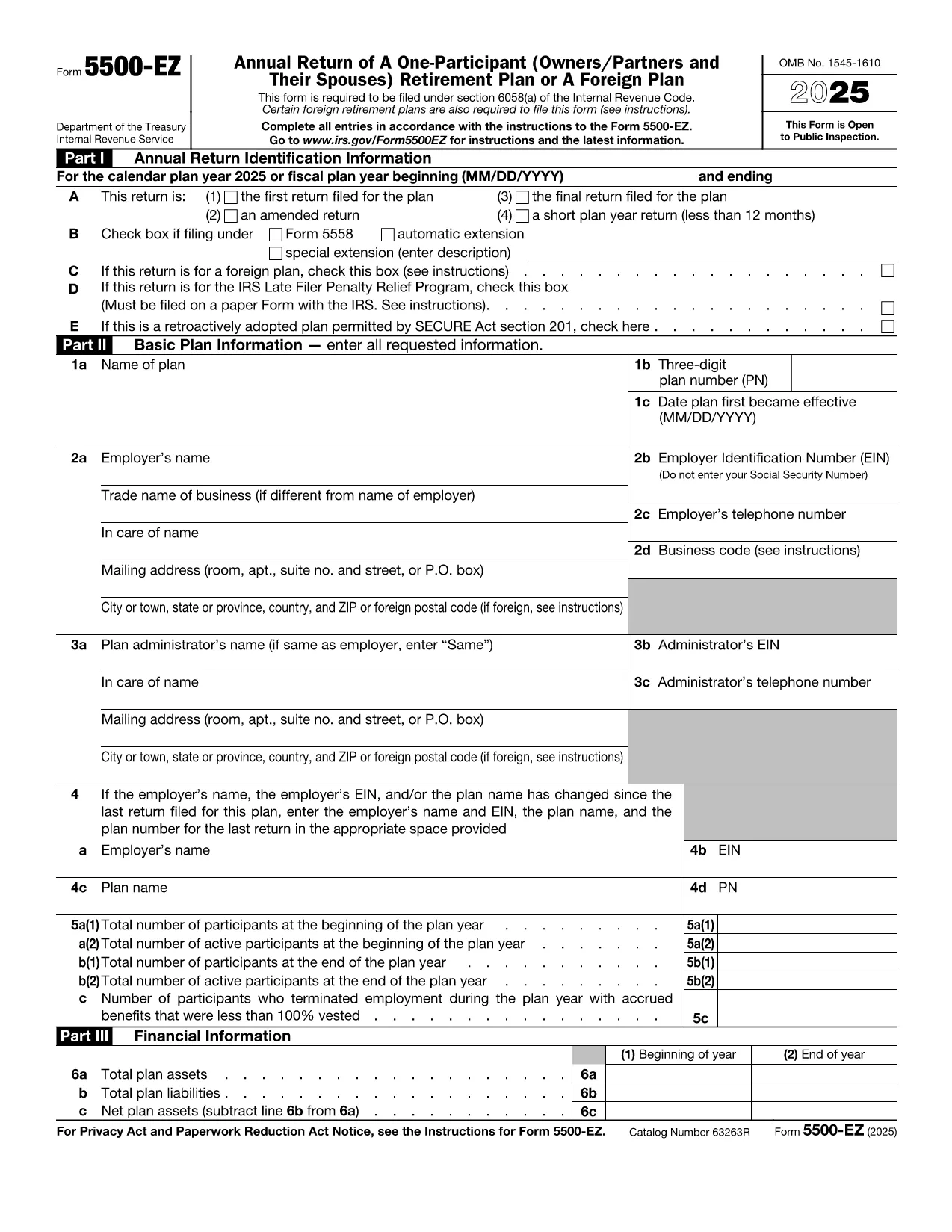
Form 5500‑EZ is the streamlined annual reporting form used by the Internal Revenue Service (IRS) for small retirement plans that have only one participant or are foreign plans. It replaces the longer Form 5500 series and includes basic plan information, number of participants, contributions, benefits, and other required details.

What Is Form 5500‑EZ?

This form is required for:

  • One‑participant pension plans (e.g., solo 401(k) or SIMPLE IRA)
  • Foreign retirement plans that meet the IRS definition of a small plan
  • Plans that do not need to file Schedule MB or Schedule SB

Filing Form 5500‑EZ on time helps you avoid penalties and keeps your retirement plan in good standing.

How to Fill Out the Form Online with Formize

Instead of downloading the PDF and editing it manually, you can complete the form directly on our site:

  1. Click the "Fill out this form" button below.
  2. The Formize PDF Filler app loads the official fillable PDF.
  3. Enter the required information in each field – the form validates data as you type.
  4. When you’re done, add your electronic signature, then save or download the completed PDF.

All changes are saved automatically, so you never lose your work.

Common Mistakes & Tips for a Smooth Filing

  • Incorrect plan year: Verify the plan year on the first page; a mismatch triggers an IRS notice.
  • Missing participant count: Even a single‑participant plan must list the exact number of participants.
  • Wrong contribution totals: Double‑check employer and employee contributions – they must equal the amounts reported on Schedule A.
  • Signature errors: Use the built‑in electronic signature tool; hand‑written signatures on a printed PDF are not accepted for e‑filings.

Download the Official IRS PDF

If you prefer the original IRS version, you can download it directly from the link below. The file is the same one used by Formize, ensuring full compatibility with the online filler.

Download Form 5500‑EZ (PDF)

instruksi

  • Form 5500-EZ Instruksi - Instruksi untuk Form 5500-EZ, Pengembalian Tahunan A One-Participant (Owners/Partners dan Spouses mereka) Rencana Pensiun atau Rencana Luar Negeri
FAQ
  • Who must file Form 5500‑EZ?

    Any one‑participant retirement plan or foreign plan that meets the IRS definition of a small plan must file Form 5500‑EZ annually.

  • Can I file Form 5500‑EZ electronically?

    Yes. Use the IRS e‑file system or a compliant online filler like Formize, then submit the completed PDF through the FIRE system.

  • What is the filing deadline?

    The form is due by the last day of the seventh month after the plan year ends (typically July 31 for calendar‑year plans).

  • Do I need Schedule MB or Schedule SB?

    No. Form 5500‑EZ does not require Schedule MB (Money‑Based) or Schedule SB (Service‑Based).

  • What if I make a mistake after filing?

    You can file an amended Form 5500‑EZ using the same fillable PDF. Mark the form as "Amended" and include an explanation of the changes.

  • Is there a fee to use Formize's filler?

    Formize offers a free basic fillable version for Form 5500‑EZ. Advanced features may require a subscription, but the core filing process is free.

  • Can I print the completed form for a paper filing?

    Yes. After completing the form online, download the PDF and print it. Sign the printed copy if you are filing by paper.

BAGAIMANA CARANYA

Cara mengisi Form 5500 EZ gratis secara online dalam 4 langkah mudah:

  1. 1
    Open the Fillable Form
    Click the "Fill out this form" button on the page. The Formize PDF Filler will load the official Form 5500‑EZ.
  2. 2
    Enter Your Information
    Complete each field. The filler validates entries in real time, helping you avoid common errors.
  3. 3
    Add Your Electronic Signature
    Use the built‑in signature tool to sign the form securely.
  4. 4
    Save or Download
    When all sections are complete, click "Save" to store the file in your account or "Download" to get the finished PDF.
Bentuk aplikasi Pengisi PDF
TENTANG

Formulir pajak

Form 5500 EZ adalah salah satu formulir Pajak yang merupakan dokumen yang digunakan untuk melaporkan pendapatan, pemotongan, dan kewajiban perpajakan kepada otoritas pajak terkait. Formulir-formulir ini merupakan bagian penting dari proses pengajuan pajak dan digunakan untuk memastikan individu dan bisnis mematuhi undang-undang perpajakan dan menghitung kewajiban perpajakan mereka secara akurat.

Formulir pajak spesifik yang diperlukan dapat bervariasi tergantung pada faktor-faktor seperti status pengajuan individu, sumber pendapatan, dan undang-undang perpajakan negara tersebut. Namun, berikut beberapa jenis formulir pajak yang umum:

Formulir Pajak Penghasilan Perorangan: Formulir ini, seperti seri 1040 di Amerika Serikat, digunakan oleh individu untuk melaporkan pendapatan mereka, pengurangan klaim dan kredit, dan menghitung kewajiban pajak mereka.

Formulir Pajak Bisnis: Bisnis, termasuk perseorangan, kemitraan, korporasi, dan wiraswasta, mungkin harus mengajukan berbagai formulir untuk melaporkan pendapatan, pengeluaran, dan pajak terhutang. Contohnya mencakup Jadwal C (Laba atau Rugi dari Bisnis) dan Formulir 1120 (Pengembalian Pajak Penghasilan Perusahaan AS).

Formulir Pajak Ketenagakerjaan: Pengusaha diharuskan melaporkan gaji karyawan dan memotong serta menyetorkan pajak gaji. Formulir seperti W-2 (Laporan Gaji dan Pajak) dan 941 (Pengembalian Pajak Federal Kuartalan Perusahaan) digunakan untuk tujuan ini.

Formulir Rekening Investasi dan Pensiun: Formulir ini digunakan untuk melaporkan pendapatan investasi, keuntungan dan kerugian modal, serta kontribusi dan distribusi dari rekening pensiun. Contohnya termasuk Formulir 1099-DIV (Dividen dan Distribusi) dan Formulir 5498 (Informasi Kontribusi IRA).

Formulir Pajak Harta dan Hadiah: Ketika seseorang meninggal dunia atau memberikan hadiah penting, formulir khusus seperti Formulir 706 (Pengembalian Pajak Properti Amerika Serikat (dan Pengalihan Generasi)) dan Formulir 709 (Hadiah Amerika Serikat (dan Generasi- Melewati Transfer) Pengembalian Pajak) digunakan untuk melaporkan dan menghitung pajak harta benda atau hadiah yang berlaku.

Penting untuk dicatat bahwa undang-undang dan formulir perpajakan dapat berubah seiring berjalannya waktu, sehingga individu dan badan usaha harus berkonsultasi dengan otoritas pajak terkait atau mencari nasihat perpajakan profesional untuk memastikan kepatuhan terhadap persyaratan saat ini.

FITUR

Pengisi PDF

Cara termudah untuk mengisi formulir PDF secara online

  • Isi Form 5500 EZ dengan cepat
    Mencari cara mengisi Form 5500 EZ dengan cepat secara online? Dengan pengisi formulir PDF online gratis kami, Anda akan tahu cara mengedit dan mengisi dokumen pdf ini dalam waktu kurang dari satu menit.
  • Editor PDF online yang mudah digunakan
    Muak dengan mencetak file PDF sehingga Anda dapat mengeditnya, sebelum memindai ulang dan mengirimnya kembali? Edit dokumen PDF secara online gratis. Gunakan editor pdf online kami untuk menghemat waktu dan kertas.
  • Alat hebat, semua platform
    Ingin tahu cara mengisi Form 5500 EZ di Mac, atau mungkin cara menggunakan pengisi PDF gratis? Alat PDF online kami berfungsi di semua platform.
  • Penyimpanan file yang aman
    File "Form 5500 EZ" yang telah selesai disimpan dalam database aman yang dikelola oleh hosting Amazon Cloud. Anda dapat menghapus file Anda dari sistem kami kapan saja. Bagaimanapun, file-file ini secara otomatis dihapus setelah 24 jam.
  • Ngobrol dengan Form 5500 EZ
    Ngobrol dengan "Form 5500 EZ" di Chatize yang merupakan asisten pembaca PDF gratis. Ajukan pertanyaan dan dapatkan jawaban dari "Form 5500 EZ". Cukup klik tombol Chat Dengan Dokumen di atas.

Hapus sesi pengisian

Hapus sesi pengisian yang dipilih? Dalam hal ini, kemajuan Anda dalam menyelesaikan formulir akan hilang.

Hapus sesi pengeditan

Hapus sesi pengeditan yang dipilih? Dalam hal ini, kemajuan Anda dalam membuat dan mengedit formulir akan hilang.