
Pilih bahasa

Form 990 Schedule F – Fillable PDF Online

  1. Negara Amerika Serikat
  2. Bahasa Bahasa inggris
  3. Aktivitas Pajak
  4. Departemen Layanan Pendapatan Internal
Form 990 Schedule F – Fillable PDF Online

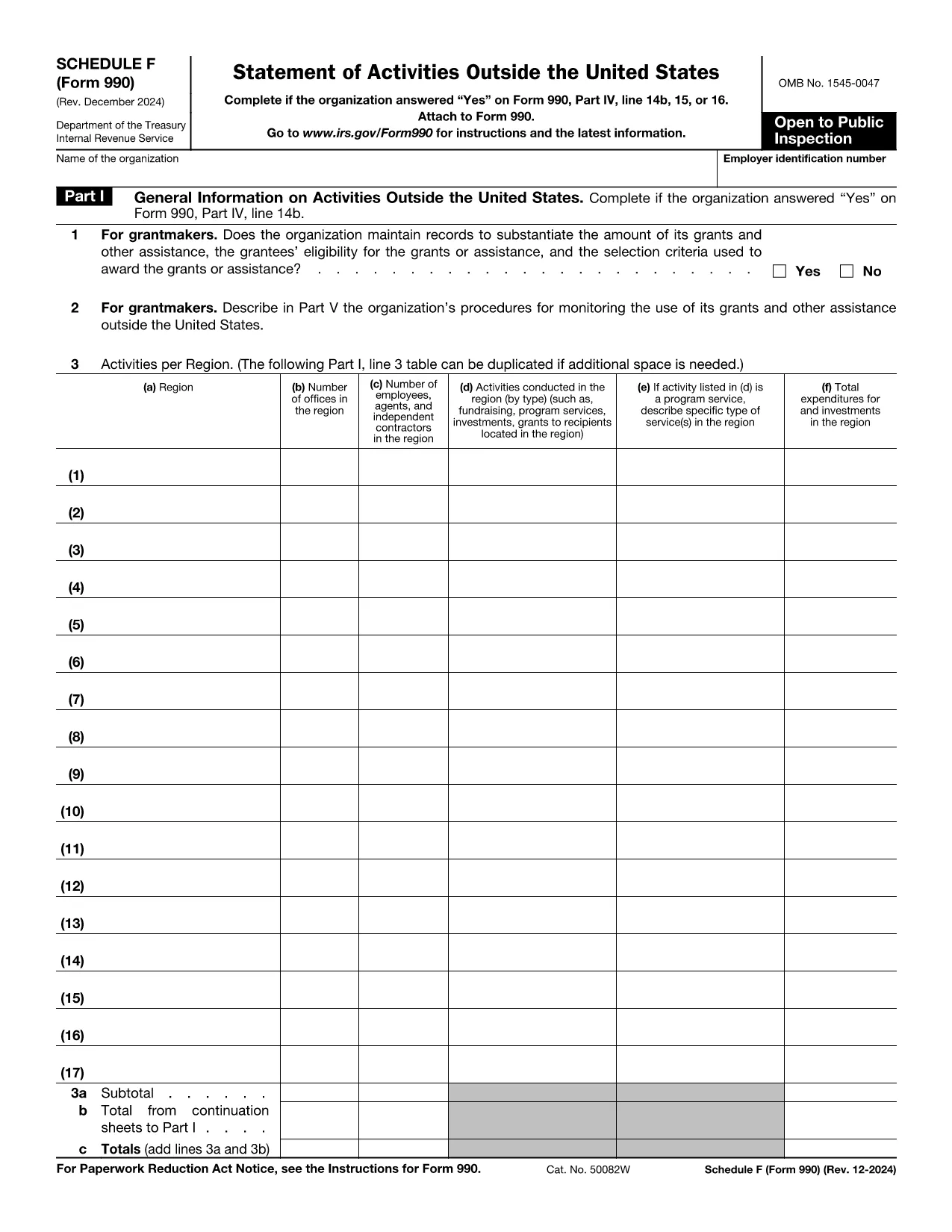
The IRS Form 990 Schedule F (Grant and Other Assistance to Organizations Outside the United States) is required for tax‑exempt organizations that reported a “Yes” on Form 990, Part IV, line 15. This schedule captures details of any grant, contribution, or assistance of $5,000 or more provided to foreign entities.

What Is Schedule F and Who Must File?

Schedule F is part of the annual Form 990 return. Non‑profit organizations that make significant foreign grants must complete this schedule. If your organization answered “Yes” to the foreign assistance question, you need to disclose each recipient, the amount, and the purpose of the assistance.

Key Sections of Schedule F Explained

  • Part I – General Information: Identify the foreign recipient and the type of assistance.
  • Part II – Grants and Other Assistance: List each grant over $5,000, including dates, amounts, and program descriptions.
  • Part III – Summary: Totals for each category and a certification statement.

How to Fill Out Schedule F Using Formize

Instead of downloading the PDF and editing it in a separate program, simply click the “Fill out this form” button on this page. The Formize PDF Filler app will load the official IRS Schedule F PDF, and you can complete every field directly in your browser.

Common Mistakes & Tips for Accurate Filing

  • Do not omit any foreign recipient that received $5,000 or more.
  • Provide clear, concise program descriptions – vague language can trigger IRS follow‑up.
  • Ensure totals in Part III match the sum of the individual entries in Part II.
  • Sign and date the certification; an unsigned schedule is considered incomplete.

Once you have finished, you can download the completed PDF, save a copy for your records, and attach it to your Form 990 filing.

instruksi

FAQ
  • Do I need to file Schedule F if the grant is under $5,000?

    No. Schedule F is required only for foreign grants of $5,000 or more. Smaller amounts can be reported in the narrative section of Form 990.

  • Can I file Schedule F electronically?

    Yes. After completing the fillable PDF with Formize, you can upload the saved PDF as part of your electronic Form 990 submission.

  • What if I made a grant to an overseas subsidiary of a U.S. organization?

    If the recipient is a foreign entity and the assistance exceeds $5,000, it must be reported on Schedule F regardless of ownership structure.

  • Is a digital signature accepted on Schedule F?

    The IRS accepts electronic signatures on the PDF as long as the signature field is completed using a recognized PDF signing tool, such as the one built into Formize.

  • Where can I find the official instructions for Schedule F?

    The official IRS instructions are included in the PDF linked below. They provide detailed guidance on each line item and reporting requirements.

  • What common errors should I avoid?

    Common errors include omitting eligible foreign recipients, miscalculating totals, and forgetting to sign the certification. Use the checklist in the instructions to avoid these pitfalls.

  • Can I edit the PDF after I’ve downloaded it?

    Yes, but using Formize ensures the fields remain fillable and the document stays compliant with IRS formatting standards.

BAGAIMANA CARANYA

Cara mengisi Form 990 Schedule F gratis secara online dalam 5 langkah mudah:

  1. 1
    Click the Fill Out Button
    Press the “Fill out this form” button on the page. Formize will open the official Schedule F PDF in a secure online editor.
  2. 2
    Wait for the Formize PDF Filler to Load
    The app loads the fillable fields automatically. This usually takes a few seconds.
  3. 3
    Complete Each Section
    Enter the required information for each grant, assistance, or foreign recipient. Use the on‑screen prompts for date formats and dollar amounts.
  4. 4
    Review and Save
    Double‑check totals and signatures, then click “Save” to store a copy in your browser or download the completed PDF.
  5. 5
    Attach to Your Form 990
    Include the finished Schedule F PDF with your annual Form 990 filing, either electronically or on paper.
Bentuk aplikasi Pengisi PDF
TENTANG

Formulir pajak federal

Form 990 Schedule F adalah salah satu formulir pajak Federal yang merupakan dokumen yang digunakan untuk melaporkan dan mengajukan pajak pendapatan federal ke Internal Revenue Service (IRS) di Amerika Serikat. Formulir ini digunakan oleh individu, bisnis, dan organisasi untuk melaporkan pendapatan, pemotongan, dan informasi relevan lainnya yang diperlukan untuk menghitung kewajiban pajak federal mereka.

Formulir pajak federal yang paling umum digunakan adalah Formulir 1040, yang digunakan oleh wajib pajak orang pribadi untuk melaporkan pajak penghasilan pribadinya. Formulir lain yang umum digunakan mencakup Formulir 1065 untuk kemitraan, Formulir 1120 untuk perusahaan, dan Formulir 990 untuk organisasi bebas pajak.

Formulir pajak federal biasanya mengharuskan pembayar pajak untuk melaporkan berbagai sumber pendapatan, seperti upah, gaji, dan tip, serta pendapatan dari investasi, properti sewaan, dan sumber lainnya. Formulir tersebut juga memungkinkan pembayar pajak untuk mengklaim pengurangan dan kredit untuk berbagai pengeluaran, seperti sumbangan amal, bunga hipotek, dan biaya perawatan kesehatan.

Penting untuk mengajukan formulir pajak federal secara akurat dan tepat waktu, karena kegagalan untuk melakukannya dapat mengakibatkan denda dan biaya bunga dari IRS.

FITUR

Pengisi PDF

Cara termudah untuk mengisi formulir PDF secara online

  • Isi Form 990 Schedule F dengan cepat
    Mencari cara mengisi Form 990 Schedule F dengan cepat secara online? Dengan pengisi formulir PDF online gratis kami, Anda akan tahu cara mengedit dan mengisi dokumen pdf ini dalam waktu kurang dari satu menit.
  • Editor PDF online yang mudah digunakan
    Muak dengan mencetak file PDF sehingga Anda dapat mengeditnya, sebelum memindai ulang dan mengirimnya kembali? Edit dokumen PDF secara online gratis. Gunakan editor pdf online kami untuk menghemat waktu dan kertas.
  • Alat hebat, semua platform
    Ingin tahu cara mengisi Form 990 Schedule F di Mac, atau mungkin cara menggunakan pengisi PDF gratis? Alat PDF online kami berfungsi di semua platform.
  • Penyimpanan file yang aman
    File "Form 990 Schedule F" yang telah selesai disimpan dalam database aman yang dikelola oleh hosting Amazon Cloud. Anda dapat menghapus file Anda dari sistem kami kapan saja. Bagaimanapun, file-file ini secara otomatis dihapus setelah 24 jam.
  • Ngobrol dengan Form 990 Schedule F
    Ngobrol dengan "Form 990 Schedule F" di Chatize yang merupakan asisten pembaca PDF gratis. Ajukan pertanyaan dan dapatkan jawaban dari "Form 990 Schedule F". Cukup klik tombol Chat Dengan Dokumen di atas.

Hapus sesi pengisian

Hapus sesi pengisian yang dipilih? Dalam hal ini, kemajuan Anda dalam menyelesaikan formulir akan hilang.

Hapus sesi pengeditan

Hapus sesi pengeditan yang dipilih? Dalam hal ini, kemajuan Anda dalam membuat dan mengedit formulir akan hilang.