
Pilih bahasa

IRS W‑4 Employee Tax Form – Fillable PDF Online

  1. Negara Amerika Serikat
  2. Bahasa Bahasa inggris
  3. Aktivitas Pajak
  4. Departemen Layanan Pendapatan Internal
IRS W‑4 Employee Tax Form – Fillable PDF Online

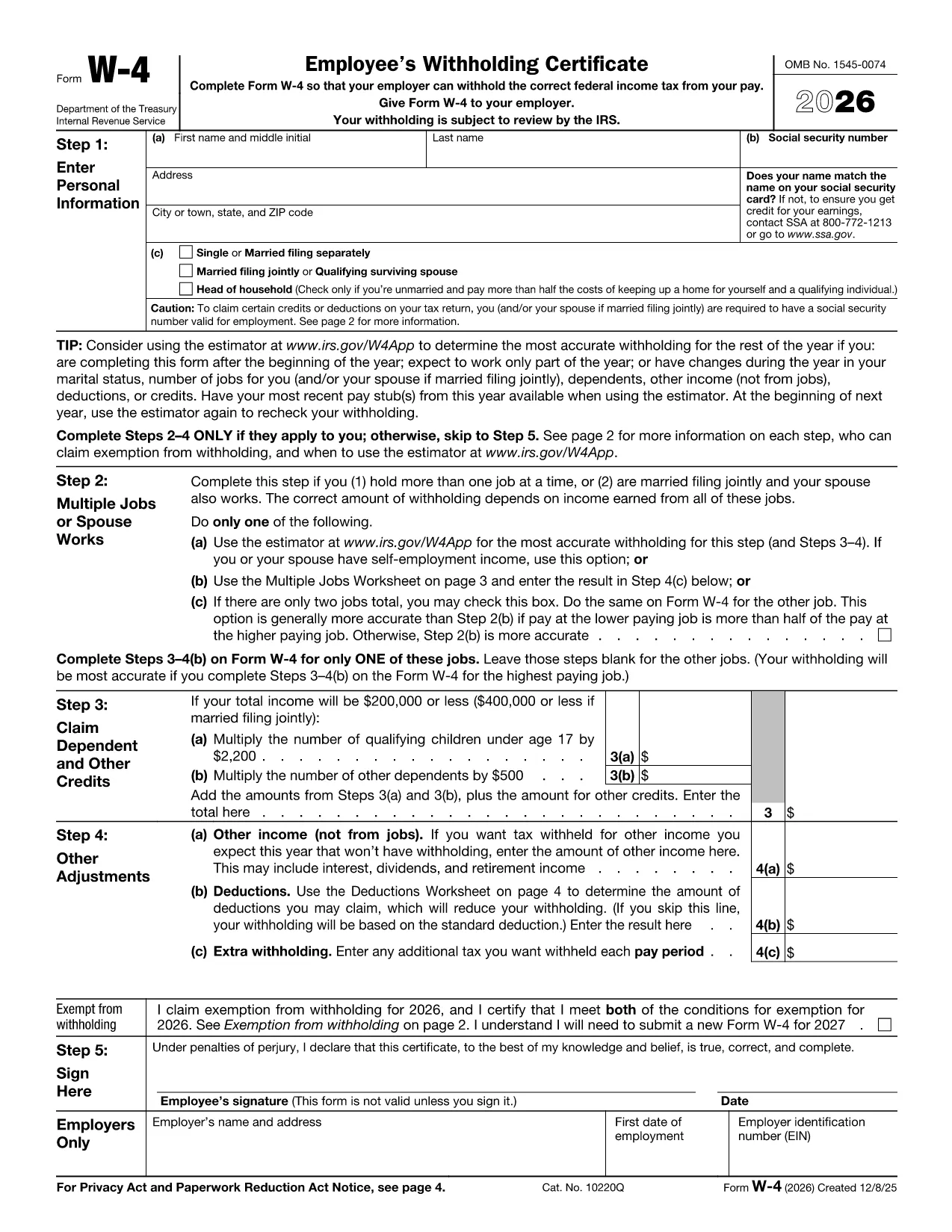
Employers require the IRS W‑4 employee tax form to determine the correct amount of federal income tax to withhold from each paycheck. Instead of printing, scanning, or struggling with a static PDF, you can fill out the official form directly in your browser using Formize’s online PDF filler.

Why Use the Fillable W‑4 Form?

  • Official source: The PDF is provided by the IRS, ensuring it meets the latest tax year requirements.
  • Fully fillable: All fields are interactive – no need for a separate editor.
  • Secure and private: Your data never leaves your device unless you choose to download or email the completed form.
  • Save time: Complete the form in minutes, then download or print the finished document.

How to Complete the W‑4 in Seconds

Follow the simple steps below and you’ll have a correctly completed W‑4 ready for your HR department.

Common Mistakes to Avoid

  • Leaving the Signature line blank – the form is invalid without a signature.
  • Incorrectly entering the number of dependents – double‑check the Dependents worksheet.
  • Forgetting to update the form when your life changes (marriage, new child, second job).

Where to Submit Your W‑4

After you download the completed PDF, give it to your employer’s payroll or HR department. Some companies also accept a secure email attachment.

Need More Help?

The IRS provides detailed instructions on the second page of the form. If you have specific tax‑withholding questions, consult a tax professional.

FAQ
  • Is the IRS W‑4 form on Formize really free?

    Yes. The PDF is provided directly from the IRS website and the Formize filler is free to use for this form.

  • Do I need an Adobe Acrobat Reader to fill out the W‑4?

    No. The Formize online filler works in any modern browser, so you don’t need additional software.

  • Can I save my progress and finish later?

    Yes. While filling, click “Save” to download a partially completed PDF. Re‑upload it later to continue.

  • What if I make a mistake after I submit the form to my employer?

    Submit a new, corrected W‑4 to your HR department. The IRS allows you to update your withholding at any time.

  • Do I need to file the W‑4 with the IRS?

    No. The W‑4 is only for your employer’s payroll records. The IRS receives the information indirectly through your employer’s tax filings.

  • Is my personal data safe when I use Formize?

    Formize processes the PDF locally in your browser; no data is stored on our servers unless you choose to download or share the file.

BAGAIMANA CARANYA

Cara mengisi W‑4 form gratis secara online dalam 5 langkah mudah:

  1. 1
    Click the Fill‑out Button
    On this page, click the bright “Fill out this form” button. The Formize PDF Filler app will launch in a new tab.
  2. 2
    Wait for the Form to Load
    The official IRS W‑4 PDF loads automatically. All fields become interactive, ready for your input.
  3. 3
    Enter Your Information
    Type your name, address, Social Security number, filing status, and any adjustments. Use the built‑in calculator for dependents if needed.
  4. 4
    Review and Sign
    Double‑check every entry, then type your electronic signature in the signature box.
  5. 5
    Download or Print
    When you’re satisfied, click “Download PDF” to save a copy or “Print” to hand it directly to your employer.
Bentuk aplikasi Pengisi PDF
TENTANG

Formulir pajak

W‑4 form adalah salah satu formulir Pajak yang merupakan dokumen yang digunakan untuk melaporkan pendapatan, pemotongan, dan kewajiban perpajakan kepada otoritas pajak terkait. Formulir-formulir ini merupakan bagian penting dari proses pengajuan pajak dan digunakan untuk memastikan individu dan bisnis mematuhi undang-undang perpajakan dan menghitung kewajiban perpajakan mereka secara akurat.

Formulir pajak spesifik yang diperlukan dapat bervariasi tergantung pada faktor-faktor seperti status pengajuan individu, sumber pendapatan, dan undang-undang perpajakan negara tersebut. Namun, berikut beberapa jenis formulir pajak yang umum:

Formulir Pajak Penghasilan Perorangan: Formulir ini, seperti seri 1040 di Amerika Serikat, digunakan oleh individu untuk melaporkan pendapatan mereka, pengurangan klaim dan kredit, dan menghitung kewajiban pajak mereka.

Formulir Pajak Bisnis: Bisnis, termasuk perseorangan, kemitraan, korporasi, dan wiraswasta, mungkin harus mengajukan berbagai formulir untuk melaporkan pendapatan, pengeluaran, dan pajak terhutang. Contohnya mencakup Jadwal C (Laba atau Rugi dari Bisnis) dan Formulir 1120 (Pengembalian Pajak Penghasilan Perusahaan AS).

Formulir Pajak Ketenagakerjaan: Pengusaha diharuskan melaporkan gaji karyawan dan memotong serta menyetorkan pajak gaji. Formulir seperti W-2 (Laporan Gaji dan Pajak) dan 941 (Pengembalian Pajak Federal Kuartalan Perusahaan) digunakan untuk tujuan ini.

Formulir Rekening Investasi dan Pensiun: Formulir ini digunakan untuk melaporkan pendapatan investasi, keuntungan dan kerugian modal, serta kontribusi dan distribusi dari rekening pensiun. Contohnya termasuk Formulir 1099-DIV (Dividen dan Distribusi) dan Formulir 5498 (Informasi Kontribusi IRA).

Formulir Pajak Harta dan Hadiah: Ketika seseorang meninggal dunia atau memberikan hadiah penting, formulir khusus seperti Formulir 706 (Pengembalian Pajak Properti Amerika Serikat (dan Pengalihan Generasi)) dan Formulir 709 (Hadiah Amerika Serikat (dan Generasi- Melewati Transfer) Pengembalian Pajak) digunakan untuk melaporkan dan menghitung pajak harta benda atau hadiah yang berlaku.

Penting untuk dicatat bahwa undang-undang dan formulir perpajakan dapat berubah seiring berjalannya waktu, sehingga individu dan badan usaha harus berkonsultasi dengan otoritas pajak terkait atau mencari nasihat perpajakan profesional untuk memastikan kepatuhan terhadap persyaratan saat ini.

FITUR

Pengisi PDF

Cara termudah untuk mengisi formulir PDF secara online

  • Isi W‑4 form dengan cepat
    Mencari cara mengisi W‑4 form dengan cepat secara online? Dengan pengisi formulir PDF online gratis kami, Anda akan tahu cara mengedit dan mengisi dokumen pdf ini dalam waktu kurang dari satu menit.
  • Editor PDF online yang mudah digunakan
    Muak dengan mencetak file PDF sehingga Anda dapat mengeditnya, sebelum memindai ulang dan mengirimnya kembali? Edit dokumen PDF secara online gratis. Gunakan editor pdf online kami untuk menghemat waktu dan kertas.
  • Alat hebat, semua platform
    Ingin tahu cara mengisi W‑4 form di Mac, atau mungkin cara menggunakan pengisi PDF gratis? Alat PDF online kami berfungsi di semua platform.
  • Penyimpanan file yang aman
    File "W‑4 form" yang telah selesai disimpan dalam database aman yang dikelola oleh hosting Amazon Cloud. Anda dapat menghapus file Anda dari sistem kami kapan saja. Bagaimanapun, file-file ini secara otomatis dihapus setelah 24 jam.
  • Ngobrol dengan W‑4 form
    Ngobrol dengan "W‑4 form" di Chatize yang merupakan asisten pembaca PDF gratis. Ajukan pertanyaan dan dapatkan jawaban dari "W‑4 form". Cukup klik tombol Chat Dengan Dokumen di atas.

Hapus sesi pengisian

Hapus sesi pengisian yang dipilih? Dalam hal ini, kemajuan Anda dalam menyelesaikan formulir akan hilang.

Hapus sesi pengeditan

Hapus sesi pengeditan yang dipilih? Dalam hal ini, kemajuan Anda dalam membuat dan mengedit formulir akan hilang.