
Pilih bahasa

IRS Form W‑4S – Fillable PDF for Sick Pay Tax Withholding

  1. Negara Amerika Serikat
  2. Bahasa Bahasa inggris
  3. Aktivitas Pajak
  4. Departemen Layanan Pendapatan Internal
IRS Form W‑4S – Fillable PDF for Sick Pay Tax Withholding

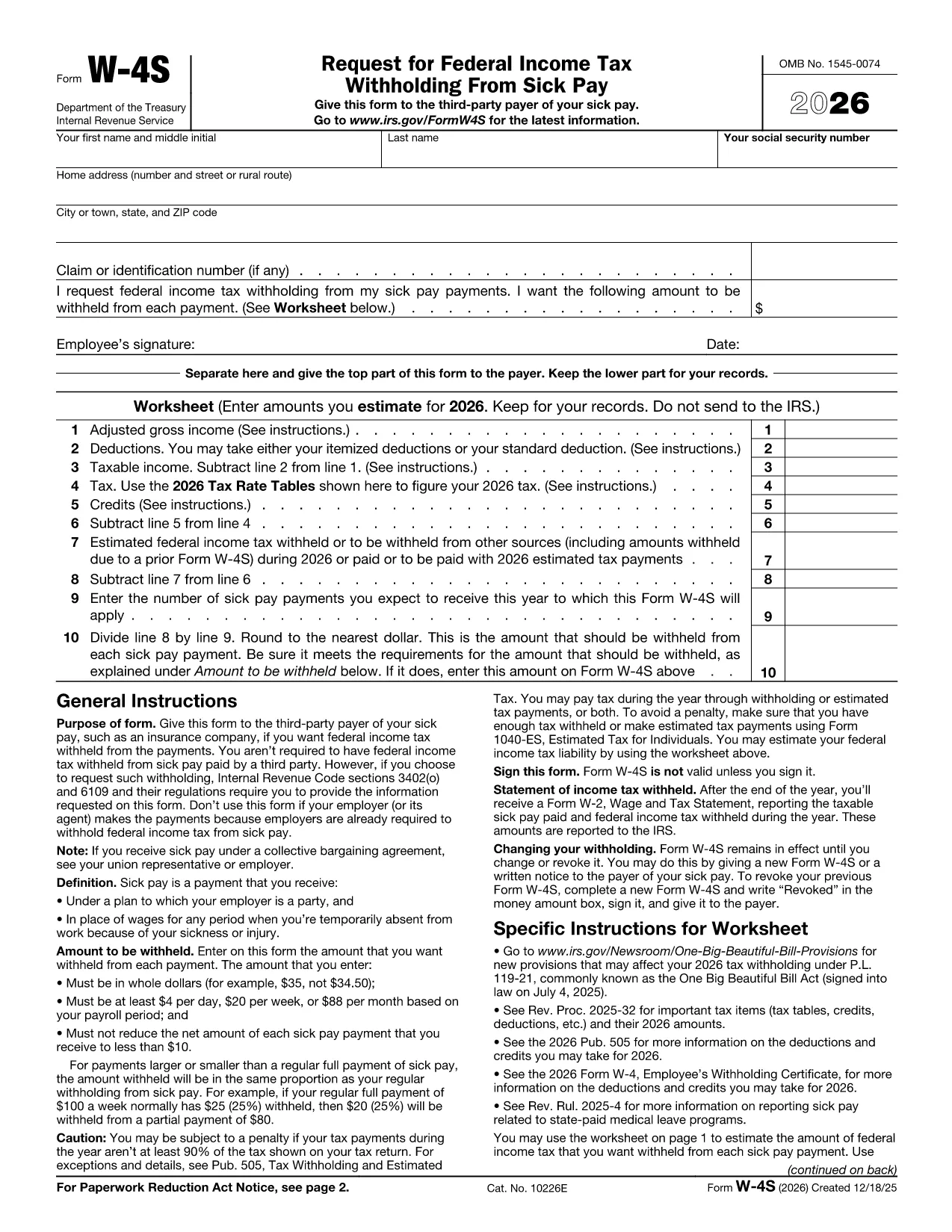
Form W‑4S, officially titled Request for Federal Income Tax Withholding From Sick Pay, is the IRS document you give to a third‑party payer (such as an insurance company) so that federal income tax can be withheld from your sick‑pay benefits.

What Is Form W‑4S?

This one‑page form has two parts: a Withholding Certificate that the payer keeps, and a Worksheet for your records. The certificate tells the payer how much tax you want taken out of each payment, while the worksheet helps you calculate the correct amount based on your projected income, deductions, and credits.

How to Complete Form W‑4S Online with Formize

Instead of downloading the PDF and editing it in a desktop program, you can fill it out instantly on our site:

  1. Click the **"Fill out this form"** button below.
  2. Wait a few seconds while the Formize PDF Filler app loads the official IRS PDF.
  3. Enter your personal information, Social Security number, and the exact dollar amount you want withheld.
  4. Complete the worksheet section to verify your calculation.
  5. Review the completed form, then click **Submit** to download a signed copy or print it for your payer.

When Should You Use Form W‑4S?

Use this form whenever you receive sick‑pay from a third‑party payer (e.g., an insurance carrier) and you want federal tax withheld. It is not required when the sick pay comes directly from your employer, because employers already withhold taxes.

Common Mistakes to Avoid

  • Entering amounts in cents – the IRS requires whole‑dollar amounts only.
  • Withholding less than the minimum: $4 per day, $20 per week, or $88 per month.
  • Reducing your net payment below $10 – the payer cannot withhold more than the payment allows.
  • Forgetting to sign and date the form – an unsigned form is invalid.

Where to Find Help

If you have questions about the calculations, consult the IRS instructions (linked on the form) or a tax professional. You can also review our detailed FAQ below.

FAQ
  • Do I need to file Form W‑4S with the IRS?

    No. You give the completed certificate to the third‑party payer of your sick pay. Keep the worksheet for your records.

  • Can I change the withholding amount later?

    Yes. Submit a new Form W‑4S whenever your financial situation changes or you want a different withholding amount.

  • What is the minimum amount the IRS allows me to withhold?

    The minimum is $4 per day, $20 per week, or $88 per month. The payer cannot withhold less than these amounts.

  • Is the Formize filler truly free?

    Yes. Formize provides a free, secure online PDF filler for IRS forms, including Form W‑4S.

  • What if my sick‑pay provider is my employer?

    Employers already withhold federal tax from sick pay, so Form W‑4S is not required in that case.

  • Can I submit the form electronically to the payer?

    Most third‑party payers accept a printed copy. Check with your payer; some may allow a scanned PDF upload.

  • What happens if I withhold too much?

    Any excess tax withheld will be refunded to you when you file your annual tax return.

  • Do I need to attach the worksheet to the payer?

    No. The worksheet is for your personal records only; only the top part of the form goes to the payer.

BAGAIMANA CARANYA

Cara mengisi Form W-4S gratis secara online dalam 5 langkah mudah:

  1. 1
    Open the Fillable Form
    Click the **"Fill out this form"** button on the page. The Formize PDF Filler will open the official IRS Form W‑4S instantly.
  2. 2
    Enter Your Information
    Type your name, SSN, address, and the exact dollar amount you want withheld per payment.
  3. 3
    Complete the Worksheet
    Use the worksheet section to calculate your estimated tax based on projected income, deductions, and credits.
  4. 4
    Review and Sign
    Check all entries for accuracy, then add your electronic signature and date.
  5. 5
    Download or Print
    When you’re satisfied, click **Submit** to download the completed PDF or print it to give to your payer.
Bentuk aplikasi Pengisi PDF
TENTANG

Formulir pajak

Form W-4S adalah salah satu formulir Pajak yang merupakan dokumen yang digunakan untuk melaporkan informasi terkait pajak kepada otoritas pajak terkait. Ada berbagai jenis formulir pajak, termasuk formulir pajak federal, negara bagian, dan lokal, yang dapat bervariasi tergantung pada keadaan dan lokasi pembayar pajak.

FITUR

Pengisi PDF

Cara termudah untuk mengisi formulir PDF secara online

  • Isi Form W-4S dengan cepat
    Mencari cara mengisi Form W-4S dengan cepat secara online? Dengan pengisi formulir PDF online gratis kami, Anda akan tahu cara mengedit dan mengisi dokumen pdf ini dalam waktu kurang dari satu menit.
  • Editor PDF online yang mudah digunakan
    Muak dengan mencetak file PDF sehingga Anda dapat mengeditnya, sebelum memindai ulang dan mengirimnya kembali? Edit dokumen PDF secara online gratis. Gunakan editor pdf online kami untuk menghemat waktu dan kertas.
  • Alat hebat, semua platform
    Ingin tahu cara mengisi Form W-4S di Mac, atau mungkin cara menggunakan pengisi PDF gratis? Alat PDF online kami berfungsi di semua platform.
  • Penyimpanan file yang aman
    File "Form W-4S" yang telah selesai disimpan dalam database aman yang dikelola oleh hosting Amazon Cloud. Anda dapat menghapus file Anda dari sistem kami kapan saja. Bagaimanapun, file-file ini secara otomatis dihapus setelah 24 jam.
  • Ngobrol dengan Form W-4S
    Ngobrol dengan "Form W-4S" di Chatize yang merupakan asisten pembaca PDF gratis. Ajukan pertanyaan dan dapatkan jawaban dari "Form W-4S". Cukup klik tombol Chat Dengan Dokumen di atas.

Hapus sesi pengisian

Hapus sesi pengisian yang dipilih? Dalam hal ini, kemajuan Anda dalam menyelesaikan formulir akan hilang.

Hapus sesi pengeditan

Hapus sesi pengeditan yang dipilih? Dalam hal ini, kemajuan Anda dalam membuat dan mengedit formulir akan hilang.