
Pilih bahasa

Fillable Form W‑9S – Request Student or Borrower TIN

  1. Negara Amerika Serikat
  2. Bahasa Bahasa inggris
  3. Aktivitas Pajak
  4. Departemen Layanan Pendapatan Internal
Fillable Form W‑9S – Request Student or Borrower TIN

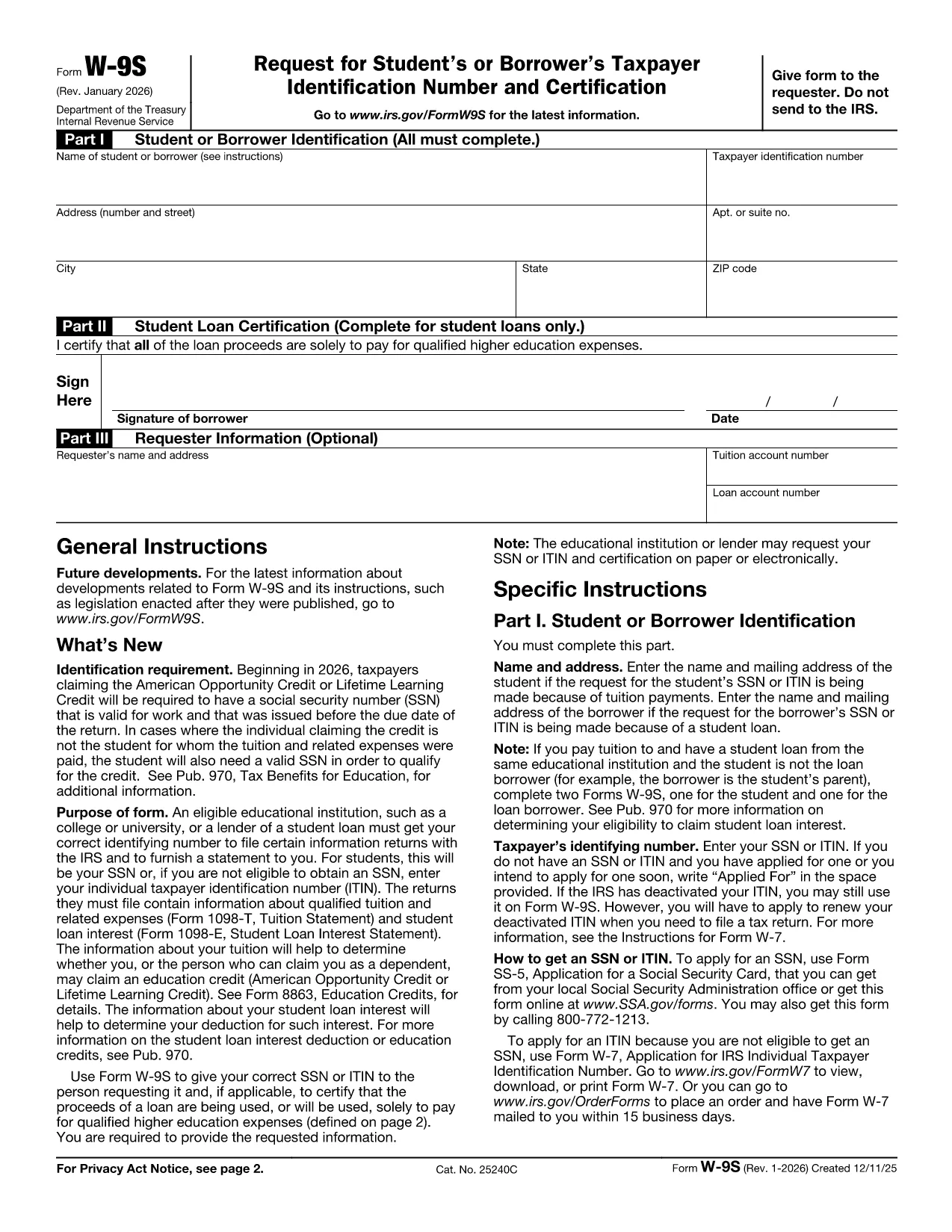
The IRS Form W‑9S, Request for Student's or Borrower's Taxpayer Identification Number and Certification, is used by qualifying educational institutions to collect the TIN of students or borrowers who receive scholarships, grants, or loan interest that must be reported on Forms 1098‑T or 1098‑E.

Our fillable Form W‑9S lets you complete the entire request directly in your browser—no printing, scanning, or PDF editor required. Simply click the “Fill out this form” button, let the Formize PDF Filler load, and start entering the required information.

What Is Form W‑9S and Who Needs It?

Form W‑9S captures the name, address, and Taxpayer Identification Number (TIN) of a student or borrower. It is required when the institution must issue a 1098‑T (tuition statement) or 1098‑E (student loan interest) to the IRS. Both federal and private loan recipients may be asked to submit this form.

How to Complete Form W‑9S Online

Follow these simple steps:

  1. Click the “Fill out this form” button on this page.
  2. Wait for the Formize PDF Filler app to load (usually a few seconds).
  3. Enter the student or borrower’s legal name, TIN (SSN or EIN), and full address.
  4. If you are reporting a loan, complete Part II with the loan certification.
  5. Sign electronically and submit the form according to your school’s instructions.

Common Mistakes to Avoid on Form W‑9S

  • Incorrect TIN: Double‑check the Social Security Number or EIN; a typo will delay processing.
  • Missing Signature: The form is not valid without a signed certification.
  • Out‑of‑date Address: Use the current mailing address to ensure the 1098‑E or 1098‑T reaches the taxpayer.
  • Leaving Part II Blank: Only leave it blank if the request is not for a loan.

Download the Official PDF

If you prefer the original IRS version, you can download it here: Form W‑9S (PDF). Our fillable version mirrors this official layout while adding a seamless online experience.

FAQ
  • What is the difference between Form W‑9 and Form W‑9S?

    Form W‑9 is used for general payee information, while Form W‑9S is specifically for students or borrowers who need to report tuition or loan interest to the IRS.

  • Can I use the same TIN for multiple schools?

    Yes. Your Social Security Number or EIN remains the same; each institution will request a separate Form W‑9S for its records.

  • Do I need to file Form W‑9S with the IRS myself?

    No. The educational institution collects the form and uses the information to issue the appropriate 1098‑T or 1098‑E to the IRS.

  • Is an electronic signature accepted on Form W‑9S?

    Yes. The IRS accepts electronic signatures on fillable PDFs as long as the signer certifies the information is correct.

  • What should I do if I make a mistake after submitting?

    Contact your school’s financial aid office immediately. They can provide a corrected Form W‑9S or advise you on the next steps.

  • Is there a fee to use the Formize PDF Filler?

    No. Formize offers free online filling for government forms like Form W‑9S.

BAGAIMANA CARANYA

Cara mengisi Form W‑9S gratis secara online dalam 3 langkah mudah:

  1. 1
    Open the Fillable Form
    Click the “Fill out this form” button on the page. The Formize PDF Filler will open in a new window.
  2. 2
    Enter Required Information
    Complete Part I with the student or borrower’s name, TIN, and address. If you have a loan, fill in Part II.
  3. 3
    Sign and Submit
    Add your electronic signature, review the data for accuracy, and follow your institution’s submission instructions.
Bentuk aplikasi Pengisi PDF
TENTANG

Formulir pajak federal

Form W‑9S adalah salah satu formulir pajak Federal yang merupakan dokumen yang digunakan untuk melaporkan dan mengajukan pajak pendapatan federal ke Internal Revenue Service (IRS) di Amerika Serikat. Formulir ini digunakan oleh individu, bisnis, dan organisasi untuk melaporkan pendapatan, pemotongan, dan informasi relevan lainnya yang diperlukan untuk menghitung kewajiban pajak federal mereka.

Formulir pajak federal yang paling umum digunakan adalah Formulir 1040, yang digunakan oleh wajib pajak orang pribadi untuk melaporkan pajak penghasilan pribadinya. Formulir lain yang umum digunakan mencakup Formulir 1065 untuk kemitraan, Formulir 1120 untuk perusahaan, dan Formulir 990 untuk organisasi bebas pajak.

Formulir pajak federal biasanya mengharuskan pembayar pajak untuk melaporkan berbagai sumber pendapatan, seperti upah, gaji, dan tip, serta pendapatan dari investasi, properti sewaan, dan sumber lainnya. Formulir tersebut juga memungkinkan pembayar pajak untuk mengklaim pengurangan dan kredit untuk berbagai pengeluaran, seperti sumbangan amal, bunga hipotek, dan biaya perawatan kesehatan.

Penting untuk mengajukan formulir pajak federal secara akurat dan tepat waktu, karena kegagalan untuk melakukannya dapat mengakibatkan denda dan biaya bunga dari IRS.

FITUR

Pengisi PDF

Cara termudah untuk mengisi formulir PDF secara online

  • Isi Form W‑9S dengan cepat
    Mencari cara mengisi Form W‑9S dengan cepat secara online? Dengan pengisi formulir PDF online gratis kami, Anda akan tahu cara mengedit dan mengisi dokumen pdf ini dalam waktu kurang dari satu menit.
  • Editor PDF online yang mudah digunakan
    Muak dengan mencetak file PDF sehingga Anda dapat mengeditnya, sebelum memindai ulang dan mengirimnya kembali? Edit dokumen PDF secara online gratis. Gunakan editor pdf online kami untuk menghemat waktu dan kertas.
  • Alat hebat, semua platform
    Ingin tahu cara mengisi Form W‑9S di Mac, atau mungkin cara menggunakan pengisi PDF gratis? Alat PDF online kami berfungsi di semua platform.
  • Penyimpanan file yang aman
    File "Form W‑9S" yang telah selesai disimpan dalam database aman yang dikelola oleh hosting Amazon Cloud. Anda dapat menghapus file Anda dari sistem kami kapan saja. Bagaimanapun, file-file ini secara otomatis dihapus setelah 24 jam.
  • Ngobrol dengan Form W‑9S
    Ngobrol dengan "Form W‑9S" di Chatize yang merupakan asisten pembaca PDF gratis. Ajukan pertanyaan dan dapatkan jawaban dari "Form W‑9S". Cukup klik tombol Chat Dengan Dokumen di atas.

Hapus sesi pengisian

Hapus sesi pengisian yang dipilih? Dalam hal ini, kemajuan Anda dalam menyelesaikan formulir akan hilang.

Hapus sesi pengeditan

Hapus sesi pengeditan yang dipilih? Dalam hal ini, kemajuan Anda dalam membuat dan mengedit formulir akan hilang.