
Pilih bahasa

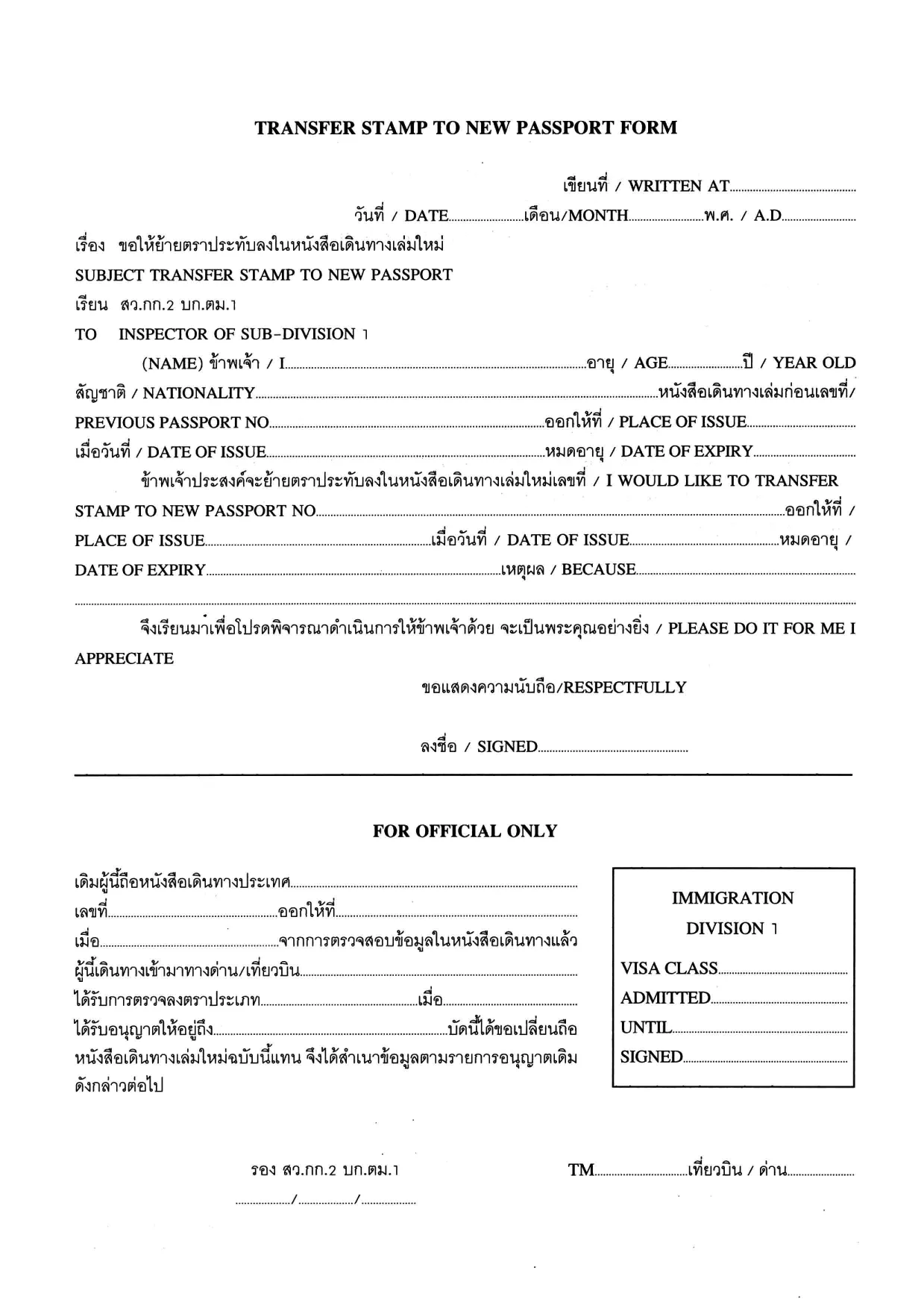
Transfer Stamp to New Passport Form (Fillable PDF)

  1. Bahasa Bahasa inggris Thai
  2. Negara Thailand
  3. Aktivitas Visa
Transfer Stamp to New Passport Form (Fillable PDF)

When you receive a new passport, you must transfer any valid visa or entry stamp from your old passport to the new one. The Transfer Stamp to New Passport Form is the official document used by many embassies and consulates to record this transfer.

Our fillable PDF lets you complete the form quickly, without printing, scanning, or hand‑writing. Simply click the button below, let the Formize PDF Filler load, and start typing. The form saves your progress automatically, so you can return later if needed.

Why You Need This Form

Without a transferred stamp, your existing visa may be considered invalid, which can lead to denied entry, delays at the border, or the need to re‑apply for a new visa. The transfer form ensures that immigration authorities recognize the continuity of your visa status.

How to Fill the Transfer Stamp Form Online

Follow the step‑by‑step guide in the How To section below. The online Formize filler mirrors the original PDF layout, so you’ll know exactly where each piece of information belongs.

Required Documents and Common Mistakes

  • Old passport – copy of the page with the original stamp.
  • New passport – copy of the biographic page.
  • Embassy or consular letter (if required).

Common errors include misspelling names, entering an incorrect passport number, or forgetting to sign the form. Double‑check each field before saving.

Download & Start Filling Instantly

Click the button below to open the fillable PDF in the Formize PDF Filler app. No additional software is needed – everything runs securely in your browser.

Fill out this form

FAQ
  • Who must use the Transfer Stamp to New Passport Form?

    Anyone who has a valid visa or entry stamp in an old passport that is being replaced with a new passport must complete this form to keep the visa active.

  • Can I fill out the form on a mobile device?

    Yes. The Formize PDF Filler works on all modern browsers, including smartphones and tablets.

  • Do I need to print the form after filling it online?

    Most embassies accept a digitally signed PDF, but check the specific instructions of the consulate you are dealing with.

  • What documents should I attach with the completed form?

    Attach a clear copy of the page containing the original stamp from the old passport, a copy of the biographic page of the new passport, and any embassy letter if required.

  • Is the information I enter secure?

    Formize runs over HTTPS, encrypting all data between your browser and our servers. The PDF is stored only on your device unless you choose to upload it.

  • Can I edit the form after I have downloaded it?

    Yes, you can reopen the saved PDF in Formize to make additional changes before final submission.

  • What should I do if I make a mistake?

    Simply correct the field in the filler and re‑save. If you have already submitted the form, contact the embassy for guidance on re‑issuing the document.

  • Is there a fee for using the Transfer Stamp form?

    The form itself is free to download. Any processing or visa transfer fees are set by the embassy or consulate.

BAGAIMANA CARANYA

Cara mengisi transfer stamp new passport gratis secara online dalam 5 langkah mudah:

  1. 1
    Click the Fill‑out Button
    Press the “Fill out this form” button on the page. The Formize PDF Filler will open in a new browser tab.
  2. 2
    Wait for the Formizer to Load
    The fillable PDF loads automatically. A loading indicator shows when the app is ready.
  3. 3
    Enter Your Information
    Type directly into each field – name, passport numbers, visa details, and dates. Use the tab key to move quickly between fields.
  4. 4
    Save Your Progress
    The filler saves your entries in real time. You can close the tab and return later without losing data.
  5. 5
    Download or Submit
    When finished, click “Download PDF” to save the completed form, or follow your embassy’s instructions to submit it electronically.
Bentuk aplikasi Pengisi PDF
TENTANG

Formulir Visa

transfer stamp new passport adalah salah satu formulir Visa yang merupakan dokumen yang digunakan untuk mengajukan visa masuk ke negara asing. Visa adalah dokumen yang memungkinkan warga negara asing untuk masuk, tinggal, dan terkadang bekerja di negara asing untuk jangka waktu tertentu. Bentuk dan persyaratan yang tepat untuk memperoleh visa bervariasi menurut negara dan jenis visa.

Formulir visa biasanya memerlukan informasi pribadi seperti nama, tanggal lahir, dan informasi paspor, serta informasi tentang tujuan dan lama perjalanan, tujuan yang dituju, dan apakah pemohon visa sebelumnya telah ditolak atau dideportasi dari suatu negara. Formulir tersebut mungkin juga memerlukan dokumen pendukung seperti paspor, foto, dan bukti dukungan keuangan.

Di Amerika Serikat, formulir visa yang paling umum adalah formulir DS-160 dan DS-260. Formulir DS-160 digunakan untuk mengajukan visa non-imigran, sedangkan formulir DS-260 digunakan untuk mengajukan visa imigran. Formulir ini memerlukan informasi rinci tentang riwayat pribadi dan perjalanan pemohon, serta dokumen pendukung seperti paspor, rencana perjalanan, dan catatan keuangan.

Negara lain mungkin memiliki formulir dan persyaratan visa yang berbeda, tetapi proses dasarnya biasanya melibatkan penyelesaian aplikasi visa, memberikan dokumentasi pendukung, dan menghadiri wawancara dengan petugas konsuler di kedutaan atau konsulat AS. Penting untuk dicatat bahwa proses permohonan visa dapat rumit dan memakan waktu, dan disarankan agar individu yang mencari visa berkonsultasi dengan pengacara imigrasi atau profesional lain yang memenuhi syarat untuk memastikan bahwa semua formulir dan persyaratan yang diperlukan dipenuhi.

FITUR

Pengisi PDF

Cara termudah untuk mengisi formulir PDF secara online

  • Isi transfer stamp new passport dengan cepat
    Mencari cara mengisi transfer stamp new passport dengan cepat secara online? Dengan pengisi formulir PDF online gratis kami, Anda akan tahu cara mengedit dan mengisi dokumen pdf ini dalam waktu kurang dari satu menit.
  • Editor PDF online yang mudah digunakan
    Muak dengan mencetak file PDF sehingga Anda dapat mengeditnya, sebelum memindai ulang dan mengirimnya kembali? Edit dokumen PDF secara online gratis. Gunakan editor pdf online kami untuk menghemat waktu dan kertas.
  • Alat hebat, semua platform
    Ingin tahu cara mengisi transfer stamp new passport di Mac, atau mungkin cara menggunakan pengisi PDF gratis? Alat PDF online kami berfungsi di semua platform.
  • Penyimpanan file yang aman
    File "transfer stamp new passport" yang telah selesai disimpan dalam database aman yang dikelola oleh hosting Amazon Cloud. Anda dapat menghapus file Anda dari sistem kami kapan saja. Bagaimanapun, file-file ini secara otomatis dihapus setelah 24 jam.
  • Ngobrol dengan transfer stamp new passport
    Ngobrol dengan "transfer stamp new passport" di Chatize yang merupakan asisten pembaca PDF gratis. Ajukan pertanyaan dan dapatkan jawaban dari "transfer stamp new passport". Cukup klik tombol Chat Dengan Dokumen di atas.

Hapus sesi pengisian

Hapus sesi pengisian yang dipilih? Dalam hal ini, kemajuan Anda dalam menyelesaikan formulir akan hilang.

Hapus sesi pengeditan

Hapus sesi pengeditan yang dipilih? Dalam hal ini, kemajuan Anda dalam membuat dan mengedit formulir akan hilang.