
Pilih bahasa

Form RE – Official Copyright Registration Form (Fillable PDF)

  1. Bahasa Bahasa inggris
  2. Negara Amerika Serikat
  3. Departemen Kantor Hak Cipta
Form RE – Official Copyright Registration Form (Fillable PDF)

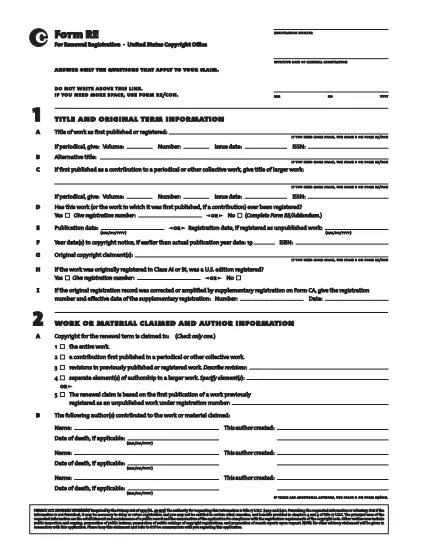
Form RE is the United States Copyright Office’s standard registration form for works that were not registered during their original term. Whether you are filing for a literary, musical, or visual work, the fillable PDF version lets you complete the entire process quickly and accurately.

Using Formize’s secure PDF filler, you can edit, sign, and save Form RE directly in your browser – no extra software required. Once completed, simply download the signed PDF and submit it to the Copyright Office.

Below you’ll find a quick guide to each section of the form, tips for avoiding common errors, and step‑by‑step instructions for an effortless online filing experience.

FAQ
  • What is the purpose of Form RE?

    Form RE is used to register a work that was not registered during its original term, or to add an addendum to an existing registration.

  • Can I submit Form RE electronically?

    Yes. After completing the fillable PDF with Formize, you can upload the signed file through the Copyright Office’s electronic filing portal.

  • Do I need a lawyer to fill out Form RE?

    No. The form is designed for creators to complete on their own. However, you may consult an attorney for complex copyright issues.

  • What happens if I make a mistake on the form?

    The Formize filler highlights missing or invalid entries before you can save. If an error is discovered after submission, you can file a correction using Form RE/Addendum.

  • Is there a filing fee for Form RE?

    Yes. The current fee schedule is available on the Copyright Office website. Fees must be paid at the time of submission.

  • How long does it take for the Copyright Office to process Form RE?

    Standard processing takes approximately 3‑6 months, but expedited processing is available for an additional fee.

  • Can I use Form RE for works created outside the United States?

    Form RE is intended for works that are eligible for U.S. copyright protection. Foreign works may require additional documentation.

  • What format should I use when submitting the completed form?

    Submit the signed PDF file exactly as downloaded from the Formize filler. Do not convert it to another format.

BAGAIMANA CARANYA

Cara mengisi Form RE gratis secara online dalam 5 langkah mudah:

  1. 1
    Open the Fillable Form
    Click the “Fill out this form” button on the page. The Formize PDF Filler app will load directly in your browser.
  2. 2
    Complete All Required Fields
    Enter the requested information for each section of Form RE. The filler validates entries in real time.
  3. 3
    Add Your Electronic Signature
    Use the built‑in signature tool to sign the form electronically. This satisfies the Copyright Office’s signing requirement.
  4. 4
    Review and Save
    Double‑check every field, then click “Save” to download the completed PDF to your device.
  5. 5
    Submit to the Copyright Office
    Mail or upload the saved PDF according to the Copyright Office’s submission guidelines.
Bentuk aplikasi Pengisi PDF
TENTANG

Formulir Kantor Hak Cipta

Form RE adalah salah satu formulir resmi yang digunakan oleh Kantor Hak Cipta Amerika Serikat, sebuah departemen di Perpustakaan Kongres, untuk mendaftarkan dan melindungi hak cipta. Kantor Hak Cipta bertanggung jawab untuk mengatur undang-undang hak cipta di Amerika Serikat, termasuk pendaftaran hak cipta, pencatatan pengalihan hak cipta dan lisensi, serta menyediakan informasi dan layanan terkait hak cipta.

Berikut beberapa contoh formulir Kantor Hak Cipta:

Permohonan Pendaftaran Hak Cipta: Ini adalah formulir utama yang digunakan untuk mendaftarkan hak cipta ke Kantor Hak Cipta AS. Formulir permohonan yang berbeda tersedia untuk berbagai jenis karya, seperti karya sastra, seni visual, komposisi musik, rekaman suara, film, dan banyak lagi. Aplikasi ini mengumpulkan informasi tentang karya yang didaftarkan, penulis, penggugat, dan detail relevan lainnya.

Formulir Pencatatan Dokumen: Formulir ini digunakan untuk mencatat pengalihan hak cipta, seperti penugasan atau lisensi, pada Kantor Hak Cipta. Mereka menyediakan cara untuk membuat catatan publik tentang pengalihan kepemilikan hak cipta.

Formulir Direktori Agen yang Ditunjuk DMCA: Formulir ini digunakan untuk menunjuk agen di Kantor Hak Cipta berdasarkan Digital Millennium Copyright Act (DMCA). Agen yang ditunjuk bertanggung jawab untuk menerima dan menangani pemberitahuan penghapusan terkait pelanggaran hak cipta online.

Daftar Biaya Kantor Hak Cipta: Meskipun bukan formulir spesifik, daftar biaya memberikan informasi tentang biaya yang terkait dengan berbagai layanan hak cipta, termasuk pendaftaran, pencatatan, dan layanan terkait lainnya.

Penting untuk diperhatikan bahwa formulir dan persyaratan spesifik dapat berubah seiring waktu, dan formulir yang berbeda mungkin diperlukan untuk jenis pendaftaran atau layanan hak cipta yang berbeda. Sebaiknya kunjungi situs web resmi Kantor Hak Cipta A.S. (www.copyright.gov) atau berkonsultasi dengan profesional hukum yang berspesialisasi dalam hukum hak cipta untuk mendapatkan informasi yang akurat dan terkini mengenai formulir Kantor Hak Cipta spesifik yang relevan dengan kebutuhan terkait hak cipta Anda.

FITUR

Pengisi PDF

Cara termudah untuk mengisi formulir PDF secara online

  • Isi Form RE dengan cepat
    Mencari cara mengisi Form RE dengan cepat secara online? Dengan pengisi formulir PDF online gratis kami, Anda akan tahu cara mengedit dan mengisi dokumen pdf ini dalam waktu kurang dari satu menit.
  • Editor PDF online yang mudah digunakan
    Muak dengan mencetak file PDF sehingga Anda dapat mengeditnya, sebelum memindai ulang dan mengirimnya kembali? Edit dokumen PDF secara online gratis. Gunakan editor pdf online kami untuk menghemat waktu dan kertas.
  • Alat hebat, semua platform
    Ingin tahu cara mengisi Form RE di Mac, atau mungkin cara menggunakan pengisi PDF gratis? Alat PDF online kami berfungsi di semua platform.
  • Penyimpanan file yang aman
    File "Form RE" yang telah selesai disimpan dalam database aman yang dikelola oleh hosting Amazon Cloud. Anda dapat menghapus file Anda dari sistem kami kapan saja. Bagaimanapun, file-file ini secara otomatis dihapus setelah 24 jam.
  • Ngobrol dengan Form RE
    Ngobrol dengan "Form RE" di Chatize yang merupakan asisten pembaca PDF gratis. Ajukan pertanyaan dan dapatkan jawaban dari "Form RE". Cukup klik tombol Chat Dengan Dokumen di atas.

Hapus sesi pengisian

Hapus sesi pengisian yang dipilih? Dalam hal ini, kemajuan Anda dalam menyelesaikan formulir akan hilang.

Hapus sesi pengeditan

Hapus sesi pengeditan yang dipilih? Dalam hal ini, kemajuan Anda dalam membuat dan mengedit formulir akan hilang.