Pilih bahasa

DTS Form 1 – Fillable PDF Profile Worksheet

  1. Negara Amerika Serikat
  2. Bahasa Bahasa inggris
  3. Departemen Department of Defense
  4. Aktivitas Travel
DTS Form 1 – Fillable PDF Profile Worksheet

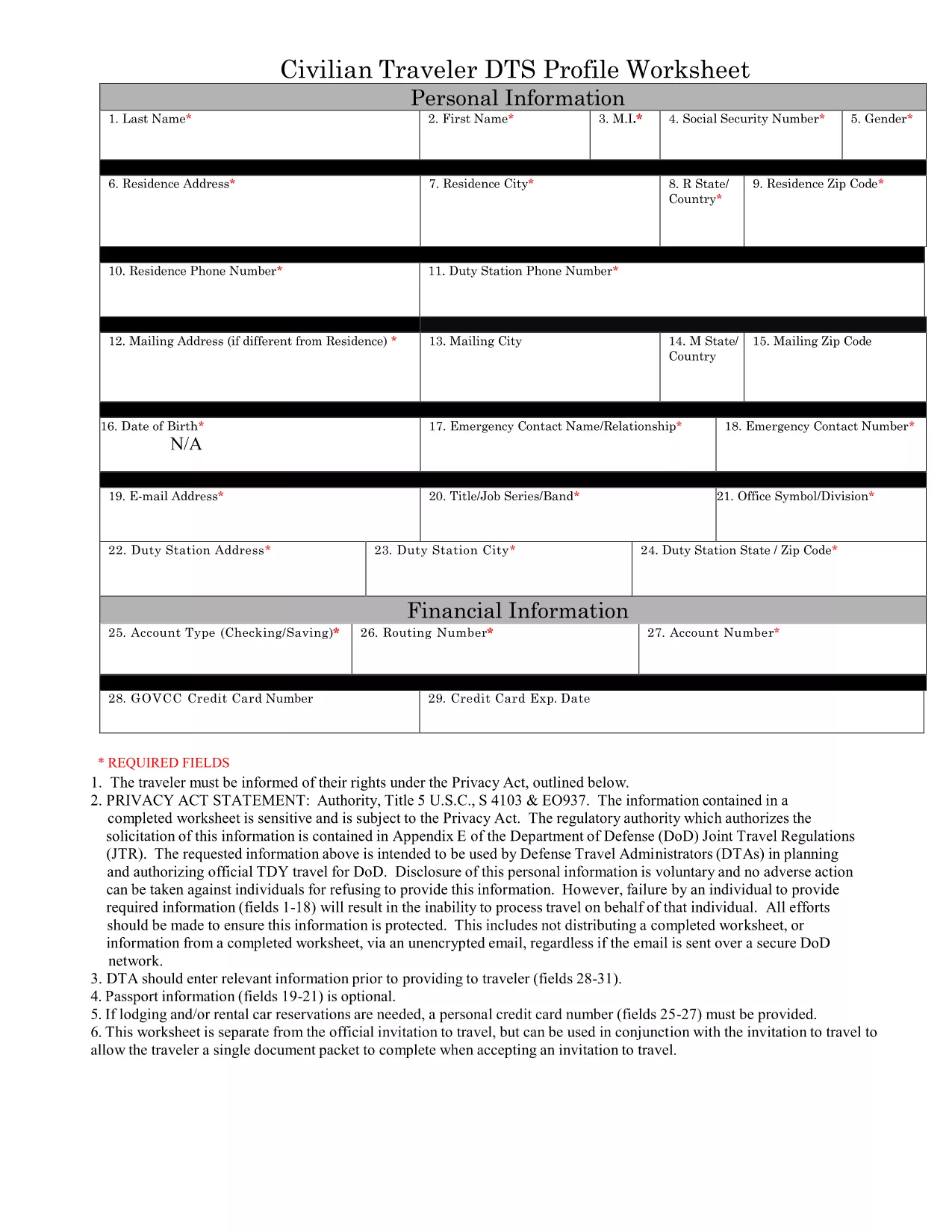
The Defense Travel System (DTS) Form 1, also known as the DTS Profile Worksheet, is the standard document used by U.S. Army personnel to capture personal, travel, and funding information before a trip is entered into the system. Having a fillable PDF version means you can complete the form quickly, accurately, and without printing.

What Is DTS Form 1?

DTS Form 1 collects essential data such as:

  • Traveler’s name, rank, and contact details
  • Unit and sponsor information
  • Travel purpose, destination, and dates
  • Estimated expenses and funding source

Key Sections of the DTS Profile Worksheet

Understanding each section helps you avoid errors that could delay approval:

  1. Section 1 – Personal Data: Fill in your official name, SSN, and contact numbers exactly as they appear in your personnel records.
  2. Section 2 – Travel Details: Specify the mission purpose, location, and expected departure/return dates.
  3. Section 3 – Funding: Indicate the appropriate cost center and any special authorizations.
  4. Section 4 – Signatures: The traveler and approving official must sign electronically after completing the form.

How to Complete the Form Online

Instead of downloading and editing the PDF in a desktop editor, simply click the “Fill out this form” button on this page. The Formize PDF Filler will load the fillable document directly in your browser, allowing you to:

  • Enter data into each field with keyboard navigation
  • Save progress and return later
  • Submit the completed PDF to your unit’s travel office instantly

Common Mistakes to Avoid

  • Leaving the SSN or rank fields blank – the system will reject the submission.
  • Using unofficial abbreviations for locations or units.
  • Forgetting to attach required supporting documents (e.g., travel orders).
  • Entering dates that conflict with the mission timeline.

Download the Official PDF

If you prefer to keep a local copy, you can download the original, government‑issued PDF below. The file is fully fillable and compatible with Formize’s online editor.

Download DTS Form 1 (PDF)

FAQ
  • Is the DTS Form 1 available for free?

    Yes. The official government PDF is free to download, and Formize’s online filler is also free to use.

  • Can I edit the PDF on a mobile device?

    Absolutely. The Formize PDF Filler works on all modern browsers, including smartphones and tablets.

  • Do I need Adobe Acrobat to fill out the form?

    No. The form is fully fillable in the browser via Formize, so you don’t need any additional software.

  • What should I do if a field is locked or missing?

    All fields in the official DTS Form 1 are editable. If a field appears locked, refresh the page or contact your unit’s travel administrator.

  • How long is the DTS Form 1 valid?

    The worksheet reflects the current fiscal year’s format. Check with your command for any updates before submitting.

  • Can I print the completed form after filling it online?

    Yes. After you finish, use the “Print” button in the Formize interface to produce a hard copy.

BAGAIMANA CARANYA

Cara mengisi DTS form gratis secara online dalam 3 langkah mudah:

  1. 1
    Open the Fillable Form
    Click the “Fill out this form” button on this page. The Formize PDF Filler will launch in a new tab, loading the DTS Form 1 automatically.
  2. 2
    Enter Your Information
    Use your keyboard to navigate each field. All required sections are highlighted. Double‑check spelling of names, ranks, and locations.
  3. 3
    Save or Submit
    When you’re finished, click “Save” to store a copy on your device, or click “Submit” to email the completed PDF directly to your unit’s travel office.
Bentuk aplikasi Pengisi PDF
TENTANG

kerangka DTS form

Dengan serangkaian fitur tradisional untuk melihat dan mengisi dokumen PDF, dipadukan dengan manfaat aplikasi web dan tata letak responsif, Anda dapat menyelesaikan DTS form dalam hitungan menit.

FITUR

Pengisi PDF

Cara termudah untuk mengisi formulir PDF secara online

  • Isi DTS form dengan cepat
    Mencari cara mengisi DTS form dengan cepat secara online? Dengan pengisi formulir PDF online gratis kami, Anda akan tahu cara mengedit dan mengisi dokumen pdf ini dalam waktu kurang dari satu menit.
  • Editor PDF online yang mudah digunakan
    Muak dengan mencetak file PDF sehingga Anda dapat mengeditnya, sebelum memindai ulang dan mengirimnya kembali? Edit dokumen PDF secara online gratis. Gunakan editor pdf online kami untuk menghemat waktu dan kertas.
  • Alat hebat, semua platform
    Ingin tahu cara mengisi DTS form di Mac, atau mungkin cara menggunakan pengisi PDF gratis? Alat PDF online kami berfungsi di semua platform.
  • Penyimpanan file yang aman
    File "DTS form" yang telah selesai disimpan dalam database aman yang dikelola oleh hosting Amazon Cloud. Anda dapat menghapus file Anda dari sistem kami kapan saja. Bagaimanapun, file-file ini secara otomatis dihapus setelah 24 jam.
  • Ngobrol dengan DTS form
    Ngobrol dengan "DTS form" di Chatize yang merupakan asisten pembaca PDF gratis. Ajukan pertanyaan dan dapatkan jawaban dari "DTS form". Cukup klik tombol Chat Dengan Dokumen di atas.

Hapus sesi pengisian

Hapus sesi pengisian yang dipilih? Dalam hal ini, kemajuan Anda dalam menyelesaikan formulir akan hilang.

Hapus sesi pengeditan

Hapus sesi pengeditan yang dipilih? Dalam hal ini, kemajuan Anda dalam membuat dan mengedit formulir akan hilang.