
Pilih bahasa

DS-157 Supplemental Nonimmigrant Visa Application – Fillable PDF

  1. Bahasa Bahasa inggris
  2. Negara Amerika Serikat
  3. Departemen Departemen Luar Negeri
  4. Aktivitas Visa
DS-157 Supplemental Nonimmigrant Visa Application – Fillable PDF

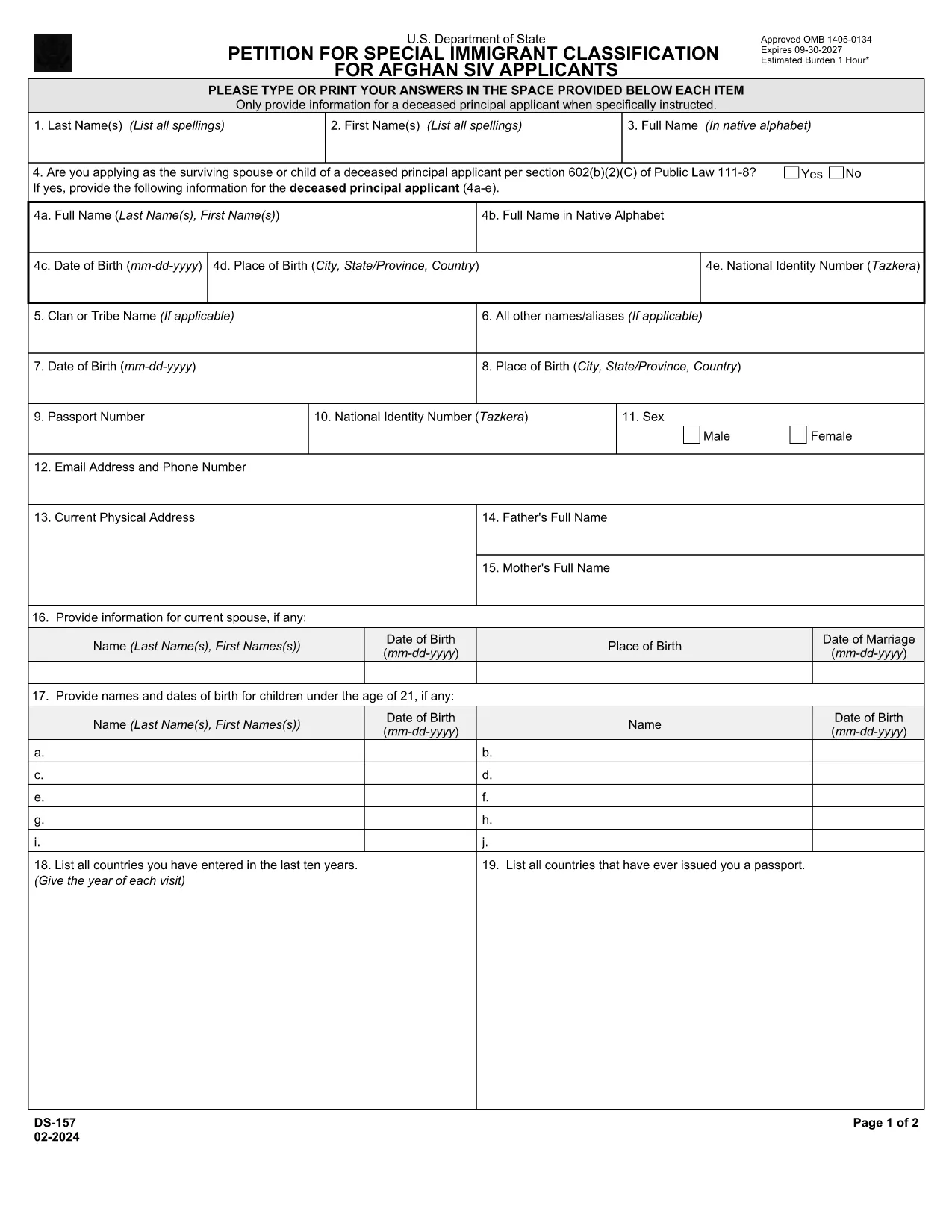
The DS-157 (Supplemental Nonimmigrant Visa Application) is required for certain male visa applicants, especially Afghan Special Immigrant Visa (SIV) candidates. It collects detailed personal, employment, and travel information that supports the main DS-160 application.

What is the DS-157 Form?

Issued by the U.S. Department of State, the DS-157 is a supplemental questionnaire that must be submitted with your visa packet. It is a fillable PDF that can be completed electronically, printed, signed, and attached to your visa interview documents.

How to Fill the DS-157 Online with Formize

Formize provides a secure, browser‑based PDF filler so you never need to download, print, or scan the form. Follow these steps:

  • Click the **"Fill out this form"** button on this page.
  • Wait a few seconds while the Formize PDF Filler app loads.
  • Enter your information in the highlighted fields. Use the tab key or click to move between sections.
  • When finished, click **"Save & Download"** to get a copy you can print or email.
  • Sign the form with your finger (touchscreen) or type your signature, then download the completed PDF.

Common Mistakes to Avoid

  • Leaving fields blank – every question must be answered, even if the answer is “None” or “N/A”.
  • Incorrect dates – double‑check birth dates, travel dates, and employment periods.
  • Illegible signatures – use the built‑in e‑signature tool for a clear, legal signature.
  • Mismatched information – ensure details match those on your DS‑160 and supporting documents.

Where to Submit the Completed Form

Print the filled DS-157, sign it in ink if you printed a hard copy, and attach it to your visa interview packet. Submit the package to the U.S. Embassy or Consulate handling your case. Some posts now accept the PDF electronically; verify the specific instructions on your appointment notice.

Download the Official PDF

For reference or offline use, you can download the official, government‑issued PDF directly from the Department of State:

Download DS-157 PDF

Using Formize’s online filler saves you time, reduces errors, and eliminates the need for a scanner.

FAQ
  • Who must complete the DS-157 form?

    All male non‑immigrant visa applicants between ages 16‑45, including Afghan SIV applicants, must submit a DS-157 in addition to the DS‑160.

  • Is the DS-157 form available in languages other than English?

    The official form is only provided in English. If you need translation assistance, you must provide an accurate English version for the U.S. Embassy.

  • Can I submit the DS-157 electronically?

    Some U.S. posts accept an electronic PDF, but most still require a printed, signed copy. Check the instructions on your appointment notice.

  • Do I need a notarized signature on the DS-157?

    No notarization is required. A regular signature (ink or e‑signature) is sufficient as long as it matches the signature on your other visa documents.

  • What happens if I make a mistake on the DS-157?

    Correct the error by crossing out the mistake neatly, writing the correct information, and initialing the change. If the mistake is extensive, download a fresh copy and refill the form.

  • How long is the DS-157 valid?

    The DS-157 is tied to a specific visa application. If your application is withdrawn or denied, you must obtain a new form for any future applications.

BAGAIMANA CARANYA

Cara mengisi ds-157 gratis secara online dalam 4 langkah mudah:

  1. 1
    Open the Formize filler
    Click the "Fill out this form" button on the page. The Formize PDF Filler will open in a new tab.
  2. 2
    Enter your information
    Type directly into each highlighted field. Use the tab key or click to move to the next question.
  3. 3
    Add your signature
    Use the built‑in e‑signature tool to sign with your finger or mouse. The signature is legally binding.
  4. 4
    Save and download
    When all fields are complete, click "Save & Download" to get a copy of the filled PDF. Print it if a hard copy is required.
Bentuk aplikasi Pengisi PDF
TENTANG

Formulir Visa

ds-157 adalah salah satu formulir Visa yang merupakan dokumen yang digunakan untuk mengajukan visa masuk ke negara asing. Visa adalah dokumen yang memungkinkan warga negara asing untuk masuk, tinggal, dan terkadang bekerja di negara asing untuk jangka waktu tertentu. Bentuk dan persyaratan yang tepat untuk memperoleh visa bervariasi menurut negara dan jenis visa.

Formulir visa biasanya memerlukan informasi pribadi seperti nama, tanggal lahir, dan informasi paspor, serta informasi tentang tujuan dan lama perjalanan, tujuan yang dituju, dan apakah pemohon visa sebelumnya telah ditolak atau dideportasi dari suatu negara. Formulir tersebut mungkin juga memerlukan dokumen pendukung seperti paspor, foto, dan bukti dukungan keuangan.

Di Amerika Serikat, formulir visa yang paling umum adalah formulir DS-160 dan DS-260. Formulir DS-160 digunakan untuk mengajukan visa non-imigran, sedangkan formulir DS-260 digunakan untuk mengajukan visa imigran. Formulir ini memerlukan informasi rinci tentang riwayat pribadi dan perjalanan pemohon, serta dokumen pendukung seperti paspor, rencana perjalanan, dan catatan keuangan.

Negara lain mungkin memiliki formulir dan persyaratan visa yang berbeda, tetapi proses dasarnya biasanya melibatkan penyelesaian aplikasi visa, memberikan dokumentasi pendukung, dan menghadiri wawancara dengan petugas konsuler di kedutaan atau konsulat AS. Penting untuk dicatat bahwa proses permohonan visa dapat rumit dan memakan waktu, dan disarankan agar individu yang mencari visa berkonsultasi dengan pengacara imigrasi atau profesional lain yang memenuhi syarat untuk memastikan bahwa semua formulir dan persyaratan yang diperlukan dipenuhi.

FITUR

Pengisi PDF

Cara termudah untuk mengisi formulir PDF secara online

  • Isi ds-157 dengan cepat
    Mencari cara mengisi ds-157 dengan cepat secara online? Dengan pengisi formulir PDF online gratis kami, Anda akan tahu cara mengedit dan mengisi dokumen pdf ini dalam waktu kurang dari satu menit.
  • Editor PDF online yang mudah digunakan
    Muak dengan mencetak file PDF sehingga Anda dapat mengeditnya, sebelum memindai ulang dan mengirimnya kembali? Edit dokumen PDF secara online gratis. Gunakan editor pdf online kami untuk menghemat waktu dan kertas.
  • Alat hebat, semua platform
    Ingin tahu cara mengisi ds-157 di Mac, atau mungkin cara menggunakan pengisi PDF gratis? Alat PDF online kami berfungsi di semua platform.
  • Penyimpanan file yang aman
    File "ds-157" yang telah selesai disimpan dalam database aman yang dikelola oleh hosting Amazon Cloud. Anda dapat menghapus file Anda dari sistem kami kapan saja. Bagaimanapun, file-file ini secara otomatis dihapus setelah 24 jam.
  • Ngobrol dengan ds-157
    Ngobrol dengan "ds-157" di Chatize yang merupakan asisten pembaca PDF gratis. Ajukan pertanyaan dan dapatkan jawaban dari "ds-157". Cukup klik tombol Chat Dengan Dokumen di atas.

Hapus sesi pengisian

Hapus sesi pengisian yang dipilih? Dalam hal ini, kemajuan Anda dalam menyelesaikan formulir akan hilang.

Hapus sesi pengeditan

Hapus sesi pengeditan yang dipilih? Dalam hal ini, kemajuan Anda dalam membuat dan mengedit formulir akan hilang.