
Pilih bahasa

DS-60 Affidavit Regarding a Change of Name – Fillable PDF

  1. Bahasa Bahasa inggris
  2. Negara Amerika Serikat
  3. Departemen Departemen Luar Negeri
DS-60 Affidavit Regarding a Change of Name – Fillable PDF

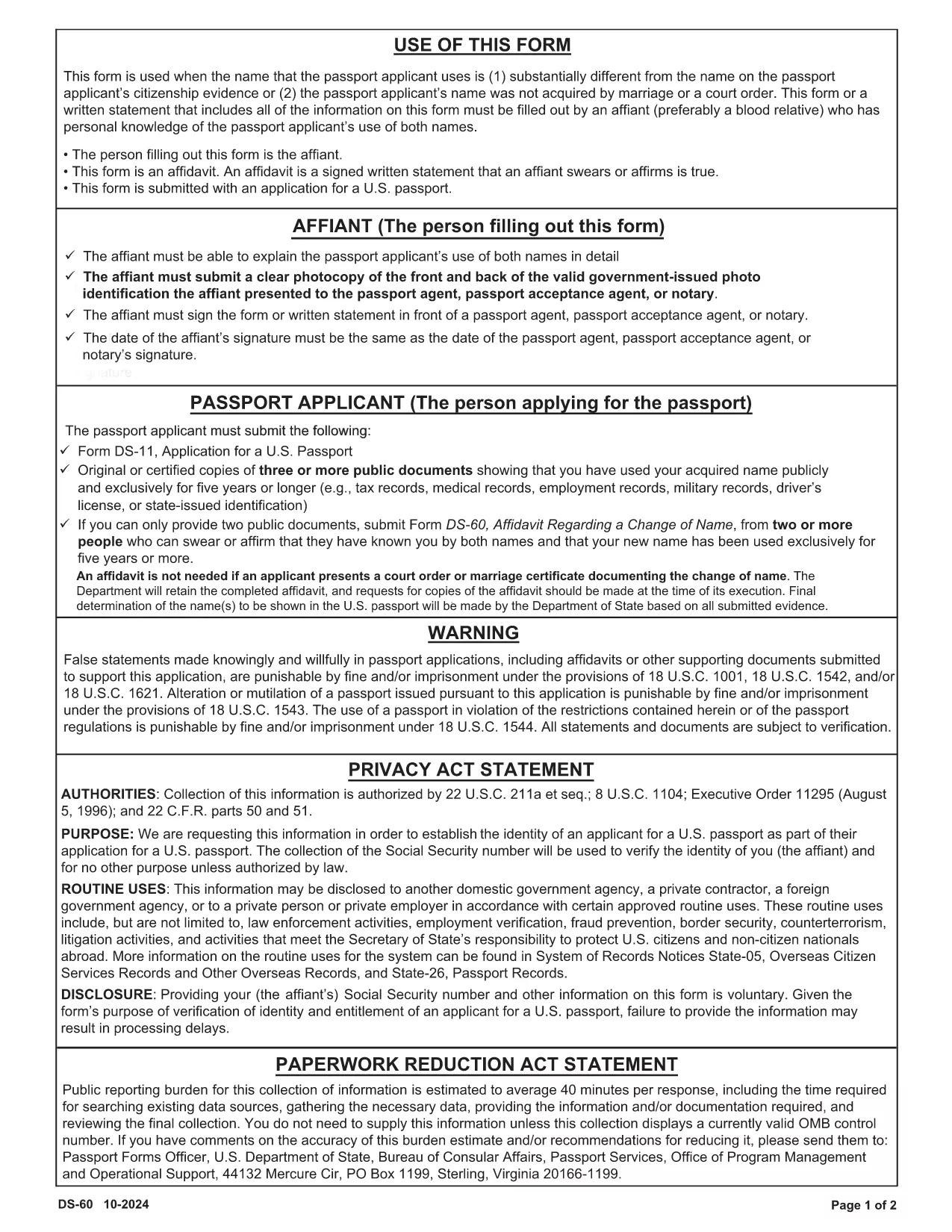
The DS-60 is the U.S. Department of State’s affidavit used when a passport applicant’s current name differs substantially from the name on their citizenship evidence, or when the name was not acquired through marriage or a court order. An affiant—usually a close relative who knows the applicant’s name usage—must complete the form.

Our fillable PDF version lets you complete the DS-60 directly in your browser. No printing, scanning, or PDF editors are required. Just click the button, fill the fields, and download a ready‑to‑submit document.

What Is the DS-60 Form and When Is It Required?

The DS-60 serves as a sworn statement that the applicant is known by two names. It is typically attached to a passport application (Form DS‑11) when:

  • The applicant uses a name that is substantially different from the name on their birth certificate or naturalization certificate.
  • The name change was not the result of marriage, divorce, or a court order.
  • The affiant can personally attest to the applicant’s use of both names.

How to Complete the DS-60 Online with Formize

Follow these simple steps to fill out the DS-60 without leaving your desk:

  1. Click the "Fill out this form" button on the page.
  2. Wait a few seconds while the Formize PDF Filler app loads.
  3. Enter the requested information in each fillable field (affiant name, relationship, applicant’s two names, etc.).
  4. Review the completed form for accuracy.
  5. Click Save & Download to get a PDF you can attach to your passport package.

Common Mistakes to Avoid on Your DS-60

  • Leaving fields blank: Every line must be completed, even if the answer is "None" or "N/A".
  • Incorrect relationship description: Specify the exact relationship (e.g., "maternal aunt") to avoid processing delays.
  • Signature errors: The affiant must sign in the designated area; electronic signatures are accepted when using Formize.
  • Mismatched names: Ensure the two names match exactly what appears on the applicant’s supporting documents.

By using our fillable DS-60, you reduce the risk of these errors and speed up your passport application.

FAQ
  • Who can act as the affiant on a DS-60?

    The affiant should be a close relative (parent, sibling, child, aunt, uncle, grandparent, etc.) who personally knows the applicant’s use of both names.

  • Do I need to notarize the DS-60?

    No. The DS-60 is a sworn affidavit and does not require notarization, but the affiant must sign the form.

  • Can I submit a digital signature?

    Yes. When you fill out the form using Formize, an electronic signature is accepted by the U.S. Department of State.

  • What supporting documents should I include with the DS-60?

    Attach copies of the applicant’s current passport, birth certificate, naturalization certificate, or any document that shows the name discrepancy.

  • How long does it take for the DS-60 to be processed?

    The DS-60 itself is processed as part of the overall passport application. Processing time depends on the passport service you request (routine, expedited, etc.).

  • Is the DS-60 required for a name change due to marriage?

    No. For name changes due to marriage, divorce, or a court order, use the appropriate legal documents instead of the DS-60.

  • Can I edit the DS-60 after downloading it?

    Yes. With Formize you can reopen the saved PDF, make corrections, and re‑download the final version.

BAGAIMANA CARANYA

Cara mengisi DS-60 form gratis secara online dalam 4 langkah mudah:

  1. 1
    Open the Fillable Form
    Click the "Fill out this form" button on the page. The Formize PDF Filler will open in a new tab.
  2. 2
    Enter All Required Information
    Type the affiant’s details, relationship to the applicant, and both names exactly as they appear on supporting documents.
  3. 3
    Review and Sign
    Double‑check each field for accuracy, then add your electronic signature in the signature box.
  4. 4
    Save and Download
    Click the "Save & Download" button to obtain a completed PDF ready to be submitted with the passport application.
Bentuk aplikasi Pengisi PDF
TENTANG

Formulir Departemen Luar Negeri (DOS).

DS-60 form adalah salah satu formulir aplikasi yang digunakan oleh Departemen Luar Negeri Amerika Serikat (DOS) untuk mengumpulkan informasi dan memproses berbagai layanan terkait perjalanan internasional, visa, paspor, dan layanan konsuler. DOS bertanggung jawab untuk mengelola kebijakan luar negeri AS, hubungan internasional, dan memberikan layanan kepada warga negara AS dan warga negara asing.

Berikut adalah beberapa contoh formulir Departemen Luar Negeri:

Formulir Permohonan Paspor: Formulir ini digunakan untuk mengajukan permohonan paspor AS, yang merupakan dokumen resmi yang dikeluarkan oleh pemerintah yang memungkinkan seseorang melakukan perjalanan internasional. Formulir permohonan paspor mengumpulkan informasi pribadi, rincian tentang kewarganegaraan, identitas, dan informasi lain yang diperlukan.

Formulir Permohonan Visa Non-imigran: DOS mengawasi penerbitan visa non-imigran, yang memungkinkan warga negara asing untuk sementara mengunjungi Amerika Serikat untuk berbagai tujuan seperti pariwisata, bisnis, belajar, atau bekerja. Formulir permohonan visa non-imigran, seperti DS-160, DS-156, atau DS-260, digunakan untuk mengumpulkan informasi tentang data pribadi pemohon, riwayat perjalanan, tujuan perjalanan, dan informasi relevan lainnya.

Formulir Permohonan Visa Imigran: Bagi individu yang ingin berimigrasi ke Amerika Serikat, formulir permohonan visa imigran digunakan. Formulir ini mengumpulkan informasi rinci tentang riwayat pribadi pelamar, anggota keluarga, riwayat pekerjaan, dan informasi relevan lainnya. Contohnya termasuk formulir DS-260 untuk imigrasi berbasis keluarga atau formulir DS-230 untuk pemenang lotere visa keberagaman.

Formulir Laporan Konsuler Kelahiran di Luar Negeri (CRBA): Formulir ini digunakan untuk mendokumentasikan kelahiran anak warga negara AS di luar negeri dari orang tua warga negara AS. Ini mengumpulkan informasi tentang anak, orang tua, dan dokumentasi pendukung.

Formulir Pernyataan Dukungan: Saat mensponsori seorang imigran ke Amerika Serikat, warga negara AS atau penduduk tetap yang sah mungkin perlu menyerahkan formulir Pernyataan Dukungan. Formulir ini, seperti I-864 atau I-134, digunakan untuk menunjukkan kemampuan finansial untuk mendukung calon imigran dan mencegah mereka menjadi tuntutan publik.

Formulir Layanan Konsuler: DOS menyediakan berbagai layanan konsuler kepada warga negara AS dan warga negara asing, seperti layanan notaris, permintaan bantuan darurat, atau penolakan kewarganegaraan AS. Formulir khusus digunakan untuk layanan ini, termasuk formulir DS-11, DS-3053, atau DS-4079, bergantung pada sifat layanan yang diminta.

Penting untuk diingat bahwa formulir spesifik yang digunakan oleh Departemen Luar Negeri AS dapat berubah seiring waktu, dan layanan yang berbeda mungkin memerlukan formulir yang berbeda. Dianjurkan untuk mengunjungi situs web resmi Departemen Luar Negeri AS atau berkonsultasi dengan kedutaan atau konsulat AS terdekat untuk mendapatkan informasi terkini dan akurat mengenai formulir khusus yang diperlukan untuk berbagai layanan.

FITUR

Pengisi PDF

Cara termudah untuk mengisi formulir PDF secara online

  • Isi DS-60 form dengan cepat
    Mencari cara mengisi DS-60 form dengan cepat secara online? Dengan pengisi formulir PDF online gratis kami, Anda akan tahu cara mengedit dan mengisi dokumen pdf ini dalam waktu kurang dari satu menit.
  • Editor PDF online yang mudah digunakan
    Muak dengan mencetak file PDF sehingga Anda dapat mengeditnya, sebelum memindai ulang dan mengirimnya kembali? Edit dokumen PDF secara online gratis. Gunakan editor pdf online kami untuk menghemat waktu dan kertas.
  • Alat hebat, semua platform
    Ingin tahu cara mengisi DS-60 form di Mac, atau mungkin cara menggunakan pengisi PDF gratis? Alat PDF online kami berfungsi di semua platform.
  • Penyimpanan file yang aman
    File "DS-60 form" yang telah selesai disimpan dalam database aman yang dikelola oleh hosting Amazon Cloud. Anda dapat menghapus file Anda dari sistem kami kapan saja. Bagaimanapun, file-file ini secara otomatis dihapus setelah 24 jam.
  • Ngobrol dengan DS-60 form
    Ngobrol dengan "DS-60 form" di Chatize yang merupakan asisten pembaca PDF gratis. Ajukan pertanyaan dan dapatkan jawaban dari "DS-60 form". Cukup klik tombol Chat Dengan Dokumen di atas.

Hapus sesi pengisian

Hapus sesi pengisian yang dipilih? Dalam hal ini, kemajuan Anda dalam menyelesaikan formulir akan hilang.

Hapus sesi pengeditan

Hapus sesi pengeditan yang dipilih? Dalam hal ini, kemajuan Anda dalam membuat dan mengedit formulir akan hilang.