
Pilih bahasa

DS-64 Statement – Lost or Stolen U.S. Passport Fillable Form

  1. Bahasa Bahasa inggris
  2. Negara Amerika Serikat
  3. Departemen Departemen Luar Negeri
  4. Aktivitas Passports
DS-64 Statement – Lost or Stolen U.S. Passport Fillable Form

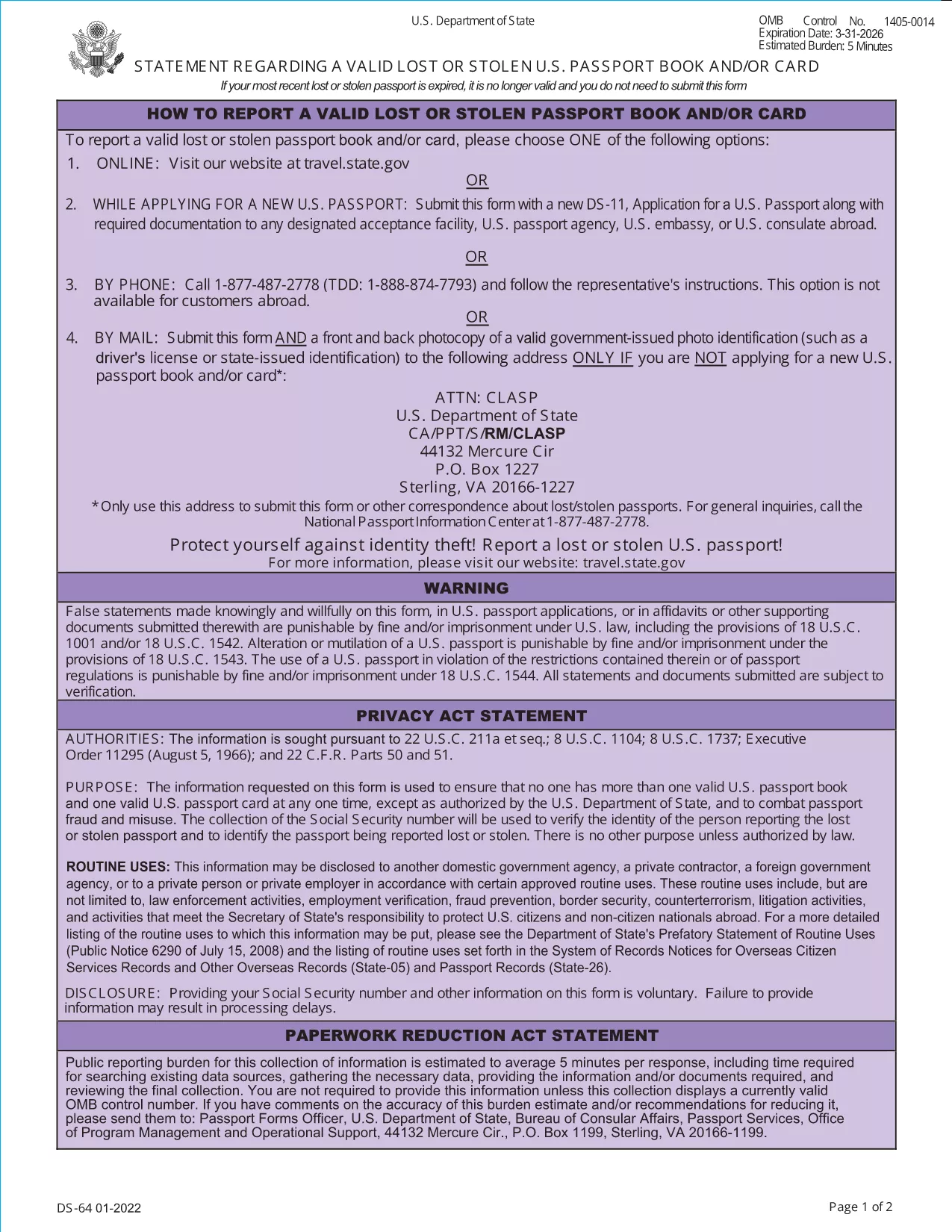
If your U.S. passport has been lost or stolen, the Department of State requires you to submit the DS-64, Statement Regarding a Lost or Stolen Passport. This official PDF can now be filled out directly on our site, saved, and printed without any extra software.

What Is the DS-64 Form?

The DS-64 is a short, one‑page declaration that tells the State Department that your passport is no longer in your possession. It includes basic personal details, the passport number (if known), and the circumstances of the loss or theft. Submitting this form protects you from fraud and allows the State Department to cancel the missing document.

How to Complete the DS-64 Online with Formize

Follow these simple steps to fill the form instantly:

  • Click the "Fill out this form" button on this page.
  • Wait a few seconds while the Formize PDF Filler app loads.
  • Enter the required information in the highlighted fields.
  • Review your entries, then click Save & Download to get a completed PDF.
  • Print the PDF and sign it before submission.

Common Mistakes to Avoid

  • Leaving the passport number blank: If you truly don’t know it, write "000000000" rather than leaving the field empty.
  • Forgetting to sign: The form is not valid without a handwritten signature.
  • Providing inaccurate dates: Give the best estimate if you can’t recall the exact issue date.
  • Submitting an unsigned PDF: Print, sign, and then scan or mail the original.

Where to Submit the Completed Form

After printing and signing, mail the DS-64 to the Consular Lost and Stolen Passport Unit (CLASP). Include any supporting documentation, such as a police report for stolen passports. If you are filing a replacement application (DS‑11), attach the DS‑64 to that packet.

Need Help? Quick Resources

U.S. Department of State – Official Forms
Passport Fees & Processing Times

FAQ
  • Do I need a passport number if I don’t know it?

    If the number is unknown, write nine zeros (000000000). The State Department accepts this placeholder for lost or stolen passports.

  • Can I submit the DS-64 electronically?

    The DS-64 must be signed by hand. You can fill it out online, download, print, and sign before mailing it to the CLASP.

  • How long does it take for the lost passport to be cancelled?

    Cancellation is usually processed within 5–7 business days after the CLASP receives your signed DS‑64.

  • Do I need to fill out a DS‑11 as well?

    Yes, if you are applying for a replacement passport you must submit a DS‑11 together with the completed DS‑64.

  • Is there a fee for filing the DS‑64?

    There is no separate fee for the DS‑64 itself. Fees apply only to the replacement passport application (DS‑11).

  • What if my passport was stolen abroad?

    Report the theft to the local police, obtain a report, and then submit the DS‑64 to the U.S. Embassy or Consulate along with your replacement application.

  • Can I use the same DS‑64 for multiple lost passports?

    Each lost or stolen passport requires its own DS‑64 statement. Submit a separate form for each incident.

BAGAIMANA CARANYA

Cara mengisi lost passport form gratis secara online dalam 5 langkah mudah:

  1. 1
    Open the Fillable Form
    Click the "Fill out this form" button on this page. The Formize PDF Filler will open in a new window.
  2. 2
    Enter Your Information
    Type your personal details, passport number (or 000000000 if unknown), and describe how the passport was lost or stolen.
  3. 3
    Save and Download
    After completing all fields, click "Save & Download". The filled PDF will be saved to your device.
  4. 4
    Print and Sign
    Print the downloaded PDF and add your handwritten signature in the designated area.
  5. 5
    Submit to CLASP
    Mail the signed form to the Consular Lost and Stolen Passport Unit (CLASP) along with any required supporting documents.
Bentuk aplikasi Pengisi PDF
TENTANG

Formulir Departemen Luar Negeri (DOS).

lost passport form adalah salah satu formulir aplikasi yang digunakan oleh Departemen Luar Negeri Amerika Serikat (DOS) untuk mengumpulkan informasi dan memproses berbagai layanan terkait perjalanan internasional, visa, paspor, dan layanan konsuler. DOS bertanggung jawab untuk mengelola kebijakan luar negeri AS, hubungan internasional, dan memberikan layanan kepada warga negara AS dan warga negara asing.

Berikut adalah beberapa contoh formulir Departemen Luar Negeri:

Formulir Permohonan Paspor: Formulir ini digunakan untuk mengajukan permohonan paspor AS, yang merupakan dokumen resmi yang dikeluarkan oleh pemerintah yang memungkinkan seseorang melakukan perjalanan internasional. Formulir permohonan paspor mengumpulkan informasi pribadi, rincian tentang kewarganegaraan, identitas, dan informasi lain yang diperlukan.

Formulir Permohonan Visa Non-imigran: DOS mengawasi penerbitan visa non-imigran, yang memungkinkan warga negara asing untuk sementara mengunjungi Amerika Serikat untuk berbagai tujuan seperti pariwisata, bisnis, belajar, atau bekerja. Formulir permohonan visa non-imigran, seperti DS-160, DS-156, atau DS-260, digunakan untuk mengumpulkan informasi tentang data pribadi pemohon, riwayat perjalanan, tujuan perjalanan, dan informasi relevan lainnya.

Formulir Permohonan Visa Imigran: Bagi individu yang ingin berimigrasi ke Amerika Serikat, formulir permohonan visa imigran digunakan. Formulir ini mengumpulkan informasi rinci tentang riwayat pribadi pelamar, anggota keluarga, riwayat pekerjaan, dan informasi relevan lainnya. Contohnya termasuk formulir DS-260 untuk imigrasi berbasis keluarga atau formulir DS-230 untuk pemenang lotere visa keberagaman.

Formulir Laporan Konsuler Kelahiran di Luar Negeri (CRBA): Formulir ini digunakan untuk mendokumentasikan kelahiran anak warga negara AS di luar negeri dari orang tua warga negara AS. Ini mengumpulkan informasi tentang anak, orang tua, dan dokumentasi pendukung.

Formulir Pernyataan Dukungan: Saat mensponsori seorang imigran ke Amerika Serikat, warga negara AS atau penduduk tetap yang sah mungkin perlu menyerahkan formulir Pernyataan Dukungan. Formulir ini, seperti I-864 atau I-134, digunakan untuk menunjukkan kemampuan finansial untuk mendukung calon imigran dan mencegah mereka menjadi tuntutan publik.

Formulir Layanan Konsuler: DOS menyediakan berbagai layanan konsuler kepada warga negara AS dan warga negara asing, seperti layanan notaris, permintaan bantuan darurat, atau penolakan kewarganegaraan AS. Formulir khusus digunakan untuk layanan ini, termasuk formulir DS-11, DS-3053, atau DS-4079, bergantung pada sifat layanan yang diminta.

Penting untuk diingat bahwa formulir spesifik yang digunakan oleh Departemen Luar Negeri AS dapat berubah seiring waktu, dan layanan yang berbeda mungkin memerlukan formulir yang berbeda. Dianjurkan untuk mengunjungi situs web resmi Departemen Luar Negeri AS atau berkonsultasi dengan kedutaan atau konsulat AS terdekat untuk mendapatkan informasi terkini dan akurat mengenai formulir khusus yang diperlukan untuk berbagai layanan.

FITUR

Pengisi PDF

Cara termudah untuk mengisi formulir PDF secara online

  • Isi lost passport form dengan cepat
    Mencari cara mengisi lost passport form dengan cepat secara online? Dengan pengisi formulir PDF online gratis kami, Anda akan tahu cara mengedit dan mengisi dokumen pdf ini dalam waktu kurang dari satu menit.
  • Editor PDF online yang mudah digunakan
    Muak dengan mencetak file PDF sehingga Anda dapat mengeditnya, sebelum memindai ulang dan mengirimnya kembali? Edit dokumen PDF secara online gratis. Gunakan editor pdf online kami untuk menghemat waktu dan kertas.
  • Alat hebat, semua platform
    Ingin tahu cara mengisi lost passport form di Mac, atau mungkin cara menggunakan pengisi PDF gratis? Alat PDF online kami berfungsi di semua platform.
  • Penyimpanan file yang aman
    File "lost passport form" yang telah selesai disimpan dalam database aman yang dikelola oleh hosting Amazon Cloud. Anda dapat menghapus file Anda dari sistem kami kapan saja. Bagaimanapun, file-file ini secara otomatis dihapus setelah 24 jam.
  • Ngobrol dengan lost passport form
    Ngobrol dengan "lost passport form" di Chatize yang merupakan asisten pembaca PDF gratis. Ajukan pertanyaan dan dapatkan jawaban dari "lost passport form". Cukup klik tombol Chat Dengan Dokumen di atas.

Hapus sesi pengisian

Hapus sesi pengisian yang dipilih? Dalam hal ini, kemajuan Anda dalam menyelesaikan formulir akan hilang.

Hapus sesi pengeditan

Hapus sesi pengeditan yang dipilih? Dalam hal ini, kemajuan Anda dalam membuat dan mengedit formulir akan hilang.