
Pilih bahasa

Virginia DL-145 Driver’s License Form – Fillable PDF

  1. Bahasa Bahasa inggris
  2. Negara Amerika Serikat
  3. Aktivitas Surat izin Mengemudi
  4. Departemen DMV
Virginia DL-145 Driver’s License Form – Fillable PDF

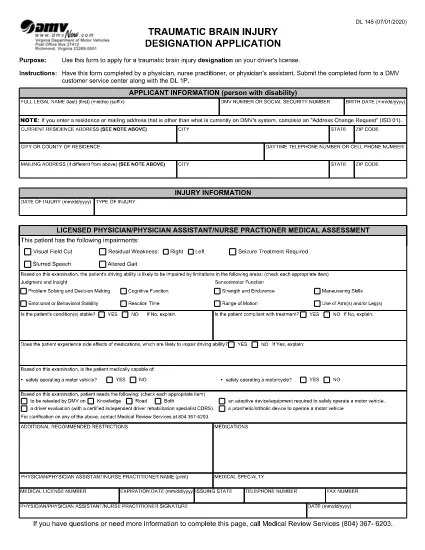
What Is the DL-145 Form?

The DL-145 is the official Virginia Department of Motor Vehicles (DMV) application used to request a driver’s license, learner’s permit, or ID card. It gathers personal information, residency proof, and eligibility details required by state law.

How to Complete the DL-145 Online

Instead of printing, filling out by hand, and scanning, you can complete the DL-145 instantly on our page:

  1. Click the Fill out this form button below.
  2. Wait a few seconds while the Formize PDF Filler app loads the fillable version of the DL-145.
  3. Enter your information in the interactive fields – the form saves your progress automatically.
  4. When you’re done, choose to download a completed PDF or print it directly for submission.

Common Mistakes to Avoid

  • Incorrect address format: Use the exact street address as it appears on your utility bill or lease.
  • Missing signatures: The applicant and any required sponsors must sign the designated fields.
  • Out‑of‑date documents: Ensure all supporting documents (e.g., birth certificate, SSN card) are current and legible.
  • Skipping required checkboxes: The DMV validates each required box; unselected boxes cause delays.

Where to Submit the Completed Form

After you download the filled DL-145, bring it to any Virginia DMV customer service center along with the required supporting documents and payment. Some locations also accept mail‑in submissions; check the Virginia DMV website for specific instructions.

Why Use Formize’s Fillable PDF

Formize provides a secure, browser‑based PDF filler that eliminates the need for third‑party software. Benefits include:

  • Instant loading – no downloads or installations.
  • Auto‑save feature prevents data loss.
  • Fully compliant with Virginia DMV formatting requirements.
  • Free and accessible from any device.
FAQ
  • Is the DL-145 form available for free?

    Yes. The Virginia DMV provides the DL-145 PDF at no cost, and Formize lets you fill it out online for free.

  • Can I save my progress and finish later?

    The Formize filler auto‑saves your data while the browser session is open. For longer breaks, download a partially completed PDF and reopen it later.

  • Do I need special software to use the fillable PDF?

    No. The Formize PDF Filler runs entirely in your web browser—no Adobe Acrobat or other editor required.

  • What documents must I bring with the completed DL-145?

    Typically you need proof of identity, residency, Social Security number, and any applicable fee receipts. Check the Virginia DMV checklist for the exact list.

  • Can I submit the DL-145 electronically?

    The Virginia DMV still requires a printed, signed form for most license types. Some renewals may be completed online, but the DL-145 itself is submitted in person or by mail.

  • What if I make a mistake after downloading?

    You can reopen the downloaded PDF in any standard PDF editor, correct the error, and re‑print. Alternatively, start a new session in Formize and fill the form again.

  • Is my personal information safe when using Formize?

    Formize processes data locally in your browser and does not store any personal information on its servers.

BAGAIMANA CARANYA

Cara mengisi DL-145 gratis secara online dalam 5 langkah mudah:

  1. 1
    Open the Fillable Form
    Click the "Fill out this form" button on the page. The Formize PDF Filler will open the DL-145 in your browser.
  2. 2
    Enter Your Information
    Fill each field with accurate data. The form automatically saves your entries as you type.
  3. 3
    Review & Validate
    Double‑check all entries, especially signatures and checkboxes, to ensure the DMV accepts the form.
  4. 4
    Download or Print
    When finished, click "Download" to save a copy or "Print" to produce a hard copy for submission.
  5. 5
    Submit to the DMV
    Take the printed form and required documents to a Virginia DMV office or follow the mail‑in instructions on the DMV website.
Bentuk aplikasi Pengisi PDF
TENTANG

Formulir Permohonan Surat Izin Mengemudi

Di sebagian besar negara, wajib memiliki surat izin mengemudi sebelum Anda dapat berangkat. Mendapatkan SIM adalah tonggak penting bagi siapa saja yang ingin mengendarai mobil.

DL-145 adalah salah satu formulir Surat Izin Mengemudi yang merupakan dokumen yang digunakan untuk mengumpulkan informasi dari orang-orang yang ingin mengajukan surat izin mengemudi. Biasanya berisi kolom nama pemohon, tanggal lahir, nomor KTP, informasi kontak, serta riwayat dan pengalaman SIM mereka.

FITUR

Pengisi PDF

Cara termudah untuk mengisi formulir PDF secara online

  • Isi DL-145 dengan cepat
    Mencari cara mengisi DL-145 dengan cepat secara online? Dengan pengisi formulir PDF online gratis kami, Anda akan tahu cara mengedit dan mengisi dokumen pdf ini dalam waktu kurang dari satu menit.
  • Editor PDF online yang mudah digunakan
    Muak dengan mencetak file PDF sehingga Anda dapat mengeditnya, sebelum memindai ulang dan mengirimnya kembali? Edit dokumen PDF secara online gratis. Gunakan editor pdf online kami untuk menghemat waktu dan kertas.
  • Alat hebat, semua platform
    Ingin tahu cara mengisi DL-145 di Mac, atau mungkin cara menggunakan pengisi PDF gratis? Alat PDF online kami berfungsi di semua platform.
  • Penyimpanan file yang aman
    File "DL-145" yang telah selesai disimpan dalam database aman yang dikelola oleh hosting Amazon Cloud. Anda dapat menghapus file Anda dari sistem kami kapan saja. Bagaimanapun, file-file ini secara otomatis dihapus setelah 24 jam.
  • Ngobrol dengan DL-145
    Ngobrol dengan "DL-145" di Chatize yang merupakan asisten pembaca PDF gratis. Ajukan pertanyaan dan dapatkan jawaban dari "DL-145". Cukup klik tombol Chat Dengan Dokumen di atas.

Hapus sesi pengisian

Hapus sesi pengisian yang dipilih? Dalam hal ini, kemajuan Anda dalam menyelesaikan formulir akan hilang.

Hapus sesi pengeditan

Hapus sesi pengeditan yang dipilih? Dalam hal ini, kemajuan Anda dalam membuat dan mengedit formulir akan hilang.