Pilih bahasa

Driver Medical Evaluation Form (DS‑326) – Fillable PDF

  1. Negara Amerika Serikat
  2. Bahasa Bahasa inggris
  3. Aktivitas Vehicle Licensing
  4. Departemen DMV
Driver Medical Evaluation Form (DS‑326) – Fillable PDF

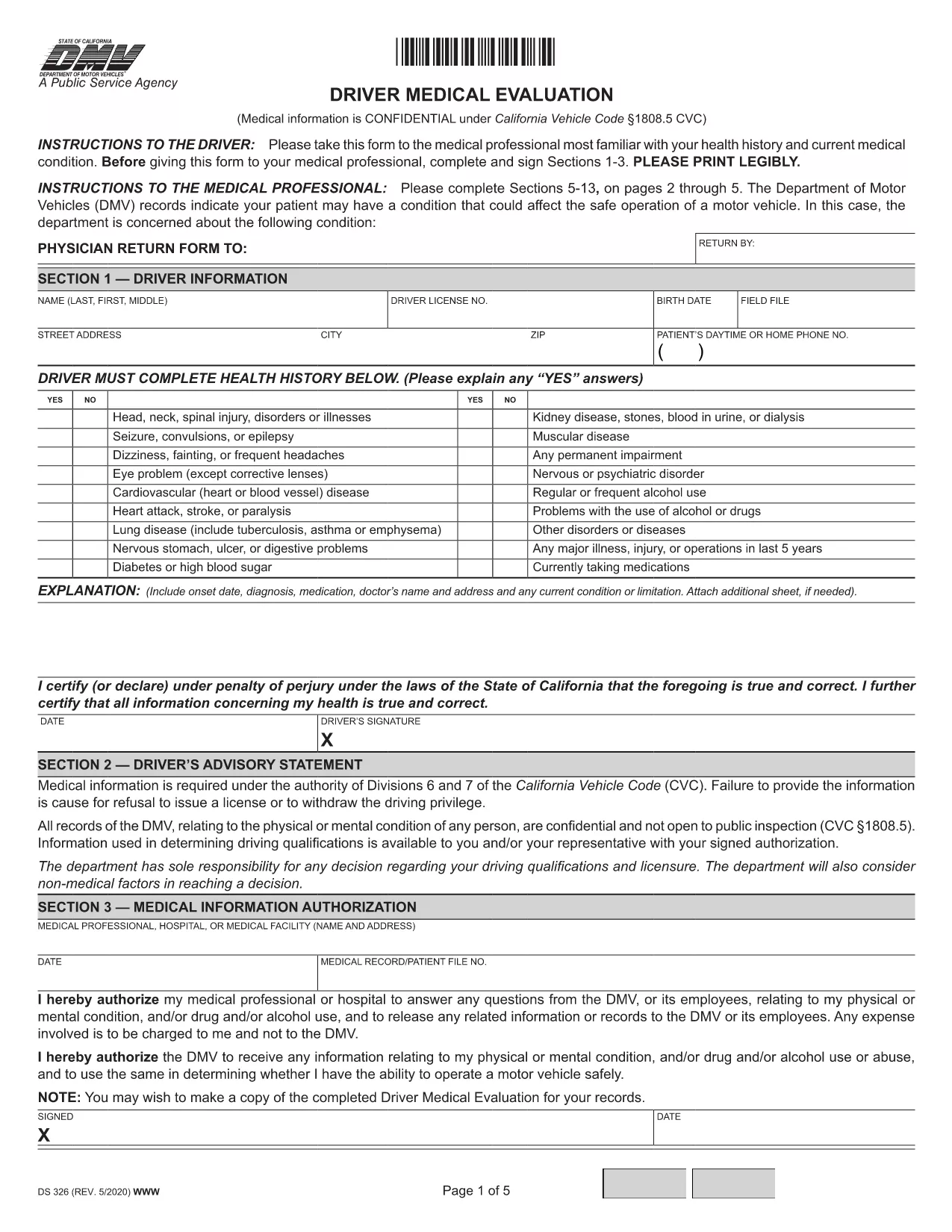
The Driver Medical Evaluation (form DS‑326) is required by the California Department of Motor Vehicles (DMV) for drivers who need to prove medical fitness for a license or permit. This fillable PDF lets you complete the health history, medical information authorization, and physician certification without printing or scanning.

What Is the Driver Medical Evaluation Form?

DS‑326 collects critical data about a driver’s vision, cardiovascular health, neurological conditions, and any medication that may affect safe operation of a vehicle. The DMV uses this information to decide whether to issue, renew, or restrict a driver’s license.

How to Complete the Fillable PDF Online

Instead of downloading the file and opening it in a PDF editor, simply click the "Fill out this form" button on this page. The Formize PDF Filler app will load in your browser, allowing you to type directly into each field, add signatures, and save your progress.

Common Mistakes to Avoid

  • Leaving the health‑history sections blank – every question must be answered, even if the answer is "None".
  • Forgetting the physician’s signature and license number – the form is invalid without a completed certification.
  • Submitting an outdated version – always use the latest DS‑326 PDF provided here.

Where to Submit the Completed Form

After you finish, you can download the completed PDF and mail it to your local DMV office, or upload it through the DMV’s online portal if you have an account. Keep a copy for your records.

Need more help? Review the FAQs below or follow the step‑by‑step guide in the "How to" section.

FAQ
  • Who needs to fill out DS‑326?

    Any driver applying for a commercial license, a medical waiver, or a license renewal where the DMV requires proof of medical fitness must complete DS‑326.

  • Can I fill out the form on a mobile device?

    Yes. The Formize PDF Filler works on smartphones and tablets, but using a larger screen makes data entry easier.

  • What if my physician refuses to sign?

    The DMV requires a qualified medical professional’s certification. If a physician declines, you must find another licensed provider who can evaluate your fitness.

  • How long is the DS‑326 valid?

    The evaluation is typically valid for one year from the date of the physician’s signature, unless the DMV issues a different validity period.

  • Do I need to attach supporting medical records?

    Attach any relevant test results or specialist reports that the physician references in the certification section.

  • Is there a fee to submit the form?

    There is no fee for the DS‑326 itself, but the DMV may charge processing fees for license issuance or renewal.

  • Can I save my progress and finish later?

    Yes. The Formize filler allows you to save a draft locally and reopen it later to complete the remaining fields.

  • What should I do if I make a mistake after submitting?

    Contact your local DMV office promptly. They may require a new, corrected DS‑326 or allow you to submit an amendment form.

BAGAIMANA CARANYA

Cara mengisi driver medical evaluation gratis secara online dalam 5 langkah mudah:

  1. 1
    Click the Fill‑out Button
    Press the "Fill out this form" button on the page to launch the Formize PDF Filler.
  2. 2
    Wait for the Filler to Load
    The online filler loads in a few seconds; no download or installation is required.
  3. 3
    Enter All Required Information
    Complete each section—personal details, health history, and physician certification—using your keyboard.
  4. 4
    Add Your Signature
    Use the built‑in signature field to sign electronically; you can also type your name if allowed.
  5. 5
    Save or Submit the Form
    Download the finished PDF for mailing, or upload it directly to the DMV portal if you have an account.
Bentuk aplikasi Pengisi PDF
TENTANG

kerangka driver medical evaluation

Dengan serangkaian fitur tradisional untuk melihat dan mengisi dokumen PDF, dipadukan dengan manfaat aplikasi web dan tata letak responsif, Anda dapat menyelesaikan driver medical evaluation dalam hitungan menit.

FITUR

Pengisi PDF

Cara termudah untuk mengisi formulir PDF secara online

  • Isi driver medical evaluation dengan cepat
    Mencari cara mengisi driver medical evaluation dengan cepat secara online? Dengan pengisi formulir PDF online gratis kami, Anda akan tahu cara mengedit dan mengisi dokumen pdf ini dalam waktu kurang dari satu menit.
  • Editor PDF online yang mudah digunakan
    Muak dengan mencetak file PDF sehingga Anda dapat mengeditnya, sebelum memindai ulang dan mengirimnya kembali? Edit dokumen PDF secara online gratis. Gunakan editor pdf online kami untuk menghemat waktu dan kertas.
  • Alat hebat, semua platform
    Ingin tahu cara mengisi driver medical evaluation di Mac, atau mungkin cara menggunakan pengisi PDF gratis? Alat PDF online kami berfungsi di semua platform.
  • Penyimpanan file yang aman
    File "driver medical evaluation" yang telah selesai disimpan dalam database aman yang dikelola oleh hosting Amazon Cloud. Anda dapat menghapus file Anda dari sistem kami kapan saja. Bagaimanapun, file-file ini secara otomatis dihapus setelah 24 jam.
  • Ngobrol dengan driver medical evaluation
    Ngobrol dengan "driver medical evaluation" di Chatize yang merupakan asisten pembaca PDF gratis. Ajukan pertanyaan dan dapatkan jawaban dari "driver medical evaluation". Cukup klik tombol Chat Dengan Dokumen di atas.

Hapus sesi pengisian

Hapus sesi pengisian yang dipilih? Dalam hal ini, kemajuan Anda dalam menyelesaikan formulir akan hilang.

Hapus sesi pengeditan

Hapus sesi pengeditan yang dipilih? Dalam hal ini, kemajuan Anda dalam membuat dan mengedit formulir akan hilang.