
Pilih bahasa

Pennsylvania DL-201 Certification of Motor Vehicle Judgment (Fillable PDF)

  1. Bahasa Bahasa inggris
  2. Negara Amerika Serikat
  3. Aktivitas Surat izin Mengemudi
  4. Negara Pennsylvania
Pennsylvania DL-201 Certification of Motor Vehicle Judgment (Fillable PDF)

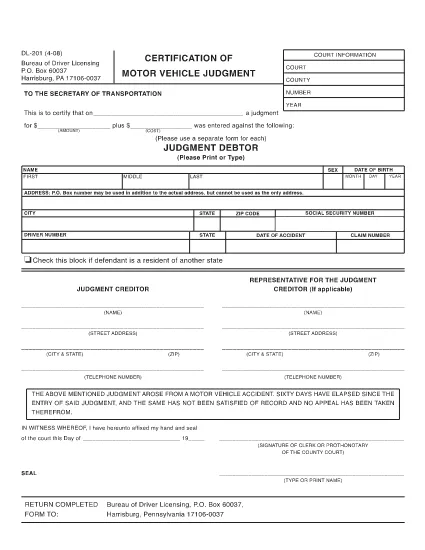
The DL-201 is Pennsylvania's official Certification of Motor Vehicle Judgment. It is required when you need to certify a judgment, lien, or other legal action related to a vehicle registered in PA. Instead of printing, printing, and mailing, you can now fill the form instantly online with Formize’s secure PDF filler.

What Is the DL-201 Form?

The DL-201 is issued by the Pennsylvania Department of Transportation (PennDOT). It records details such as the judgment amount, the vehicle identification number (VIN), and the parties involved. The form is commonly used by attorneys, lienholders, and private individuals to prove a legal claim against a vehicle.

How to Complete the DL-201 Online

Follow these simple steps to fill out the DL-201 without leaving your browser:

  1. Click the "Fill out this form" button on this page.
  2. Wait a few seconds while the Formize PDF Filler app loads the official DL-201 PDF.
  3. Enter the required information into each fillable field (judgment details, VIN, parties, etc.).
  4. Review your entries, then click Submit to download the completed PDF.

Common Mistakes to Avoid

  • Leaving fields blank: Every field marked with an asterisk (*) is mandatory.
  • Incorrect VIN format: Use the 17‑character VIN exactly as it appears on the vehicle title.
  • Mismatched names: Ensure the legal names match the judgment documents.
  • Wrong date format: Use MM/DD/YYYY throughout the form.

Where to Submit the Completed Form

After you download the filled PDF, mail or fax it to the PennDOT Bureau of Driver Licensing at the address printed on the form. Some courts also accept the form electronically; check with your local jurisdiction.

Download the Official PDF

If you prefer to work offline, you can download the official, uneditable version of the DL-201 below. The online filler will use the same document, guaranteeing compliance with PennDOT standards.

Download DL-201 PDF (official)

FAQ
  • Is the DL-201 form available as a fillable PDF?

    Yes. Formize provides an online fillable version that mirrors the official Pennsylvania DL-201 PDF.

  • Do I need a PDF editor to complete the DL-201?

    No. The Formize PDF Filler works directly in your browser—no additional software is required.

  • Can I save my progress and finish the form later?

    The online filler does not store data. Complete the form in one session, then download the finished PDF.

  • What should I do if I make a mistake after downloading?

    Open the downloaded PDF in any PDF editor, correct the error, and re‑save. Alternatively, refill the form using the online filler.

  • Where do I send the completed DL-201?

    Mail or fax the completed form to the PennDOT Bureau of Driver Licensing address printed on the form, or follow any court‑specific instructions.

  • Is there a filing fee for the DL-201?

    PennDOT does not charge a fee for the DL-201 itself, but related court or lien filing fees may apply.

  • Can I use the DL-201 for vehicles registered in other states?

    The DL-201 is specific to Pennsylvania. Other states have their own certification forms.

BAGAIMANA CARANYA

Cara mengisi DL-201 gratis secara online dalam 3 langkah mudah:

  1. 1
    Open the Fillable Form
    Click the "Fill out this form" button on the page. The Formize PDF Filler app will open the DL-201 automatically.
  2. 2
    Enter Your Information
    Complete each fillable field with the required data (judgment details, VIN, parties, dates, etc.).
  3. 3
    Save or Print
    After reviewing, click "Submit" to download the completed PDF. You can then print, mail, or fax it as required.
Bentuk aplikasi Pengisi PDF
TENTANG

Formulir Permohonan Surat Izin Mengemudi

DL-201 adalah salah satu formulir Surat Izin Mengemudi yang merupakan dokumen yang digunakan dalam proses memperoleh atau memperbarui Surat Izin Mengemudi, yaitu dokumen resmi yang dikeluarkan pemerintah yang memperbolehkan seseorang untuk mengoperasikan kendaraan bermotor di jalan umum. Bentuk-bentuk ini mungkin berbeda-beda tergantung yurisdiksinya, namun umumnya mencakup hal-hal berikut:

Formulir Permohonan: Formulir ini digunakan untuk mengajukan permohonan SIM dan biasanya menanyakan informasi pribadi seperti nama, alamat, tanggal lahir, dan nomor Jaminan Sosial.

Dokumentasi Identifikasi: Bersamaan dengan formulir permohonan, individu biasanya diminta untuk memberikan dokumen identifikasi khusus untuk membuktikan identitas, tempat tinggal, dan kehadiran resmi mereka di negara tersebut. Ini mungkin termasuk paspor yang masih berlaku, akta kelahiran, kartu Jaminan Sosial, atau tanda pengenal lainnya yang dikeluarkan pemerintah.

Bukti Tempat Tinggal: Banyak yurisdiksi mengharuskan pemohon memberikan bukti tempat tinggal, seperti tagihan utilitas, perjanjian sewa, atau laporan bank, untuk memverifikasi alamat mereka.

Formulir Pemeriksaan Kesehatan: Beberapa wilayah hukum mungkin mewajibkan pemeriksaan kesehatan untuk memastikan bahwa pemohon memenuhi persyaratan fisik dan mental yang diperlukan untuk berkendara yang aman. Seorang profesional medis biasanya mengisi formulir ini.

Formulir Penyelesaian Pendidikan Pengemudi: Untuk pengemudi pemula, penyelesaian program pendidikan pengemudi mungkin diperlukan. Formulir atau sertifikat yang menunjukkan keberhasilan penyelesaian sering kali diperlukan untuk mengajukan permohonan SIM.

Formulir Tes Penglihatan: Tes penglihatan biasanya dilakukan selama proses pengajuan SIM. Seorang profesional perawatan mata atau personel yang berwenang akan menilai ketajaman penglihatan pemohon dan melengkapi formulir yang diperlukan.

Formulir ini biasanya tersedia di Departemen Kendaraan Bermotor (DMV) setempat atau lembaga pemerintah setara yang bertanggung jawab atas surat izin mengemudi. Penting untuk memeriksa persyaratan dan formulir spesifik yang berlaku di yurisdiksi Anda, karena persyaratan dan formulir tersebut dapat bervariasi.

FITUR

Pengisi PDF

Cara termudah untuk mengisi formulir PDF secara online

  • Isi DL-201 dengan cepat
    Mencari cara mengisi DL-201 dengan cepat secara online? Dengan pengisi formulir PDF online gratis kami, Anda akan tahu cara mengedit dan mengisi dokumen pdf ini dalam waktu kurang dari satu menit.
  • Editor PDF online yang mudah digunakan
    Muak dengan mencetak file PDF sehingga Anda dapat mengeditnya, sebelum memindai ulang dan mengirimnya kembali? Edit dokumen PDF secara online gratis. Gunakan editor pdf online kami untuk menghemat waktu dan kertas.
  • Alat hebat, semua platform
    Ingin tahu cara mengisi DL-201 di Mac, atau mungkin cara menggunakan pengisi PDF gratis? Alat PDF online kami berfungsi di semua platform.
  • Penyimpanan file yang aman
    File "DL-201" yang telah selesai disimpan dalam database aman yang dikelola oleh hosting Amazon Cloud. Anda dapat menghapus file Anda dari sistem kami kapan saja. Bagaimanapun, file-file ini secara otomatis dihapus setelah 24 jam.
  • Ngobrol dengan DL-201
    Ngobrol dengan "DL-201" di Chatize yang merupakan asisten pembaca PDF gratis. Ajukan pertanyaan dan dapatkan jawaban dari "DL-201". Cukup klik tombol Chat Dengan Dokumen di atas.

Hapus sesi pengisian

Hapus sesi pengisian yang dipilih? Dalam hal ini, kemajuan Anda dalam menyelesaikan formulir akan hilang.

Hapus sesi pengeditan

Hapus sesi pengeditan yang dipilih? Dalam hal ini, kemajuan Anda dalam membuat dan mengedit formulir akan hilang.