
Pilih bahasa

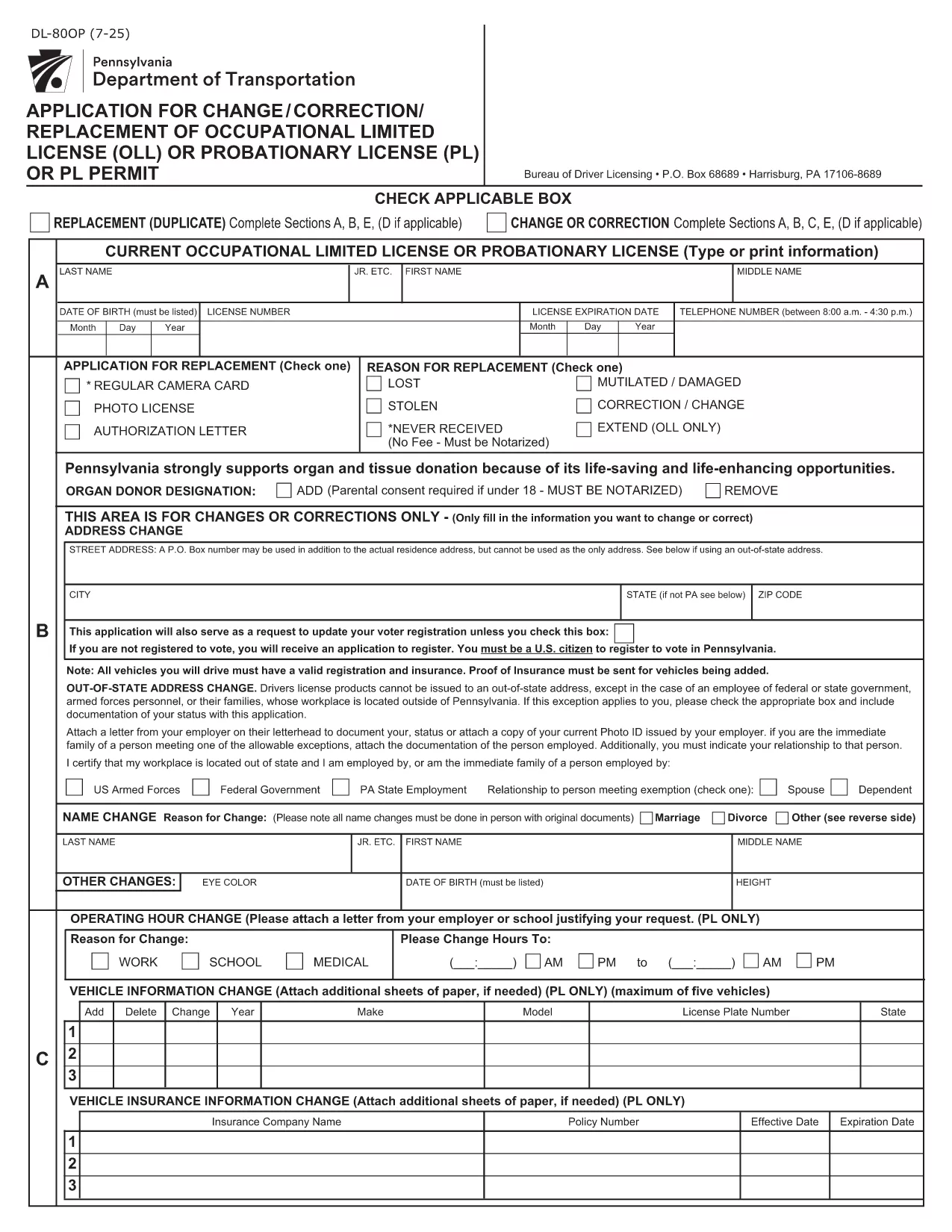
DL-80OP – Pennsylvania Occupational Driver’s License Change Form (Fillable PDF)

  1. Bahasa Bahasa inggris
  2. Negara Amerika Serikat
  3. Aktivitas Surat izin Mengemudi
  4. Negara Pennsylvania
DL-80OP – Pennsylvania Occupational Driver’s License Change Form (Fillable PDF)

The DL-80OP is the official Pennsylvania Department of Transportation (PennDOT) application used to request a change, correction, or replacement of an occupational driver’s license. This form also lets eligible veterans add a special designation to their license.

What Is the DL-80OP Form?

The DL-80OP covers requests such as name changes, address updates, photo exemptions, and the addition of a veterans designation. It is required for any modification to an existing occupational driver’s license in the Commonwealth of Pennsylvania.

How to Complete the DL-80OP Online

Instead of downloading and printing the PDF, simply click the "Fill out this form" button on this page. The Formize PDF Filler app will load the fillable document directly in your browser:

  1. Click Fill out this form.
  2. Wait a few seconds while the Formize PDF Filler loads.
  3. Enter the required information in each field.
  4. Use the built‑in validation to correct any errors.
  5. When finished, click Submit to download a completed copy or to print.

Common Mistakes to Avoid

  • Leaving required fields blank – the filler will highlight missing data.
  • Using an outdated photo – if you request a photo exemption, be sure you qualify.
  • Incorrect veteran status wording – follow the exact phrasing shown on the form.
  • Submitting without a signature – the electronic signature field must be completed.

Veterans Designation & Special Cases

Qualified veterans may add a “Veterans” designation to their occupational license. The form requires proof of service, which can be uploaded as a PDF attachment after the main form is completed.

Where to Submit Your Completed Form

After filling out the DL-80OP, you can:

  • Mail the printed form to your local PennDOT Driver License Center.
  • Bring the completed form in person to a PennDOT office.
  • Submit electronically if your local office accepts scanned copies (check with them first).

For the most up‑to‑date submission instructions, visit the Pennsylvania Department of Transportation website.

FAQ
  • What is the DL-80OP used for?

    The DL-80OP is the Pennsylvania form for changing, correcting, or replacing an occupational driver’s license, including adding a veterans designation.

  • Can I fill out the DL-80OP on a mobile device?

    Yes. The Formize PDF Filler works on most smartphones and tablets, allowing you to complete the form anywhere with an internet connection.

  • Do I need to upload proof of veteran status?

    If you request the veterans designation, you must attach a copy of your DD‑214 or other approved proof of service after completing the main form.

  • Is there a fee for submitting the DL-80OP?

    PennDOT may charge a processing fee depending on the type of change. Check the latest fee schedule on the PennDOT website.

  • How long does it take to receive my updated license?

    Processing times vary by office, but most applicants receive their new occupational license within 7‑10 business days after submission.

  • Can I submit the form electronically?

    Some PennDOT locations accept scanned copies of the completed form. Verify with your local Driver License Center before sending an electronic version.

BAGAIMANA CARANYA

Cara mengisi DL-80OP gratis secara online dalam 5 langkah mudah:

  1. 1
    Open the Fillable Form
    Click the "Fill out this form" button on the page. The Formize PDF Filler will open the DL-80OP directly in your browser.
  2. 2
    Enter Your Information
    Complete each field—personal details, address, license number, and any veteran designation—using the on‑screen prompts.
  3. 3
    Review & Validate
    The filler checks for missing or incorrectly formatted data. Correct any highlighted errors before proceeding.
  4. 4
    Submit & Save
    When all fields are valid, click Submit. Download the completed PDF or save it to your device.
  5. 5
    Print or Email Confirmation
    Print the finished form for mailing or bring it to a PennDOT office. You can also email the PDF if your local office accepts electronic submissions.
Bentuk aplikasi Pengisi PDF
TENTANG

Formulir Permohonan Surat Izin Mengemudi

Di sebagian besar negara, wajib memiliki surat izin mengemudi sebelum Anda dapat berangkat. Mendapatkan SIM adalah tonggak penting bagi siapa saja yang ingin mengendarai mobil.

DL-80OP adalah salah satu formulir Surat Izin Mengemudi yang merupakan dokumen yang digunakan untuk mengumpulkan informasi dari orang-orang yang ingin mengajukan surat izin mengemudi. Biasanya berisi kolom nama pemohon, tanggal lahir, nomor KTP, informasi kontak, serta riwayat dan pengalaman SIM mereka.

FITUR

Pengisi PDF

Cara termudah untuk mengisi formulir PDF secara online

  • Isi DL-80OP dengan cepat
    Mencari cara mengisi DL-80OP dengan cepat secara online? Dengan pengisi formulir PDF online gratis kami, Anda akan tahu cara mengedit dan mengisi dokumen pdf ini dalam waktu kurang dari satu menit.
  • Editor PDF online yang mudah digunakan
    Muak dengan mencetak file PDF sehingga Anda dapat mengeditnya, sebelum memindai ulang dan mengirimnya kembali? Edit dokumen PDF secara online gratis. Gunakan editor pdf online kami untuk menghemat waktu dan kertas.
  • Alat hebat, semua platform
    Ingin tahu cara mengisi DL-80OP di Mac, atau mungkin cara menggunakan pengisi PDF gratis? Alat PDF online kami berfungsi di semua platform.
  • Penyimpanan file yang aman
    File "DL-80OP" yang telah selesai disimpan dalam database aman yang dikelola oleh hosting Amazon Cloud. Anda dapat menghapus file Anda dari sistem kami kapan saja. Bagaimanapun, file-file ini secara otomatis dihapus setelah 24 jam.
  • Ngobrol dengan DL-80OP
    Ngobrol dengan "DL-80OP" di Chatize yang merupakan asisten pembaca PDF gratis. Ajukan pertanyaan dan dapatkan jawaban dari "DL-80OP". Cukup klik tombol Chat Dengan Dokumen di atas.

Hapus sesi pengisian

Hapus sesi pengisian yang dipilih? Dalam hal ini, kemajuan Anda dalam menyelesaikan formulir akan hilang.

Hapus sesi pengeditan

Hapus sesi pengeditan yang dipilih? Dalam hal ini, kemajuan Anda dalam membuat dan mengedit formulir akan hilang.