
Pilih bahasa

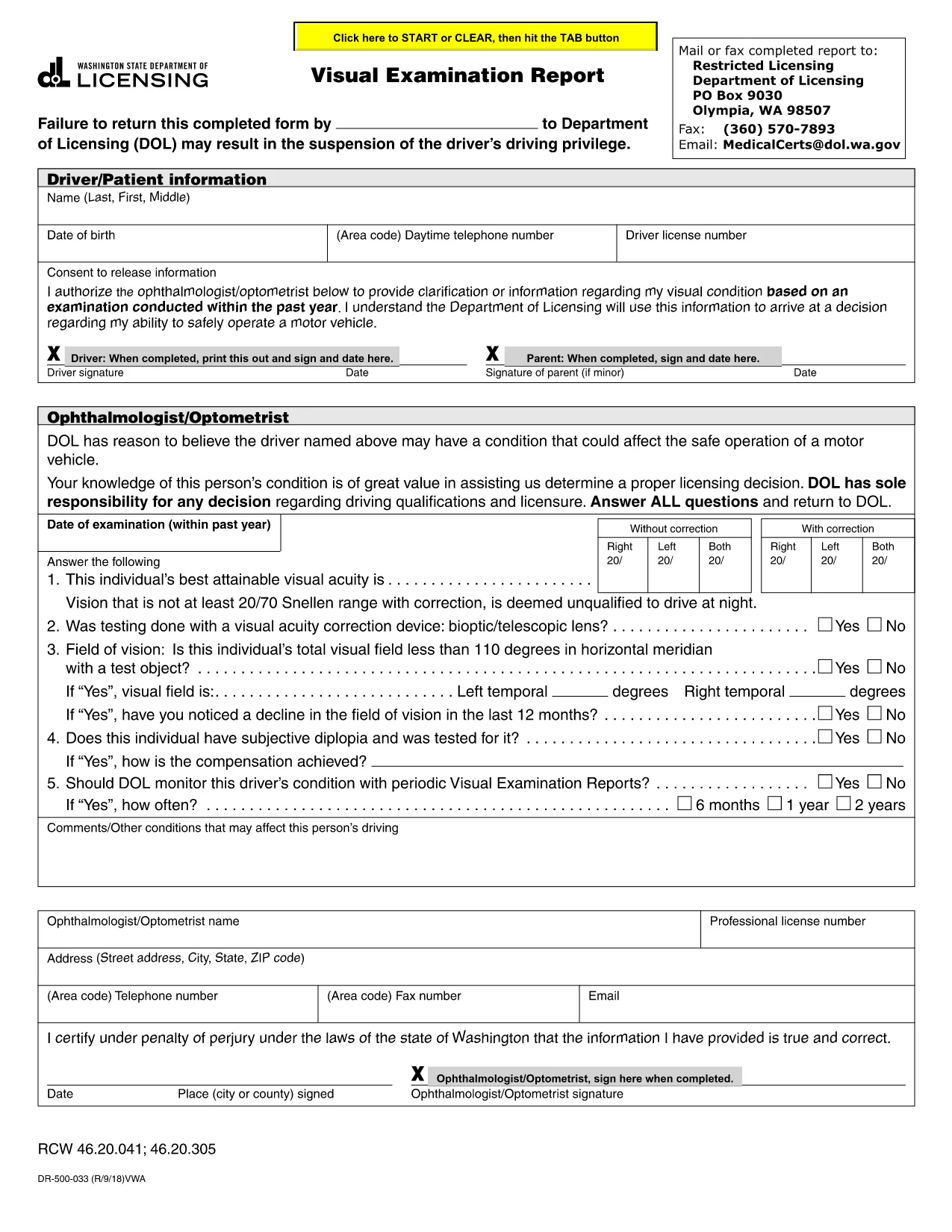
Visual Examination Report – Fillable PDF for Washington State Drivers

  1. Bahasa Bahasa inggris
  2. Negara Amerika Serikat
  3. Aktivitas Surat izin Mengemudi
  4. Negara Washington
Visual Examination Report – Fillable PDF for Washington State Drivers

The Visual Examination Report is a mandatory medical form used by the Washington State Department of Licensing (DOL) to verify that a driver meets the vision standards required for a valid driver’s license. Historically, drivers had to print, fill out by hand, and mail the form, but with Formize’s fillable PDF you can complete it online in minutes.

What Is the Visual Examination Report?

This form collects essential information about a driver’s visual acuity, field of vision, and any corrective lenses required. A licensed physician, optometrist, or ophthalmologist must sign the report, confirming that the driver meets the state’s vision requirements.

Why Use a Fillable PDF Form?

  • Fast & secure: No printing or scanning required.
  • Auto‑save: Your progress is saved as you type.
  • Built‑in validation: Prevents missing or incorrect entries.
  • Direct submission: Download the completed PDF and upload it to the DOL portal or attach it to an email.

Step‑by‑Step Guide to Completing the Report

Follow the simple steps below to finish the Visual Examination Report using Formize’s PDF filler.

Common Mistakes to Avoid

  • Leaving the physician’s signature section blank.
  • Entering vision numbers without the required units (e.g., 20/40 instead of 20/40).
  • Submitting an outdated form version – always use the latest PDF provided below.

Where to Submit Your Completed Form

After you download the filled PDF, you can:

  • Upload it directly to the Washington DOL online portal.
  • Mail it to the address listed on the form.
  • Bring a printed copy to your nearest licensing office.

Need help? Review the FAQs below or contact your eye‑care professional for clarification.

FAQ
  • Who can complete the Visual Examination Report?

    Only a licensed physician, optometrist, or ophthalmologist authorized to practice in Washington can fill out and sign the report.

  • Do I need to print the form after filling it online?

    No. You can download the completed PDF and upload it directly to the DOL website, or email it to the licensing office.

  • What vision standards must I meet?

    Washington requires a visual acuity of at least 20/40 in each eye, with or without corrective lenses, and a normal field of vision.

  • Can I use a scanned copy of a handwritten form?

    A scanned handwritten form is accepted but may cause processing delays. Using the fillable PDF ensures faster review.

  • How long is the Visual Examination Report valid?

    The report is valid for 12 months from the date of the physician’s signature. After that, a new exam is required.

  • What should I do if I make a mistake while filling the form?

    Use the “Reset” button in the Formize filler to clear the field, or simply edit the incorrect entry before downloading.

  • Is there a fee to submit the Visual Examination Report?

    There is no separate fee for the report itself, but the Washington DOL may charge a processing fee for license renewal or replacement.

BAGAIMANA CARANYA

Cara mengisi visual examination report gratis secara online dalam 5 langkah mudah:

  1. 1
    Open the Fillable Form
    Click the “Fill out this form” button on the page. The Formize PDF Filler app will open in a new tab.
  2. 2
    Wait for the Filler to Load
    The app loads the visual examination report automatically. This may take a few seconds depending on your connection.
  3. 3
    Enter the Required Information
    Complete each field – driver details, vision test results, and physician’s certification. Use the drop‑down menus where provided.
  4. 4
    Review and Sign
    Double‑check all entries for accuracy. The physician can add a digital signature directly in the filler.
  5. 5
    Download or Submit
    When finished, click “Download PDF” to save a copy or use the “Submit” button to send it straight to the Washington DOL portal.
Bentuk aplikasi Pengisi PDF
TENTANG

Formulir Permohonan Surat Izin Mengemudi

visual examination report adalah salah satu formulir Surat Izin Mengemudi yang merupakan dokumen yang digunakan untuk mengajukan permohonan Surat Izin Mengemudi atau untuk meminta berbagai layanan terkait Surat Izin Mengemudi. Formulir ini biasanya disediakan oleh departemen atau lembaga yang bertanggung jawab menerbitkan surat izin mengemudi di yurisdiksi tertentu, seperti Departemen Kendaraan Bermotor (DMV) di Amerika Serikat.

Formulir surat izin mengemudi yang umum meliputi:

Permohonan Surat Izin Mengemudi: Formulir ini digunakan untuk mengajukan permohonan Surat Izin Mengemudi baru atau untuk memperbarui Surat Izin Mengemudi yang sudah ada. Biasanya memerlukan informasi pribadi seperti nama, alamat, tanggal lahir, dan nomor Jaminan Sosial.

Dokumen Identifikasi: Beberapa yurisdiksi memerlukan dokumen identifikasi khusus untuk memverifikasi identitas dan tempat tinggal pemohon. Ini mungkin termasuk formulir seperti akta kelahiran, paspor, atau kartu jaminan sosial.

Pemeriksaan Penglihatan: Banyak permohonan SIM memerlukan formulir pemeriksaan penglihatan, yang mana profesional medis resmi atau spesialis perawatan mata menyatakan bahwa pemohon memenuhi persyaratan penglihatan minimum untuk mengemudi.

Formulir Pendidikan Pengemudi: Dalam beberapa kasus, individu mungkin perlu memberikan bukti telah menyelesaikan kursus pendidikan pengemudi, seperti sertifikat penyelesaian pendidikan pengemudi atau formulir yang ditandatangani oleh instruktur.

Evaluasi Medis: Kondisi medis tertentu mungkin memerlukan formulir tambahan yang harus diisi oleh profesional kesehatan. Formulir ini memverifikasi kebugaran fisik dan mental pemohon untuk mengemudi.

Formulir Perubahan Alamat: Jika pemegang SIM pindah ke alamat baru, mereka mungkin perlu mengisi formulir perubahan alamat untuk memperbarui informasi SIM mereka.

Formulir Surat Izin Mengemudi dapat diperoleh dari kantor DMV setempat atau diunduh dari situs web mereka. Penting untuk melengkapi dan menyerahkan formulir yang diperlukan beserta dokumen pendukungnya dengan cermat untuk memastikan kelancaran proses pengajuan atau layanan.

FITUR

Pengisi PDF

Cara termudah untuk mengisi formulir PDF secara online

  • Isi visual examination report dengan cepat
    Mencari cara mengisi visual examination report dengan cepat secara online? Dengan pengisi formulir PDF online gratis kami, Anda akan tahu cara mengedit dan mengisi dokumen pdf ini dalam waktu kurang dari satu menit.
  • Editor PDF online yang mudah digunakan
    Muak dengan mencetak file PDF sehingga Anda dapat mengeditnya, sebelum memindai ulang dan mengirimnya kembali? Edit dokumen PDF secara online gratis. Gunakan editor pdf online kami untuk menghemat waktu dan kertas.
  • Alat hebat, semua platform
    Ingin tahu cara mengisi visual examination report di Mac, atau mungkin cara menggunakan pengisi PDF gratis? Alat PDF online kami berfungsi di semua platform.
  • Penyimpanan file yang aman
    File "visual examination report" yang telah selesai disimpan dalam database aman yang dikelola oleh hosting Amazon Cloud. Anda dapat menghapus file Anda dari sistem kami kapan saja. Bagaimanapun, file-file ini secara otomatis dihapus setelah 24 jam.
  • Ngobrol dengan visual examination report
    Ngobrol dengan "visual examination report" di Chatize yang merupakan asisten pembaca PDF gratis. Ajukan pertanyaan dan dapatkan jawaban dari "visual examination report". Cukup klik tombol Chat Dengan Dokumen di atas.

Hapus sesi pengisian

Hapus sesi pengisian yang dipilih? Dalam hal ini, kemajuan Anda dalam menyelesaikan formulir akan hilang.

Hapus sesi pengeditan

Hapus sesi pengeditan yang dipilih? Dalam hal ini, kemajuan Anda dalam membuat dan mengedit formulir akan hilang.