Pilih bahasa

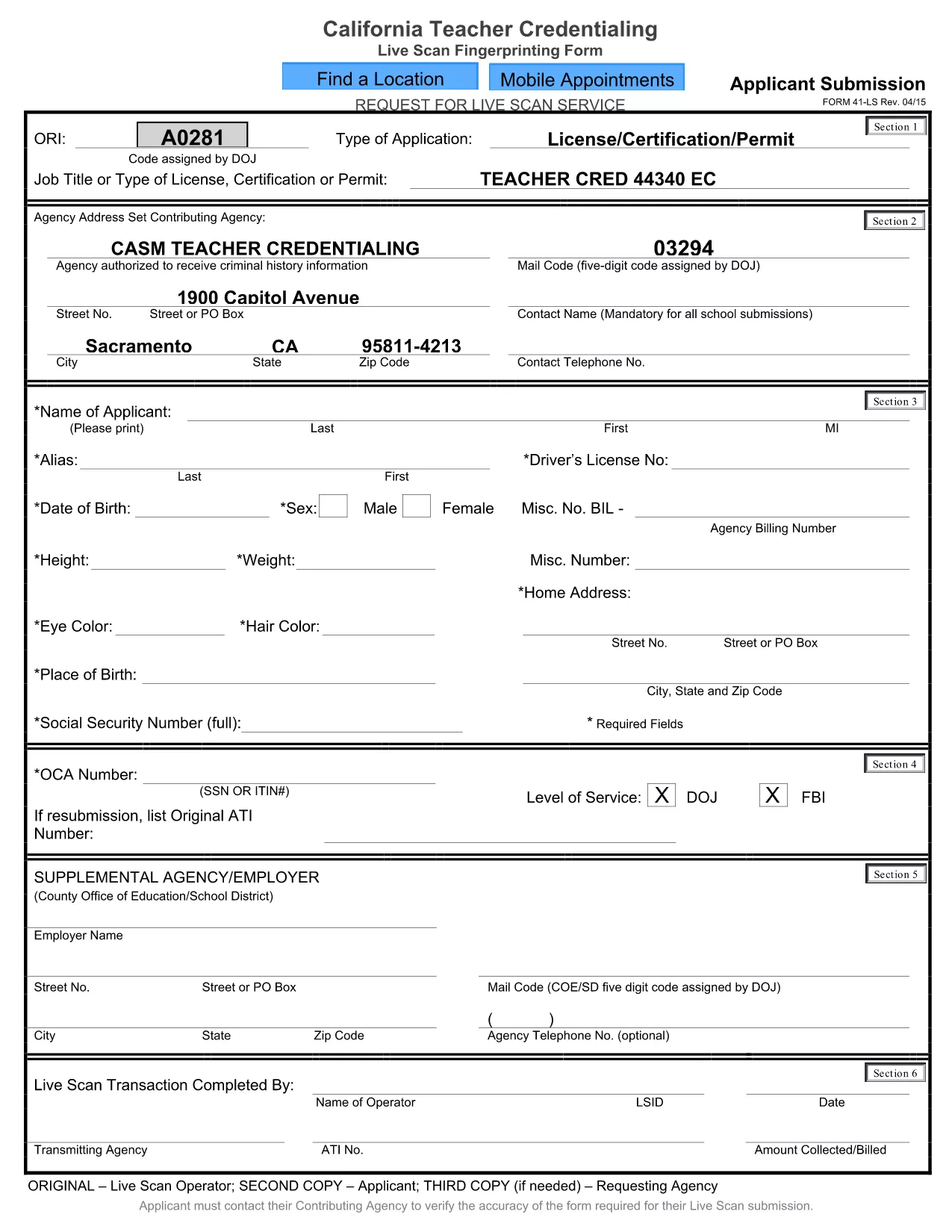
California CA‑41 Live Scan Fingerprinting Form (Fillable PDF)

  1. Bahasa Bahasa inggris
  2. Negara Amerika Serikat
  3. Aktivitas Teacher Credentialing
  4. Departemen Education
California CA‑41 Live Scan Fingerprinting Form (Fillable PDF)

The CA‑41 Live Scan form is required for California teachers, school staff, and other professionals who need a fingerprint‑based background check. This official form captures applicant information and authorizes the California Department of Justice to process your live‑scan results.

With Formize you can fill the CA‑41 directly in your browser—no extra software needed. Simply click the button below, complete each field, and download the finished PDF ready for submission.

Our step‑by‑step guide below explains everything you need to know, from preparing your documents to avoiding common errors that could delay processing.

FAQ
  • What is the purpose of the CA‑41 Live Scan form?

    The CA‑41 authorizes the California Department of Justice to conduct a live‑scan fingerprint background check for teachers, staff, and other professionals.

  • Do I need a PDF editor to fill out the CA‑41?

    No. With Formize you can fill the form online in any modern browser—no additional software required.

  • Can I save a partially completed CA‑41 and finish later?

    Yes. Use the “Save Draft” button in the Formize filler to download a copy you can reopen and complete later.

  • What common mistakes should I avoid?

    Make sure all required fields are completed, use the exact spelling of names, and double‑check your California driver’s license number. Missing or incorrect data can delay processing.

  • Where do I submit the finished CA‑41?

    Submit the completed form to the agency that requested the live‑scan (e.g., school district, licensing board) along with your fingerprint results.

  • Is there a fee to use Formize’s PDF filler?

    Formize offers free filling and downloading of the CA‑41 form. No hidden charges apply.

  • What if I need help while filling the form?

    Review the on‑screen field instructions, or consult the official California DOJ guidance linked at the bottom of the form.

BAGAIMANA CARANYA

Cara mengisi CA-41 form gratis secara online dalam 3 langkah mudah:

  1. 1
    Open the Fillable Form
    Click the “Fill out this form” button on this page. The Formize PDF Filler will load instantly in your browser.
  2. 2
    Enter Your Information
    Type directly into each field, upload any required fingerprint image, and use the navigation toolbar to move between sections.
  3. 3
    Save & Submit
    When you’re finished, click “Save PDF” to download the completed CA‑41. Follow the submission instructions provided by your agency.
Bentuk aplikasi Pengisi PDF
TENTANG

kerangka CA-41 form

Dengan serangkaian fitur tradisional untuk melihat dan mengisi dokumen PDF, dipadukan dengan manfaat aplikasi web dan tata letak responsif, Anda dapat menyelesaikan CA-41 form dalam hitungan menit.

FITUR

Pengisi PDF

Cara termudah untuk mengisi formulir PDF secara online

  • Isi CA-41 form dengan cepat
    Mencari cara mengisi CA-41 form dengan cepat secara online? Dengan pengisi formulir PDF online gratis kami, Anda akan tahu cara mengedit dan mengisi dokumen pdf ini dalam waktu kurang dari satu menit.
  • Editor PDF online yang mudah digunakan
    Muak dengan mencetak file PDF sehingga Anda dapat mengeditnya, sebelum memindai ulang dan mengirimnya kembali? Edit dokumen PDF secara online gratis. Gunakan editor pdf online kami untuk menghemat waktu dan kertas.
  • Alat hebat, semua platform
    Ingin tahu cara mengisi CA-41 form di Mac, atau mungkin cara menggunakan pengisi PDF gratis? Alat PDF online kami berfungsi di semua platform.
  • Penyimpanan file yang aman
    File "CA-41 form" yang telah selesai disimpan dalam database aman yang dikelola oleh hosting Amazon Cloud. Anda dapat menghapus file Anda dari sistem kami kapan saja. Bagaimanapun, file-file ini secara otomatis dihapus setelah 24 jam.
  • Ngobrol dengan CA-41 form
    Ngobrol dengan "CA-41 form" di Chatize yang merupakan asisten pembaca PDF gratis. Ajukan pertanyaan dan dapatkan jawaban dari "CA-41 form". Cukup klik tombol Chat Dengan Dokumen di atas.

Hapus sesi pengisian

Hapus sesi pengisian yang dipilih? Dalam hal ini, kemajuan Anda dalam menyelesaikan formulir akan hilang.

Hapus sesi pengeditan

Hapus sesi pengeditan yang dipilih? Dalam hal ini, kemajuan Anda dalam membuat dan mengedit formulir akan hilang.