
Pilih bahasa

Form 8038-CP – Fillable PDF for Easy Online Completion

  1. Negara Amerika Serikat
  2. Bahasa Bahasa inggris
  3. Aktivitas Pajak
  4. Departemen IRS
Form 8038-CP – Fillable PDF for Easy Online Completion

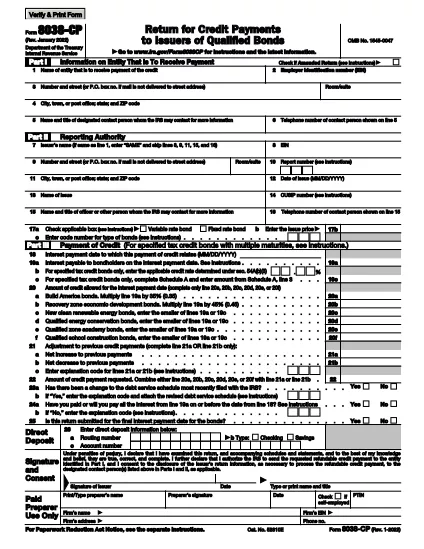
Form 8038‑CP is the IRS application used by organizations seeking tax‑exempt status under section 501(c)(3). Instead of printing, printing‑and‑scanning, or using a clunky PDF editor, you can complete the official form directly in your browser with the Formize PDF Filler. Our fillable PDF keeps the layout identical to the IRS version while allowing you to type, save, and submit your answers instantly.

What Is Form 8038-CP?

The form collects essential information about your organization’s purpose, governance, finances, and activities. It is required for charities, educational institutions, and other nonprofit entities that want to be recognized as tax‑exempt.

How to Fill Out Form 8038-CP Online

Follow the simple steps below – no PDF software needed. The Formize app loads the official IRS PDF, turns every field into a live, editable box, and validates your entries in real time.

Common Mistakes to Avoid

  • Leaving required fields blank – the filler will highlight missing data.
  • Using the wrong EIN format – enter numbers only, without dashes.
  • Providing inconsistent financial figures – double‑check totals before saving.

Where to Submit the Completed Form

Once you finish, download the completed PDF and mail it to the IRS address listed in the form’s instructions, or upload it through the IRS online portal if you have an e‑file account.

Need More Help?

Review the IRS instructions that accompany the form, or consult a qualified tax professional. The Formize filler does not replace legal advice, but it does make the data‑entry part painless.

FAQ
  • What is the purpose of Form 8038‑CP?

    Form 8038‑CP is the IRS application used by organizations to request recognition of tax‑exempt status under section 501(c)(3).

  • Who needs to file Form 8038‑CP?

    Any nonprofit, charitable, educational, religious, or scientific organization that wants federal tax‑exempt status must complete this form.

  • Can I fill out Form 8038‑CP on a mobile device?

    Yes. The Formize PDF Filler works on all modern browsers, including mobile Safari and Chrome, so you can complete the form on a phone or tablet.

  • Do I need special software to edit the PDF?

    No. The Formize filler turns the official PDF into a web‑based, fillable form – no Adobe Acrobat or other editor is required.

  • Is there a filing fee for Form 8038‑CP?

    Filing for tax‑exempt status usually requires a separate user fee (e.g., Form 1023 has a fee). Form 8038‑CP itself does not have a separate fee, but check the latest IRS instructions.

  • Can I save my progress and return later?

    Yes. The filler lets you download a partially completed PDF, which you can reopen later in the Formize app to finish.

  • How do I avoid common errors?

    Use the built‑in validation, double‑check EIN formatting, and ensure all financial totals match. The filler highlights missing or inconsistent entries.

  • Where should I send the completed form?

    Mail the printed PDF to the IRS address listed in the form’s instructions, or upload it via the IRS online portal if you have an e‑file account.

  • Is electronic submission accepted?

    The IRS currently accepts electronic uploads for many nonprofit applications. Verify on the IRS website whether Form 8038‑CP can be filed electronically.

  • What if I need help while filling out the form?

    Review the IRS instructions that accompany the form or consult a qualified tax professional. The Formize filler assists with data entry but does not replace professional advice.

BAGAIMANA CARANYA

Cara mengisi form 8038-cp gratis secara online dalam 5 langkah mudah:

  1. 1
    Click “Fill out this form”
    Press the button on the page to launch the Formize PDF Filler app. The official IRS Form 8038‑CP will load automatically.
  2. 2
    Wait for the filler to initialize
    The app prepares each field for typing. This usually takes a few seconds.
  3. 3
    Enter your information
    Type directly into the highlighted boxes. Required fields are marked with a red asterisk.
  4. 4
    Validate and save
    When you finish, click “Validate” to let the filler check for missing or incorrect data, then save the completed PDF to your device.
  5. 5
    Submit to the IRS
    Print and mail the saved PDF, or upload it through the IRS online portal as instructed in the form’s cover page.
Bentuk aplikasi Pengisi PDF
TENTANG

Formulir pajak

form 8038-cp adalah salah satu formulir Pajak yang merupakan dokumen yang digunakan untuk melaporkan informasi terkait pajak kepada otoritas pajak terkait. Ada berbagai jenis formulir pajak, termasuk formulir pajak federal, negara bagian, dan lokal, yang dapat bervariasi tergantung pada keadaan dan lokasi pembayar pajak.

FITUR

Pengisi PDF

Cara termudah untuk mengisi formulir PDF secara online

  • Isi form 8038-cp dengan cepat
    Mencari cara mengisi form 8038-cp dengan cepat secara online? Dengan pengisi formulir PDF online gratis kami, Anda akan tahu cara mengedit dan mengisi dokumen pdf ini dalam waktu kurang dari satu menit.
  • Editor PDF online yang mudah digunakan
    Muak dengan mencetak file PDF sehingga Anda dapat mengeditnya, sebelum memindai ulang dan mengirimnya kembali? Edit dokumen PDF secara online gratis. Gunakan editor pdf online kami untuk menghemat waktu dan kertas.
  • Alat hebat, semua platform
    Ingin tahu cara mengisi form 8038-cp di Mac, atau mungkin cara menggunakan pengisi PDF gratis? Alat PDF online kami berfungsi di semua platform.
  • Penyimpanan file yang aman
    File "form 8038-cp" yang telah selesai disimpan dalam database aman yang dikelola oleh hosting Amazon Cloud. Anda dapat menghapus file Anda dari sistem kami kapan saja. Bagaimanapun, file-file ini secara otomatis dihapus setelah 24 jam.
  • Ngobrol dengan form 8038-cp
    Ngobrol dengan "form 8038-cp" di Chatize yang merupakan asisten pembaca PDF gratis. Ajukan pertanyaan dan dapatkan jawaban dari "form 8038-cp". Cukup klik tombol Chat Dengan Dokumen di atas.

Hapus sesi pengisian

Hapus sesi pengisian yang dipilih? Dalam hal ini, kemajuan Anda dalam menyelesaikan formulir akan hilang.

Hapus sesi pengeditan

Hapus sesi pengeditan yang dipilih? Dalam hal ini, kemajuan Anda dalam membuat dan mengedit formulir akan hilang.